English
 Deutsch
 Polski
ads_data_redaction in Consent Mode v2: Mechanism, Legal Framework and Configuration

Contents
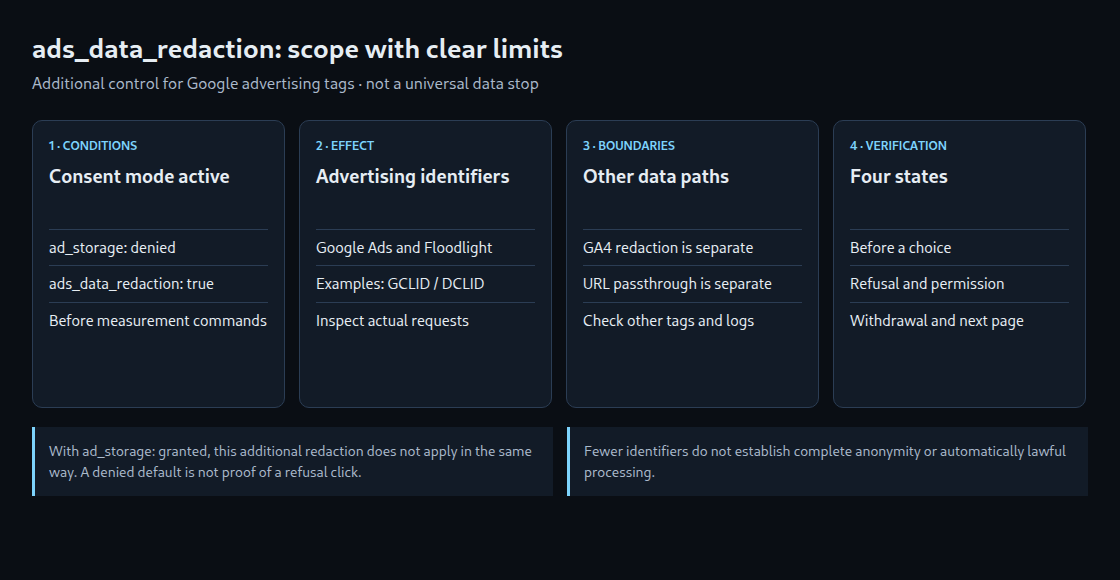
ads_data_redaction limits certain advertising identifiers in Google requests when ad_storage is denied. It is an additional technical control within consent mode. It does not block an entire measurement pipeline or replace inspection of the data actually sent.
1. Scope and limits
Google describes redacting click identifiers, such as GCLID and DCLID, from Google Ads and Floodlight tag requests. This requires consent mode, ads_data_redaction: true and ad_storage: denied. With ad_storage: granted, the additional setting has no corresponding effect.
The documentation also describes requests through a domain without the relevant third-party cookies. The destination hostname alone does not establish that identifiers were redacted. The actual requests and their contents are the evidence.
Reduction is not complete anonymization. Other fields or other tags can still transmit data. This setting does not disable Meta or other third-party tags. Server logs and redirects are outside its control as well.
2. Distinguish basic and advanced mode
In basic consent mode, the relevant Google tags remain blocked until appropriate permission. In advanced mode, requests without the relevant cookies can occur while storage is denied. “Denied means no transmission” is therefore incorrect. A default denied state also does not necessarily represent a completed banner decision.
The additional ad_user_data and ad_personalization signals must reflect the actual choice. ads_data_redaction replaces neither. Google product requirements also do not create a statutory obligation to use a particular technical mode.
3. Direct gtag.js configuration
The example sets only initial states and the redaction option. The CMP must subsequently communicate the actual choice and later changes. The fragment illustrates initialization only; it is not a complete CMP integration.
window.dataLayer = window.dataLayer || [];
function gtag() { window.dataLayer.push(arguments); }
gtag('consent', 'default', {
  ad_storage: 'denied',
  analytics_storage: 'denied',
  ad_user_data: 'denied',
  ad_personalization: 'denied'
});
gtag('set', 'ads_data_redaction', true);
// Configure measurement only after these initial settings.
// The CMP must provide the actual consent updates.
Both settings must precede commands that trigger measurement, especially config and event. There is no universal requirement to place ads_data_redaction before default. Neither ordering can protect against tags that already fired earlier. Other scripts and the loading sequence need inspection too.
4. Google Tag Manager configuration
Check an existing CMP integration first. Independent default or update implementations can produce conflicting states. Custom GTM templates should use setDefaultConsentState and updateConsentState; gtagSet sets additional options.
- Select the consent integration intended for the CMP and map states to the actual choices.
- Run defaults on Consent Initialization – All Pages. This orders GTM tags early; it does not control scripts started outside the container.
- Enable
ads_data_redactionas booleantruewhere the integration exposes that option. - Check updates after selection, withdrawal and subsequent page loads.
One community option by Simo Ahava is named Consent Mode (Google + Microsoft tags) in the inspected source. Its field is Redact Ads Data (ads_data_redaction). The template is an option, not a mandatory or proven universally best solution. An installed version and its settings may differ from the current repository.
5. Legal framework and verification
GDPR Article 5(1)(c) limits personal-data processing to what the purpose requires; it does not automatically authorize remaining requests. Article 5(3) of the ePrivacy Directive concerns terminal storage and access, with narrow exceptions for transmission and explicitly requested services. Techniques without traditional cookies can fall within its scope. National implementation and the actual processing remain relevant.
This switch guarantees neither lawfulness nor the absence of all identifying data. Technical checks should cover the initial state, refusal, permission and withdrawal. Inspect states in Tag Assistant and identifiers and URLs in network requests. Any GCLID, DCLID or other click parameters in use need their own test cases. A successful configuration call does not prove redaction.
Questions and answers
What does url_passthrough do?
It can pass measurement information through links within the same domain. That is a different data path from redacting identifiers in certain advertising requests. It does not establish that Google receives nothing while the website safely retains everything. Redirects, destinations, logs and subsequently fired tags need consideration.
Is this GA4 web-stream data redaction?
No. GA4 web-stream redaction handles detected email addresses and configured URL parameters. It is a separate feature with its own limits, including Measurement Protocol. Check the two controls separately.
Sources
Related articles