

 English
 Deutsch
 Polski
Tutorial: Finding Personal Data in GA4 Page Paths and Removing It

Management Summary
Page addresses and search terms can unintentionally carry personal information into Google Analytics 4, for example when a website places identifying details in a link. This creates a privacy problem beyond ordinary visitor statistics. Fixing the website’s outgoing data prevents further collection, while information already stored needs separate treatment. Automatic removal only covers certain cases, and exported copies require their own cleanup. Prevention and historical deletion therefore address different parts of the same problem.
Contents
- 1. Affected values and transmission routes
- 2. Queries of available reports
- 3. Detection of leads and assessment of context
- 4. Prevention of further transmission at the source
- 5. Historical GA4 data: deletion types and exceptions
- 6. BigQuery and other copies require separate treatment
- 7. Comparison of Collect requests without replaying them
- Frequently asked questions
- Sources and technical references
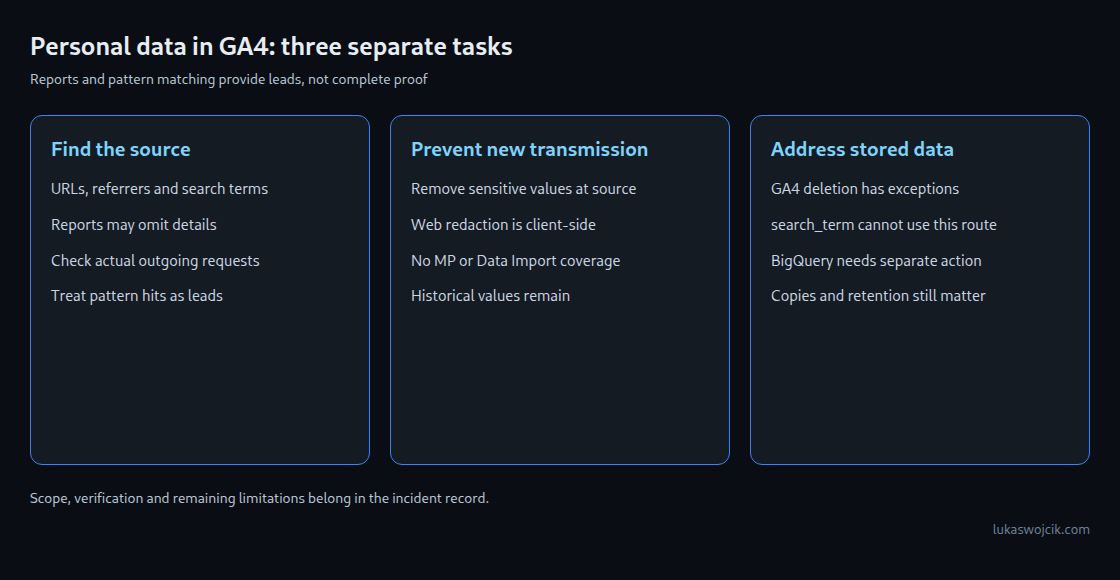
An email address in a URL path, a search term containing a phone number or a personal order reference can reach GA4 together with an event. The finding creates two separate tasks: prevent further transmission and address stored data. Changing a tag does not clean historical reports.
The workflow below starts with an inventory, then limits collection and finally considers deletion. No single report or regular expression can prove the absence of personal data.
1. Affected values and transmission routes
Email addresses and personal phone numbers are obvious examples. An order number or password-reset token can also identify a person when combined with available additional information. A token is also a secret. Calling a value pseudonymous or hashing the value does not automatically remove the connection to a person. PII stands for personally identifiable information. Google’s PII rules and the legal concept of personal data are not identical.
The investigation covers full page addresses, paths, query parameters, referrers, page titles, search terms and custom event parameters. The GA4 default for page_location excludes the URL fragment after #. JavaScript or a different implementation can still explicitly transmit fragments. A fragment is therefore not a secure storage location for secrets.
A finding record needs the source, parameter, period, affected destinations and a sanitized example. Full tokens or addresses do not belong in tickets, broadly accessible spreadsheets or public online checkers. Exposed access or reset tokens also require invalidation; later removal from reports is insufficient.
2. Queries of available reports
The Data API provides report data, not a complete raw-data inventory. pageLocation includes the page address with host and query; pagePathPlusQueryString includes path and query. pagePath alone omits query parameters. Separate queries using pageReferrer and searchTerm cover other possible locations. Sending a custom parameter does not automatically create a queryable custom dimension.
This example is the JSON body for an authenticated POST request to https://analyticsdata.googleapis.com/v1beta/properties/PROPERTY_ID:runReport. The request requires the numeric property ID, read access and an appropriate OAuth scope such as analytics.readonly. The fixed date range is illustrative and must match the investigated incident.
{
  "dateRanges": [
    {
      "startDate": "2026-10-01",
      "endDate": "2026-10-07"
    }
  ],
  "dimensions": [
    {
      "name": "pageLocation"
    }
  ],
  "metrics": [
    {
      "name": "eventCount"
    }
  ],
  "orderBys": [
    {
      "dimension": {
        "dimensionName": "pageLocation",
        "orderType": "ALPHANUMERIC"
      }
    }
  ],
  "limit": "10000",
  "offset": "0",
  "returnPropertyQuota": true
}
eventCount counts events; page views would be unsuitable for a separate search-term query. Pagination sets offset to the number of rows already retrieved until the reported rowCount is reached. Alphabetical sorting and a fixed range make pagination easier, but late-arriving data can still change the results. The API permits at most 250,000 rows per request, and quotas still apply.
Response checks include dataLossFromOtherRow, samplingMetadatas, dataTruncationReasons and subjectToThresholding. The last flag indicates that thresholds apply, not necessarily that rows were withheld. Fetching further pages does not restore values grouped into “(other)”, truncated data or unavailable history. Even clear metadata does not establish a complete privacy audit.
3. Detection of leads and assessment of context
Percent encoding represents characters in a URL with codes; for example, %40 represents @. Decoding turns those codes back into characters. The Python example checks the original text and up to two additional rounds of percent decoding. Query parsing handles repeated and empty parameters and encoded key names. Inspecting a fragment only describes the input text; the result does not establish actual collection by GA4.
import re
from urllib.parse import parse_qsl, unquote, urlsplit

EMAIL = re.compile(r"[A-Z0-9.!#$%&'*+/=?^_`{|}~-]+@[A-Z0-9-]+(?:\.[A-Z0-9-]+)+", re.I)
FIELDS = {
    "secret_field": {"token", "hash", "auth", "key", "sig", "pwd", "password"},
    "name_field": {"name", "vorname", "nachname", "firstname", "lastname", "user"},
    "phone_field": {"phone", "tel", "mobile", "telephone"},
    "search_field": {"q", "s", "search", "query"},
}


def scan_url(text):
    if not isinstance(text, str):
        raise TypeError("text must be a string")
    if len(text) > 16384:
        return {"input_too_long"}
    flags = set()
    if re.search(r"%(?![0-9a-fA-F]{2})", text):
        flags.add("invalid_percent_encoding")
    forms = [text]
    for _ in range(2):
        decoded = unquote(forms[-1])
        if decoded == forms[-1]:
            break
        forms.append(decoded)
    if unquote(forms[-1]) != forms[-1]:
        flags.add("further_encoding")
    for form in forms:
        if EMAIL.search(form):
            flags.add("email_like")
        try:
            parts = urlsplit(form)
            if parts.username is not None or parts.password is not None:
                flags.add("url_credentials")
            # Fragment query syntax is inspected too, without claiming collection.
            queries = [parts.query, parts.fragment.partition("?")[2] or parts.fragment]
            for query in queries:
                for key, value in parse_qsl(query, keep_blank_values=True, max_num_fields=1000):
                    for label, names in FIELDS.items():
                        if key.casefold() in names:
                            flags.add(label)
                    if EMAIL.search(value):
                        flags.add("email_like")
        except ValueError:
            flags.add("url_parse_error")
    return flags
The function returns categories rather than raw values. email_like marks an email-like pattern, while secret_field marks a suspicious key name. phone_field establishes neither a valid phone number nor a connection to a person. A product search term or name=product can also trigger a review flag. The number 20260920 is not automatically classified as a phone number.
Blind spots include unknown parameter names, personal numeric identifiers in paths, Unicode edge cases, deeper encoding and encrypted content. Decoded separators can introduce additional false positives. input_too_long, url_parse_error and further_encoding require separate investigation. An empty result only means that these limited rules found nothing. Samples support contextual assessment but cannot replace examination of all relevant sources.
4. Prevention of further transmission at the source
A URL without sensitive values protects more than a downstream correction of an analytics field. Where personal form input is necessary, POST avoids the usual placement of form fields in the query string. POST does not prevent form-data tracking, request-body logs, problematic redirects or a later URL containing the same values.
A suitable implementation collects permitted fields with a defined purpose and sanitizes page addresses, referrers, titles and free text before transmission. Server-side tagging can add checks before forwarding. Browser requests already sent to other destinations and direct routes bypassing the server container remain unaffected.
GA4 web-stream data redaction provides an additional layer. Email detection is best effort; values of configured query keys are replaced with a redaction marker in the documented URL parameters, including page_location and page_referrer. Processing takes place on the client. Measurement Protocol, Data Import and HTTP headers are outside this feature’s coverage. The setting does not clean historical values.
Controlled tests use invented values such as test@example.invalid. The decisive evidence is the outgoing request after all tag rules: initial load, navigation, internal search, form completion and every transmission route. A correct preview display alone does not prove correct production transmission.
5. Historical GA4 data: deletion types and exceptions
Administration provides data-deletion requests for supported parameters and periods. Dates follow the property’s time zone. For automatically collected parameters, the documentation requires the broad “Delete all parameters on all events” type; apparently selecting page_location alone is not a general substitute. Registering an additional custom dimension does not bypass that restriction.
A significant limit: Google explicitly lists search_term among parameters that this mechanism cannot delete. Other documented exceptions also apply. An incident involving search terms cannot be considered resolved merely because a request for other parameters has finished. The specific case requires an appropriate additional resolution, potentially involving Google support.
The mechanism affects text values, not numeric parameter values, and retains event counts. Supported values receive a deletion marker; the broad deletion type can also affect event names. User-ID-related deletion has a separate route. Parameter deletion is therefore neither removal of entire events nor deletion of all personal data involved in a case.
A request can be cancelled for seven days. Processing can take seven to 63 days overall, and data must be more than twelve days old. An optional contains filter compares text without case sensitivity. Preview and temporary exclusion do not establish completed deletion. Scope, status and reporting effects need documentation.
6. BigQuery and other copies require separate treatment
A GA4 deletion request does not replace cleaning previously exported data. The following inventory counts parameter occurrences and value types in one exact table without exposing the values. Project, dataset, date and keys must match the actual findings.
-- Review one closed daily table; no modification is performed.
DECLARE target_keys ARRAY<STRING> DEFAULT
  ['page_location', 'page_referrer', 'search_term'];

SELECT
  p.key,
  COUNT(*) AS parameter_occurrences,
  COUNTIF(p.value.string_value IS NOT NULL) AS text_values,
  COUNTIF(p.value.int_value IS NOT NULL
       OR p.value.float_value IS NOT NULL
       OR p.value.double_value IS NOT NULL) AS numeric_values
FROM `project_id.analytics_123456789.events_20261001`,
UNNEST(event_params) AS p
WHERE p.key IN UNNEST(target_keys)
GROUP BY p.key
ORDER BY p.key;
If full removal of these three parameters has been justified, the next example shows a limited implementation. With apply_change = FALSE, only a count of affected events runs. Switching to TRUE removes every entry with a selected key from this table, including harmless values. This destructively changes the current table; the operation is not precise masking of individual email addresses.
-- Example for a confirmed full removal of selected parameter values.
-- Project, dataset, table and key list require case-specific review.
DECLARE apply_change BOOL DEFAULT FALSE;
DECLARE target_keys ARRAY<STRING> DEFAULT
  ['page_location', 'page_referrer', 'search_term'];

SELECT COUNT(*) AS affected_events
FROM `project_id.analytics_123456789.events_20261001`
WHERE EXISTS (
  SELECT 1 FROM UNNEST(event_params) AS p
  WHERE p.key IN UNNEST(target_keys)
);

IF apply_change THEN
  UPDATE `project_id.analytics_123456789.events_20261001`
  SET event_params = ARRAY(
    SELECT AS STRUCT p.*
    FROM UNNEST(event_params) AS p WITH OFFSET AS position
    WHERE p.key IS NULL OR p.key NOT IN UNNEST(target_keys)
    ORDER BY position
  )
  WHERE EXISTS (
    SELECT 1 FROM UNNEST(event_params) AS p
    WHERE p.key IN UNNEST(target_keys)
  );
END IF;
Other parameter entries, including possible NULL keys, retain values and order. The target-key list must not contain NULL. Other tables, user_properties, user identifiers, additional event fields and downstream exports remain unchanged. Before a change, an isolated test table must establish the target, permissions, expected count and effects; an inventory query then checks the result. Active or late exports can add data again and require a separate check.
BigQuery retains earlier versions through Time Travel, seven days by default and configurable from two to seven days. A seven-day fail-safe period follows. Those data are not directly queryable; recovery requires the documented support process. Snapshots, copies, downloads and other systems have separate lifecycles. An empty current query therefore does not establish immediate physical deletion of every copy.
7. Comparison of Collect requests without replaying them
The GA4 Parameter Analyser separates full Collect URLs or query-encoded request lines into parameters. Shared parameters from a POST URL can be entered in the separate input field. Multiple lines support comparison of event names, measurement IDs, repeated keys and missing versus empty values.
The analysis function percent-decodes once, replaces plus signs according to form encoding and renders results as text. The function does not replay pasted requests. Measurement Protocol JSON is a different format; packed product values receive only heuristic parsing. CSV export is not anonymization. Sanitized or synthetic examples remain appropriate for investigation; a parameter view establishes neither GA4 receipt nor a complete PII check.
Frequently asked questions
Is removing one query parameter sufficient?
Only for that exact location. Paths, referrers, titles, search, other parameters and additional transmission routes can contain the same value. The change also only affects future transmission.
Does Referrer-Policy prevent every disclosure?
Under strict-origin-when-cross-origin, same-origin requests can still carry the URL as referrer. Cross-origin requests normally carry only the origin, and an HTTPS-to-HTTP downgrade carries no referrer. Origin means scheme, host and port, rather than merely the same website. Different policies and explicitly assigned analytics parameters need separate checks.
Is a masked address automatically anonymous?
Masking can reduce information. Remaining identifiers, additional information and processing context still determine possible identification. Replacing a query value does not establish anonymity in general.
When has the technical incident been addressed?
When affected sources have been identified, future transmission has been checked, available deletion routes have completed and remaining copies or technical limits have been documented. A regex returning no matches or one cleaned report cannot establish those conditions alone.
Sources and technical references
- GA4: Data redaction
- GA4: Data-deletion requests
- Data API: runReport
- Data API: ResponseMetaData
- Data API: Dimensions & metrics
- GA4: Page views
- BigQuery: Time Travel
- GDPR: Article 4
- CJEU: C-604/22
- Google Analytics: PII
- Python: urllib.parse
- BigQuery: DML
- Chrome: Referrer-Policy
- GA4 Parameter Analyser: JavaScript
- GA4: Collection
- GA4: DebugView
- WHATWG: Form URL encoding
Related articles


