English
 Deutsch
 Polski
When GA4 Truncates or Drops Data: Identifying and Checking Collection Limits

Summary
GA4 places different limits on collecting website information, creating report categories and displaying many distinct values. These limits can lead to different outcomes: a detail may never be stored, or available data may be combined into a broader report row. This matters when business figures seem incomplete. A grouped result does not necessarily mean data loss, while information discarded before storage cannot be recovered from BigQuery. Understanding where the limit applies helps interpret what the report actually shows.
Contents
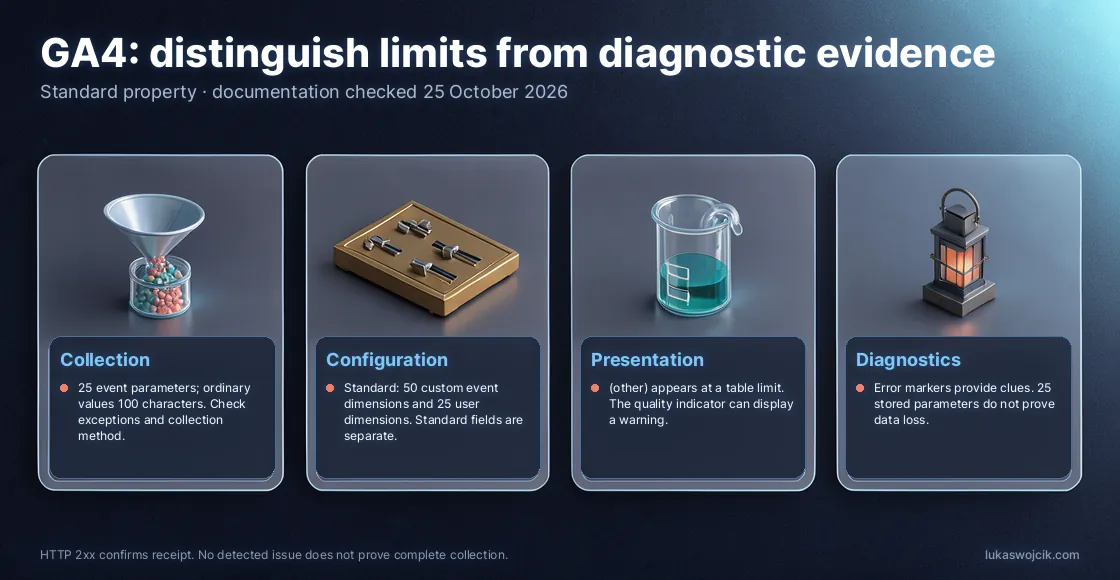
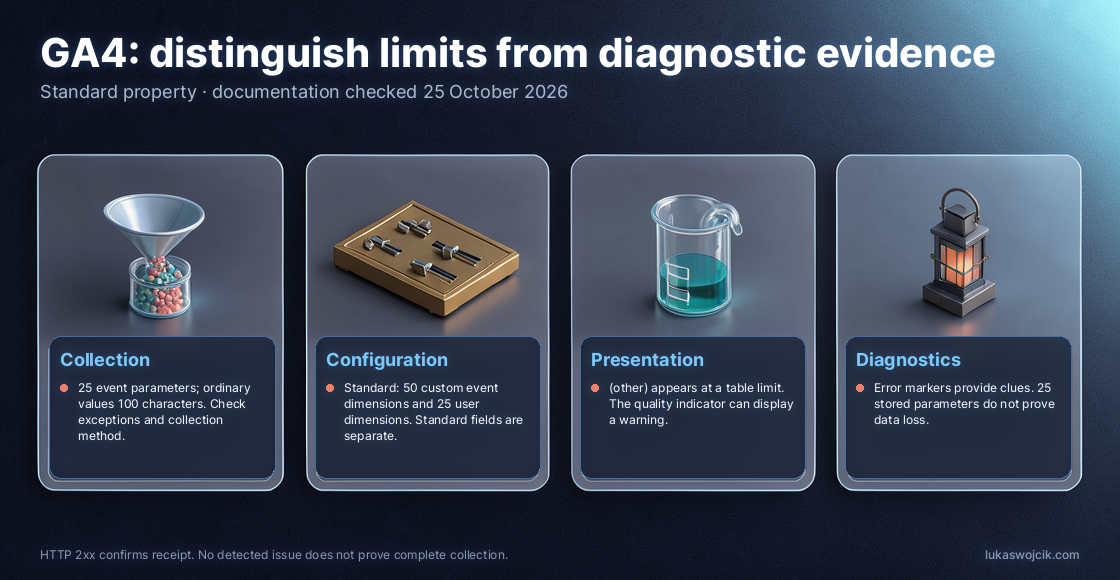
GA4 limits collection, configuration and presentation in different ways. An invalid parameter may be missing, another custom dimension may be impossible to create, or a report may combine uncommon values into (other). These outcomes do not automatically explain each other.
Successful HTTP receipt does not prove correct processing. A missing parameter alone does not prove a limit violation either. Reliable diagnosis compares the original test payload with validation, DebugView and the export actually available.
1. Applicable limits
The following baseline values concern standard properties and documentation checked on 25 October 2026. The collection method still matters:
| Area | Documented limit |
|---|---|
| Event parameters | 25 per event |
| Event and parameter names | 40 characters; additional format and reserved-name rules |
| Ordinary string parameter values | 100 characters for standard properties |
| Distinct event names in apps | 500 per app user; no equivalent numerical limit for web streams |
| Custom dimensions | 50 event-scoped and 25 user-scoped per standard property |
The general collection help allows 300 characters for page_title, 420 for page_referrer and 1,000 for page_location. The Measurement Protocol guide documents additional limits, including at most 25 events per request and parameter values of 100 characters for standard properties or 500 for 360. Its exception for session_id and session_number applies to values supplied by the corresponding built-in GTM variables.
Item parameters have separate rules: general collection help lists up to 27 custom item parameters, while the current Measurement Protocol guide lists ten. The rules for the actual collection method therefore need individual checking. Transferring every exception between tags, app SDKs and Measurement Protocol is not justified.
The eventual BigQuery array length is not a reliable count of the custom parameters originally sent. Export fields and processing stages need separate consideration. No fixed claim follows that the last three out of 28 parameters will always disappear.
2. Meaning of error markers
The Firebase error table describes code 4 for an overlong parameter value and code 5 for excess parameters. In the first case, the invalid parameter is dropped and firebase_error_value can identify its name. Code 2 concerns invalid event names; code 8 concerns excess event types in an app instance.
A marker is useful diagnostic evidence. It does not establish that every malformed payload on every collection path produces a visible marker. Measurement Protocol acknowledges HTTP receipt with a 2xx status even when data is invalid or not processed. The documented status class is not restricted to 204.
A value exactly 100 characters long can be valid, as can an event with 25 parameters. Neither proves truncation or loss. A missing value might already have been absent from the submitted payload; comparison with the original test payload is essential.
3. Event names and report dimensions
Similar actions are often easier to analyse with a shared event name and context parameter, such as button_click with button_name. Three different names are not inherently wrong. Web streams have no enforced 500-event-name cap; the app limit is not a universal property limit.
An event parameter carries an extra detail, such as the name of a clicked button. Registering a custom dimension makes a chosen detail available as a reporting attribute. Collected parameters and registered custom dimensions are therefore different things. A standard property has 50 event-scoped and 25 user-scoped custom-dimension slots; custom metrics have a separate allowance. Existing standard dimensions need no duplicate custom definition. Unregistered parameters can be available in the export.
Cardinality means the number of different values a field contains. A thousand different page addresses, for example, can create more report rows than three device categories: desktop, tablet and mobile. Google’s guidance of more than 500 values is not a collection limit. The (other) row appears when an underlying table exceeds its row limit. The data-quality indicator can display a warning even when a filter hides the combined row. A blanket claim that reports never warn is incorrect.
4. Validation before production
Local validation should cover names, reserved identifiers, types, lengths, counts and use-case-specific required fields. For Measurement Protocol, /debug/mp/collect adds validation; Google recommends validation_behavior: ENFORCE_RECOMMENDATIONS during development. The response contains validationMessages. These test events do not appear in reports.
The validation server does not validate api_secret or firebase_app_id. An empty error list therefore does not replace a controlled integration test. DebugView complements testing when debug collection is enabled appropriately; consent, data filters and the actual collection path also matter. Authentication tokens and other secrets do not belong in analytics parameters.
5. Existing error markers in BigQuery
The following query selects export rows containing a firebase_error key. Project, dataset and dates are placeholders. The suffix filter selects daily tables; estimated query cost and permissions should be checked before execution.
SELECT
  event_date,
  event_name,
  user_pseudo_id,
  event_timestamp,
  COALESCE(ARRAY_LENGTH(event_params), 0) AS exported_parameter_count,
  ARRAY(
    SELECT AS STRUCT
      ep.key,
      ep.value.int_value,
      ep.value.string_value
    FROM UNNEST(event_params) AS ep
    WHERE ep.key IN ('firebase_error', 'firebase_error_value')
  ) AS error_markers
FROM `your-project.analytics_123456789.events_*`
WHERE _TABLE_SUFFIX BETWEEN '20261001' AND '20261017'
  AND EXISTS (
    SELECT 1
    FROM UNNEST(event_params) AS ep
    WHERE ep.key = 'firebase_error'
  )
ORDER BY event_date DESC, event_timestamp;
The query checks the parameter list of each stored event separately. Two events with matching details therefore remain two separate rows. Multiple events can share a timestamp and name, and user_pseudo_id can be absent. Grouping only by these fields would merge different events. The marker array also preserves multiple existing keys instead of selecting one value with MAX.
exported_parameter_count describes only the stored row. The query cannot reconstruct discarded values or find entirely lost events. No matching rows does not prove error-free collection. BigQuery has its own export limits, filters and delays; daily tables can receive later updates. The SQL semantics were checked with isolated example data, not executed against an actual GA4 property.
Questions and answers
Does shortening before sending help?
A deliberately shortened display string can fit, but loses information. Two different titles can become identical after shortening, so the report can no longer distinguish them. A fixed article number is often clearer. A separate table can connect that number to the full title; the number should contain no personal information. Splitting values across parameters uses additional slots.
Is BigQuery always complete?
No. The export contains available data that was actually exported. Content lost before storage cannot be recovered from it. This is separate from report-level (other) grouping.
Why avoid a session identifier as a custom dimension?
Many session values increase cardinality and use a limited dimension slot. A time-based identifier alone is not necessarily globally unique. Detailed analysis benefits from a carefully defined combination in the export.
Related articles