37 Months and Out: Google Ads Data Now Expires on a Schedule
Contents
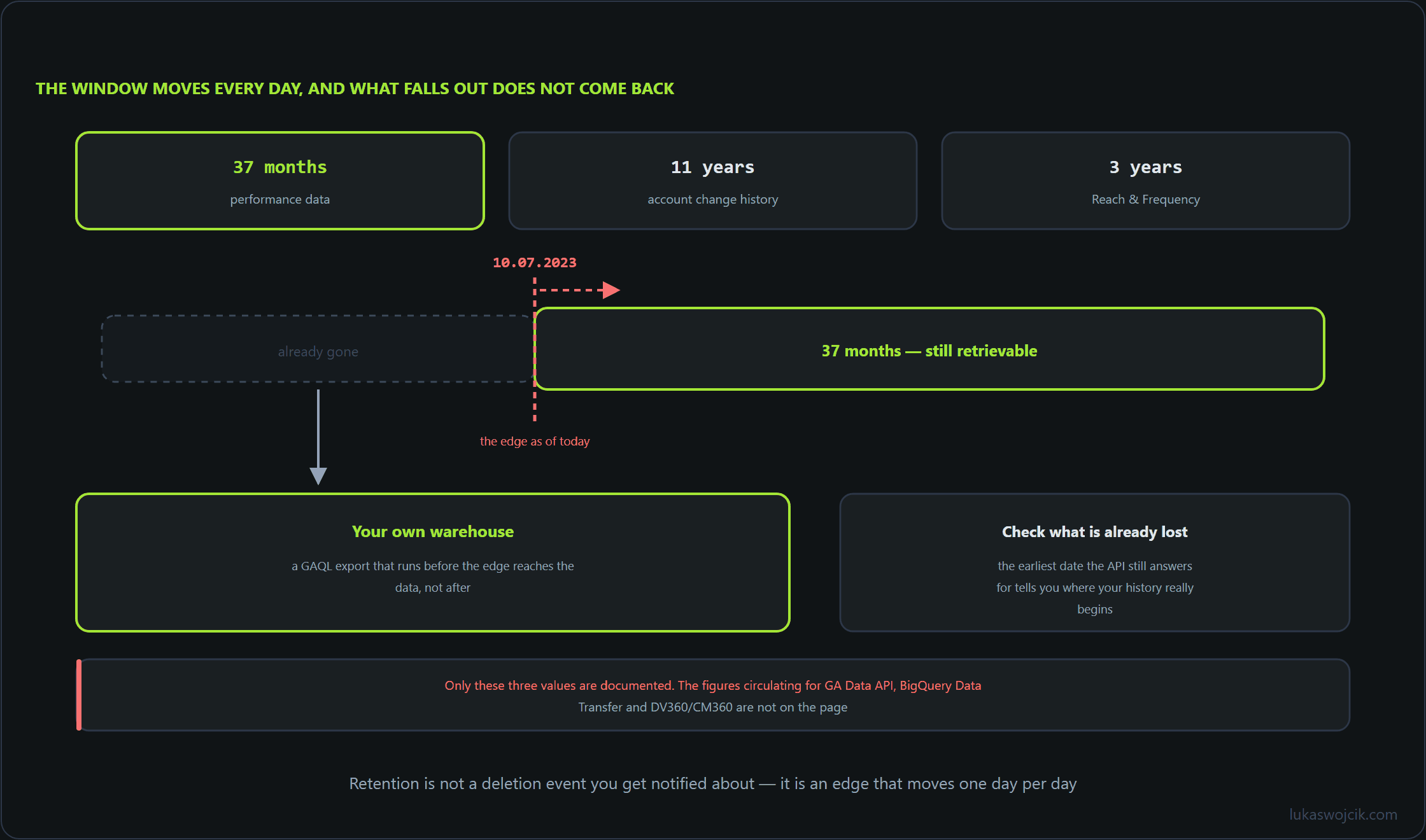
Since 1 June 2026, Google Ads data has an expiry date. Performance data is kept for 37 months, account change history for 11 years, Reach and Frequency data for 3 years. Today is 10 August 2026, so the oldest performance day you can still pull is 10 July 2023, and that line moves forward by one day every day. If your reporting history lives only inside Google Ads, you are quietly losing a day of it per day. This article does the arithmetic, corrects the numbers that are being misquoted alongside it, and builds a resumable backfill job that moves everything above the line into your own warehouse.
1. What the retention page actually says
Three windows are documented, and only three:
- 37 months for performance data.
- 11 years for the history of account changes.
- 3 years for Reach and Frequency.
Most write-ups of this change carry three further numbers along with it: 36 months for the GA Data API, 24 months for the BigQuery Data Transfer Service, 24 months for DV360 and CM360. Those values do not appear on the Google Ads help page that announced the retention windows. They are undocumented as far as this announcement goes, and passing them on as if they were part of it is how a rumour becomes a planning assumption. Plan against the three values above. If you need a retention figure for GA4, for BigQuery transfers or for DV360 and CM360, take it from that product’s own documentation.
One detail is easy to misread: 37 months is longer than three years. Reach and Frequency therefore expires about a month before the performance data covering the same campaigns. If you are backing up both, R&F has the tighter deadline, not the looser one.
2. Work out your own deadline, then find what is already gone
The boundary is a rolling one, not a single cut that happened in June. Compute it rather than remembering it:
from datetime import date
from dateutil.relativedelta import relativedelta

today = date(2026, 8, 10)
print(today - relativedelta(months=37))  # performance      2023-07-10
print(today - relativedelta(years=3))    # reach, frequency 2023-08-10
print(today - relativedelta(years=11))   # change history   2015-08-10
Anything dated before 10 July 2023 is already unrecoverable through the API. Tomorrow that becomes 11 July 2023. Before writing any export code, find out how much of the still-available range you are actually holding. Against a Postgres warehouse with a daily table:
WITH expected AS (
  SELECT generate_series(DATE '2023-07-10', CURRENT_DATE - 1, INTERVAL '1 day')::date AS d
)
SELECT count(*) AS missing_days, min(e.d) AS oldest_gap, max(e.d) AS newest_gap
FROM expected e
LEFT JOIN ads_daily a ON a.day = e.d
WHERE a.day IS NULL;
Run the same query with the window start set to your own earliest expected day. Everything it reports below 2023-07-10 is a permanent hole; everything above it is work you can still do.
3. A backfill job that resumes
I am not going to print a GAQL field list here, because the right one is the one you already use. Take the resource, the date segment and the selected fields straight out of the report you run today, put them in a config file, and let the job own nothing but the date window:
{
  "customer_id": "1234567890",
  "dsn": "postgresql://ads@localhost/warehouse",
  "resource":   "<the resource your existing report reads>",
  "date_field": "<the date segment that report groups by>",
  "fields":     ["<field 1>", "<field 2>"],
  "query_template": "SELECT {fields} FROM {resource} WHERE {date_field} BETWEEN '{start}' AND '{end}'",
  "oldest_wanted": "2019-01-01"
}
The runner fetches exactly one window per invocation and records it. State is four columns: customer_id, window_start, window_end, rows, written in the same transaction as the data, so a crash simply repeats the window.
import json
from datetime import date, timedelta
from dateutil.relativedelta import relativedelta
import psycopg

CFG, CHUNK = json.load(open("/etc/ads-backfill/config.json")), timedelta(days=7)
CID = CFG["customer_id"]

def next_window(cur):
    cur.execute("SELECT max(window_end) FROM backfill_state WHERE customer_id = %s", (CID,))
    (last,) = cur.fetchone()
    floor = max(date.today() - relativedelta(months=37),
                date.fromisoformat(CFG["oldest_wanted"]))
    start = last + timedelta(days=1) if last else floor
    if start < floor:                    # job stalled, those days expired
        cur.execute("INSERT INTO backfill_lost VALUES (%s, %s, %s)",
                    (CID, start, floor - timedelta(days=1)))
        start = floor
    end = min(start + CHUNK - timedelta(days=1), date.today() - timedelta(days=1))
    return (start, end) if start <= end else None

with psycopg.connect(CFG["dsn"]) as conn, conn.cursor() as cur:
    win = next_window(cur)
    if win:
        start, end = win
        rows = run_report(CID, CFG["query_template"].format(
            fields=", ".join(CFG["fields"]), resource=CFG["resource"],
            date_field=CFG["date_field"], start=start, end=end))
        cur.executemany(CFG["insert_sql"], rows)
        cur.execute("INSERT INTO backfill_state VALUES (%s, %s, %s, %s, now())",
                    (CID, start, end, len(rows)))
        conn.commit()
run_report is your existing API wrapper, whichever client library it wraps. Everything else in the file works on your side of the line: your config, your table, your transaction boundary.
4. Cron, ordering, and the loss ledger
# /etc/cron.d/ads-backfill — one window per hour, oldest first
7 * * * * ads /opt/ads-backfill/.venv/bin/python /opt/ads-backfill/backfill.py >> /var/log/ads-backfill.log 2>&1
Two things about that job are deliberate. It walks forward from the boundary, not backward from today, because the oldest data is the only data with a deadline; recent days can wait. And when it finds that the boundary has overtaken its own progress, it does not silently skip the gap, it writes the span into backfill_lost. That table is the honest answer to “which periods do we no longer have”, and it is worth putting on a dashboard next to the gap query from section 2.
The arithmetic is comfortable. From 10 July 2023 to yesterday is 1,126 days, which is 161 windows of seven days. At one window per hour that is under seven days of wall clock, during which the boundary advances by seven days: you are gaining 168 days of history for every one you lose. Once the backlog is closed, the same job keeps the tail topped up and costs one API call per hour.
5. Summary
You now have a boundary you compute instead of remember, a query that tells you which days inside the still-available window are missing from your warehouse, a single-window runner that resumes cleanly after a crash and clamps itself to the current cutoff, an hourly cron entry, and a ledger of the periods that are already beyond recovery. The whole backlog from 10 July 2023 onward closes in about a week of unattended running, after which the job becomes maintenance.
What that buys you is that your reporting history stops being someone else’s retention policy. Year-over-year comparisons, seasonality models and attribution rebuilds all need data older than 37 months eventually, and after 1 June 2026 the only copy that will still exist is the one you keep. Confirm the three documented windows in the primary source and ignore the extra figures circulating with them: Google Ads data retention policy.
Related articles