English
 Deutsch
 Polski
Microsoft Ads Consent Mode: Implementation via JavaScript and GTM, Differences From Google

Contents
Microsoft Universal Event Tracking (UET) measures advertising conversions. Consent Mode passes a consent state to the tag and controls cookie access. A banner collects the decision; Consent Mode applies the decision technically. The setting does not automatically authorize every data transfer.
Basic and Advanced are different setups
Basic blocks UET until the required consent exists. Advanced loads UET with an explicit denied default and sends restricted measurement signals. Microsoft describes the data as anonymized and aggregated before modeling. That description is not a general guarantee that every network request in every implementation contains no personal information.
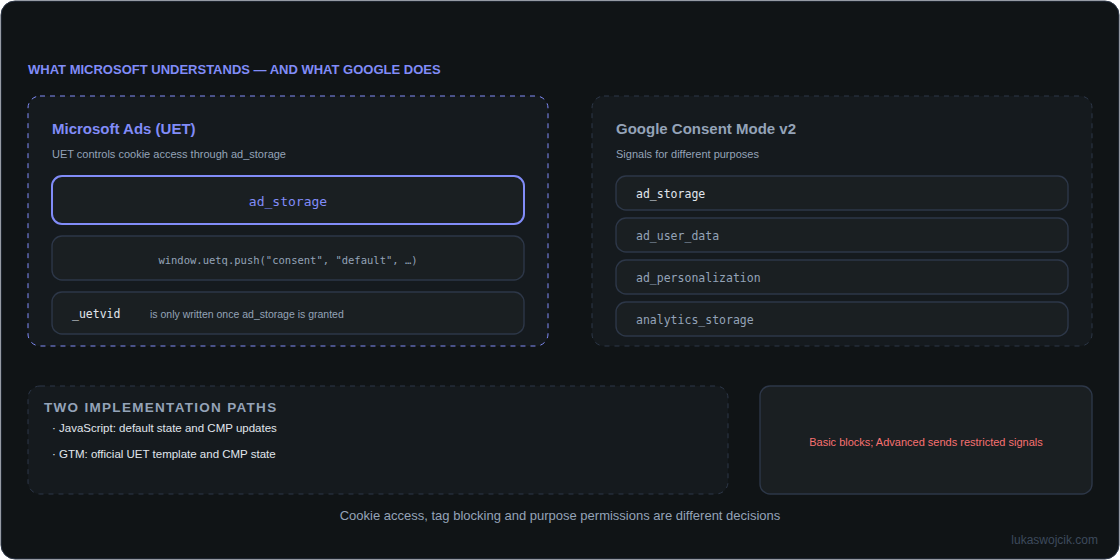
The ad_storage signal controls cookie access. According to Microsoft, denied prevents reading and writing first-party UET cookies and writing third-party cookies. Existing third-party cookies may still be read for fraud and spam prevention. “No cookies” is therefore an imprecise blanket description.
Direct JavaScript implementation
Each page needs a denied default early enough to prevent the first measurement from using an incorrect state. The following fragment sets the default and defines an update function. The UET base tag, banner interface and stored-choice handling remain separate parts of the integration.
window.uetq = window.uetq || [];
window.uetq.push('consent', 'default', { ad_storage: 'denied' });

function updateUetConsent(advertisingAllowed) {
  window.uetq = window.uetq || [];
  window.uetq.push('consent', 'update', {
    ad_storage: advertisingAllowed === true ? 'granted' : 'denied'
  });
}
The CMP calls updateUetConsent(true) only for valid advertising consent. Rejection, withdrawal or missing permission calls updateUetConsent(false). A still-valid stored choice must also be transmitted on subsequent pages. This function does not create a banner or persist a choice.
Implementation through Google Tag Manager
The current official UET template supports GTM consent states. A correctly configured CMP supplies the initial state and subsequent updates. No particular third-party consent template is universally required.
- Enable consent updates: Receives changes. A state set before UET loads needs particular attention.
- Inherit Initial User Consent: Reads the initial state. This option needs a reliable state supplied by the CMP first; a missing default must not become consent.
- Additional Consent Checks: Requiring
ad_storageprevents firing without consent. This is a Basic-style block, not a running Advanced implementation. A suitable trigger must actually fire the previously blocked tag after consent.
Comparison with Google and other platforms
UET uses ad_storage here. Google distinguishes purposes through signals including analytics_storage, ad_storage, ad_user_data and ad_personalization. Four values do not represent the same decision repeated four times. These interfaces provide no reliable general ranking of modeling maturity or required data volume.
Other platforms need separate checks. TikTok, for example, documents cookie and consent controls of its own. The claim that every other platform only supports a complete tag block is therefore inaccurate. Suppressing cookies, preventing all tag execution and sending server events are different measures.
Tests that matter
Test a fresh browser profile, rejection, acceptance, withdrawal and a subsequent page separately. UET Tag Helper reports the consent state; network requests and cookie storage reveal actual behavior. Basic must produce no UET requests before permission. Advanced requests before permission must carry the denied state. A clean GTM preview alone does not prove these conditions.
Questions and answers
Does Consent Mode replace consent?
No. A signal communicates a decision; a signal does not replace the required information or lawful basis.
Does UET consent automatically cover Clarity?
No. Microsoft requires a separate Clarity setting for the UET-Clarity integration.
Does a server API solve the consent issue?
No. Server-side events also need a lawful basis and appropriate purpose permissions. Moving processing from a browser to a server does not remove those requirements.
Related articles