English
 Deutsch
 Polski
Tag Management Systems: From Hardcoding to Server-Side, and How to Choose One

Contents
A tag management system (TMS) manages small programs used for analytics, advertising and other website features. Rules determine when a tag runs and which data is transmitted. A TMS simplifies changes but still needs a well-defined data layer, testing, consent controls and clear responsibilities.
From embedded scripts to containers
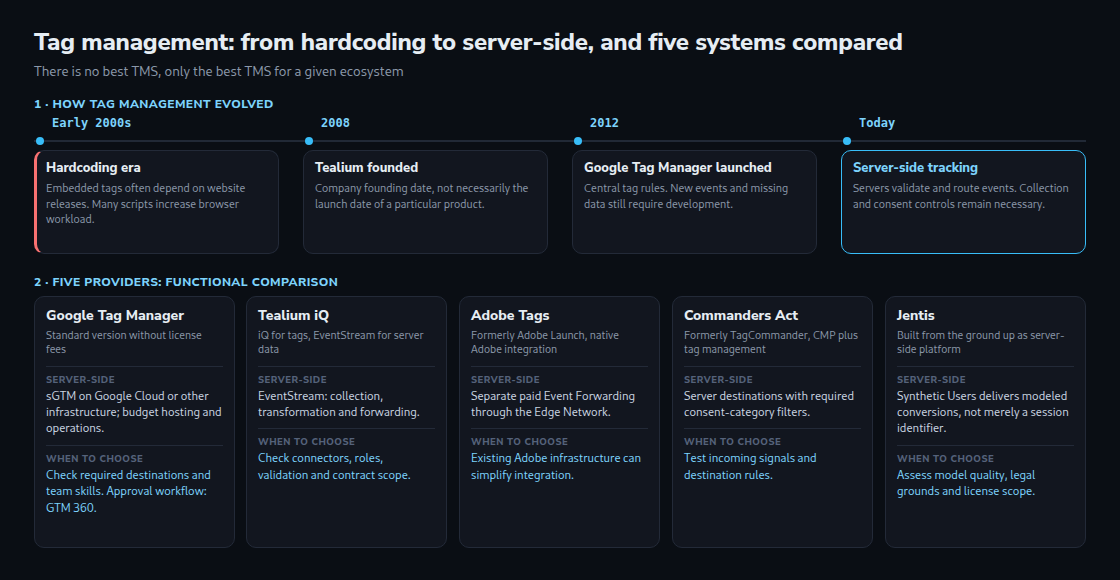
Tags embedded directly in website code often depend on the website release process. A TMS moves part of that configuration into a central interface. Google Tag Manager launched on October 1, 2012; Tealium was founded in 2008. A company founding date does not establish when a particular product launched.
After installing a container, many tag rules can change without a new website release. New events, shop features or missing data often still require development. Additional tags consume processing time and make network requests even inside a container. A TMS does not automatically make an overloaded page faster.
What server-side tagging changes
Browser tags send data directly to destinations. With server-side tagging, a server receives events, checks or modifies the payload and forwards permitted fields. This can reduce browser requests and improve control over destinations. Reliable collection of the original events remains necessary, often through browser code.
A first-party endpoint guarantees neither complete data nor immunity from browser restrictions. Rejection and withdrawal remain relevant on the server. Server-side processing, anonymity and lawful processing are separate properties.
Compare five providers against concrete requirements
Google Tag Manager
The standard version offers a widely used starting point and supports Google and third-party tags. Configured tags determine data destinations; a GTM container does not automatically send every event to Google Analytics. Server GTM can run on Google Cloud or other suitable infrastructure. Hosting, monitoring and maintenance add costs. The integrated approval workflow belongs to GTM 360.
Tealium
Tealium iQ manages tags; EventStream provides server-side event collection, transformation and delivery. Evaluation should cover the connectors actually needed, data validation, roles and environments. Product modules, volumes and services belong in a specific quote. A large integration catalog does not establish error-free delivery.
Adobe Tags
Adobe Tags uses rules, data elements and extensions. Event Forwarding is a separate paid offering in the Adobe ecosystem and processes data already received by the Edge Network. Existing Adobe infrastructure can simplify integration; that does not mean only an entirely Adobe-based business can use the product.
Commanders Act
Commanders Act distinguishes browser and server destinations. Server destinations can require particular consent categories. Correct incoming signals and appropriate rules for each recipient remain essential. A provider’s location or an integrated CMP does not guarantee a compliant configuration.
JENTIS
JENTIS provides a server-side data collection platform. According to the provider, the Synthetic Users add-on uses models based on first-party data and segments to send modeled conversion signals to advertising and analytics systems. Documentation distinguishes preview access from licensed activation. The mechanism involves more than assigning a cookieless session identifier.
Modeled data does not reconstruct an observed individual journey. Provider statements about anonymity or compliance do not replace an assessment of actual collection, purposes, recipients and legal grounds. “100% GDPR compliant” is too broad a promise for a general product comparison.
Make the choice testable
A short trial with identical events provides more evidence than broad rankings: a purchase with a stable event ID, a consent change, a destination failure and a retry. Relevant results include complete fields, no duplicate counting, permitted destinations, useful logs and recovery after failure. Total cost, operational effort, export options and contractual service commitments also matter.
Questions and answers
What does data governance mean in practice?
Separate roles, controlled publishing, auditable changes, limited fields and defined recipients. Small teams also benefit from technical controls; team size alone is not an adequate measure of risk.
Is Synthetic Users the same as Google modeling?
Both estimate missing information, but inputs, processing and outputs differ. A useful comparison needs independent metrics and a controlled experiment. A synthetic identifier alone says nothing about model quality.
Can a container move straight to another provider?
Container exports are usually vendor-specific. A documented data layer with stable events makes migration easier, but rules, destination mapping and consent logic still need rebuilding and testing.
Related articles