English
 Deutsch
 Polski
Home Assistant Energy Dashboard: Device Class, Unit and State Class in the Discovery Payload

Contents
An MQTT sensor can show changing values in history while remaining unavailable in a particular Energy dashboard field. Device class, unit and state class must fit the measurement, but discovery validity, recording and statistics errors matter too. These fields describe the data; changing a label does not convert watts into kilowatt-hours.
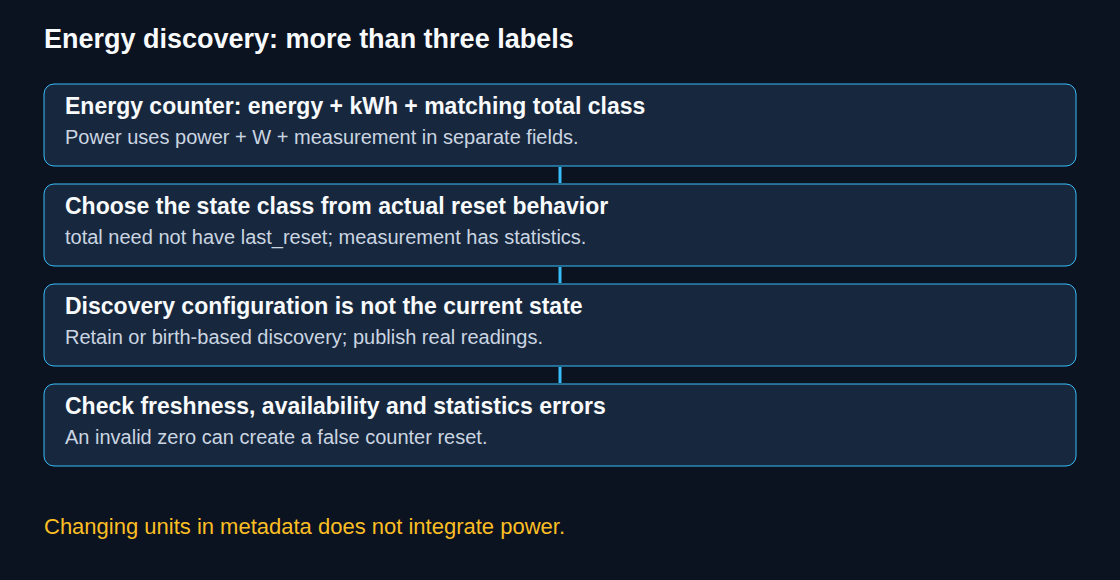
Match the quantity to the dashboard field
For an accumulated energy reading, use device_class: energy, a supported energy unit such as kWh, and an appropriate total state class. Unit spelling matters: kwh is not the standard kWh symbol. Supported units must also fit the selected dashboard field. Invalid combinations can produce logs or statistics errors; failure is not necessarily silent.
Power is a rate in watts. Current Home Assistant versions provide separate power-measurement fields in the Energy dashboard, using device_class: power and state_class: measurement. Such a value is useful there, but is not an accumulated-energy counter. Changing W to kWh without integrating over time would falsify the measurement.
Choose the state class from reset behavior
measurementrecords measurements such as power or temperature. It can generate long-term minimum, maximum and mean statistics; it does not produce an energy-counter sum.totalsupports totals that rise or fall. A lifetime counter that never resets can use total without last_reset. For a total that resets at known boundaries, the integration must provide the appropriate reset information.total_increasingfits a nonnegative counter that rises and can restart from zero. It does not require last_reset. A recognized downward reset starts another cycle; the first reading of the new cycle contributes from zero.
The first observed reading is a baseline, not automatically the entire historical consumption. A sequence 1000, 1005, 0, 1006 can nevertheless add a false 1006 after the zero reset. Small decreases are not all treated as resets: current developer documentation describes a tolerance for drops below 10%. This is not a substitute for detecting stale or invalid readings.
A complete single-sensor discovery example
The following sensor.json describes a counter that really uses the total_increasing behavior. The state topic expects a numeric kWh payload such as 123.456, without a unit suffix. The publisher must supply online/offline availability messages and valid readings frequently enough for the illustrative 300-second expiry.
{
  "name": "Energy",
  "unique_id": "example_meter_energy",
  "state_topic": "example/meter/energy",
  "device_class": "energy",
  "unit_of_measurement": "kWh",
  "state_class": "total_increasing",
  "availability_topic": "example/meter/status",
  "payload_available": "online",
  "payload_not_available": "offline",
  "expire_after": 300
}
The commands below publish the configuration and, separately, remove that exact example configuration. BROKER is a placeholder; credentials, port and TLS settings must match the test broker. Removal is a distinct administrative operation, not the next step after every creation.
mosquitto_pub -h BROKER -r -t "homeassistant/sensor/example_meter_energy/config" -f sensor.json

mosquitto_pub -h BROKER -r -t "homeassistant/sensor/example_meter_energy/config" -n
Single-component discovery follows <prefix>/<component>/[<node_id>/]<object_id>/config. The node segment is optional. Retained configuration can be replayed when Home Assistant subscribes again; publishers can instead resend discovery after Home Assistant’s birth message. Retaining discovery does not retain current sensor readings or prove that the device is online.
A zero-length retained message clears this retained configuration. Permanent retirement also requires stopping a publisher from advertising it again; a device with other entities need not disappear. A stable unique_id supports registry identity and customization. It is mandatory for device-based discovery, but is not itself a universal energy-statistics prerequisite. Invalid required fields can reject configuration; only unknown keys are generally ignored.
Availability and freshness are separate checks
A last-will offline message helps detect a lost MQTT connection. It does not detect every frozen measurement while the publishing client remains connected. expire_after can expose missing updates, provided the normal publication interval is known. Repeating an old number as a new message can still defeat a message-age check; the producer should validate acquisition freshness.
Retained state values require particular care: replay after a Home Assistant restart can make an expired reading appear fresh. The MQTT Sensor documentation recommends avoiding retained sensor-state payloads with expiry handling; Home Assistant can restore its state and remaining expiry itself. The discovery configuration can still be retained.
Check statistics before relying on the result
Inspect the entity’s actual attributes and value, then Settings → Tools → Statistics and the logs. Confirm that recording includes the sensor. Short-term statistics are compiled every five minutes and hourly aggregates form long-term statistics. Correcting discovery does not automatically reconstruct all missing past energy totals.
The statistics tools can correct recorded anomalies. They cannot infer missing readings from a blank interval. Changes to cumulative sums can affect later offsets and adjacent differences, so review the surrounding timeline and preserve a backup before correction. A later cumulative reading can reveal the total increase across an outage without revealing its true hourly distribution.
Questions and answers
Can power become an energy counter?
The Integral helper approximates energy from sampled power over time. For a source in W, prefix k and time unit h produce kWh. The left method can suit accurately reported step changes followed by stable plateaus; trapezoidal integration can suit smooth, frequently sampled signals. Neither method repairs missing measurements. A trustworthy hardware energy counter is preferable when available.
Should every zero be rejected?
No. Zero can be a valid new meter reading or reset. Communication failure should be represented as unavailable or unknown, not fabricated zero. Filtering must use device status, timestamps and plausible changes, with an explicit meter-replacement path. A blanket value-greater-than-zero template would also hide legitimate zeros and does not solve every stale-value problem.
Sources
Related articles