English
 Deutsch
 Polski
WordPress Database: Performance Limits of wp_postmeta and How to Build Custom Tables

Contents
WordPress Database: Performance Limits of wp_postmeta and How to Build Custom Tables
Post metadata is suitable for many WordPress extensions. A custom table becomes useful when measured query costs, frequent counter updates or structured reporting exceed the practical limits of the existing schema. Row count alone does not establish that limit. Migration also creates responsibilities for upgrades, caching and data deletion.
Where post metadata becomes expensive
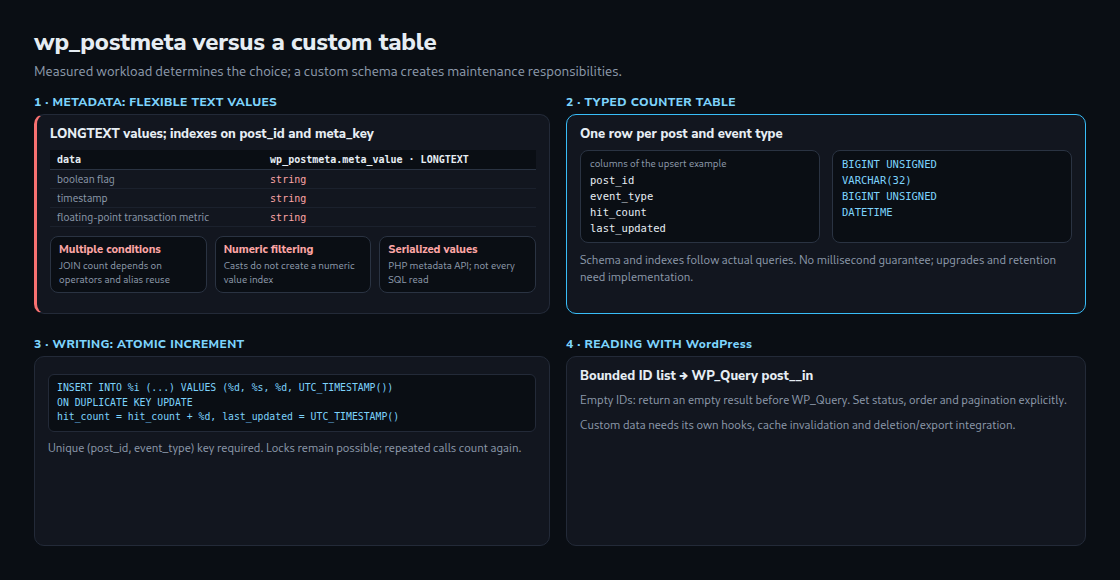
The standard table stores the value in meta_value LONGTEXT, alongside a post ID and a key. This flexible Entity–Attribute–Value model gives different posts different fields without changing the schema. The default indexes cover the post ID and a prefix of the key; no default numeric index covers the value.
Multiple metadata conditions can require multiple table joins. The exact count depends on operators and logical relationships: WordPress can reuse compatible table aliases. Three criteria therefore do not universally mean three separate joins. Numeric casts permit numeric comparisons and sorting, but do not turn a text column into an indexed numeric column.
Arrays and objects add serialization work through the metadata API. SQL filtering itself does not deserialize PHP values. Metadata caching and conditional deserialization also make “every query serializes everything” inaccurate. Slow-query logs, the generated SQL, EXPLAIN, examined rows and representative concurrent load provide a better migration basis.
A schema for a counter
The example stores one counter per post and event type. The composite primary key defines that identity; BIGINT UNSIGNED stores the count and DATETIME stores the last update in UTC. The secondary index supports time-based maintenance. Different access patterns require different indexes, with additional write and storage costs.
The installer belongs in a versioned plugin activation or upgrade routine, not every page request. The table prefix and character settings come from WordPress. dbDelta() creates or adjusts the described schema; no automatic performance guarantee follows. Backfill, schema-version checks and rollback need separate implementation.
function lw_metrics_install() {
    global $wpdb;
    $table = $wpdb->prefix . 'custom_analytics_metrics';
    $collate = $wpdb->get_charset_collate();
    $sql = "CREATE TABLE $table (
        post_id bigint(20) unsigned NOT NULL,
        event_type varchar(32) NOT NULL,
        hit_count bigint(20) unsigned NOT NULL DEFAULT 0,
        last_updated datetime NOT NULL,
        PRIMARY KEY  (post_id,event_type),
        KEY updated (last_updated)
    ) ENGINE=InnoDB $collate;";
    require_once ABSPATH . 'wp-admin/includes/upgrade.php';
    dbDelta($sql);
}
Incrementing without a separate existence check
This function requires WordPress 6.2 or later for the identifier placeholder %i. Accepted event types and positive integer inputs are deliberately limited. The repeated increment parameter avoids the deprecated MySQL VALUES() reference in the update clause and also works in MariaDB.
function lw_metrics_increment($post_id, $event_type, $delta = 1) {
    global $wpdb;
    if (!is_int($post_id) || $post_id < 1 ||
        !is_int($delta) || $delta < 1 || $delta > 1000000 ||
        !in_array($event_type, ['page_view', 'conversion_hit'], true)) {
        return new WP_Error('invalid_metric', 'Invalid metric input');
    }
    $table = $wpdb->prefix . 'custom_analytics_metrics';
    $sql = $wpdb->prepare(
        "INSERT INTO %i (post_id, event_type, hit_count, last_updated)
         VALUES (%d, %s, %d, UTC_TIMESTAMP())
         ON DUPLICATE KEY UPDATE
             hit_count = hit_count + %d,
             last_updated = UTC_TIMESTAMP()",
        $table, $post_id, $event_type, $delta, $delta
    );
    if (false === $wpdb->query($sql)) {
        return new WP_Error('metric_write_failed', 'Metric write failed');
    }
    return true;
}
The unique key makes the single InnoDB statement insert a new counter or increment the existing counter atomically. Concurrent writes to a popular counter can still wait for locks. A database failure returns WP_Error; callers must handle that result. Parameter escaping protects SQL syntax, but does not establish authorization, trustworthy events or CSRF protection.
This counter counts accepted calls, including repeated deliveries. Exactly-once event processing needs a separate idempotency design, such as unique event IDs and transactional bookkeeping. Blind retries after an uncertain response can count twice. The example is a building block, not a complete tracking endpoint.
Questions and answers
When is migration justified?
No universal million-row or three-filter threshold exists. Query selectivity, indexes, sort operations, hardware and contention matter. A benchmark must compare realistic reads and writes, including migration and maintenance costs.
Can the result still use WP_Query?
A bounded custom query can supply post IDs to post__in. An empty ID list must return an empty application result before running WP_Query: post__in = [] does not mean “no posts”. Explicit post-status rules, pagination and order remain necessary; orderby = post__in preserves the supplied order when required. Large ID lists can be expensive.
Custom fields do not automatically participate in the metadata API, its hooks or its cache invalidation. Updates need a defined cache strategy. Post deletion, export/erasure, multisite scope and retention also require integration. A documented source of truth avoids inconsistent dual writes.
Related articles