English
 Deutsch
 Polski
Sharing 2.4 GHz: What a Zigbee Channel Change Costs

Jump to the interactive example ↓
Contents
A Zigbee channel change can improve an unreliable mesh, but may also interrupt communication and leave individual devices needing attention. Before changing the network, the useful checks are the occupied Wi-Fi channels, channel width, coordinator placement and actual message reliability. No Zigbee channel is permanently free of interference.
Channel numbers describe frequency, not guaranteed separation
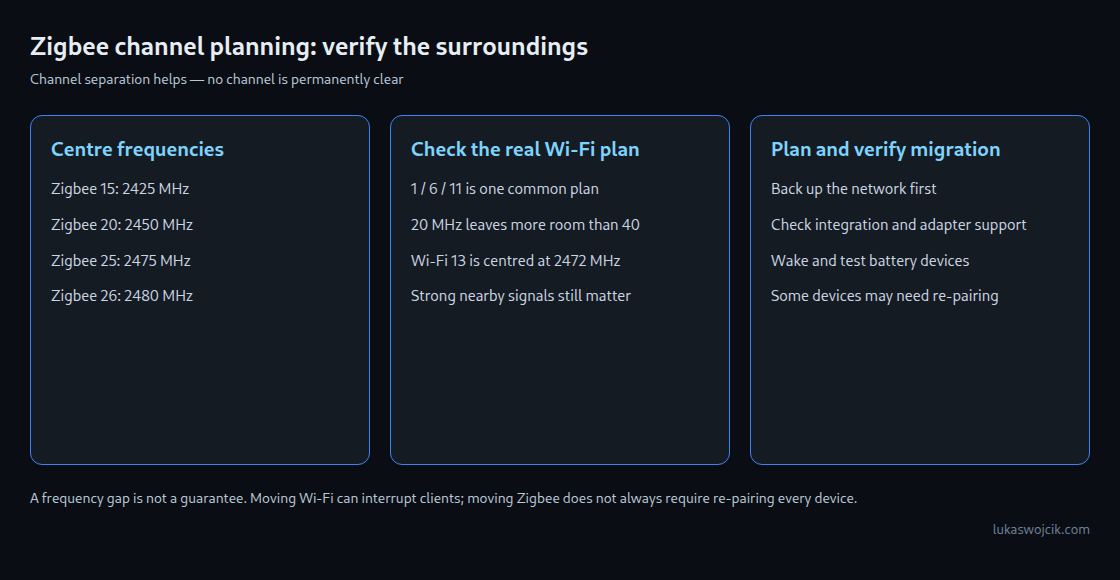
For the 2.4 GHz Zigbee channels 11–26, the centre frequency is 2405 MHz plus 5 MHz for each step above channel 11. The signal occupies roughly 2 MHz. Modern 2.4 GHz Wi-Fi commonly uses 20 MHz channels; the familiar 22 MHz drawing describes legacy DSSS operation. Neither drawing is a hard wall beyond which a strong transmitter has no effect.
Zigbee centre (MHz) = 2405 + 5 × (channel − 11)
Zigbee 11: 2405    15: 2425    20: 2450    25: 2475    26: 2480
Wi-Fi   1: 2412     6: 2437    11: 2462    13: 2472
Numbers are centre frequencies, not interference-free boundaries.
Wi-Fi 1, 6 and 11 form a common three-channel plan. Other channels exist where permitted and supported; the plan is not a statement that only these three numbers can work. Zigbee 15, 20 and 25 are useful candidates around that particular Wi-Fi arrangement, not universally clear channels. Wi-Fi 13 changes the situation near Zigbee 25 and 26. Actual nearby access points, widths and signal strengths determine the choice.
Interference depends on received energy and airtime
Neither Wi-Fi nor Zigbee has one universal transmit power. The important conditions include received signal strength, distance, antenna placement, receiver filtering and how much time each radio transmits. A nearby busy access point can overwhelm a weak Zigbee link even when a simplified channel diagram suggests a gap.
Both systems use mechanisms to avoid collisions. Wi-Fi does not decode a Zigbee packet as a Wi-Fi packet, but sufficiently strong non-Wi-Fi energy can still affect channel assessment. The claim that Wi-Fi never hears Zigbee is therefore too absolute. Carrier sensing also cannot eliminate every collision, particularly when transmitters cannot hear each other. Delayed or lost messages are possible in both directions.
Reduce local interference before moving the mesh
- Coordinator position: distance from the host, SSD, USB 3 devices and Wi-Fi antennas can help. A suitable shielded USB extension and a USB 2 port are useful trials. A one-metre cable is neither a guaranteed cure nor evidence that range previously fell by exactly half.
- Wi-Fi width: 20 MHz generally leaves more room in a crowded 2.4 GHz band than 40 MHz. Moving suitable clients to another supported band can reduce 2.4 GHz traffic.
- Intermittent sources: microwave ovens and other radios can disturb reception. Their effect depends on location, shielding and activity; channel 20 is not automatically unusable whenever an oven runs.
- Measurement: compare message success, delays and repeatable operating conditions. A Wi-Fi network list does not reveal every non-Wi-Fi interferer. A single link-quality value does not explain the cause.
Channel migration is not automatically a complete re-pairing
Zigbee2MQTT documents an existing-network channel change for the zstack and ember adapter types. A network-update broadcast communicates the change. Sleeping devices may follow when they next wake; triggering a sensor after the change helps verify this. Some devices do not support the migration and may need manual re-pairing after remaining unresponsive despite waking.
Before migration, a verified backup and a record of the existing channel are useful. The supported procedure depends on the integration and adapter. Changing a channel must not be confused with changing the network key or PAN ID: those changes have different re-pairing consequences. A maintenance window should allow time to check powered routers, wake battery devices according to their instructions and test important automations. A successful coordinator log alone does not prove that every device followed.
Moving Wi-Fi can be the less disruptive option, but a Wi-Fi channel change can interrupt active clients, calls or IoT connections. The better choice depends on both networks. After any change, reliability needs checking during realistic traffic and recurring interference. No choice remains optimal merely because a neighbouring router has not changed yet.
Questions and answers
Why not always use channel 26?
Device support and permitted transmit power are product-specific. Digi, for example, documents reduced output or lack of channel 26 support for particular XBee variants. The full installed device set matters. Channel 25 also requires a local interference check; a high channel number is not a quality rating.
Does Bluetooth advertising rule out particular channels?
Bluetooth LE primary advertising frequencies are 2402, 2426 and 2480 MHz. Legacy advertising can use one or more of these, so not every advertiser transmits on all three. Extended advertising also uses secondary channels. Proximity to Zigbee 15 or 26 is useful context, but traffic and signal strength determine the effect. No Zigbee channel avoids all Bluetooth activity.
What changes with a Thread network?
Common 2.4 GHz Thread networks use the same IEEE 802.15.4 channel range. Networks on the same channel share airtime and can still collide. Frequency separation can help, but does not guarantee complete isolation. OpenThread can distribute a channel change through a pending dataset with a delay; the documented delay should exceed the longest sleeping-device poll interval. Offline or unreachable devices remain a consideration, and the product must expose a supported migration procedure.
Must automatic Wi-Fi channel selection always be disabled?
No. Selection rules and interference measurements depend on the access point. Cisco Meraki, for example, documents automatic selection among 1, 6 and 11 at 2.4 GHz and consideration of non-Wi-Fi interference. A fixed channel or a restricted automatic plan may suit a coordinated installation. The actual configuration, changes over time and settings after a reset need checking; a universal claim that automatic selection ignores Zigbee or chooses any channel is not justified.
Sources
- Zigbee2MQTT: channel change
- Zigbee2MQTT: network stability
- Bluetooth LE primer
- Bluetooth LE advertising frequencies
- Intel: USB 3.0 interference
- OpenThread Channel Manager
- OpenThread pending dataset
- Silicon Labs: Wi-Fi coexistence
- Cisco: wireless RF reference
- Digi: supported channels
- Cisco Meraki: RF profiles
- University of Twente: Ultra-Narrowband Communications
- Connectivity Standards Alliance: Zigbee
Learn by trying
Do your channels share the same space?
Move Wi-Fi and Zigbee within the same frequency band.
Schematic widths: Wi-Fi 20 MHz, Zigbee 2 MHz. Not a measurement of interference power. Adjacent channels can still interfere; check regional and device restrictions.
This module runs in your browser and does not send or store your input.
What happens if …?
Simplified learning model
What happens if …?
Take a component offline in a sample network. Which services keep working?
Camera feed on the local network
A local camera is accessed by IP. The switch and Wi-Fi connect it to your device. This model does not need internet, DNS or the Pi for that.
Home Assistant by local IP
The interface runs on the Pi. Your device reaches it over the local network; no DNS name is needed here.
Zigbee automation on the Pi
A Zigbee coordinator connected directly to the Pi controls a local device. This fixed rule needs neither Wi-Fi nor internet in this example.
Cloud access to Home Assistant
Access uses a cloud hostname and a tunnel from the Pi. It needs all four components in this example.
Open a new external website
A new, uncached hostname needs DNS and a route to the internet. The local Pi does not host this external site.
Existing internet connection by IP
An established connection does not need a fresh name lookup. It survives the DNS outage while the network and internet remain available.
Simplified learning model
A sample network, not a live view of my setup. Devices stay powered. Pi = Home Assistant with USB Zigbee; DNS is an external resolver, with no cache or fallback. “Switch / Wi-Fi” represents all local access. Results describe the outage itself, not automatic recovery.
DNS · RFC 1034 ↗These examples run only in your browser. No real systems are disrupted.
PNG with settings, result and article link. Created locally only when you click.
Related articles