English
 Deutsch
 Polski
Zigbee2MQTT and ZHA: Planning a Reliable Zigbee Network
Part 1 of 6 in the series Home Assistant without the cloud

Contents
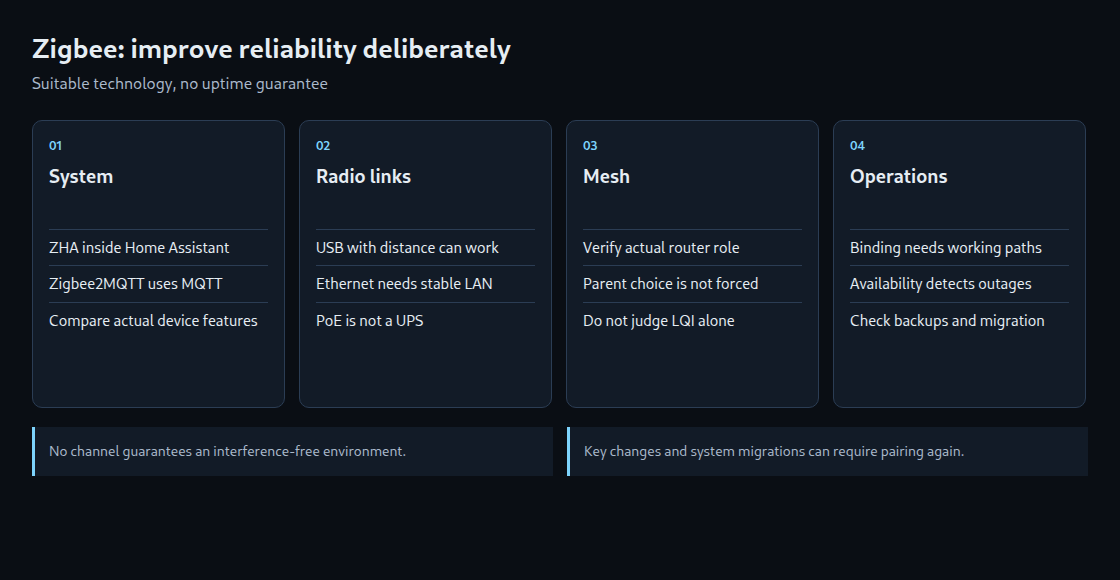
A reliable Zigbee network depends on suitable devices, good radio links and a tested recovery plan. Both ZHA and Zigbee2MQTT can provide an appropriate foundation. Ethernet, PoE or a particular LQI value guarantees neither uninterrupted operation nor zero-delay automations.
Choose ZHA or Zigbee2MQTT for the actual requirements
ZHA integrates directly with Home Assistant and does not require an additional MQTT broker for Zigbee. Zigbee2MQTT runs the Zigbee connection as a separate service and exchanges data through MQTT. Independent maintenance can be useful, but adds dependencies: the broker, service and possibly the network connection to the coordinator.
The decisive comparison concerns the actual devices and functions: exact model, firmware, exposed entities, special features and update paths. Neither system is universally more compatible. A coordinator belongs to one application at a time; ZHA and Zigbee2MQTT cannot use the same adapter concurrently.
USB and Ethernet: placement versus added dependencies
A USB coordinator is not merely a fallback. Distance from USB 3 devices, SSDs and other transmitters can reduce interference. Zigbee2MQTT documentation identifies a 50 cm extension as a useful measure; cable quality, orientation and the actual environment still matter. A suitable USB 2 port may also help.
An Ethernet coordinator makes a better location easier to reach where a stable local wired network exists. It does not completely shield the antenna from interference. The switch, network path, adapter firmware and power become additional operating requirements. PoE delivers power through a network cable; uninterrupted operation needs appropriate backup for every required component. A WAN, VPN or unreliable Wi-Fi path is not equivalent to a stable local connection.
Ethernet connects the software to the coordinator. It does not automatically extend the Zigbee radio mesh to a distant building. The radio side of a network adapter used as a router still needs a Zigbee radio link.
Plan channels from the surrounding networks
2.4 GHz Wi-Fi, Zigbee and Thread share spectrum. Channel numbers from different standards are not directly comparable. Zigbee channels 15, 20 or 25 can suit a particular Wi-Fi plan but do not guarantee interference-free gaps. Wi-Fi width, regional channels, neighboring networks and other transmitters affect the result.
For new networks, Zigbee2MQTT’s configuration documentation recommends ZLL channels 11, 15, 20 or 25 for device compatibility. Channel 26 is not universally prohibited; device and firmware support and permitted power need checking. Increasing coordinator power also does not automatically improve a sensor’s weaker return path.
An existing Thread network belongs in the same inventory. Home Assistant identifies Thread channel 26 as a frequently useful choice with less Wi-Fi interference. Different channel numbers alone do not establish interference-free coexistence. Channel changes need planning and subsequent checks with the affected devices.
Understand routers, end devices and measurements
Routers forward Zigbee messages and must remain available. End devices do not route and use a parent router or coordinator. Battery devices are normally end devices. Mains power alone does not prove router capability; the actual device type matters. Turning off a router bulb can interrupt connections.
A sensibly distributed set of compatible routers comes first, followed by sensors at their intended locations. This can encourage a suitable parent selection without forcing the geometrically nearest router. Device behavior, radio quality and available child capacity also matter. Restricting joining to a selected router can help but does not replace functional checks.
LQI is not a uniform cross-vendor quality scale. A value above 100 guarantees neither stable routes nor immediate updates. Error logs, failed commands, delays and radio measurements considered together over time are more informative. A missing line on a map does not prove that a sleeping device has disconnected.
Binding and availability have distinct limits
Binding can connect supported devices directly, such as a switch and a light. Each command then need not travel through Home Assistant or MQTT. Setup is available through the Bind tab, and sleeping devices often need waking first. This can tolerate a software outage while the devices, parent link and necessary radio route remain functional. Binding does not remove the effect of losing a required router.
Availability detects missing check-ins rather than repairing the network. It is disabled by default. Active devices are checked after the usual ten-minute period without a message and marked offline when the check fails. Passive devices cannot be pinged and use a default 25-hour period. Timeouts, jitter and retry intervals affect actual detection.
availability:
  enabled: true
  active:
    timeout: 10
  passive:
    timeout: 1500
This fragment enables the documented default timeouts in minutes within an otherwise configured Zigbee2MQTT installation. Thresholds need to suit device reporting behavior. Offline status does not prove an empty battery; radio links, routers or services may also be responsible.
Questions and answers
What happens during a channel change?
Zigbee2MQTT supports channel changes for zstack and ember adapters. Sleeping devices may follow after waking; some require pairing again. Existing backups, a maintenance window and checks of all important devices belong in the plan. Changing a controllable Wi-Fi channel may be an alternative without changing Zigbee.
Is replacing an adapter the same as moving from ZHA to Zigbee2MQTT?
No. Supported adapter migration within one system can preserve devices. Moving between implementations requires a specifically supported procedure; without that evidence, resets and pairing should be planned. Device mappings, entity names, automations and bindings need checking after the change.
Why is network_key: GENERATE absent from the example?
A random new identifier or key belongs in deliberate new-network setup, not an incidental optimization of an existing network. Changing the network key requires pairing devices again. Network backups, keys and configuration need protected storage. A backup supports recovery; it is not an automatic standby coordinator.
Sources
- www.zigbee2mqtt.io/advanced/zigbee/02_improve_network_range_and_stability.html
- www.zigbee2mqtt.io/guide/configuration/device-availability.html
- www.zigbee2mqtt.io/guide/usage/binding.html
- www.home-assistant.io/integrations/zha/
- www.home-assistant.io/integrations/thread/
- www.zigbee2mqtt.io/guide/configuration/zigbee-network.html
- www.zigbee2mqtt.io/guide/configuration/adapter-settings.html
- www.zigbee2mqtt.io/guide/faq/
- www.zigbee2mqtt.io/advanced/zigbee/01_zigbee_network.html
- www.zigbee2mqtt.io/guide/getting-started/
Home Assistant without the cloud
- Zigbee2MQTT and ZHA: Planning a Reliable Zigbee Network
- ESPHome and ESP32 in Practice: Building Cloud-Free Environmental Sensors
- Presence Detection 2.0: mmWave Radars (LD2410/LD2450) in Lighting Automation
- Local Voice Control in Home Assistant with Whisper & Piper
- WireGuard & Tailscale DMZ: Secure External Access to Home Assistant and Self-Hosted Servers
- Local Energy Management: Integrating PV Inverters and Battery Storage via Modbus TCP
Related articles