English
 Deutsch
 Polski
GA4 Cost Data Import: Mandatory Currency, New Diagnostic, Validation Report

Contents
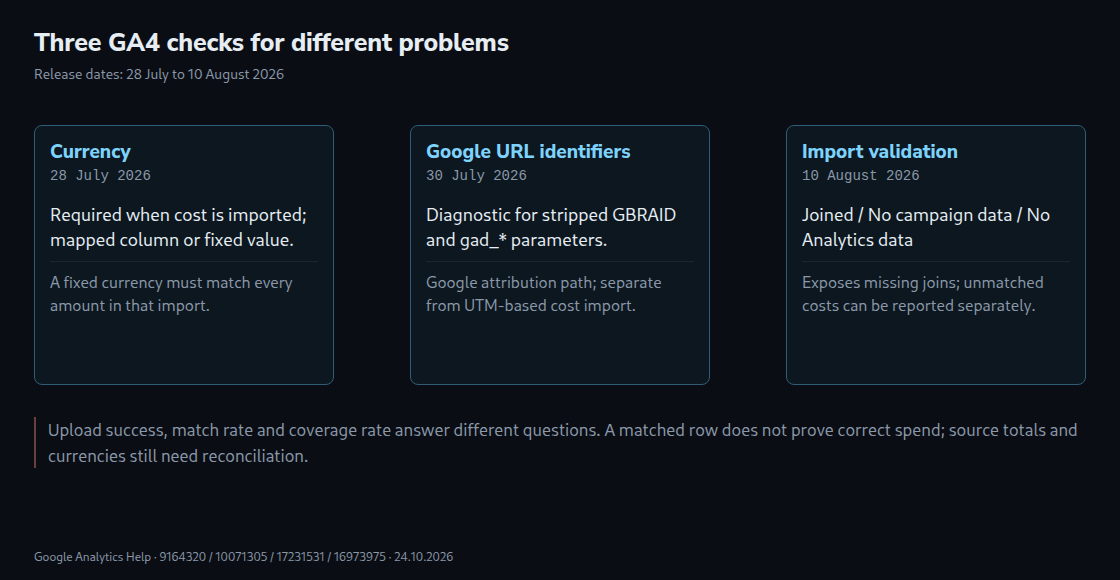
Reliable campaign comparisons in GA4 require suitable cost data, an unambiguous currency and correctly linked visitor activity. Between 28 July and 10 August 2026, Google added three features: currency specification for cost imports, diagnostics for missing Google advertising identifiers, and a validation report for imported campaign data.
These features check different problems. The identifier diagnostic concerns Google advertising traffic. Campaign data import combines external costs, clicks and impressions with Analytics data. The validation report specifically makes missing joins visible.
Currency is required when importing cost
Since the 28 July update, imports containing cost require an ISO 4217 currency, such as EUR or PLN. The currency can come from a mapped source column or a fixed value for the whole import. A fixed value is suitable only when every amount actually uses that currency; the number of target markets is not the deciding factor.
GA4 handles conversion for aligned reporting. According to the release note, existing imports continue to assume that costs match the current property currency. Older imports therefore deserve particular attention when the property currency changes. A valid currency code does not prove that the amount was labelled correctly.
Google identifiers are not UTM import keys
The 30 July diagnostic flags problems with stripped gbraid and gad_* parameters. These aggregate identifiers support campaign attribution when standard Google click identifiers cannot be used. GBRAID does not identify an individual person or event. gad_source identifies an advertising source, while gad_campaignid identifies a campaign.
The alert lists problematic URLs, without necessarily establishing which redirect removed a parameter. A controlled comparison of the starting URL, redirects and final URL when tags load helps locate the cause. Missing identifiers can lead to “organic” or “(not set)” attribution. A working UTM import does not repair this separate Google attribution path. Diagnostics may take up to 48 hours to reflect a fix.
Which values must match for an import
Source, medium and date are required dimensions. Campaign ID and campaign name are optional but recommended, and must be supplied consistently when used. At least one metric—clicks, cost or impressions—is required. Values must agree with the recorded Analytics dimensions; Facebook and facebook, for example, differ. The date must not be omitted from the comparison.
A simplified example for an external campaign:
URL:
/offer?utm_source=partner&utm_medium=cpc&utm_id=fall_26&utm_campaign=Autumn

Import row; field names need mapping in the import configuration:
utm_source,utm_medium,date,utm_id,utm_campaign,currency,cost,clicks
partner,cpc,2026-10-20,fall_26,Autumn,EUR,120.00,80

Expected: matching source, medium and day
          plus consistent campaign fields where used
Check: 120 EUR cost / 80 clicks = 1.50 EUR per click
The example does not invent Google identifiers for an external platform. Meaningful reconciliation also requires aligned day boundaries and date ranges. Duplicate keys within a file and overlapping import sources can distort results.
What the validation report actually shows
The report released on 10 August is under Reports → Data import → Campaign data import validation. An Editor or higher role can restore the report to navigation if the entry is missing. The default view is session-scoped and filtered to paid manual campaigns; filters and selected dimensions therefore need checking during analysis.
| Status | Meaning |
|---|---|
| Joined | Imported campaign data was linked to Analytics data. |
| No campaign data | Imported campaign data is absent for the selected dimension or did not join correctly. |
| No Analytics data | Imported data has no matching Analytics activity and is reported separately. |
A failed match therefore does not automatically erase imported cost. A missing or zero denominator also does not establish a meaningful infinite ROAS. ROAS is attributed revenue divided by advertising cost; missing cost makes the comparison unreliable. Cost per click, by contrast, divides cost by clicks, both of which may come from the advertising platform.
Three rates answer different questions
- % imported: the proportion of rows successfully imported.
- Match rate: the proportion of imported rows linked to Analytics data, considering the most recent two years of imported data.
- Coverage rate: successfully joined rows divided by the considered rows containing Analytics data in the validation report.
A 100% successful upload does not guarantee 100% coverage. High coverage does not establish accurate billing amounts or currencies either. Row-based rates are not budget-weighted: one unmatched large campaign can matter more financially than many small matches.
Questions and answers
Is checking one known campaign enough?
A sample is useful but cannot replace reconciliation by platform, day and campaign. Total cost, clicks and impressions also need comparison with the source, alongside import status, joins and filters. GA4 can take up to 24 hours to make an upload available. A round cost amount is not itself evidence of an error.
Do URL-encoded values automatically cause mismatches?
No. The relevant values are the recorded dimensions after URL processing, not the raw URL text. For example, Autumn%20Sale can be recorded as Autumn Sale. Spaces, case and encoding need comparison between the import and recorded values; indiscriminate re-encoding can introduce new errors.
Related articles