English
GA4 Measurement Protocol Payloads: Every Field, Every Limit, and Why the Endpoint Answers 204 to Broken JSON

Contents
- What the endpoint answers
- Where the payload actually goes
- The identity fields
- The two parameters that decide whether the reports add up
- The event and its name
- Parameters, and the limits that apply to them
- Where the two maxima collide
- Time, and the three ways to get it wrong
- Consent, and the keys that do not belong here
- Validation behaviour, and why production should not set it
- Finding a fault at all
- What the protocol is now
- Questions and answers
- Sources
A Measurement Protocol request is one HTTPS POST: a query string carrying two credentials, and a JSON body carrying the events. It is the way data reaches a GA4 property from a server rather than from a browser — offline conversions from a CRM, a payment confirmed by a webhook, an app backend, a bot-free replay of hits that an ad blocker swallowed.
It is also the only ingestion path in the whole stack that never says whether it worked.
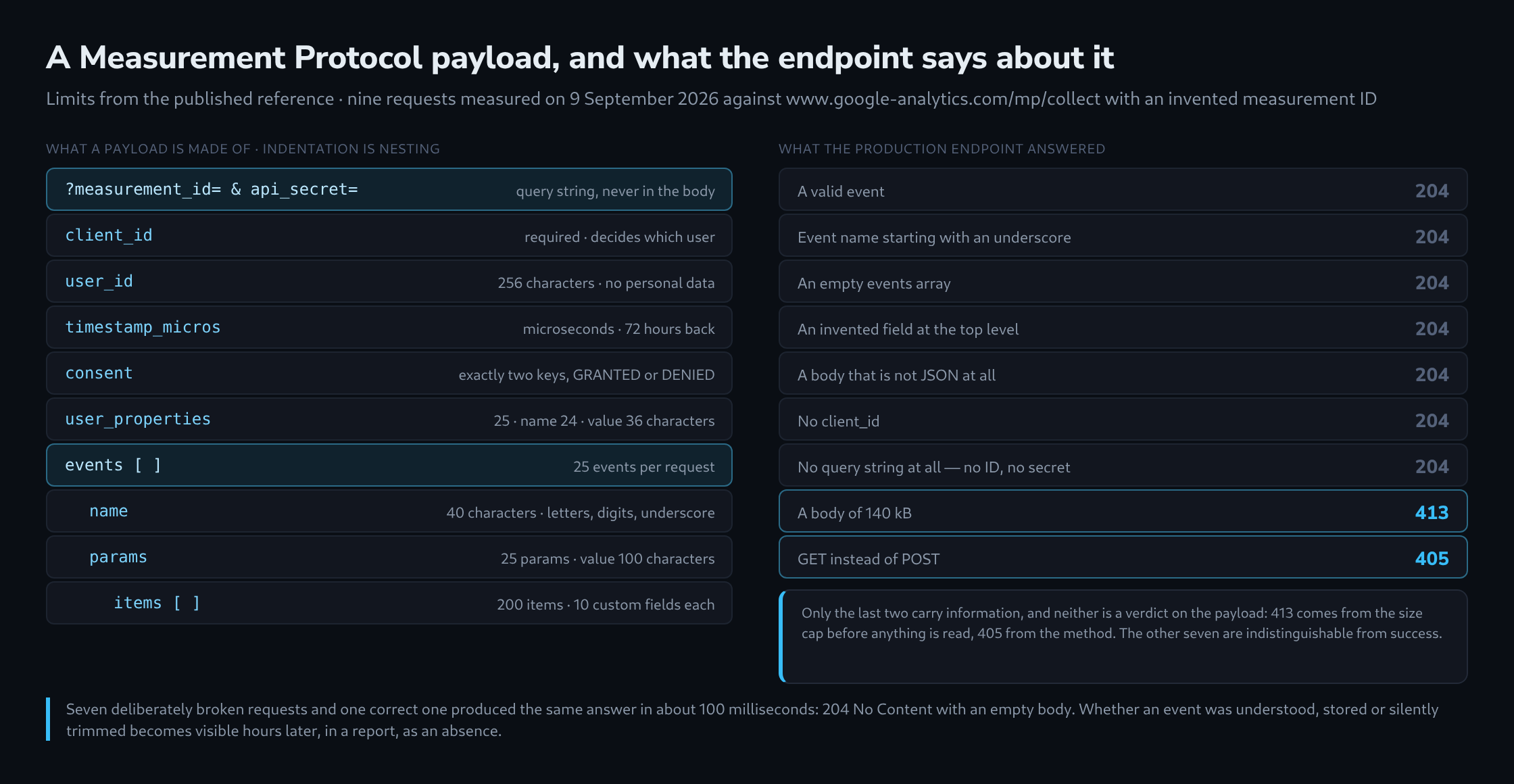
What the endpoint answers
Nine requests went to https://www.google-analytics.com/mp/collect on 9 September 2026, all with a made-up measurement ID so that nothing could be recorded anywhere. Seven of them were deliberately broken.
Eight of the nine came back 204 No Content in about 100 milliseconds with an empty body. Not only the valid one: also the event whose name started with an underscore, the empty events array, the payload with an invented top-level field, the request with no client_id, and a body that was not JSON at all. A request sent with no query string whatsoever — no measurement ID, no API secret — also returned 204.
Exactly two things produced an HTTP error, and neither is a verdict on the payload. A body of 140 kB was refused with 413 and an HTML error page from the front end, because it exceeded the documented 130 kB cap before any parsing happened. A GET was refused with 405.
The European endpoint region1.google-analytics.com behaves identically. Over five runs each, the median round trip from the same server was 90 milliseconds to both hosts.
The response code therefore tells you only that the request arrived. It does not tell you whether the event was understood or stored, or whether a parameter was dropped. Those problems remain invisible when sending; they appear only as missing data in a report hours later.
Where the payload actually goes
Two parts, and they are easy to confuse.
The query string carries the credentials: measurement_id for a web stream (or firebase_app_id for an app stream) and api_secret, which is created per stream in the GA4 admin. Neither belongs in the JSON. Placed there they become unknown fields, and an unknown field is not ignored — it makes the entire payload unreadable.
The body is a JSON object with a fixed set of permitted keys:
{
  "client_id": "1234567890.1700000000",
  "user_id": "crm-88213",
  "timestamp_micros": 1788000000000000,
  "consent": { "ad_user_data": "GRANTED", "ad_personalization": "DENIED" },
  "user_properties": { "customer_tier": { "value": "gold" } },
  "events": [
    {
      "name": "purchase",
      "params": {
        "transaction_id": "T-8891",
        "currency": "EUR",
        "value": 20,
        "session_id": "1700000000",
        "engagement_time_msec": 100,
        "items": [
          { "item_id": "A-1", "item_name": "Shirt", "price": 10, "quantity": 2 }
        ]
      }
    }
  ]
}
Besides these, the reference permits user_data, user_location, ip_override, device, user_agent, non_personalized_ads and validation_behavior. That is the complete list. Anything else — a stray event key copied from a dataLayer object, an ecommerce wrapper, a note to a colleague — costs the whole request.
The identity fields
client_id is required on a web stream, and it is the single field that decides whether an event joins an existing user or invents a new one. The recommended form is two positive numbers joined by a period, which is what gtag('get') hands out and what the built-in Analytics Client ID variable returns in Google Tag Manager. The full _ga cookie value, GA1.1.1234567890.1700000000, is accepted as well; the two numbers are the part inside it.
A value invented on the server is accepted too, and that is the expensive mistake. A fresh identifier per request produces a fresh user and a fresh session every time — a property that looks busy and consists entirely of one-event sessions with a 100 % engagement-free rate.
App streams use app_instance_id instead: 32 hexadecimal characters from the Firebase SDK, not a client ID under another name. Sending both does no harm and no good; the field belonging to the other stream type is ignored.
user_id is optional, up to 256 characters, and must be a string. It is a join key, not a person: an email address or a phone number in that field is personal data, which the Google Analytics terms forbid and which is grounds for deleting a property. The same applies to every event parameter and every user property.
The two parameters that decide whether the reports add up
An event without session_id belongs to no session. It is still stored and still countable, but sessions, engaged sessions and the session-scoped dimensions do not add up, and the event may be missing from Realtime entirely.
An event without engagement_time_msec contributes nothing to average engagement time, which then reads as zero for the traffic that arrived this way.
Neither is required, neither produces a warning anywhere, and both are the usual answer to “the events arrive but the report is wrong”. session_id must be a positive integer — a timestamp in the ordinary case — and may be sent as a number or as a string of digits. Letters in it are refused.
The event and its name
An event is an object with exactly two permitted keys, name and params. A timestamp put beside them as a third key breaks the payload; the per-event timestamp goes inside params as timestamp_micros.
Names must start with a letter and may contain only letters, digits and underscores. Hyphens, dots and spaces are refused outright. Names are case sensitive, which is the quiet one: Purchase is accepted, is stored, and is a different event from purchase — it will never reach the e-commerce reports, because those are wired to the lowercase name.
Thirty-one names are reserved for Google’s own use, among them session_start, first_visit, user_engagement, app_remove and error. Three further names — screen_view, ad_impression and in_app_purchase — exist but are permitted on app streams only. On a web stream they are simply not collected, and nothing anywhere says so.
Parameters, and the limits that apply to them
Every limit in the protocol, in one place:
| What | Limit |
|---|---|
| JSON body | under 130 kB |
| Events per request | 25 |
| Event name | 40 characters |
| Parameters per event | 25 |
| Parameter name | 40 characters |
| Parameter value | 100 characters, 500 on an Analytics 360 property |
| User properties per request | 25 |
| User property name | 24 characters |
| User property value | 36 characters |
user_id |
256 characters |
| Items per event | 200 |
| Custom parameters per item | 10 |
| Backdating | 72 hours |
Parameter names may not begin with _, firebase_, ga_, google_ or gtag., and firebase_conversion is reserved outright. User property names carry the same prefix rules plus five reserved names, of which user_id is the one people reach for by accident — the user ID belongs at the top level, not in user_properties.
Only items may hold an array. Every other parameter takes a single value; a nested object handed to one is dropped, and the report shows the parameter as absent rather than as wrong.
Where the two maxima collide
Twenty-five events per request and two hundred items per event are both documented, and they cannot both be used. Measured on generated payloads with realistic item fields — ID, name, brand, category, variant, price, quantity:
- A
purchasewith one item, including consent and user properties, is 558 bytes. - Twenty-five such events come to roughly 14 kB, which is 10.7 % of the cap.
- Twenty-five events with 29 items each cross 130 kB. At 28 items the payload is still 126 kB.
- Twenty-five events with the permitted 200 items each would be 879 kB — 6.8 times the cap.
A single event with 200 items is 35 kB and fits comfortably. So the event count is the binding limit for ordinary traffic, and the size cap takes over as soon as baskets get long. The crossover sits at roughly 29 items per event, and it is the one limit that answers with an HTTP error instead of silence.
Time, and the three ways to get it wrong
timestamp_micros is a Unix timestamp in microseconds. Omitted, the event is stamped on arrival, which is right for anything happening now and wrong for anything replayed.
The unit is the trap. time() in PHP and time.time() in Python return seconds; Date.now() in JavaScript returns milliseconds. Both are accepted as numbers, and both put the event somewhere in 1970. Google’s validation server does report this — as “timestamp too far in the past”, a message that sends people looking for a backdating problem when the actual fault is a factor of a thousand or a million.
The window is 72 hours. Anything older is discarded, and events sent with validation_behavior set to ENFORCE_RECOMMENDATIONS are rejected outright rather than dropped. A timestamp in the future usually means a clock out of step or a time zone added twice.
Consent, and the keys that do not belong here
The consent object takes exactly two keys, ad_user_data and ad_personalization, each of them GRANTED or DENIED. Not analytics_storage, not ad_storage — those are Consent Mode in the browser, a different mechanism with a different vocabulary.
Putting one of them here is not a partial failure. An unknown key inside consent, or a value other than the two permitted ones, makes the payload unparseable and the whole request pointless. Left out entirely, GA4 falls back to the consent state from the browser interactions of the same client, which is usually what a server-side integration wants.
non_personalized_ads still works and is deprecated; ad_personalization inside consent replaces it.
Validation behaviour, and why production should not set it
validation_behavior has two values. RELAXED is the default: malformed requests are rejected, but parameters that exceed the limits are ignored rather than reported, and data that is merely of the wrong type may still be accepted. ENFORCE_RECOMMENDATIONS rejects those instead.
Use strict validation in testing, where a rejection helps identify a problem. In production, leave the field out: a rejection there means lost data. With relaxed validation, an event with one over-long parameter arrives without that parameter; with strict validation, the entire event is rejected.
Finding a fault at all
Since the production endpoint says nothing, faults have to be found before sending. Google’s validation server takes the same request at /debug/mp/collect and answers with a validationMessages array; events sent there are never recorded.
Before relying on the validation server, keep two limitations in mind. It reports only the first fault it finds: if an event has three problems, it returns one message, and the next appears only after the first is fixed. It also checks neither measurement_id nor api_secret. Invented credentials therefore produce exactly the same verdict as real ones. This is documented and lets you check a payload without sending a real secret outside the organisation.
It is also worth knowing what it does not check at all. Measured against it with ENFORCE_RECOMMENDATIONS set, all of the following passed without a word: thirty events in one request, an empty events array, a payload with no events key, two events sharing a name, screen_view on a web stream, and a purchase with neither value nor currency. Without validation_behavior — that is, the way production treats the same text — a parameter value of 120 characters came back clean as well.
What the protocol is now
Google put the Measurement Protocol into a finalized state in June 2026: no deprecation, no new features. The documentation now recommends the Data Manager API for new server-to-server integrations, with OAuth instead of an API secret, several destinations per request and encrypted identifiers.
For an existing integration that is not an emergency. The Measurement Protocol keeps working, its limits keep applying, and its endpoint keeps answering 204 to everything — which makes the checking that has to happen before sending the same job it always was.
Questions and answers
How can it be established in production whether Measurement Protocol events actually arrive?
Not from the response code, which is almost always 204. What works is a combination of checking before sending and reconciling afterwards:
- Every new or changed payload goes to
/debug/mp/collectfirst. Because the validation server reports only the first fault, the run has to be repeated until no message comes back. - What the validation server does not check, the sending code checks itself: no more than 25 events per request, a non-empty events array, recommended event names such as purchase in lowercase, no app-only events on a web stream, value and currency on a purchase.
- The sender logs what it sent, for example the number of purchase events per day and their transaction_id values. Once the report is available a few hours later, the comparison shows whether events are missing.
Only the third step also catches losses in production, for example after an API secret has been replaced or when a timestamp is in the wrong unit.
What happens when the API secret is deleted or replaced in the GA4 admin?
Nothing visible at the point of sending: in the measurement, the endpoint answered 204 even to a request with no credentials at all, and the validation server does not check measurement_id or api_secret. A sender still using an outdated secret therefore loses its events unnoticed. When a secret is replaced, all senders have to be switched over before the old one is deleted.
How do server-side events fit with the consent recorded in the browser through Consent Mode?
Only through the sending code. The Measurement Protocol consent object supports only ad_user_data and ad_personalization; there is no key for analytics_storage, and sending one anyway makes the payload unreadable. A refusal of analytics therefore cannot be passed to the endpoint through the consent object. The decision whether an event is sent for this client at all has to be made beforehand, in the sender’s own system.
The identifier adds to this. With analytics_storage denied, the Google tag in the browser sets no _ga cookie, so a server reading the client_id from it finds none. A replacement identifier invented on the server would be exactly the expensive mistake: a new user with a session made of a single event.
Does a timestamp in milliseconds land in 1970 or not reach the reports at all?
It does not reach them, because it misses the 72-hour window. For the moment in the example payload, Date.now() returns 1,788,000,000,000. Read as microseconds, that is 1,788,000 seconds, about 20.7 days after the start of Unix time, which is 21 January 1970. A value in seconds lands just under half an hour after midnight on 1 January 1970. Both are older than 72 hours and are discarded, while the production endpoint keeps answering 204.
Related articles