English
 Deutsch
 Polski
Retroactive and Forward-Only Analytics Changes: Keeping a Year-over-Year Comparison Valid

Contents
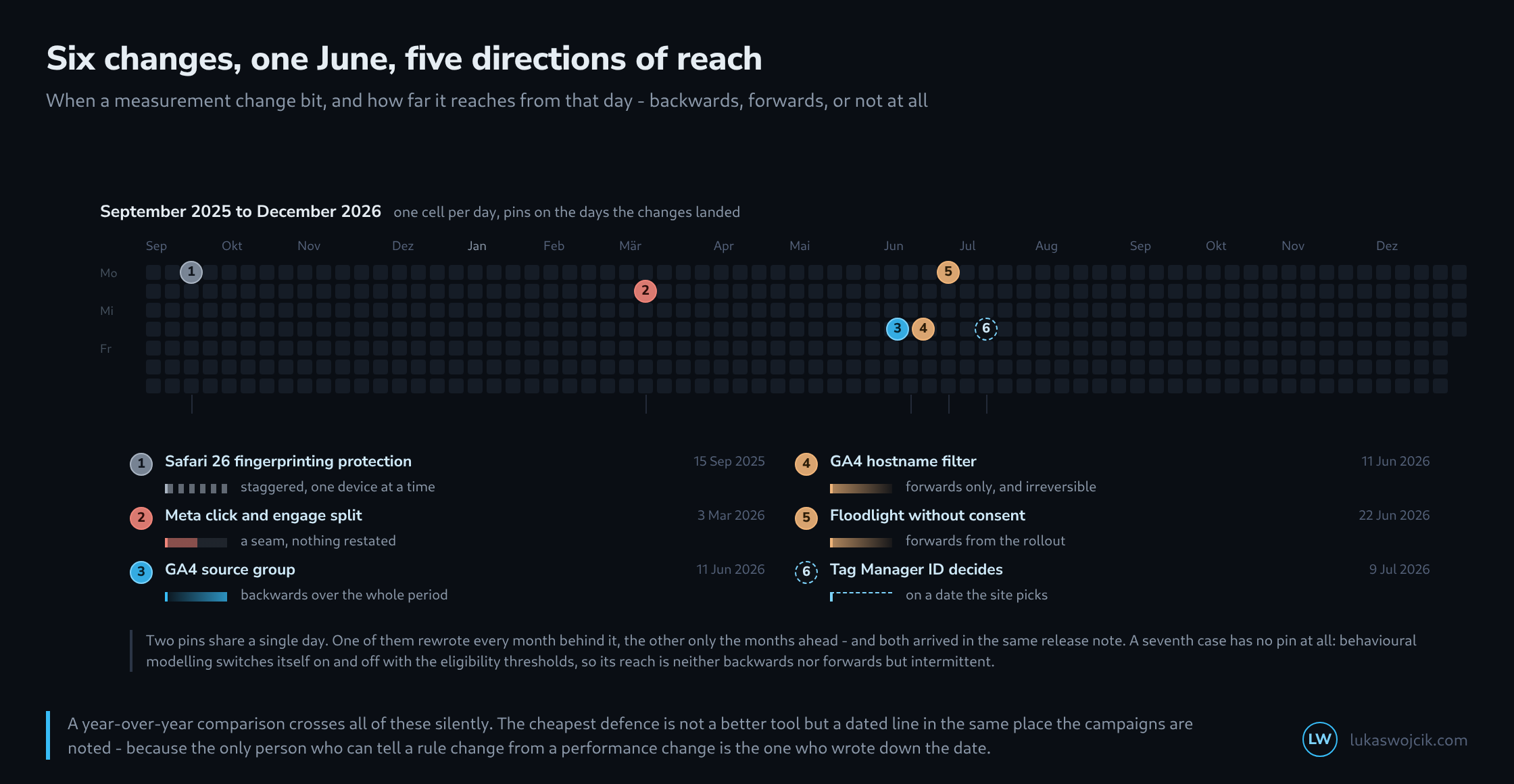
In sixteen months a dozen things changed in an ordinary measurement setup, most of them small taken one at a time. What separates them is not what they do but how far they reach from their effective date.
Two of them fell on the same day and appeared in the same release note. One rewrote every month behind it, the other only the months ahead. A report running across that day says nothing about it.
Backwards over the whole period
The source group in GA4 is formed at query time rather than at collection time. That sounds technical and has a tangible consequence: it applies to everything already stored. A year-over-year comparison has no break at this point, because both periods are read by the same rule.
This is the most agreeable of the five reaches and the rarest. Retroactive changes are only possible where the change is a reading rule and not a storage rule.
Forwards only, and with no way back
A data filter is the opposite. It acts from the moment it is made active, drops the matching events permanently, and leaves the past untouched. A step appears in the time series, and the unfiltered data stands in the months before it.
Both changes – the retroactive one and the irreversible one – appeared on 11 June 2026. Switching both on that day produces a source list consistent across two years and an event store filtered differently from precisely that day.
The break: nothing was restated
Meta’s reorganisation of attribution in March 2026 created a third case. The rule changed, the old figures stayed under the old rule, and nobody recalculated retroactively. There are therefore two periods with two definitions and no marker on the axis.
This is the most dangerous of the five, because it looks like a performance collapse. A drop in attributed conversions with no change to the ads is exactly the picture a campaign that stopped working produces – and exactly the picture a changed column definition produces.
Staggered and self-chosen
The fingerprinting protection in Safari 26 has no effective date but a distribution: it acts as soon as a device is updated, and devices are updated over months. In a time series this appears not as a step but as a slope, and a slope looks like a trend.
With the Tag Manager change the effective date works differently again: it is voluntary, so the site picks it. For an organisation with several sites that means the same change takes effect on different days – and the only place that date is written down is one’s own log.
Intermittent
The fifth case has no effective date at all. Behavioural modelling under consent mode switches on when a property meets the eligibility thresholds and off when it falls below them. Both happen without announcement, and a property with seasonal traffic may pass through it twice a year.
The counting method is therefore not different on one day but in stretches – and which stretches those are is recorded nowhere.
The change log no software provides
All five cases have the same remedy, and it is unspectacular: a dated line. Four columns suffice.
Date         Change                    Reach           Affects

2025-09-15   Safari 26 AFP             staggered       origin, identifiers
2026-03-03   Meta click/engage split   break           attributed conversions
2026-06-11   GA4 source group          backwards       source list
2026-06-11   GA4 hostname filter       forwards only   sessions, events
2026-06-22   Floodlight w/o consent    forwards only   requests sent
2026-07-09   GTM ID decides            self-chosen     execution in browser

  The "reach" column is the one nobody keeps and the one that
  answers every follow-up question. Without it a note is just a
  date; with it, it is an instruction for reading the report.
Where this list lives is secondary – it should simply live where the campaigns are noted, because that is where somebody looks when a figure comes out unexpectedly. Anyone keeping it can say within two minutes whether a decline is a rule or a performance. Anyone not keeping it discusses it for an afternoon and decides on instinct.
Questions and answers
Can the step caused by a data filter be quantified before the filter is made active?
In GA4, yes, through the testing state. A data filter can first run in the “Testing” state: it then drops nothing but marks matching events through the “Test data filter name” dimension. Only in the “Active” state are the events discarded permanently, as the article describes.
The test phase supplies exactly the figure the change log lacks: the share of marked events per day is the height of the step that appears in the time series after activation. Recorded next to the log entry, this figure allows a year-over-year comparison across the effective date to be corrected at least approximately, because the share the filter removes is known.
Two limitations remain. The test phase measures the share at its own time, not that of the previous year; if the traffic the filter targets has changed since, the correction is only approximate. And the marking, too, works forwards only; earlier data does not receive it.
How does a year-over-year comparison stay usable across a break like the one at Meta?
By falling back on a figure the break does not touch. Orders in the shop’s own system and ad spend do not depend on Meta’s attribution rule. If their ratio stays stable across the effective date while attributed conversions fall, that points to a shifted definition rather than a change in performance.
How can a staggered effect be told apart from a genuine trend?
By splitting the data along whatever drives the staggering. For the fingerprinting protection in Safari 26 that is the browser version: if the time series is split by browser and version, the slope is absent from older Safari versions and from other browsers, and it sits entirely in the growing share of updated devices. A genuine trend, by contrast, shows up in all segments at once.
For the change log this means that a single date is not enough for a staggered change. A second entry helps once the share of the affected version has reached a noticeable size, because from then on the change visibly contributes to the curve.
Sources
Related articles