English
AI Agents in Web Analytics: How Agentic Traffic Skews GA4 and How It Can Be Separated on the Server

Contents
- Three classes of AI visits
- The new AI Assistant channel in GA4: what it measures and what it does not
- The blind spot: agentic browsers in the dataset
- Agent identity: from User-Agent to cryptographic signature
- Architecture: classification before tracking
- Implementation: from the request to the BigQuery analysis
- WebMCP: measuring agent interactions as clean events
- Data hygiene: hostname allowlist and server-side events
- Checklist for the next 30 days
- Conclusion
- Questions and answers
- Sources
In 2026, AI agents have moved from experiment to measurable traffic factor – and most analytics setups simply count them as humans. Agents open pages, scroll, fill in forms and add products to the basket. In the GA4 report this shows up as an ordinary session with a Chrome browser, often as “Direct”, sometimes even as organic traffic.
The scale is no longer negligible. According to HUMAN Security, traffic from AI agents and agentic browsers grew by 7,851% year on year in 2025. In the August 2026 benchmark, agentic traffic rose by another 27% and reached a new high.
At the same time, Google introduced a dedicated “AI Assistant” channel in GA4 in May 2026. That sounds like a solution, but it measures only part of the picture. This article shows which kinds of AI visits exist, which of them GA4 actually recognises, and how agentic traffic can be classified on the server and carried cleanly into reporting – with concrete code examples.
Three classes of AI visits
“AI traffic” is not a single phenomenon; technically it splits into three classes with completely different measurement behaviour. Lumping them together yields neither clean user figures nor a reliable statement about the value of AI as a channel.
| Class | Examples | Executes JavaScript | Appears in GA4 | Detectable via |
|---|---|---|---|---|
| AI-referred humans | Click on a source in ChatGPT, Gemini, Claude, Perplexity | yes | yes, often in the “AI Assistant” channel | Referrer, UTM parameters |
| Server-side fetches on behalf of a user | ChatGPT-User, Claude-User, Perplexity-User | mostly no | no | User-Agent, IP lists, server logs |
| Agentic browsers | Perplexity Comet, ChatGPT Agent, Chrome Auto Browse, Google-Agent | yes | yes, as a normal session | difficult: partly User-Agent tokens, partly signatures, partly not at all |
On top of that come classic training and search crawlers such as GPTBot or OAI-SearchBot. These crawlers usually do not execute JavaScript and therefore only appear in logs, not in tag-based tracking.
The real problem is the third class. Agentic browsers run the tracking script, set cookies and trigger events – without behaving like a human. Precisely these sessions shift conversion rates, bounce behaviour and funnel analyses without being marked as agents.
The new AI Assistant channel in GA4: what it measures and what it does not
The “AI Assistant” channel only captures clicks by humans with a recognisable referrer – in other words, only the first of the three classes. According to Google’s release notes of 13 May 2026, GA4 sets the medium to “ai-assistant” as soon as the referrer matches a known AI assistant. These visits land in the Default Channel Group as “AI Assistant”, and the campaign is “(ai-assistant)”.
In addition, the Source Group dimension has been available since 11 June 2026. It groups source values and, according to Google, already contains groupings for ChatGPT (OpenAI) and Perplexity – populated retroactively, so it can also be used for historical periods.
Three gaps remain nonetheless:
- Missing referrer. Transitions from native apps to the browser often carry no referrer. Such visits fall into “Direct”, even though an AI assistant triggered them. Some are rescued by UTM parameters, such as
utm_source=chatgpt.com, which ChatGPT appends to many links. - AI features within Google. Clicks from AI Overviews or AI Mode come with the Google referrer and therefore remain part of “Organic Search”. The new channel does not separate them.
- Agents instead of humans. An agentic browser that opens a product page on a user’s behalf often has no referrer at all, or an arbitrary one. The channel says nothing about these sessions – they sit undetected in every channel.
For a first assessment the channel is still valuable: it shows which content is linked as a source in AI answers and how well this traffic converts compared with organic.
The blind spot: agentic browsers in the dataset
Agentic browsers are based on Chromium, run tracking normally and present themselves as ordinary Chrome by default. The IAB bot list on which GA4 relies for bot filtering does not catch them, as Snowplow has analysed. In one test, Seer Interactive even observed OpenAI’s agent showing up in GA4 as Bing/organic.
The market sorted itself noticeably in 2026:
- Perplexity Comet was the largest single source of agentic traffic in August 2026 with 40.7%, according to HUMAN.
- OpenAI discontinued its standalone ChatGPT Atlas browser on 9 August 2026. ChatGPT Agent, Codex and Atlas together accounted for around 31% of agentic traffic in August; Atlas can only have contributed until it was discontinued on 9 August.
- Chrome Auto Browse has been running directly in the most widely used browser since 28 January 2026. According to an overview by nohacks, the feature is still limited to the US and to paying Google AI Pro and Ultra subscriptions. For sites in the German-speaking DACH region the effect is therefore still small, but the reach is already in place.
In addition, according to TAGGRS, Comet blocks ads and trackers by default. Part of the agentic sessions is then missing entirely while another part is counted in full – a double distortion that cannot be resolved without server-side data.
Typical symptoms in the dataset:
- rising sessions while purchases or leads stagnate
- more “Direct” traffic on deep product and search pages without any recognisable campaign
- form starts and add-to-cart events without completion, concentrated on desktop Chrome
- conspicuously even intervals between events within a session
Another HUMAN figure shows how small the direct revenue share still is: 2.3% of agentic activity took place on checkout pages in 2025. Most agents research, compare and abandon – and thereby depress exactly the metrics on which optimisation decisions are based.
Agent identity: from User-Agent to cryptographic signature
An agent can only be identified reliably if it identifies itself – and in 2026 a robust standard for this is emerging for the first time. Detection currently works on three levels that differ markedly in trustworthiness.
1. User-Agent token. The simplest, but spoofable. On 20 March 2026 Google documented the Google-Agent fetcher. According to the Google documentation, its User-Agent contains the token compatible; Google-Agent within an otherwise normal Chrome string. As a user-triggered fetch, Google-Agent ignores robots.txt.
2. IP ranges and reverse DNS. Considerably more robust. Google publishes the addresses of Google-Agent in a dedicated file, user-triggered-agents.json. According to PPC Land, fetches operated by Google resolve via reverse DNS to google-proxy-***-***-***-***.google.com. The check takes two steps: a reverse lookup of the IP, then a forward lookup of the hostname back to the same IP.
3. Web Bot Auth. The new approach signs every request cryptographically on the basis of RFC 9421 (HTTP Message Signatures). The IETF working group webbotauth has been chartered, but the protocol document is still an Internet-Draft. A signed request carries three additional headers, roughly like this according to Contextbolt:
Signature-Agent: "https://chatgpt.com"
Signature-Input: sig1=("@authority" "signature-agent");
  created=1786951400; expires=1786951700;
  keyid="poqkLGiymh_W0uP6PZFw-dvez3QJT5SolqXBCW38r0U";
  alg="ed25519"; tag="web-bot-auth"
Signature: sig1=:jP4kZG2h9xQvT1mN...:
The server fetches the public key from the origin given in Signature-Agent at /.well-known/http-message-signatures-directory, looks up the matching keyid and verifies the signature as well as the time window from created and expires. A spoofed User-Agent does not pass this check.
| Operator | Signature-Agent | Status |
|---|---|---|
| ChatGPT (cloud browser) | https://chatgpt.com | signed, key published at the standard path |
| Google-Agent | https://agent.bot.goog | experimental, only some of the requests |
| Cloudflare Verified Bots | per operator | Web Bot Auth as one of two accepted forms of proof |
| AWS WAF Bot Control | per operator | supported since 21 November 2025 |
Status according to Contextbolt, protocol draft at revision 02 of 18 August 2026.
For most websites, implementing signature verification in-house is not worthwhile. It makes more sense to adopt the classification of a CDN or WAF and pass its result on to the application as a header. The following architecture builds on exactly that.
Architecture: classification before tracking
Separation only works if the class of a visit is settled before the tracking script runs. Filters applied afterwards in GA4 come too late, because they lack the server-side signals: signatures, IP origin, reverse DNS.
Three principles support the architecture:
- Verification at the edge. The CDN or WAF checks Web Bot Auth, IP lists and reverse DNS and passes the result on as a header.
- A single classification. The web server assigns exactly one class per request. Verified identity takes precedence over self-reporting via the User-Agent.
- Marking rather than deleting. Agent sessions stay in the data but carry their own dimension. That way the agent channel itself remains open to analysis.
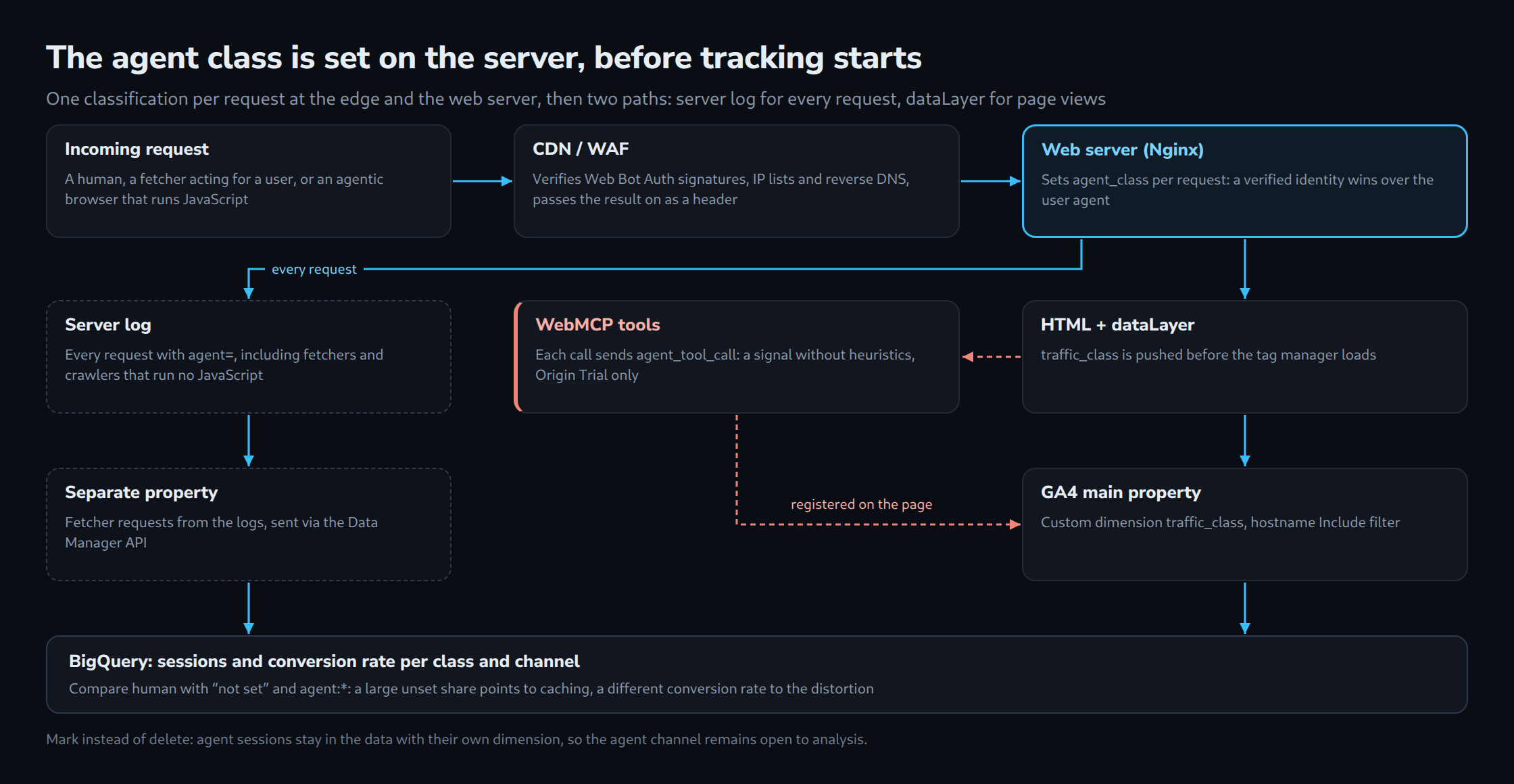
The server log records every fetch, including those without JavaScript. GA4 only receives page views – but with a class and, optionally, with WebMCP events as an unambiguous agent signal.
Implementation: from the request to the BigQuery analysis
The implementation consists of four building blocks: classification on the web server, logging, hand-over to tracking, and analysis. The examples use Nginx, PHP, GA4 and BigQuery; the principle carries over to any stack.
1. Classification in Nginx
Two sources come together: a header set by the CDN with the verified result (here X-Verified-Agent, for example via a Transform Rule) and a simple User-Agent detection as a fallback. The verified result takes precedence.
# Fallback: self-reported User-Agent (can be spoofed, so only second choice)
map $http_user_agent $ua_agent_class {
    default                                          "";
    ~*Google-Agent                                   "agent:google";
    ~*ChatGPT-User                                   "fetcher:openai";
    ~*Claude-User                                    "fetcher:anthropic";
    ~*Perplexity-User                                "fetcher:perplexity";
    ~*(GPTBot|OAI-SearchBot|ClaudeBot|PerplexityBot) "crawler";
}

# Verified CDN result takes precedence over the User-Agent, otherwise "human"
map "$http_x_verified_agent|$ua_agent_class" $agent_class {
    default                "human";
    "~^(?<v>[^|]+)\|"       "$v";
    "~^\|(?<u>.+)$"         "unverified:$u";
}

log_format analytics '$remote_addr [$time_local] "$request" $status '
                     '"$http_referer" "$http_user_agent" agent=$agent_class';

server {
    access_log /var/log/nginx/access.log analytics;

    location ~ \.php$ {
        fastcgi_param AGENT_CLASS $agent_class;
        # ... remaining FastCGI configuration
    }
}
Important: at the origin, the X-Verified-Agent header must be removed or ignored on requests that do not come through the CDN. Otherwise any client can declare itself verified.
2. Server logs as a second source of truth
Fetchers and crawlers do not execute JavaScript and are therefore missing from GA4 entirely. The log format above makes them visible:
grep -o 'agent=[^ ]*' /var/log/nginx/access.log | sort | uniq -c | sort -rnThe result shows how often AI systems fetch content on behalf of users without a session ever being created. For content sites this is often the most revealing figure of all.
3. Hand-over to the dataLayer
The class is written into the page on the server and pushed to the dataLayer before the Tag Manager loads:
<?php $trafficClass = $_SERVER['AGENT_CLASS'] ?? 'human'; ?>
<script>
  window.dataLayer = window.dataLayer || [];
  window.dataLayer.push({
    traffic_class: <?= json_encode($trafficClass) ?>
  });
</script>
With full-page caching, the class of the first visitor would be served to everyone. Clean alternatives: inserting the class into the HTML stream via edge logic, varying the cache by $agent_class, or reading the class from the request header only in the server-side Tag Manager.
4. GA4 configuration
- Sending
traffic_classas an event parameter with the Google tag (in GTM as a dataLayer variable). - Creating a dimension in GA4 under Admin → Custom definitions with the scope “Event” and the parameter
traffic_class. - Custom dimensions do not apply retroactively. The earlier they are set up, the longer the baseline for comparison.
5. Analysis in BigQuery
The query calculates sessions and conversion rate per traffic class and channel. Project and dataset names need to be adjusted.
WITH events AS (
  SELECT
    CONCAT(user_pseudo_id, '-', CAST(
      (SELECT value.int_value FROM UNNEST(event_params) WHERE key = 'ga_session_id') AS STRING
    )) AS session_key,
    (SELECT value.string_value FROM UNNEST(event_params) WHERE key = 'traffic_class') AS traffic_class,
    session_traffic_source_last_click.cross_channel_campaign.default_channel_group AS channel,
    event_name
  FROM `my-project.analytics_123456789.events_*`
  WHERE _TABLE_SUFFIX BETWEEN '20260901' AND '20260930'
),
sessions AS (
  SELECT
    session_key,
    COALESCE(MAX(traffic_class), 'not set') AS traffic_class,
    MAX(channel) AS channel,
    COUNTIF(event_name = 'purchase') > 0 AS converted
  FROM events
  GROUP BY session_key
)
SELECT
  traffic_class,
  channel,
  COUNT(*) AS sessions,
  ROUND(100 * COUNTIF(converted) / COUNT(*), 2) AS conversion_rate_pct
FROM sessions
GROUP BY traffic_class, channel
ORDER BY sessions DESC;
The most revealing comparison is “human” against “not set”: a large share without a class points to caching problems or blocked scripts, while a clearly different conversion rate for “agent:*” confirms the distortion effect.
WebMCP: measuring agent interactions as clean events
WebMCP turns the measurement problem around: instead of guessing at agents after the fact, the website offers them defined functions – and every call is by definition an agent event. To do this, the website registers tools with a name, description and JSON schema that an agent in the browser can call directly.
The status in October 2026 according to mcpplaygroundonline and chudi.dev:
- W3C Community Group draft, not yet on the standards track
- public origin trial in Chrome from version 149 to 156
- The API has moved from
navigator.modelContexttodocument.modelContext. Chrome 150 marked the old form as deprecated; many tutorials still show the old one. - local testing via
chrome://flags/#enable-webmcp-testing
WebMCP is interesting for analytics because the measurement can be anchored directly in the handler:
const mc = document.modelContext ?? navigator.modelContext;

if (mc) {
  await mc.registerTool({
    name: 'search_products',
    description: 'Searches the product catalogue by keyword and an optional maximum price.',
    inputSchema: {
      type: 'object',
      properties: {
        query: { type: 'string' },
        max_price: { type: 'number' }
      },
      required: ['query']
    },
    async execute({ query, max_price }) {
      window.dataLayer = window.dataLayer || [];
      window.dataLayer.push({
        event: 'agent_tool_call',
        tool_name: 'search_products',
        traffic_class: 'agent:webmcp'
      });

      const params = new URLSearchParams({ q: query });
      if (max_price) params.set('max', String(max_price));
      const data = await (await fetch('/api/search?' + params)).json();

      return { content: [{ type: 'text', text: JSON.stringify(data.items) }] };
    }
  });
}
The agent_tool_call event delivers a signal without heuristics: which functions agents use, how often, and with what outcome over the rest of the session. Input values should not flow into tracking unchecked, because agents may pass on their users’ search terms or form data.
As long as WebMCP only runs as an origin trial, it is an additional signal for early insights, not a replacement for server-side classification. Since the API has already changed once, wrapping it in a dedicated helper function is advisable.
Data hygiene: hostname allowlist and server-side events
Two GA4 additions from 2026 belong in every setup that takes agentic traffic seriously: the include filter for hostnames and the Data Manager API. According to the Google release notes, both are already available.
Hostname include filter (since 21 September 2026). Until now, hostnames could only be excluded, which required maintenance with every new spam source. Now an allowlist of the site’s own domains can be defined. Two details are decisive:
- Events without a hostname are discarded automatically. Server-side setups that do not send page context thus lose data unnoticed. The filter should therefore first run in the “Testing” state and only be activated after reconciliation.
- Events sent via the Measurement Protocol are not covered by the filter. The
api_secrettherefore remains the only protection of this interface and belongs exclusively on the server.
Data Manager API (since 7 May 2026). The API is an alternative to the Measurement Protocol for recommended and custom events sent directly to web and app data streams. For the topic of this article it offers a clean way to transfer fetcher requests from the server logs as separate events – ideally into a separate property, so that human metrics stay untouched.
The result is a clear separation: the main property measures humans and marked agent sessions, while a second property or a BigQuery dataset collects pure machine fetches.
Checklist for the next 30 days
The following steps build on one another and can be implemented within a month.
- Reviewing the “AI Assistant” channel and the “Source Group” dimension in GA4 and saving them as a comparison segment
- Extending the server logs with an agent class and collecting one week of baseline data
- Checking whether the CDN or WAF evaluates verified bots and Web Bot Auth signatures, and passing the result on as a header
- Adding
traffic_classto the dataLayer and the Google tag, testing caching behaviour - Registering the custom dimension
traffic_classin GA4 - Creating the hostname include filter in the “Testing” state, activating it after reconciliation
- Setting up the BigQuery query and comparing conversion rates per class
- Testing a WebMCP tool in the origin trial for one central function (search, availability, contact request)
Conclusion
The key metric in 2026 is no longer “How much AI traffic is there?” but “What share of sessions comes from humans at all?”. The new AI Assistant channel only answers the first question, and even that only for clicks with a referrer.
Agentic browsers run tracking without identifying themselves as agents. The separation only becomes reliable through server-side classification, ideally based on verified identities from Web Bot Auth, IP lists and CDN evaluation. This class belongs in tracking as a dimension of its own, not as a filter applied afterwards.
WebMCP shows where things are heading: websites that deliberately offer functions to agents get clean measurement points in return. Until that becomes standard, a site’s own infrastructure decides whether analytics data still reflects human behaviour.
Questions and answers
Why can agentic sessions not be filtered out of GA4 after the fact?
Because GA4 only sees what the tag sends. An agentic browser delivers the same data as ordinary Chrome: the same browser, often no referrer or an arbitrary one, and events triggered as usual. The IAB bot list on which GA4’s bot filtering relies does not recognise such browsers.
The features that actually give an agent away belong to the individual HTTP request: the Web Bot Auth signature, the origin in a published IP list and the two-step reverse DNS check. These checks run at the CDN or on the web server. Only when their result is delivered with the page as traffic_class does GA4 have a feature to separate by. And since custom dimensions do not apply retroactively, the separation only takes effect from the day it is set up.
Why does a class derived from the User-Agent carry the prefix “unverified:” in Nginx?
Because the User-Agent is self-reported and can be spoofed at will. The prefix keeps classes checked by a CDN apart from classes that are merely claimed, in logs and reports alike. Even a genuine Google-Agent can appear as unverified:agent:google if the CDN or WAF has not verified its request, especially since Google-Agent so far signs only some of its requests.
What happens to the class when a page cache or a CDN serves the page?
Without precautions, every visitor receives the class of whoever requested the page first. The PHP part writes traffic_class into the HTML. Once that version sits in the cache, every later request gets the same value, human or agent.
Three approaches keep the class correct:
- Varying the cache by class.
$agent_classbecomes part of the cache key. Since the class takes only a few values, each page ends up with only a few versions. - Inserting the class at the edge. Edge logic writes the value into the cached HTML only on delivery, so the cache itself stays uniform.
- Reading the class in the server-side Tag Manager. The HTML then carries no class; the server container reads it from the header of the incoming measurement request. This requires that request to pass through the classifying CDN as well.
Independently of this, the server log is only complete if requests reach the web server. When an upstream CDN serves a page from its own cache, Nginx never sees that fetch. In that case the CDN logs belong in the analysis too.
Sources
- Google Analytics: What’s new (Release Notes 2026)
- Google: List of user-triggered fetchers (Google-Agent)
- HUMAN: 2026 State of AI Traffic & Cyberthreat Benchmark Report
- HUMAN: State of Agentic Traffic, August 2026
- HUMAN: Key Findings 2025
- Snowplow: Agentic Browsing Is Here
- Seer Interactive: The New Analytics Blind Spot
- TAGGRS: The impact of AI Browsers on user tracking
- Wikipedia: ChatGPT Atlas
- nohacks: The Agentic Browser Landscape in 2026
- PPC Land: Google-Agent joins the crawler list
- Contextbolt: Web Bot Auth
- IETF Draft: HTTP Message Signatures for automated traffic
- mcpplaygroundonline: WebMCP in 2026
- chudi.dev: What Is WebMCP?
Related articles