English
 Deutsch
Cache-Control Explained: What no-cache, no-store, max-age and s-maxage Each Do

Contents
A page that loads instantly on the second visit was not fetched again. It came out of a store somewhere between the server and the screen, and one header line decided that it could.
That line is Cache-Control. It is short, it is made of words that look self-explanatory, and two of those words mean nearly opposite things while sounding like synonyms.
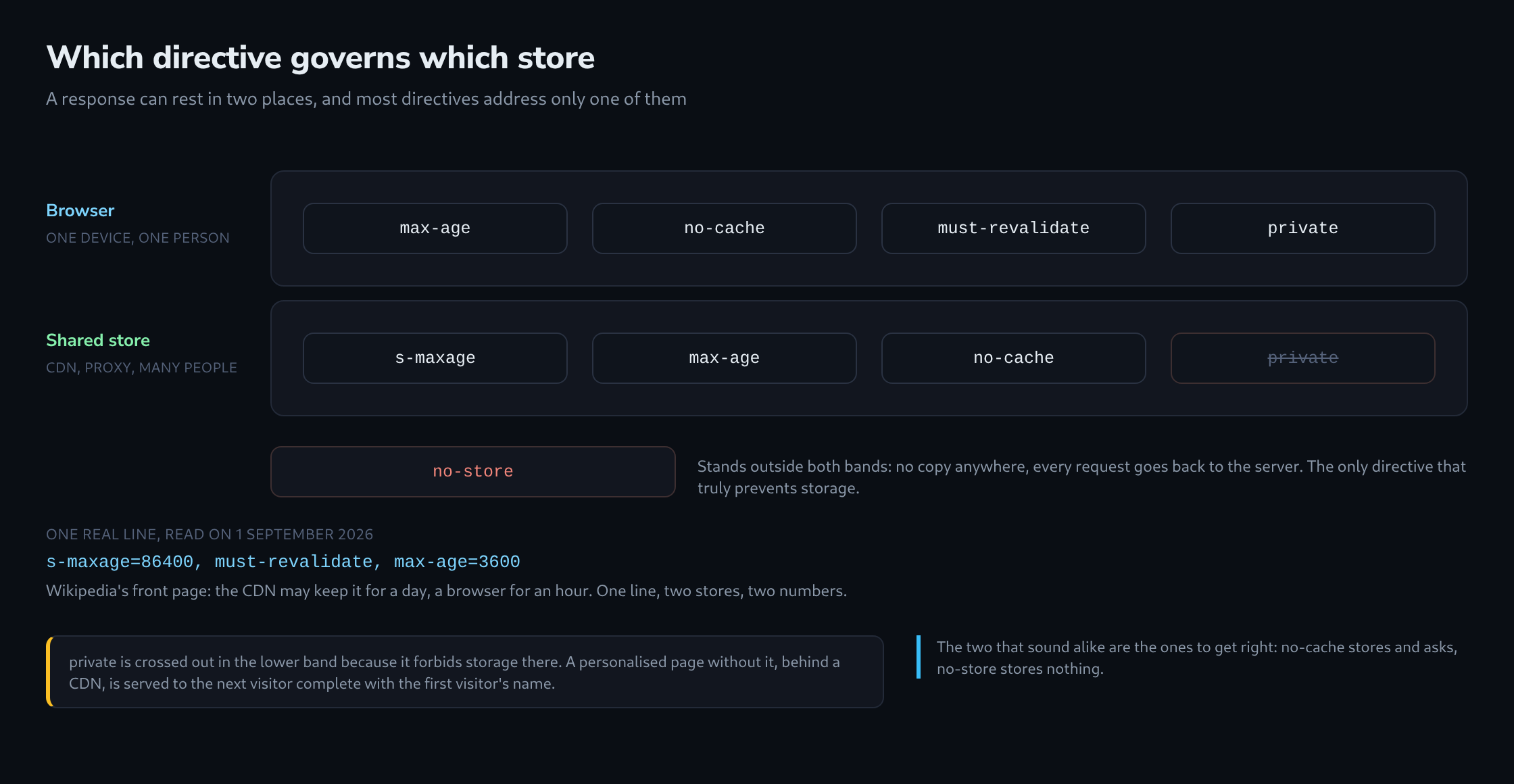
Two stores, not one
Between a server and a screen there are usually two places a response can rest.
The first is the browser on one device. What it keeps serves exactly one person, and it stays there until it expires or the person clears it.
The second is a shared store: a CDN, a company proxy, anything sitting in the path and serving many people from one copy. It is the more powerful of the two, because one stored copy saves thousands of requests – and the more dangerous, because a personalised page stored there gets handed to the wrong people.
Nearly every misunderstanding about caching comes from forgetting that the second store exists. Directives that seem to contradict each other usually address different stores.
no-cache and no-store are not the same word twice
These two look like a matched pair. They are not.
no-store means: keep nothing. No copy anywhere, not in the browser, not in a shared cache, not on disk. Every request goes back to the server. This is the one for a bank statement.
no-cache means: keep it, but ask before using it. The copy is stored quite normally; the browser simply may not serve it without checking back first. If the server answers that nothing changed, the stored copy is used and no content is transferred.
So no-cache is not “do not cache”. It is “cache, but revalidate every time” – and it exists precisely to make caching possible for pages that change unpredictably. A short check costs a fraction of a full transfer.
Writing no-store where no-cache was meant throws away that saving on every single request. Writing no-cache where no-store was meant leaves a copy of something confidential on a disk.
Two numbers for two stores
max-age is the lifetime in seconds. s-maxage is the same thing for shared stores only, and it overrides max-age there.
Wikipedia’s front page shows why both exist. Its header reads s-maxage=86400, must-revalidate, max-age=3600: the CDN may keep the page for a full day, a browser for one hour. The expensive store holds it long, the personal store briefly – and one line does both.
Without s-maxage, the shared store simply follows max-age. That is the common case, and it is why a CDN sometimes holds a page far longer or shorter than intended: nobody wrote a separate number for it.
must-revalidate completes the picture. Once the lifetime has run out, the stored copy may not be used any more, not even briefly, not even if the server is unreachable. Without it, a cache is allowed some latitude with an expired copy.

Who is allowed to store it at all
private and public do not describe the content. They name the store.
private means: only the browser of one person. Shared caches must not keep this response. It is the right setting for anything showing a name, a basket, an account balance – anything assembled for one visitor.
public means: shared stores may keep it too. It also overrides a few rules that would otherwise prevent caching, which is why it appears on pages that are perfectly cacheable anyway.
The failure here is quiet and serious: a personalised page without private, behind a CDN, gets stored once and served to the next visitor complete with the first visitor’s name. Nothing crashes, nothing logs an error, and the page looks correct – to the wrong person.
The stale answers that are served on purpose
Two additions allow a cache to serve an expired copy deliberately, and both make sites feel faster than they are.
stale-while-revalidate says: if the copy has just expired, hand it over anyway and fetch a fresh one in the background. The visitor waits for nothing; the next visitor gets the new version.
stale-if-error says: if the server is unreachable, keep serving the old copy rather than an error page. A site with this setting survives a short outage without anyone noticing.
The BBC’s front page uses both, with 30 and 90 seconds. GitHub, by contrast, sends max-age=0, private, must-revalidate – nothing is served without asking, because a repository page must never be a second out of date.
Neither is more correct. They are different answers to the same question: what is worse here, a slow page or an old one.
What one header line shows
The line arrives with every response and reading it costs one request.
Four questions are worth asking. Is the intent no-store or no-cache – keeping nothing, or keeping and asking. Does a personalised page carry private. Is there a separate s-maxage for the shared store, or is one number silently doing both jobs. And is the lifetime plausible for how often the content actually changes.
The HTTP security header checker reads the headers of any address as a browser reads them, following the redirects on the way.
The useful answer is one sentence: whether this page is stored where it should be, for as long as it should be – and by nobody else.
Questions and answers
Why does no-cache only save a transfer when the response carries an ETag or a Last-Modified?
Because the check needs something to compare. The browser sends it back as If-None-Match or If-Modified-Since, and only then can the server answer 304 Not Modified without sending the content again. Without either, there is nothing to compare, and every check turns into a full transfer.
How does an outdated page disappear from a CDN that holds it with s-maxage=86400?
Not through a new header. Copies already stored carry their lifetime with them; a changed header only applies to the next copy. For the CDN, the remedy is clearing its cache through its admin interface or API, usually called a purge.
Browsers offer no such means. A copy with max-age=3600 stays there for up to an hour, whatever the server sends in the meantime. That fits the split in the Wikipedia example: the store the operator can empty may hold the page for a long time, the one it cannot reach only briefly.
For scripts and stylesheets the usual route is a different one: a new address per version, for example with a version number or a hash in the file name, combined with a long lifetime. A changed file then has a new address, and no old copy stands in the way.
Which rule does public override, and when does that become risky?
The most important one concerns requests carrying an Authorization header, such as those behind password protection through HTTP authentication. Under RFC 9111 a shared cache normally may not reuse the response to such a request for other requests, because it is meant for a signed-in person. public explicitly allows it, as do s-maxage and must-revalidate.
It becomes risky when a template sets public on every page and a protected area falls under it: the CDN may then store the response and serve it to visitors who never signed in. Protected areas need private or no-store in the header, regardless of what the rest of the site sends.
Does stale-if-error also apply when the server responds, but with an error?
Yes. Under RFC 5861, the status codes 500, 502, 503 and 504 count as errors too, not only an unreachable server. Whether a cache honours the directive at all depends on the CDN and the browser, though, and an error page sent with status 200 is not recognised as an error by either.
Related articles