Tutorial: Checking a JSON Payload Before It Goes Into a Tag

Contents
A payload that a parser rejects is annoying and harmless: something breaks immediately, in one place, and the fix takes a minute. A payload that a parser accepts and reads differently than intended is neither of those things.
Both kinds come from the same source. JSON looks like a JavaScript object and is a much narrower format, and the differences between them are exactly the list below.
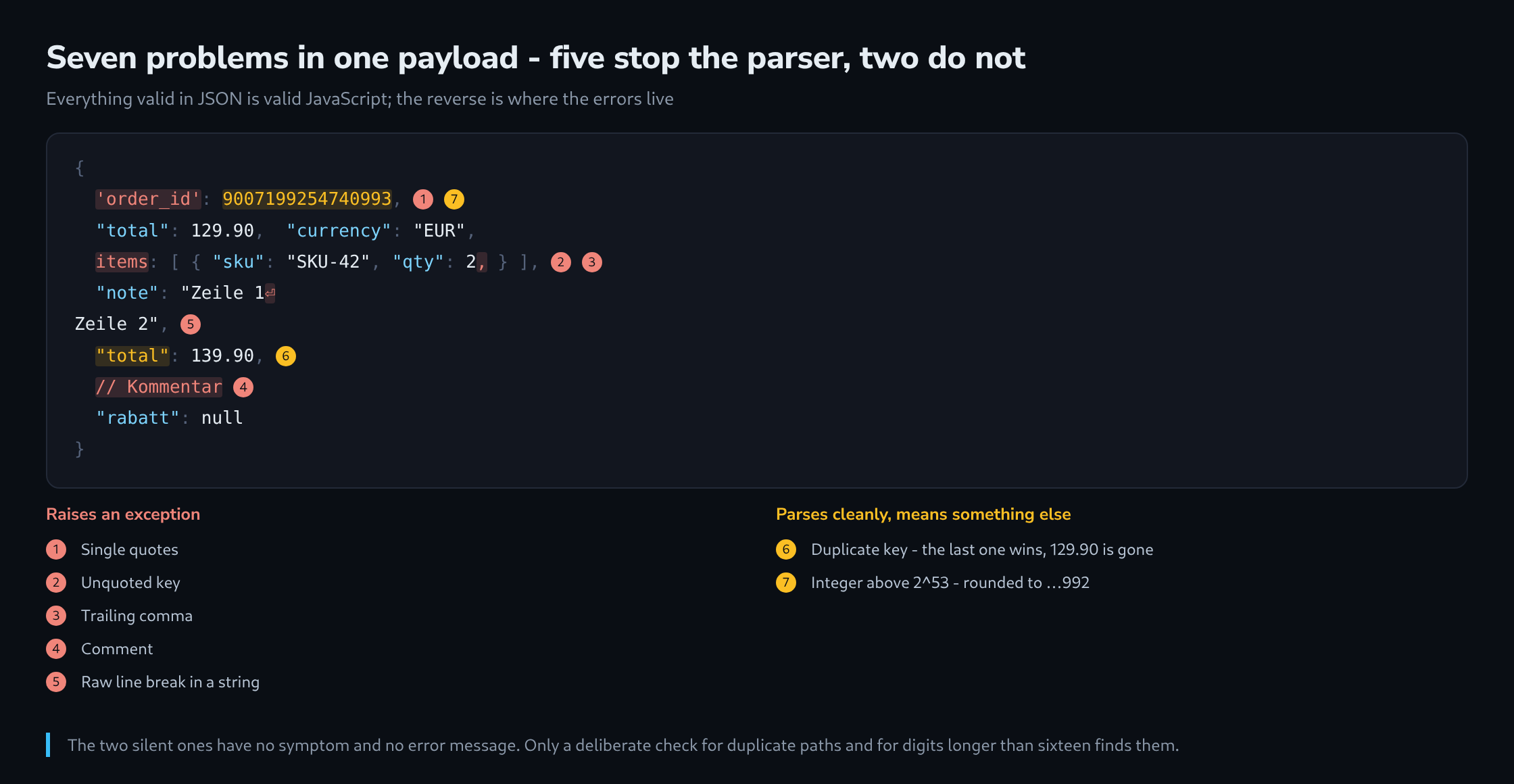
Why a JavaScript Object Is Not JSON
Everything valid in JSON is valid JavaScript. The reverse does not hold, and the gap between them is where the errors live.
{                                     // JavaScript, not JSON
  'order_id': 9007199254740993,       // single quotes
  total: 129.90,                      // unquoted key
  items: [ { sku: "SKU-42", qty: 2, } ],   // trailing comma
  rabatt: NaN,                        // not a JSON value
  /* a comment */
}
JSON permits double quotes and nothing else, requires every key to be quoted, forbids a comma before a closing bracket, has no comments, and knows exactly seven value types: object, array, string, number, true, false and null. There is no undefined, no NaN, no Infinity and no date.
That last point is worth stating plainly, because it produces a recurring surprise: a date has no representation of its own. Whatever arrives is a string or a number that both sides have agreed to read as a date, and any disagreement about the format is invisible to the parser.
The Five Errors That Raise an Exception
These are the loud ones, and every one of them produces the same unhelpful message about an unexpected token.
| Error | What it looks like |
|---|---|
| Single quotes | ‘order_id’ instead of “order_id” |
| Unquoted key | total: 129.90 instead of “total”: 129.90 |
| Trailing comma | A comma before } or ] |
| Comment | Anything after // or between /* and */ |
| Raw line break in a string | A newline inside quotes; it has to be \n |
A sixth belongs in the same group without being visible at all: a byte order mark at the beginning of the file. It is three invisible bytes before the opening brace, and the parser reports an unexpected token at position 0 – which looks like the brace is the problem. A file that looks flawless and fails at position 0 has one, and an editor set to save without a BOM removes it.
The Two That Report Nothing
These are the ones worth hunting for on purpose, because nothing else will point at them.
The first is a duplicate key. The specification allows it, and the common behaviour is that the last one wins – so a document with "total" twice parses cleanly and carries the second value. Where the two are far apart in a long payload, the result is a number that is neither wrong-looking nor right.
{ "total": 129.90, "currency": "EUR", "total": 139.90 }

JSON.parse(...).total   →   139.90
The second is a large integer. Numbers in JavaScript are floating point, and integers stay exact only up to 2^53 − 1. An order number, an ID from a database, a Meta CAPI identifier – all of them regularly exceed that, and the parser rounds them without a word.
JSON.parse('{"id": 9007199254740993}').id   →   9007199254740992

JSON.parse('{"id": "9007199254740993"}').id →   "9007199254740993"
The rule that follows is short: an identifier is a string, always, even when it consists only of digits. Nothing is ever calculated with it, and a string survives every parser unchanged.
Reading the Position a Parser Reports
The position in the error message is a character offset into the whole document, which in a minified payload is a number without meaning.
The first step is therefore always to format the document, not to look for the error. A formatted payload puts the position onto a line, and the line above the reported one is usually where the fault actually is – a missing comma is noticed at the next token, not at the place it is missing from.
try {
  JSON.parse(text);
} catch (e) {
  const stelle = Number((e.message.match(/position (\d+)/) || [])[1]);
  if (!Number.isNaN(stelle)) {
    console.log(text.slice(Math.max(0, stelle - 60), stelle + 60));
    console.log(" ".repeat(Math.min(60, stelle)) + "^");
  }
}
Sixty characters either side of the position is enough to see the problem in almost every case, and the caret removes the counting. This is worth having as a snippet, because the alternative is opening a formatter, pasting, scrolling and losing the position.
Checking It on the Command Line
Where the payload comes out of a file or a request, a single command answers the question.
# valid? formatted output, or an error with a line number
jq . nutzlast.json

# only the answer, without the content
jq -e . nutzlast.json >/dev/null && echo "gueltig" || echo "ungueltig"

# find duplicate keys - jq keeps the last, this counts them
jq -r 'paths(scalars) | join(".")' nutzlast.json | sort | uniq -d

# large numbers that will lose precision
grep -oE '"[a-z_]+": *[0-9]{16,}' nutzlast.json
The third command is the one worth running on a payload that has never been checked. It lists the paths that occur more than once, which is the only mechanical way to find the silent case – and on a generated payload it finds something surprisingly often, because a template that appends a field in two branches produces exactly this.
Where It Matters Most
Three places turn a small JSON mistake into something that is hard to notice afterwards.
A JSON-LD block in the page is the first. A syntax error means search engines read no structured data at all, and the page keeps working perfectly – so nothing about the site suggests a problem, and the loss appears weeks later as missing rich results. A validator on the rendered page, not on the template, is the check that catches it.
A conversions API payload is the second. The receiving platform answers with an error, but that error is on a server-to-server response nobody is watching, and a failed event simply does not appear. This is the case where the duplicate key does the most damage: a payload with an event value twice sends the wrong one, and both the sender and the receiver consider the request successful.
A tag manager template configuration is the third. Its JSON is read once when the template is loaded, and a malformed field can leave the template installed but inert. What makes this one different is that it fails at the moment of import rather than at runtime – which is a better place to fail, and only if somebody reads the message.
What all three have in common: they are checked at the point where the payload is produced, not where it is consumed. A build step that runs the parser over every generated file costs nothing and catches all five loud errors before they leave the machine.
Related articles