English
 Deutsch
 Polski
Tutorial: Reading a Minified Third-Party Script Before It Goes on the Site

Management Summary
Third-party scripts add outside services to a website, but can also read page information and contact other servers. Minified scripts are compressed into a difficult-to-read form to reduce download size. The article explains how inspecting that code and its behaviour helps understand the access being introduced before installation. This supports control over data sharing and future changes, while recognising a limit: the website code alone cannot reveal everything a provider does with information after receiving it.
Contents
A third-party script executed directly in a page can access that page’s DOM and many browser APIs with the page’s privileges. The DOM is the browser’s representation of the page, including text, forms and other elements. Browser boundaries still matter: cross-origin frames, HttpOnly cookies and permission-gated APIs are not simply unrestricted. The review must establish which integration context actually applies.
Formatting and keyword searches are a useful first inspection. Six searches cannot establish every capability, prove harmlessness or replace a security review. A practical result is an evidence record: the exact file, candidate capabilities, observed behaviour, required endpoints and unresolved questions.
A reproducible copy before analysis
The following Bash example requires curl, sha256sum and an already installed, approved version of js-beautify. The reserved example URL needs the real vendor URL before use. A separate review directory keeps each dated snapshot intact. The download saves headers and the final URL, rejects HTTP errors and permits only HTTPS redirects; it does not execute the downloaded script.
set -eu
curl --fail --show-error --silent --location   \
  --proto '=https' --proto-redir '=https'   \
  --connect-timeout 10 --max-time 60   \
  --dump-header widget.headers.txt   \
  --write-out '%{url_effective}\n'   \
  --output widget.raw.js \
  'https://cdn.vendor.example/widget.js' > widget.final-url.txt
test -s widget.raw.js
sha256sum widget.raw.js > widget.sha256
js-beautify --version
js-beautify widget.raw.js -o widget.pretty.js
A successful download still needs a content and Content-Type check: an HTML login page with status 200 is not the expected JavaScript. The formatter version and retrieval time belong in the record. Raw bytes remain the reference for hashes; pretty-printing only aids reading. The difference in file size is not a security metric or a reliable measurement of network compression.
Formatting cannot reconstruct original names, comments or source structure removed during a build. Source maps link positions in the delivered file to the original source code. Available maps can make inspection easier, but must correspond to the delivered file. DevTools can also save response content and export network records, so browser-based inspection can be documented. Captured URLs and payloads may contain data that needs removal before sharing.
Six searches for candidates
These examples find some common spellings. A match can be a comment or unused branch; no match does not exclude a capability. A script can call globalThis["fe" + "tch"](...), use an alias or load another file. The six categories organise review work rather than certify the script.
# Network-related candidates
grep -nE 'fetch[[:space:]]*\(|XMLHttpRequest|sendBeacon|WebSocket|EventSource|new[[:space:]]+Image' widget.pretty.js
# Storage and cookie candidates
grep -nE 'localStorage|sessionStorage|cookie|indexedDB|caches' widget.pretty.js
# Additional code or resource loading
grep -nE 'createElement|import[[:space:]]*\(|importScripts|Worker|\.src[[:space:]]*=' widget.pretty.js
# Input and form handling
grep -nE 'addEventListener|oninput|onkeydown|onsubmit|FormData|\.value' widget.pretty.js
# Device and rendering features
grep -nE 'getContext|toDataURL|AudioContext|hardwareConcurrency|RTCPeerConnection' widget.pretty.js
# Literal HTTP(S) host candidates only
grep -oiE 'https?://[a-z0-9.-]+' widget.pretty.js | sort -u
The storage search does not distinguish reads from writes. Session storage is not equivalent to indefinite persistence. Input handling requires a check of the actual element, event delegation, values read and later transmission. Canvas, audio or WebRTC use alone does not prove fingerprinting: feature tests and legitimate rendering are also possible. The purpose and data flow determine the finding.
Consent cannot be decided by “storage plus transmission” alone. Reading terminal information can matter without a new cookie, and a script with no keyword matches is not automatically a harmless rendering helper. The relevant purpose, access/storage operations, personal data and applicable exemptions require a separate assessment; the EDPB guidance describes the technical scope beyond conventional cookies.
Minification and obfuscation
Minification reduces size, for example by removing whitespace and shortening internal names; obfuscation deliberately makes understanding harder. Encoded string tables, computed property names and dynamic code generation are review leads, not proof of malicious intent. Base64 decoding with atob has legitimate non-image uses. Conversely, dynamic property access can defeat a simple search without elaborate obfuscation.
grep -nE 'eval[[:space:]]*\(|Function[[:space:]]*\(|atob[[:space:]]*\(|String\.fromCharCode|\\x[0-9a-fA-F]{2}' widget.pretty.jsObfuscated code may still be analysed through decoding, source maps or specialist static analysis. An isolated runtime test provides another form of evidence, but only for the exercised paths. A test page should contain synthetic data and no active production accounts; an untrusted script should not be evaluated in an ordinary signed-in browser or on the production site merely to inspect behaviour.
Host candidates do not automatically become CSP rules
The host expression above deliberately finds only simple literal HTTP(S) prefixes. It misses relative addresses, protocol-relative URLs, WebSocket addresses, encoded strings and dynamically assembled destinations; it also drops port information. Comments and documentation URLs can produce irrelevant matches. A Content Security Policy (CSP) defines which sources the browser may use for scripts, connections and other resources. A useful endpoint inventory combines code context, actual requests, redirects and vendor documentation.
Resource type determines the CSP directive: script loading, API connections and image requests are different operations. A host appearing in text is not sufficient reason to allow that host. The following report-only example illustrates a small fictitious site; the domains and reporting collector are placeholders, and the complete application policy needs its own review.
Reporting-Endpoints: csp="https://reports.site.example/csp"
Content-Security-Policy-Report-Only: default-src 'self'; script-src 'self' https://cdn.vendor.example; connect-src 'self' https://api.vendor.example; img-src 'self' https://images.vendor.example; report-to csp
Each header occupies one HTTP header line. The reporting endpoint must actually exist. Report-Only observes violations without blocking them; reports depend on browser support, delivery and executed paths. Missing reports are not proof of completeness, and a fixed week cannot cover every condition. Console and network observations remain part of the test.
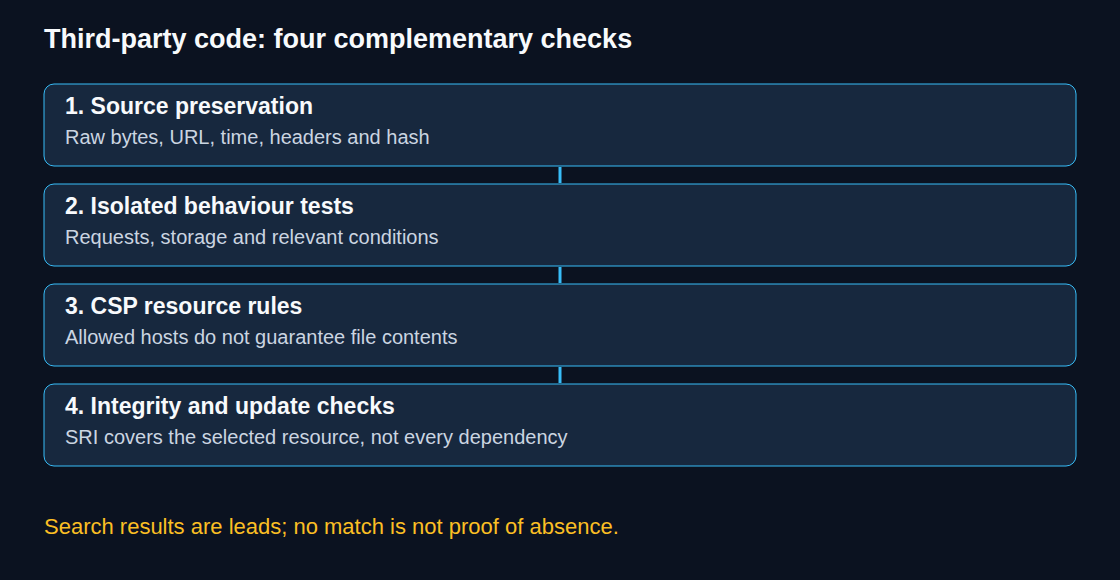
A host allowlist does not pin file contents. Another script from an already allowed host may load without a new host entry. With nonce/hash trust and 'strict-dynamic', supported browsers can also allow dynamically loaded dependencies without separate host entries. CSP therefore does not close every gap left by an unchanged loader.
SRI pins the reviewed bytes
For a suitable stable script response, Subresource Integrity checks the bytes against an expected hash before execution. The hash must be generated from the reviewed raw file, not its formatted copy. This Python example prints the actual SHA-384 integrity value:
import base64
import hashlib
from pathlib import Path

raw = Path("widget.raw.js").read_bytes()
digest = base64.b64encode(hashlib.sha384(raw).digest()).decode("ascii")
print("sha384-" + digest)
That complete output replaces the placeholder below. The placeholder is deliberately not a valid deployment hash.
<script src="https://cdn.vendor.example/widget.js"
        integrity="sha384-REPLACE_WITH_REVIEWED_BASE64_DIGEST"
        crossorigin="anonymous"></script>
A different response fails the integrity check. The application needs a defined response to that failure, rather than an automatic update to whatever hash the vendor currently serves. Cross-origin SRI also requires a suitable CORS response. crossorigin="anonymous" uses CORS with same-origin credentials mode: cross-origin credentials are omitted, while same-origin credentials can still be sent.
A changing tag container is not mathematically incompatible with hashing. In practice, dynamic or personalised responses, missing CORS support and frequent publications can make stable SRI deployment unsuitable or unsupported by the vendor. Where pinning is unavailable, publication controls, reviewed versions and monitoring remain necessary. None of those controls certifies arbitrary future code.
Questions and answers
Does the loader’s hash cover every dependency?
No. The hash on a script element covers the fetched resource for that element, not every subsequently loaded script or configuration response. A dynamically created script can carry its own integrity metadata when the loader supports that. Each dependency otherwise needs separate assessment; a permitted host alone is not an integrity guarantee.
Does an unchanged weekly hash prove unchanged behaviour?
No. Identical bytes can behave differently because of remote configuration, time, location, consent, account state or changing dependencies. A changed hash is a review signal, not a verdict. The comparison schedule should reflect the integration’s update process and risk, while runtime tests cover relevant conditions.
What belongs in an update review?
- A new raw snapshot with retrieval evidence, alongside the previous accepted version.
- A contextual comparison of code, endpoint candidates and dependencies; minifier changes can make line diffs noisy.
- Isolated tests for the relevant pages, consent states and interactions, with network and storage observations.
- A documented decision for each new destination or capability before changing CSP or the accepted integrity value.
Server-side use, retention and onward sharing cannot be established from browser code alone. Those questions need vendor evidence and the applicable contractual documentation. A technical review makes the questions concrete; it does not independently verify the vendor’s entire processing chain.
Sources
- MDN: JavaScript documentation
- MDN: JavaScript property accessors
- MDN: Same-origin policy
- MDN: Document.cookie
- Chrome DevTools: Debug original code with source maps
- Chrome DevTools: Network features reference
- js-beautify: Project documentation and CLI
- curl: Command-line manual
- EDPB: Guidelines 2/2023, technical scope of Article 5(3), version 2.0
- MDN: Content-Security-Policy script-src
- MDN: Content-Security-Policy-Report-Only
- W3C: Content Security Policy Level 3
- MDN: Subresource Integrity
- W3C: Subresource Integrity
- WHATWG HTML: CORS settings attributes
Related articles