English
 Deutsch
 Polski
Vocal Chain in FL Studio 2026: Order of the Effects, Settings and What Each Step Changes, Measured

Contents
- How this was measured
- Step 1: a separate mixer track, recording level and clean-up
- Step 2: pitch before the dynamics
- Step 3: the high-pass in Fruity Parametric EQ 2
- The high-pass belongs in front of the compressor
- Step 4: compression in Fruity Limiter, COMP tab
- Step 5: the de-esser, and what compression does to sibilants
- Before or after the compressor: the threshold decides, not the position
- Step 6: saturation, sparingly
- Reverb and delay on send tracks
- The finished chain in slot order
- After the chain: bus and loudness
- What this covers and what it does not
- Questions and answers
- Sources
In FL Studio a vocal takes its own mixer track. Every insert track has ten effect slots according to the manual, and what sits in them, in which order, decides how loud, how even and how sharp the voice ends up. This tutorial builds a chain of six steps, names the controls for each step as the manual describes them, and measures what the order changes.
The measurement did not use the FL plugins but ffmpeg on a synthetic voice signal. That answers four questions which otherwise stay a matter of taste: how high the high-pass may sit, what it costs at the fundamental, what it gains in front of the compressor, and how compression shifts the distance between sibilant and vowel.
How this was measured
- Signal: 24 seconds at 48 kHz. Every 500 ms one syllable of 300 ms vowel and 120 ms sibilant. The vowel consists of a 180 Hz fundamental with overtones up to 5 kHz and peaks at −12 dBFS, the sibilant is noise between 5 and 10 kHz at −18 dBFS. Two disturbances come on top: a continuous tone at 45 Hz with −20 dBFS and, every 2 seconds, a plosive at 30 Hz. Together the peak sits at −1.86 dBFS.
- Chain: ffmpeg 7.1.5. The high-pass is two biquads in series, 24 dB per octave in total. The compressor runs with a threshold of −20 dBFS, ratio 4:1, knee 6 dB, release 120 ms, RMS detection and no makeup gain. The de-esser is a dynamic equaliser at 7 kHz with a Q of 1.4, ratio 4:1 and an attack of 1 ms.
- Evaluation: band filters through the Fourier transform. The vowel level is the RMS value between 150 Hz and 4 kHz in the window from 50 to 280 ms of each syllable, the sibilant level the value between 5 and 10 kHz in the window from 310 to 410 ms, each averaged over 48 syllables. Loudness comes from ffmpeg according to ITU-R BS.1770.
- How far this carries: a compressor in ffmpeg is not the Fruity Limiter, and a synthetic signal is not a sung voice. The numbers show in which direction and in which order of magnitude the sequence acts, not the sound of a particular plugin.
Step 1: a separate mixer track, recording level and clean-up
For the mixer the manual states 500 insert tracks with ten effect slots each. The vocal gets one of them so that chain and sends stay independent of other tracks. The recording level may leave room: peaks around −12 to −6 dBFS are plenty for 24 bit, and the more distance to full scale remains, the less trouble plosives cause. How small the buffer may be while singing is what the latency and buffer calculator works out.
Edison loads into any effect slot according to the manual and records or plays audio from exactly that position. That makes it the first step of the chain: the entry “Clean up (Denoise / Declip / Declick)” opens the tool for repairing noisy, clipped or clicking samples, and the fades at the start and end remove clicks as well with a right-click. Whatever is repaired here needs no compressor to iron it out later.
Step 2: pitch before the dynamics
Pitcher corrects pitch to a chosen key and scale; notes outside the scale shift to the nearest note within it, as the manual puts it. The correction speed decides the character, fast settings sound more artificial and slower ones more natural. The formant control keeps the timbre while the pitch changes. In MIDI mode a keyboard or the Piano Roll sets the target notes, and the Harmonize mode adds further voices. Pitcher comes with the Signature Bundle and up or can be purchased separately, according to the manual.
Pitch correction sits before the dynamics because a compressor lifts the side effects of that correction along with everything else: the more quiet passages are raised later, the clearer artefacts become which barely show before compression. The correction itself, in turn, needs no compressed input.
Step 3: the high-pass in Fruity Parametric EQ 2
Fruity Parametric EQ 2 has seven bands which can work as high-pass, low-pass, shelf or peaking filters among others; the slope ranges from 12 to 48 dB per octave according to the manual. The default shape of a band is peaking. Linear phase mode works with a fast Fourier transform and increases plugin latency, while the standard mode processes almost instantly; for a chain that runs while singing, the standard mode is the fitting choice.
The first band becomes the high-pass. The measurement shows what different cutoff frequencies do to the test signal, measured at 24 dB per octave:
| High-pass | Disturbance, 10 to 100 Hz | Fundamental, 150 to 250 Hz | Peak level |
|---|---|---|---|
| none | −20.91 dBFS | −23.96 dBFS | −1.86 dBFS |
| 60 Hz | −34.85 dBFS | −24.06 dBFS | −10.87 dBFS |
| 80 Hz | −43.17 dBFS | −24.29 dBFS | −10.47 dBFS |
| 100 Hz | −50.29 dBFS | −24.75 dBFS | −10.70 dBFS |
| 120 Hz | −56.31 dBFS | −25.53 dBFS | −11.32 dBFS |
| 150 Hz | −63.86 dBFS | −27.38 dBFS | −12.78 dBFS |
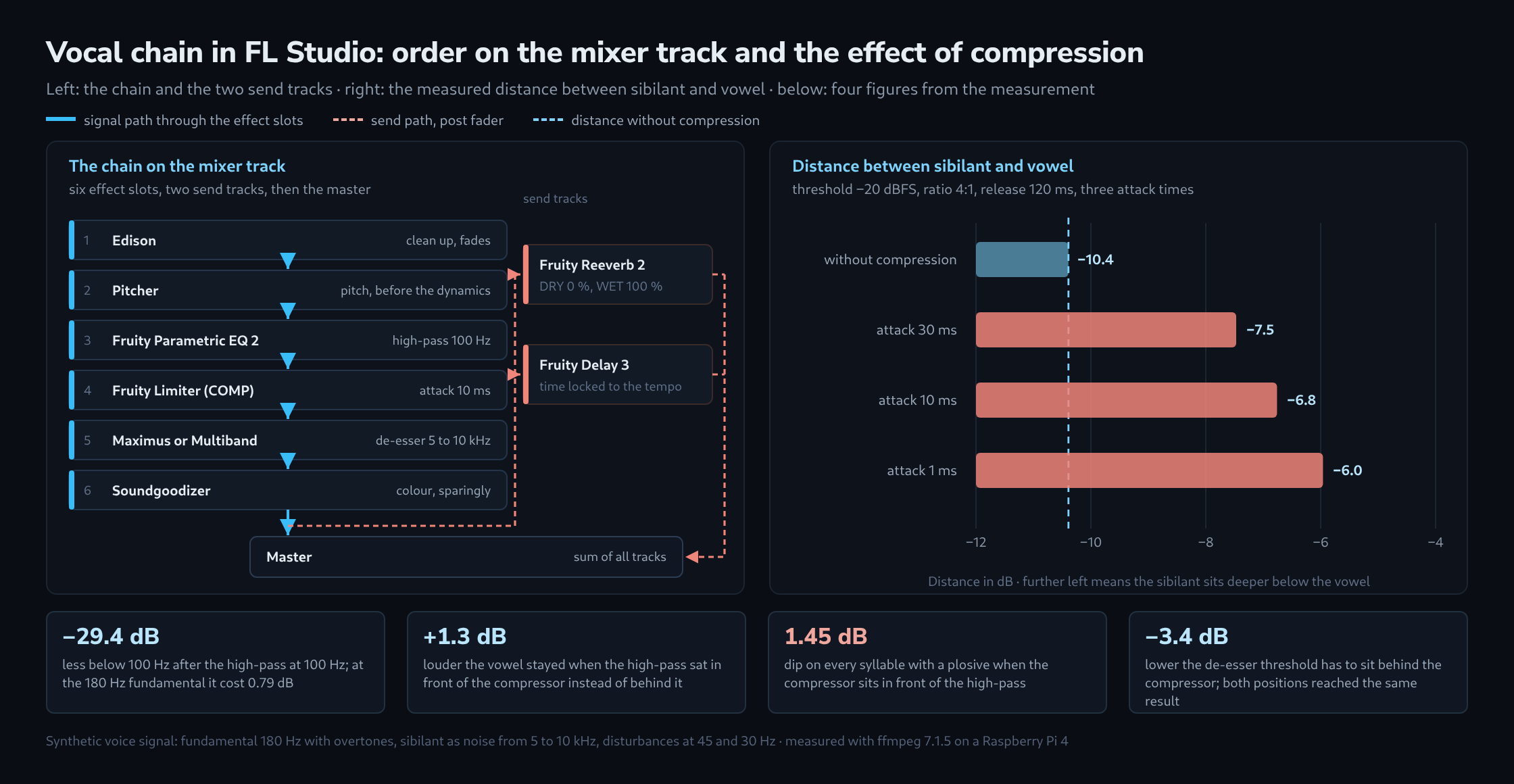
At 100 Hz the disturbance sat 29.38 dB lower than without a high-pass, while the fundamental lost 0.79 dB. At 150 Hz it was 42.95 dB less disturbance but already 3.42 dB less fundamental, and for a voice with a 180 Hz fundamental that is too much. The peak level stands out: even a high-pass at 60 Hz took 9 dB off the peak, because the plosive at 30 Hz produced the largest excursions. Those 9 dB are room the rest of the chain can use.
A cutoff half an octave below the lowest fundamental of the voice works as a starting point. For the 180 Hz of the test signal that is around 120 Hz; the measurement uses 100 Hz to keep a reserve. Lower voices move the cutoff down accordingly.
The high-pass belongs in front of the compressor
A compressor reacts to the whole level, not only to the voice. With the high-pass behind it, rumble and plosives drive its gain reduction as well. Both orders, with otherwise identical settings, gave:
| Order | Vowel level | Loudness | Peak level | Dip on plosive syllables |
|---|---|---|---|---|
| High-pass, then compressor | −23.72 dBFS | −25.8 LUFS | −13.61 dBFS | 0.01 dB |
| Compressor, then high-pass | −25.06 dBFS | −27.1 LUFS | −14.16 dBFS | 1.45 dB |
With the high-pass first the voice stayed 1.34 dB louder and the loudness 1.3 LU higher, without any change to the compressor settings. More important than the level is the last column: with the compressor first, every syllable carrying a plosive was 1.45 dB quieter on average than the other syllables. That is exactly what is heard as the voice being pushed away for a moment. With the high-pass in front, the effect disappeared completely.
Step 4: compression in Fruity Limiter, COMP tab
Fruity Limiter carries two tabs, LIMIT and COMP; the compressor controls live on the COMP tab. THRESH sets the level from which compression takes hold, RATIO how much is pulled down above it, and KNEE whether the transition is gradual or abrupt. ATT adjusts how quickly the envelope responds to the start of the signal and at the same time sets the look-ahead of the limiter, which shows up in the plugin latency. REL is the release time; set too low it introduces distortion, the manual warns. CURVE runs from 1 for an immediate to 8 for a slow response. SUSTAIN from 0 to 1000 ms sets the duration over which the input is averaged as an RMS value and so prevents a premature release. GAIN acts as makeup after the compressor and before the limiter stage.
As a starting point for a sung voice: ratio 3:1 to 4:1, a threshold low enough that loud syllables show 3 to 6 dB of gain reduction, attack around 10 ms, release around 120 ms. The attack time is not a pure matter of taste, as the next section shows. For ducking against another track the same tab takes a sidechain signal; the route for that is in the tutorial on sidechain compression in FL Studio.
Step 5: the de-esser, and what compression does to sibilants
Image-Line describes de-essers soberly: most good de-essers are simply band-limited compressors under another name. As tools the maker names Fruity Multiband Compressor and Maximus, and as the frequency range of sibilance 4,000 to 12,000 Hz. The advantage over a fixed cut in an equaliser: compression with the correct threshold and ratio cuts the sibilants only when they exceed an acceptable level, while an equaliser cuts the same frequencies across the whole track and often makes it sound dull.
Maximus brings the preset “De-esser Split Band” for this. According to the tutorial the low and high bands and the master are switched off in it, the mid band works with heavy compression holding the input to around −6 dB, and everything below that passes unmodified. The lower cutoff of the mid band goes onto the sibilance, PRE GAIN raises the signal far enough that the sibilants drive into the compression range, and POST GAIN takes the same amount back off. Fruity Multiband Compressor offers three bands instead, with four cutoff knobs, thresholds from 0 to −60 dB, ratios from 1:1 to infinity, attack from 0.1 to 100 ms, release from 10 to 1000 ms and an output gain up to 17 dB, plus switches per band for active, muted and bypassed.
What happens before the de-esser is worth a look. Compression pulls down loud vowels more than the quieter sibilants and so shifts the relation between the two:
| Processing | Vowel level | Sibilant level | Distance | Change |
|---|---|---|---|---|
| without compression | −19.29 dBFS | −29.68 dBFS | −10.39 dB | reference |
| attack 30 ms | −22.34 dBFS | −29.81 dBFS | −7.47 dB | +2.92 dB |
| attack 10 ms | −23.21 dBFS | −29.97 dBFS | −6.76 dB | +3.63 dB |
| attack 1 ms | −24.50 dBFS | −30.46 dBFS | −5.96 dB | +4.43 dB |
The sibilant itself lost at most 0.78 dB through compression, the vowel up to 5.21 dB. That moved the sibilant 2.92 dB closer to the vowel with a slow attack and 4.43 dB closer with a very fast one. A fast attack therefore does not only make the voice denser but also sharper, and measurably so. Anyone who compresses a voice and then finds it hisses more than before is not imagining it, but looking at this effect.
Before or after the compressor: the threshold decides, not the position
From the previous section it would follow that the de-esser has to sit behind the compressor. The counter-check shows a different picture. For it, the de-esser threshold was set in both positions so that the final distance between sibilant and vowel equals the one in the unprocessed signal, that is −10.39 dB:
| Position | Threshold needed | Final sibilant level | Final vowel level |
|---|---|---|---|
| De-esser before the compressor | −41.8 dB | −34.16 dBFS | −23.77 dBFS |
| De-esser after the compressor | −45.2 dB | −34.24 dBFS | −23.85 dBFS |
Both chains landed on the same sibilant level within 0.09 dB and on the same vowel level within 0.08 dB. The difference sits in the second column: after the compressor the threshold has to be 3.4 dB lower, because the compressor lowers the signal beforehand. Moving the de-esser without adjusting the threshold therefore makes the same control act quite differently. With an unchanged threshold and a short release of 5 ms both positions lowered the sibilants by 15.19 and 15.32 dB respectively, so they stayed level; a release of 200 ms, by contrast, pulled the vowel down by 5.34 and 3.21 dB, because the reduction carried over into the next syllable.
In practice this means: the de-esser sits after the compressor, because there it works on the relation that is finally heard. Its release stays short, in the order of 5 to 40 ms. And the threshold is always set in the position where the de-esser actually sits, never carried over from another chain.
Step 6: saturation, sparingly
Soundgoodizer is a maximizer and enhancer based on the Maximus engine, according to the manual. Its large knob corresponds to the LMH mix of Maximus and blends between the input and the outputs of the three compressor bands; the four presets A to D are ready-made Maximus settings. Because the plugin therefore does not only colour but also compresses, it belongs at the end of the chain and in small doses. For finer control the same settings are open directly in Maximus.
One point the measurement does not cover: saturation creates new overtones which can fall into the sibilance range. The last check after setting the saturation therefore goes back to the S sounds.
Reverb and delay on send tracks
Reverb and delay do not belong in the chain of the vocal track but on tracks of their own. Insert tracks can be sent to as many other tracks as required, according to the manual: first the source track is selected, then the send switch is set on the destination track; the switch is replaced by a knob for the amount being sent. Sends work post fader, and for a tap before the fader the Fruity Send plugin is responsible.
Fruity Reeverb 2 sits on the reverb track. For use on a send track the manual explicitly names DRY at 0 % and WET at 100 %. DELAY sets the time between the direct signal and the first reflection, DEC the time it takes to decay to −60 dB, DIFF the density of the reflections, DAMP the damping of the highs in the reverb signal, L.CUT and H.CUT remove ranges from the reverb, and SEP adjusts the stereo separation of the wet signal.
Fruity Delay 3 sits on the delay track. The delay time runs from 1 to 1000 ms, with tempo sync from a forty-eighth of a step up to 16 steps, that is one bar; the echoes then follow tempo automation as well. Four models are available: mono, stereo, ping pong and off. For the matching time in milliseconds the BPM and delay calculator converts the note values.
The finished chain in slot order
| Slot | Plugin | Task | Starting point |
|---|---|---|---|
| 1 | Edison | clean-up, fades, noise | clean up only where needed |
| 2 | Pitcher | pitch | set the key, slow correction |
| 3 | Fruity Parametric EQ 2 | high-pass and cuts | high-pass 100 Hz, 24 dB per octave |
| 4 | Fruity Limiter, COMP tab | compression | 4:1, attack 10 ms, release 120 ms |
| 5 | Maximus or Fruity Multiband Compressor | de-esser | band 5 to 10 kHz, release below 40 ms |
| 6 | Soundgoodizer | saturation | preset A, knob well to the left |
| Send 1 | Fruity Reeverb 2 | room | DRY 0 %, WET 100 % |
| Send 2 | Fruity Delay 3 | echo | tempo sync, ping pong |
After the chain: bus and loudness
Several vocal tracks sensibly run into a common track carrying another, very mild compressor. From there the rules of mastering apply: the LUFS and true peak meter shows where the loudness sits, the tool for stereo correlation and mid/side checks whether the voice really sits in the centre, and the tutorial on mastering to streaming loudness describes the path to the finished file.
What this covers and what it does not
- The measurement used ffmpeg, not the FL plugins. Controls of the same name behave differently there, and Maximus works with a freely shaped curve that no simple compressor reproduces.
- The test signal is synthetic: even syllables, no room, no breaths, no vibrato. A real recording varies more, which can make the effects of the order larger.
- The high-pass figures depend on the 180 Hz fundamental. For lower voices the values shift down accordingly.
- One observation stayed unexplained: with an unchanged threshold and a release of 40 ms the same de-esser lowered 19.40 dB before the compressor and 5.15 dB after it, while at 5 ms it worked equally hard in both positions. The value is noted but not resolved further; it supports the advice to set the threshold in the final chain.
- The plugin details come from the Image-Line manual and were not measured.
Questions and answers
Why does the plosive push down the whole syllable when the high-pass removes it afterwards?
Because the compressor reacts to the level it sees, and the plosive delivers the largest excursions there. It drives up the gain reduction, which then recovers only gradually with a release of 120 ms; the vowel of the same syllable falls within that window. The high-pass behind the compressor does remove the plosive, but the reduction of the vowel stays in the signal, 1.45 dB on average.
Does a compressor on the vocal bus bring the sibilants back up?
It works in the same direction as the compressor on the individual track, only more weakly when set gently. The measurement shows the mechanism: compression lowered the vowel by 3.05 to 5.21 dB, but the quieter sibilant by only 0.13 to 0.78 dB. The distance between the two therefore shrank by most of the amount by which the vowel was lowered. By the same logic, though not measured, a bus compressor that pulls loud syllables down by 1 to 2 dB moves the sibilants closer to the vowel by a similar amount, and it does so after the de-esser that had set their level beforehand.
Two things follow. First, the article’s rule of setting the threshold where the de-esser actually sits applies to the bus as well: the final check of the S sounds takes place with the bus compressor switched on, not on the individual track. Second, with several voices a further de-esser on the bus can be the better choice than setting the de-esser on each individual track more aggressively, because the sibilants of voices singing at the same time add up there.
Which steps of the chain delay the signal during vocal recording?
According to the article, two of the settings mentioned: the linear phase mode of Fruity Parametric EQ 2, which works with a fast Fourier transform, and the attack time of Fruity Limiter, which also sets its look-ahead. Both add to the buffer latency of the audio interface.
Delay compensation can align the playback of the other tracks with such plugins, but when monitoring during a recording the delay cannot be recovered: the voice reaches the headphones later. A lean chain with the EQ in standard mode is therefore enough for recording; the remaining settings can be switched back on after the recording.
Sources
- Image-Line: FL Studio Manual, Mixer: 500 insert tracks, ten effect slots, send switch and send knob, sends post fader, Fruity Send for the tap before it.
- Image-Line: Fruity Parametric EQ 2: seven bands, filter types, slopes from 12 to 48 dB per octave, linear phase mode with increased latency.
- Image-Line: Fruity Limiter: LIMIT and COMP tabs, THRESH, RATIO, KNEE, ATT with look-ahead, REL, CURVE 1 to 8, SUSTAIN 0 to 1000 ms, GAIN as makeup.
- Image-Line: De-Essing Options in FL Studio: de-essers as band-limited compressors, sibilance between 4,000 and 12,000 Hz, compression versus a fixed cut.
- Image-Line: Maximus Tutorials: the “De-esser Split Band” preset, only the mid band active, PRE GAIN and POST GAIN in opposite directions.
- Image-Line: Fruity Multiband Compressor: three bands, four cutoff knobs, threshold 0 to −60 dB, attack 0.1 to 100 ms, release 10 to 1000 ms.
- Image-Line: Fruity Reeverb 2: DELAY, DEC to −60 dB, DIFF, DAMP, L.CUT, H.CUT, SEP, DRY 0 % and WET 100 % on a send track.
- Image-Line: Fruity Delay 3: 1 to 1000 ms, tempo sync from a forty-eighth of a step to 16 steps, mono, stereo and ping pong models.
- Image-Line: Pitcher: key and scale, correction speed, formant, MIDI mode with Harmonize, Signature Bundle and up.
- Image-Line: Soundgoodizer: maximizer and enhancer based on the Maximus engine, knob as LMH mix, presets A to D.
- Image-Line: Edison: loads into an effect slot and records from that position; clean up for noise, clipping and clicks, fades with declicking.
Related articles