English
 Deutsch
 Polski
Plugin Check locally and in CI: findings before the review

Contents
Every plugin submitted to the WordPress.org directory goes through an automated scan before a person from the Plugins Team reads the code. Several of the points that reviewers ask about can be detected mechanically: a missing license header, output that is not escaped, a script loaded from a public CDN, a text domain that does not match the slug. Plugin Check, short PCP, is the tool published by WordPress.org for this job. According to its description it runs most of the checks used for new submissions, on any WordPress installation and before anything is uploaded.
This article shows Plugin Check 2.1.0 in three places: in the admin screen, on the command line with WP-CLI and in a GitHub Actions workflow built on the official action. A small plugin with deliberate mistakes serves as the test object. For each mistake the article names the check and the result code that a run of Plugin Check 2.1.0 on WordPress 7.1.2 reports, and then shows the corrected version.
What Plugin Check examines
The current version in the directory is 2.1.0, released on 16 August 2026. It requires WordPress 6.3 and PHP 7.4; the plugin page lists “Tested up to” 7.0.6, while the current WordPress release is 7.1.2. Version 2.1.0 added, among other things, a check for production-time changes to PHP error reporting.
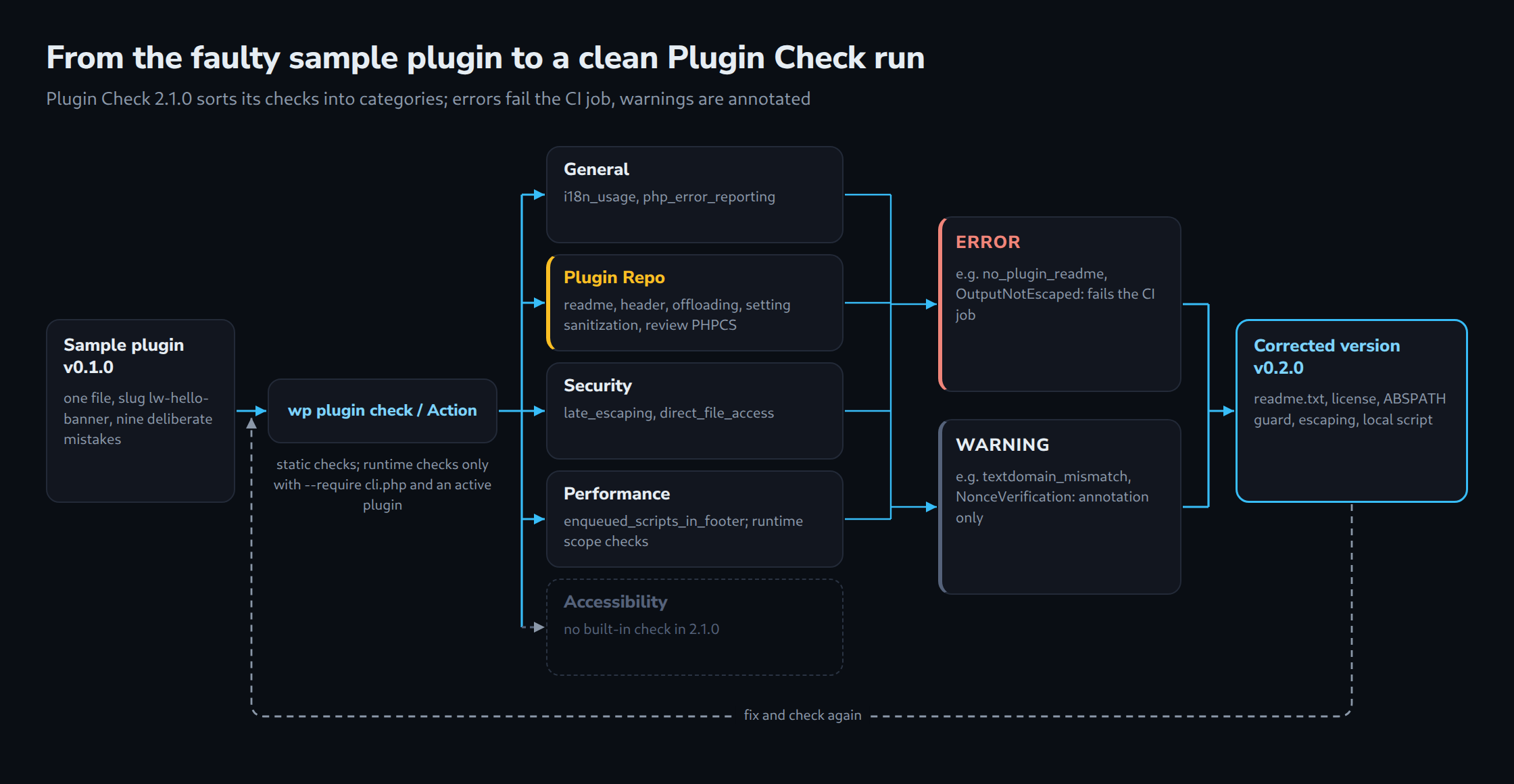
In the source of 2.1.0 the class Default_Check_Repository registers 34 checks. Each check has a slug such as late_escaping and belongs to one or more categories. Two kinds of checks exist. Static checks read the code without running it, mostly through PHP_CodeSniffer sniffs from the WordPress Coding Standards or from Plugin Check’s own sniff set, partly through custom logic. Runtime checks run the plugin, which has to be active, against a separate set of database tables and observe what it does; in 2.1.0 these are the five performance checks for script and style scope, script and style size, and loading strategy.
| Category (slug) | Examples of checks in 2.1.0 |
|---|---|
General (general) |
i18n_usage, php_error_reporting, ai_provider |
Plugin Repo (plugin_repo) |
plugin_readme, plugin_header_fields, file_type, offloading_files, setting_sanitization, prefixing, plugin_review_phpcs, trademarks |
Security (security) |
late_escaping, direct_file_access, safe_redirect, direct_db_queries, direct_db |
Performance (performance) |
enqueued_scripts_in_footer, performant_wp_query_params, enqueued_scripts_scope, non_blocking_scripts |
Accessibility (accessibility) |
none: the category is defined, but no built-in check of 2.1.0 is assigned to it |
All security checks registered in 2.1.0 also carry the plugin_repo category, so a run limited to Plugin Repo already covers escaping and direct file access. That matters because the plugin’s FAQ states that a plugin typically has to pass all checks in the Plugin Repo category to be approved for the directory. The other categories are described as additional.
Every result is either an ERROR or a WARNING and carries a severity; the default is 5, a missing license in the plugin header is reported with 9. Errors mark violations of directory requirements. Warnings point to code that is often, but not always, a problem: reading $_GET without a Nonce is fine for a harmless display parameter and a real hole in a form handler. The checks decide the type themselves, and the PHPCS ruleset of Plugin Check deliberately downgrades some sniffs, for example Nonce verification and input sanitization, to warnings.
Running it locally: admin screen and WP-CLI
Plugin Check is installed like any other plugin. The project README advises against running it on a production site, because runtime checks execute the plugin under test. After activation, the screen under Tools → Plugin Check is available to users who can manage plugins. It offers a plugin selector plus checkboxes for categories and for result types. Results are grouped by file with line, column, type, code and message, and since version 1.8.0 they can be exported as CSV, JSON or Markdown.
For repeated runs the WP-CLI command is more practical. The argument is a plugin slug, a path or the URL of a ZIP file. By default the command only executes static checks; runtime checks need the workaround documented in the README, where --require loads the file cli.php of Plugin Check before WordPress starts. In addition, the plugin under test has to be active; for an inactive plugin Plugin Check skips the runtime checks without a notice, and --checks=enqueued_scripts_scope then ends with “does not exist”.
# Install and activate Plugin Check (2.1.0 at the time of writing).
wp plugin install plugin-check --activate

# All static checks for wp-content/plugins/lw-hello-banner.
wp plugin check lw-hello-banner

# Include runtime checks (plugin must be active): load cli.php before WordPress boots.
wp plugin check lw-hello-banner --require=./wp-content/plugins/plugin-check/cli.php

# Limit the run to categories or to single checks.
wp plugin check lw-hello-banner --categories=plugin_repo,security
wp plugin check lw-hello-banner --checks=late_escaping,i18n_usage

# Errors only, as one JSON array for scripts.
wp plugin check lw-hello-banner --ignore-warnings --format=strict-json

# Show result codes, then ignore one specific code.
wp plugin check lw-hello-banner --format=csv --fields=code,message
wp plugin check lw-hello-banner --ignore-codes=textdomain_mismatch

# Checks for an update of an existing directory plugin.
wp plugin check lw-hello-banner --mode=update

# What is available in the installed version.
wp plugin list-checks --format=csv
wp plugin list-check-categories
The most important flags of wp plugin check in version 2.1.0:
| Flag | Effect |
|---|---|
--checks=, --exclude-checks= |
run only the listed check slugs, or skip them |
--categories= |
limit the run to categories, comma-separated |
--ignore-codes= |
hide individual result codes such as textdomain_mismatch |
--ignore-warnings, --ignore-errors |
hide one of the two result types |
--format= |
table (default), csv, json, ctrf and the variants strict-table, strict-csv, strict-json, strict-ctrf |
--fields= |
choose columns, for example code,message |
--exclude-directories=, --exclude-files= |
skip paths in file-based scans; .git, vendor, vendor_prefixed, vendor-prefixed and node_modules are excluded by default |
--severity=, --error-severity=, --warning-severity= |
show only results at or above a severity |
--mode= |
new (default) or update; in update mode an outdated “Tested up to” is reported as a warning instead of an error |
--slug= |
override the slug used for text domain and readme comparisons |
Check slugs and result codes are two different things. --checks=i18n_usage selects a check, --ignore-codes=WordPress.WP.I18n.TextDomainMismatch hides a single finding from it. The CLI documentation recommends --format=csv --fields=code,message to look up codes. One detail is relevant for scripts: in the 2.1.0 source the command prints its findings without setting an error exit status because of them. A shell script that is meant to fail therefore has to evaluate the output itself; in a test run against the faulty sample the command reported twelve errors and still ended with exit status 0. The GitHub Action does exactly that evaluation. With --format=json each file gets a line FILE: … followed by its own JSON array, so the output as a whole is not valid JSON; --format=strict-json returns a single array, but without file names. Without findings, both formats print only a success line.
A sample plugin with built-in mistakes
The sample is a single file in the folder wp-content/plugins/lw-hello-banner/, so the slug is lw-hello-banner. It prints a greeting at the top of the page, reads an optional name from the URL, offers a note field on Settings → General and loads a decorative script. It contains nine deliberate mistakes: no readme.txt, no license header, a text domain that differs from the slug, no guard against direct file access, a call to error_reporting(), register_setting() without sanitization, output without escaping, a translatable string with a placeholder but without a translator comment, and a script loaded from a CDN without version and loading arguments.
<?php
/**
 * Plugin Name: LW Hello Banner
 * Description: Shows a greeting banner at the top of the front page.
 * Version:     0.1.0
 * Author:      Lukas Wojcik
 * Text Domain: hello-banner
 */

// Intentionally faulty example for Plugin Check. Do not use on a live site.

error_reporting( E_ALL );

function lw_hello_banner_register_setting() {
	register_setting( 'general', 'lw_hello_banner_note' );

	add_settings_field(
		'lw_hello_banner_note',
		__( 'Banner note', 'hello-banner' ),
		'lw_hello_banner_field',
		'general'
	);
}
add_action( 'admin_init', 'lw_hello_banner_register_setting' );

function lw_hello_banner_field() {
	echo '<input type="text" name="lw_hello_banner_note" value="' . get_option( 'lw_hello_banner_note' ) . '">';
}

function lw_hello_banner_assets() {
	wp_enqueue_script( 'lw-hello-banner', 'https://cdn.jsdelivr.net/npm/canvas-confetti@1.9.3/dist/confetti.browser.min.js' );
}
add_action( 'wp_enqueue_scripts', 'lw_hello_banner_assets' );

function lw_hello_banner_render() {
	$name = isset( $_GET['lw_name'] ) ? $_GET['lw_name'] : 'Guest';
	$note = get_option( 'lw_hello_banner_note', '' );

	echo '<div class="lw-hello-banner"><p>' . sprintf( __( 'Hello, %s!', 'hello-banner' ), $name ) . ' ' . $note . '</p></div>';
}
add_action( 'wp_body_open', 'lw_hello_banner_render' );
What Plugin Check reports for it
The following table lists the findings of wp plugin check lw-hello-banner with Plugin Check 2.1.0 on WordPress 7.1.2, twelve errors and nine warnings in total; a run with --require returns the same list. Line numbers are left out; OutputNotEscaped appears four times, TextDomainMismatch and NonceVerification.Recommended twice each.
| Result code | Check (category) | Type | Cause in the sample |
|---|---|---|---|
no_plugin_readme |
plugin_readme (plugin_repo) |
ERROR | no readme.txt |
plugin_header_no_license |
plugin_header_fields (plugin_repo) |
ERROR | no License header |
textdomain_mismatch |
plugin_header_fields (plugin_repo) |
WARNING | header says hello-banner, slug is lw-hello-banner |
missing_direct_file_access_protection |
direct_file_access (security, plugin_repo) |
ERROR | functions and hooks without an ABSPATH guard |
WordPress.WP.I18n.TextDomainMismatch |
i18n_usage (general, plugin_repo) |
ERROR | __() calls with the wrong text domain |
WordPress.WP.I18n.MissingTranslatorsComment |
i18n_usage (general, plugin_repo) |
ERROR | %s without a translators: comment |
PluginCheck.CodeAnalysis.PHPErrorReporting.DirectErrorReportingCall |
php_error_reporting (general) |
WARNING | error_reporting( E_ALL ) |
WordPress.PHP.DevelopmentFunctions.prevent_path_disclosure_error_reporting |
plugin_review_phpcs (plugin_repo) |
WARNING | error_reporting( E_ALL ) |
PluginCheck.CodeAnalysis.SettingSanitization.register_settingMissing |
setting_sanitization (plugin_repo) |
ERROR | register_setting() without a third argument |
WordPress.Security.EscapeOutput.OutputNotEscaped |
late_escaping (security, plugin_repo) |
ERROR | get_option(), __(), $name and $note in echo |
PluginCheck.CodeAnalysis.EnqueuedResourceOffloading.OffloadedContent |
offloading_files (plugin_repo) |
ERROR | script URL on cdn.jsdelivr.net |
WordPress.WP.EnqueuedResourceParameters.MissingVersion, .NotInFooter |
enqueued_scripts_in_footer (performance) |
WARNING | no version, no fifth argument |
WordPress.Security.NonceVerification.Recommended |
plugin_review_phpcs (plugin_repo) |
WARNING | $_GET['lw_name'] without a Nonce check |
WordPress.Security.ValidatedSanitizedInput.MissingUnslash, .InputNotSanitized |
plugin_review_phpcs (plugin_repo) |
WARNING | $_GET['lw_name'] used raw |
Three observations from the table. First, the text domain is reported twice by different checks: the header check compares the Text Domain header with the slug and issues a warning, while the i18n sniff compares every translation call with the slug and issues an error. Second, the Nonce and sanitization findings do not come from the Security category but from plugin_review_phpcs, a PHPCS run with Plugin Check’s review ruleset; a run with --categories=security would not show them. Third, the ruleset also contains the sniff group WordPress.PHP.DevelopmentFunctions as a warning. It does report the error_reporting() line a second time, as prevent_path_disclosure_error_reporting.
The CDN script leads to a further point: the runtime checks for script scope and loading strategy only evaluate scripts whose URL lies inside the plugin folder. The CDN script is therefore reported only by the static checks, and the run with --require returns the same list as the one without. The runtime checks only matter for the corrected version with its bundled script: without the is_front_page() condition it is reported as EnqueuedScriptsScope (“This script is being loaded in all frontend contexts.”), but only in a run with --require.
The corrected version
The corrected plugin consists of three files: the main file, a readme.txt and a small local script in assets/. The main file gains a complete header with license, Requires at least and the text domain lw-hello-banner, and an ABSPATH guard. The call to error_reporting() is gone. register_setting() receives type, sanitize_callback and default value. Output is escaped at the point of output with esc_attr(), esc_html() and esc_html__(). The script is bundled with the plugin, versioned and loaded only on the front page with in_footer and strategy; the array form of the fifth argument of wp_enqueue_script() exists since WordPress 6.3, which matches the declared minimum version.
<?php
/**
 * Plugin Name:       LW Hello Banner
 * Description:       Shows a greeting banner at the top of the front page.
 * Version:           0.2.0
 * Requires at least: 6.3
 * Requires PHP:      7.4
 * Author:            Lukas Wojcik
 * License:           GPLv2 or later
 * License URI:       https://www.gnu.org/licenses/gpl-2.0.html
 * Text Domain:       lw-hello-banner
 */

if ( ! defined( 'ABSPATH' ) ) {
	exit;
}

define( 'LW_HELLO_BANNER_VERSION', '0.2.0' );

/**
 * Registers the banner note setting and its field on Settings > General.
 */
function lw_hello_banner_register_setting() {
	register_setting(
		'general',
		'lw_hello_banner_note',
		array(
			'type'              => 'string',
			'sanitize_callback' => 'sanitize_text_field',
			'default'           => '',
		)
	);

	add_settings_field(
		'lw_hello_banner_note',
		__( 'Banner note', 'lw-hello-banner' ),
		'lw_hello_banner_field',
		'general',
		'default',
		array( 'label_for' => 'lw_hello_banner_note' )
	);
}
add_action( 'admin_init', 'lw_hello_banner_register_setting' );

/**
 * Prints the input field for the banner note.
 */
function lw_hello_banner_field() {
	printf(
		'<input type="text" class="regular-text" id="lw_hello_banner_note" name="lw_hello_banner_note" value="%s">',
		esc_attr( get_option( 'lw_hello_banner_note', '' ) )
	);
}

/**
 * Loads the bundled script on the front page only.
 */
function lw_hello_banner_assets() {
	if ( ! is_front_page() ) {
		return;
	}

	wp_enqueue_script(
		'lw-hello-banner',
		plugins_url( 'assets/lw-hello-banner.js', __FILE__ ),
		array(),
		LW_HELLO_BANNER_VERSION,
		array(
			'in_footer' => true,
			'strategy'  => 'defer',
		)
	);
}
add_action( 'wp_enqueue_scripts', 'lw_hello_banner_assets' );

/**
 * Prints the banner on the front page.
 */
function lw_hello_banner_render() {
	if ( ! is_front_page() ) {
		return;
	}

	// phpcs:ignore WordPress.Security.NonceVerification.Recommended -- Read-only display value, nothing is stored.
	$name = isset( $_GET['lw_name'] ) ? sanitize_text_field( wp_unslash( $_GET['lw_name'] ) ) : '';
	if ( '' === $name ) {
		$name = __( 'Guest', 'lw-hello-banner' );
	}

	$greeting = sprintf(
		/* translators: %s: visitor name */
		__( 'Hello, %s!', 'lw-hello-banner' ),
		$name
	);

	$note = get_option( 'lw_hello_banner_note', '' );

	echo '<div class="lw-hello-banner"><p>' . esc_html( $greeting );
	if ( '' !== $note ) {
		echo ' ' . esc_html( $note );
	}
	echo '</p><button type="button">' . esc_html__( 'Dismiss', 'lw-hello-banner' ) . '</button></div>';
}
add_action( 'wp_body_open', 'lw_hello_banner_render' );
The name from the URL is kept on purpose, in the parameter lw_name: WordPress itself reads name as a post slug, so ?name=Anna turns the front page into a 404 page on which is_front_page() is false. It is unslashed and sanitized, and the remaining Nonce warning is suppressed with a phpcs:ignore comment that names the sniff and gives a reason. The Plugin Check FAQ describes such annotations as the intended way to handle PHPCS false positives on a specific line. The justification is valid here only because the value changes nothing: it is not stored and it does not trigger an action. For a form that saves data, the correct fix is a Nonce plus a capability check, which a separate article in this series covers in detail.
=== LW Hello Banner ===
Contributors: lukaswojcik
Tags: banner, greeting
Requires at least: 6.3
Tested up to: 7.1
Requires PHP: 7.4
Stable tag: 0.2.0
License: GPLv2 or later
License URI: https://www.gnu.org/licenses/gpl-2.0.html

Shows a short, dismissible greeting banner at the top of the front page.

== Description ==

LW Hello Banner prints a greeting on the front page. An optional note can be set under Settings > General.

== Changelog ==

= 0.2.0 =
* Fix all findings reported by Plugin Check.

= 0.1.0 =
* Initial version.
Two readme details follow from the check code. “Tested up to” must match the current major version of WordPress, at the moment 7.1. An older value is an error for new plugins and a warning in update mode, and a value with a patch level such as 7.1.2 is reported as invalid_tested_upto_minor. The license in the readme is compared with the one in the plugin header and reported as license_mismatch if they differ, which is why both files use the same wording. The fields of the readme and the plugin header are the subject of a separate article in this series.
// assets/lw-hello-banner.js
( function () {
	const banner = document.querySelector( '.lw-hello-banner' );
	if ( ! banner ) {
		return;
	}

	const button = banner.querySelector( 'button' );
	if ( button ) {
		button.addEventListener( 'click', function () {
			banner.hidden = true;
		} );
	}
} )();
Plugin Check in GitHub Actions
The official integration is the repository WordPress/plugin-check-action. The latest release is v1.1.9 from 11 August 2026, and the moving tag v1 currently points to the same commit. The action is a composite action. It sets up Node 24, installs @wordpress/env, starts a WordPress instance with the plugin folder mapped into wp-content/plugins, installs Plugin Check from the directory, installs any plugins listed in Requires Plugins and then calls wp plugin check with --format=json and --require=./wp-content/plugins/plugin-check/cli.php, so runtime checks are included. According to the wp-env documentation, wp-env runs on Docker by default; the standard Ubuntu runner is therefore the natural choice.
A Node script evaluates the JSON file. Each result becomes a file annotation with the result code as title. Any ERROR sets the exit code to 1 and fails the job, warnings only appear as annotations. With strict: true every result counts as an error. For pull requests the action also posts or updates a summary comment, and the raw result is uploaded as the artifact plugin-check-results.
Inputs in v1.1.9: build-dir (default ./), checks, exclude-checks, categories, exclude-files, exclude-directories, ignore-codes, ignore-warnings, ignore-errors, include-experimental, wp-version (latest or trunk), severity, error-severity, warning-severity, include-low-severity-errors, include-low-severity-warnings, slug, strict and repo-token. List inputs take one entry per line.
Two details decide whether the results make sense. The action takes the slug from the last part of build-dir. With the default ./ that is the name of the checkout directory, which according to the GitHub documentation is named after the repository, as in /home/runner/work/my-repo-name/my-repo-name; if the repository is named differently from the plugin, every text domain call is flagged. And the check file_type in 2.1.0 warns about a .github directory inside the plugin and flags other hidden files. Checking the repository root therefore tests files that never ship. The workflow below builds the folder that would be uploaded with git archive, which honours export-ignore entries in .gitattributes, and passes that folder as build-dir.
# .github/workflows/plugin-check.yml
name: Plugin Check

on:
  pull_request:
  push:
    branches:
      - main

permissions:
  contents: read
  pull-requests: write # only for the summary comment on pull requests

jobs:
  plugin-check:
    runs-on: ubuntu-latest
    steps:
      - name: Checkout
        uses: actions/checkout@v7

      # Build the folder that would be shipped, without .github and other
      # development files (see export-ignore in .gitattributes).
      - name: Build distributable plugin folder
        run: |
          mkdir -p build
          git archive --format=tar --prefix=lw-hello-banner/ HEAD | tar -x -C build

      - name: Run Plugin Check
        uses: wordpress/plugin-check-action@v1
        with:
          # The folder name becomes the slug (text domain check, readme check).
          build-dir: ./build/lw-hello-banner
          wp-version: latest
          # Optional filters, one entry per line:
          # categories: |
          #   plugin_repo
          #   security
          # exclude-checks: |
          #   enqueued_scripts_scope
          # ignore-codes: |
          #   textdomain_mismatch
          # Fail on warnings as well:
          # strict: true
# .gitattributes: files that git archive leaves out of the build
/.gitattributes export-ignore
/.github export-ignore
/.gitignore export-ignore
/build export-ignoreThe permission pull-requests: write is only needed for the summary comment; according to GitHub’s permission tables the comment endpoint is covered by it. Without it the action logs a warning for the comment but still evaluates the results. Teams that prefer fixed versions can reference wordpress/plugin-check-action@v1.1.9 or its commit hash instead of v1.
Limits and open points
- Plugin Check does not replace the manual review. The plugin page says so explicitly, and a clean run is no guarantee of approval.
- The findings table for the sample plugin comes from a local run of
wp plugin checkon WordPress 7.1.2. The workflow itself did not run on GitHub; locally, thegit archivestep produced the expected folder, and the evaluation script of the action (v1.1.9) ended with exit code 1 for the faulty and 0 for the corrected version. - Some checks rely on heuristics. The prefix check derives the expected prefixes from the plugin code, which is why a consistent prefix such as
lw_hello_banner_matters. - The action installs whatever Plugin Check version the directory offers at run time and has no input to pin it. A pipeline can therefore turn red after a Plugin Check release without any change to the plugin.
- The action offers no input for the PHP version, and
wp-versiondistinguishes only between the latest release and trunk. Tests against older WordPress or PHP versions need a separate setup, for example with wp-env or Playground, the topic of a separate article in this series. - Performance findings about script scope depend on how the plugin enqueues files; the article on selective dequeuing of plugin scripts shows the other side of the problem.
Questions and answers
Does a run without findings guarantee that the plugin is accepted into the directory?
No. According to the Plugin Check FAQ a plugin typically has to pass all checks in the plugin_repo category, but approval still depends on the manual review. The plugin page states explicitly that Plugin Check is no replacement for the manual review; a clean run only helps to speed it up.
Why does the GitHub Action report more than a local wp plugin check run?
There are three typical reasons:
- The action always loads
cli.phpvia--requireand activates the plugin; locally, only static checks run without that workaround or while the plugin is inactive. - The action installs the current Plugin Check version from the directory, while an older one may be active locally.
- With
build-dir: ./it checks the whole repository, including.githuband hidden files.
When is it acceptable to suppress a warning?
When the finding is demonstrably harmless in the specific case, for example a sanitized URL parameter that is only displayed and never stored. A phpcs:ignore comment with the sniff name and a reason then belongs on that line. --ignore-codes or the action input ignore-codes hide a code across the whole plugin and therefore also hide real problems.
Why is the same text domain reported twice?
Two checks compare against the slug: plugin_header_fields checks the Text Domain header and reports textdomain_mismatch as a warning, i18n_usage checks every translation call and reports WordPress.WP.I18n.TextDomainMismatch. The slug is the folder name; in CI it can be set with the slug input, locally with --slug.
Sources
- Plugin Check (PCP) on WordPress.org, retrieved 29.09.2026
- WordPress/plugin-check, README, retrieved 29.09.2026
- Plugin Check release 2.1.0, retrieved 29.09.2026
- Plugin Check: WP-CLI documentation (docs/CLI.md), retrieved 29.09.2026
- Plugin Check: available checks (docs/checks.md), retrieved 29.09.2026
- Default_Check_Repository.php (tag 2.1.0), retrieved 29.09.2026
- Check_Categories.php (tag 2.1.0), retrieved 29.09.2026
- Plugin_Check_Command.php (tag 2.1.0), retrieved 29.09.2026
- plugin-check.ruleset.xml (tag 2.1.0), retrieved 29.09.2026
- Check sources (tag 2.1.0), retrieved 29.09.2026
- Unit tests of the checks (tag 2.1.0), retrieved 29.09.2026
- WordPress/plugin-check-action, README, retrieved 29.09.2026
- plugin-check-action: action.yml (v1.1.9), retrieved 29.09.2026
- plugin-check-action: src/main.ts (v1.1.9), retrieved 29.09.2026
- plugin-check-action release v1.1.9, retrieved 29.09.2026
- wp_enqueue_script() – Developer Resources, retrieved 29.09.2026
- @wordpress/env – Block Editor Handbook, retrieved 29.09.2026
- WordPress.org version check API (current release 7.1.2), retrieved 29.09.2026
- actions/checkout releases (v7.0.1), retrieved 29.09.2026
- GitHub Docs: variables reference (GITHUB_WORKSPACE), retrieved 29.09.2026
- GitHub Docs: permissions required for GitHub Apps, retrieved 29.09.2026
Related articles