English
 Deutsch
 Polski
Traefik Labels in Detail, Including the Dollar Trap

Management Summary
Traefik acts as a front door for web applications, directing each address to the right service and optionally requiring a login. In Docker setups, small configuration labels describe these routes and protection rules. The article explains how they fit together and why a password can stop working when another tool interprets its dollar signs during setup. Understanding the connection between routing and access control helps prevent an application from being reachable through an unprotected alternative address.
Contents
Docker labels describe several connected Traefik objects. An HTTP router selects requests by a rule, a service defines the destination, and middleware processes requests or responses. References connect these objects; identical names alone do not create a link.
Troubleshooting needs three separate views: the Compose file before substitution, the labels actually stored on the container, and the resulting Traefik configuration. Errors can occur during decoding; a typo is not necessarily silent.
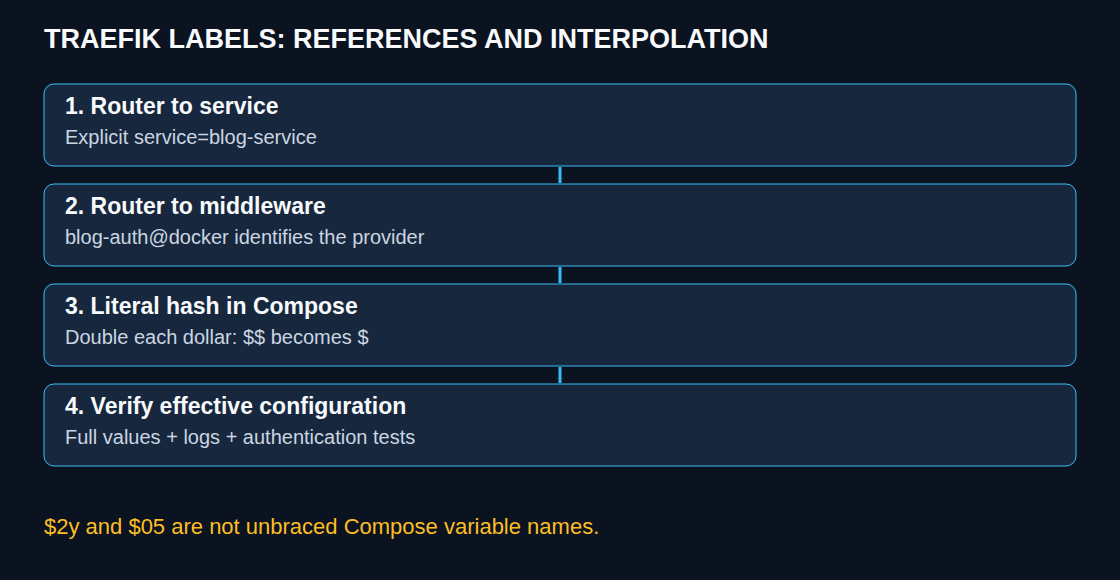
Explicit connections between router, service and middleware
This fragment belongs under an application service in Compose. It assumes a configured Docker provider, the websecure entrypoint, the le resolver and a shared Docker network actually named proxy. The Docker provider reads routing configuration from container labels. An entrypoint defines where Traefik accepts connections; the certificate resolver obtains TLS certificates. The application must be reachable on internal port 8080. The user file must be mounted readably at the specified path inside the Traefik container; the fragment is not a complete installation.
labels:
  - "traefik.enable=true"
  - "traefik.docker.network=proxy"
  - "traefik.http.routers.blog.rule=Host(`blog.example.com`)"
  - "traefik.http.routers.blog.entrypoints=websecure"
  - "traefik.http.routers.blog.tls=true"
  - "traefik.http.routers.blog.tls.certresolver=le"
  - "traefik.http.routers.blog.service=blog-service"
  - "traefik.http.routers.blog.middlewares=blog-auth@docker"
  - "traefik.http.middlewares.blog-auth.basicauth.usersfile=/etc/traefik/auth/blog.htpasswd"
- "traefik.http.services.blog-service.loadbalancer.server.port=8080"blog, blog-service and blog-auth deliberately use different names. The router’s service and middleware fields establish the references. A typo in a freely chosen object name can declare another object, whereas a typo in a defined field such as loadbalancer can cause a decoding error.
Without an explicit service reference, the Docker provider can assign a single declared service automatically or create a service. Multiple services make that automatic choice ambiguous. A different service name may therefore go unnoticed in the single-service case, while a later explicit reference fails. Names should avoid conflicts throughout the provider, including across Compose projects.
Without an explicit destination port, documented Docker detection uses the sole or lowest exposed port. This is not automatic selection of a published host port and does not prove that the intended application is listening there. An explicit internal port makes the intention clear.
Provider names and effective protection
An unqualified middleware name resolves within the router’s provider. blog-auth@docker states that namespace explicitly; blog-auth@file references middleware from an enabled file provider. A missing referenced object prevents that route from being built. This is not a host-wide security guarantee: another matching router may still accept the request.
Declaring middleware does not automatically protect every path to a service. Router chains and any entrypoint default middlewares determine the effective chain. An empty router middleware list therefore does not necessarily mean no protection; conversely, another hostname, entrypoint or directly published backend port can bypass expected protection. BasicAuth needs HTTPS to protect credentials in transit.
What Compose actually does with dollar signs
Substituting a variable means replacing its name with its configured value; this is called interpolation. Compose substitutes valid variable expressions such as $NAME and ${NAME}. An unbraced variable name starts with a letter or underscore. The bcrypt prefixes $2y and $05 are therefore not removed as those variables. A later hash segment such as $e6zX... can nevertheless start a variable expression; an unset variable normally produces a warning and an empty replacement. The original hash is then no longer reliably preserved.
For a hash written directly into an interpolated Compose label, Traefik recommends escaping every $ as $$. This Bash command prompts for a password and doubles dollar signs in the generated user line:
set -o pipefail
htpasswd -nB admin | sed 's/\$/$$/g'
The complete output belongs after basicauth.users= when using that option instead of usersfile. Ellipses in explanatory hash fragments are not a valid replacement for a complete hash. Supplying a password as an htpasswd -b argument can expose it through process listings or shell history; the interactive variant avoids that argument.
Doubling is a Compose-processing rule, not a Traefik rule. An unchanged mounted user file and a directly read Traefik dynamic configuration file contain single dollar signs. Command lines also require attention to the shell; POSIX-shell single quotes protect a literal hash from variable expansion. .env files have their own quoting rules. Moving a value between these locations therefore requires another check.
Diagnosis without guaranteed status codes
| Finding | Useful check |
|---|---|
| Missing service or middleware | Check provider, reference and router errors. Without another matching route, 404 is typical; other routers or upstream systems may respond differently. |
| Changed or invalid hash | Check Compose warnings, effective value and authentication errors. A 401 is possible, but does not uniquely establish interpolation. |
| Unreachable backend | Check network, internal IP, port, listener and timeouts. A 502/504 is a typical clue, not a complete diagnosis. |
| Container not enabled | With exposedByDefault=false, check traefik.enable=true and other provider conditions. |
| Identical object names with different definitions | Inspect provider-wide name conflicts and logs; Compose project naming does not reliably resolve label-object conflicts. |
docker compose config shows resolved configuration without starting containers. docker inspect shows stored labels and networks of an existing container. Comparison needs the complete hash, not just its length; both outputs can contain sensitive values. Traefik logs and effective router/service objects then show what was accepted. A dashboard view does not replace authentication tests across all access paths.
Questions and answers
Does usersFile refer to the same file inside the application container?
No. Traefik reads the file from its own runtime environment. Mounting it only into the application is insufficient. Read permissions and a read-only mount need checking. Combining users and usersFile merges both lists; precedence for duplicate names should be checked against the deployed Traefik version.
Which network name does the label expect?
traefik.docker.network expects the actual Docker network name. Compose may prefix it with a project name; an explicit name or external network can differ. The label selects an existing network and does not attach containers to it.
How can the dashboard help?
Through a protected, controlled access path with suitable authentication and TLS. Publicly exposed api.insecure is not an appropriate shortcut. Missing routes, authentication failures and backend errors each need configuration, log and request checks.
Sources
Related articles