English
gzip, Brotli and zstd: What Twenty Large Websites Actually Use to Compress

Contents
A web page arriving in a browser is usually not the page the server keeps on disk. It is a packed version of it, and the unpacking happens so early that nothing further along ever notices.
Which method does the packing is agreed between browser and server on every single request. Three of them are in circulation, and a measurement of twenty large front pages shows that one is doing almost all the work.
Two header lines settle it
The browser opens with a list. Its request carries a line named Accept-Encoding, and that line names everything the browser is able to unpack – today usually gzip, deflate, br, zstd.
The server picks one from that list, packs the answer, and says which one it took in a line called Content-Encoding. Where it picks nothing, that line is simply absent and the body travels exactly as it lies on disk.
One further line matters wherever a cache sits in between. Vary: Accept-Encoding tells that cache the answer depends on what was asked for, so a packed copy is never handed on to a client unable to unpack it.
Nothing in this exchange is a fixed setting at either end. It is negotiated afresh for every file, every time.
The three methods
gzip is the oldest and the safest. It has been in every browser and every command-line tool for decades, and nothing anywhere refuses it.
br, short for Brotli, is newer and generally packs text tighter than gzip at comparable reading speed. Browsers offer it over HTTPS only.
zstd is newer still. Its argument is speed rather than density: it packs and unpacks faster at similar ratios, which counts most where the packing happens fresh for every single request.
deflate also appears in the list, largely out of habit. It is the same algorithm as gzip in a different wrapper, and it is offered far more often than it is ever used.
What twenty front pages actually send
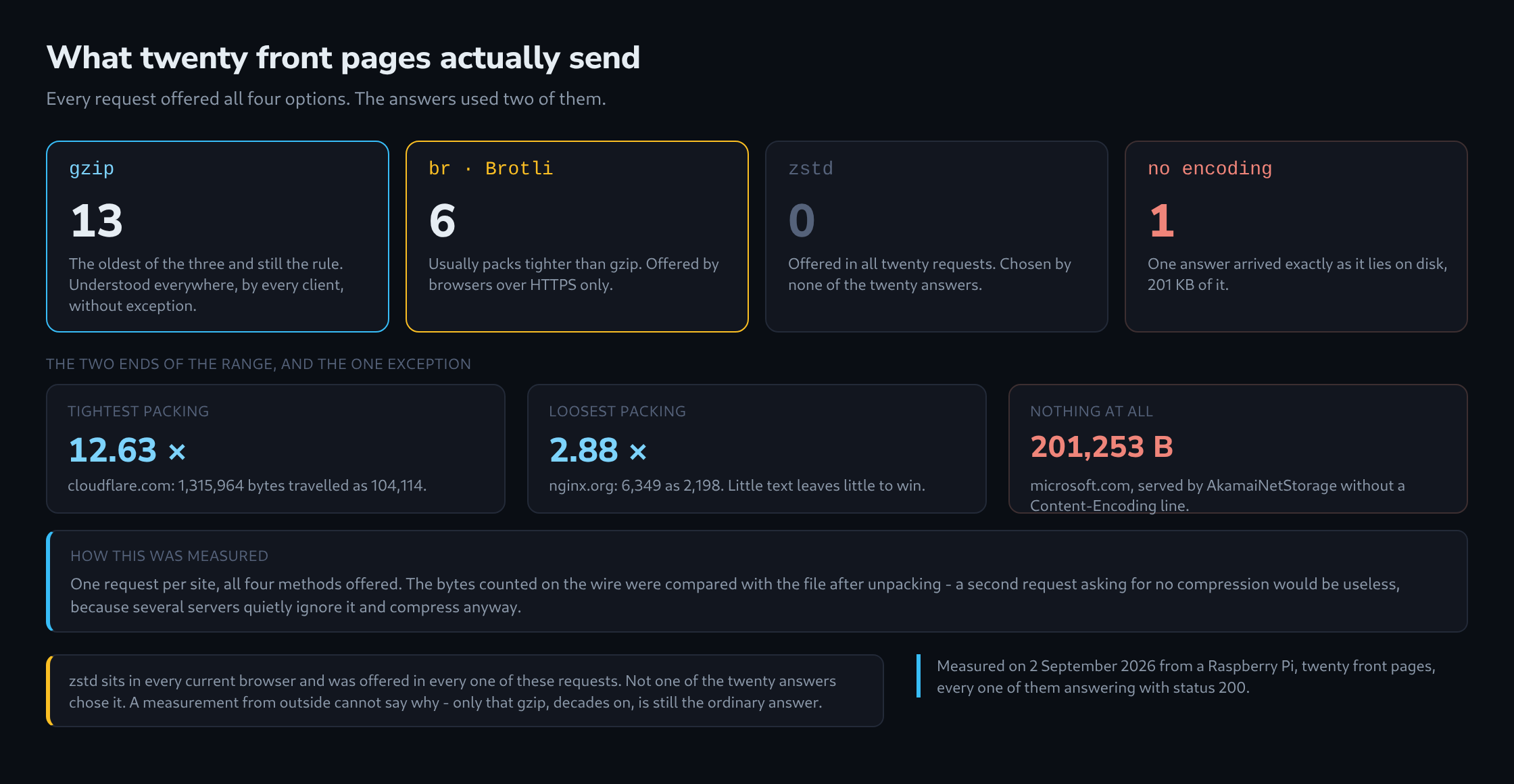
Twenty large sites were asked once each on 2 September 2026, every request offering all four methods. All twenty answered with status 200.
Thirteen answered with gzip: Wikipedia, GitHub, the BBC, the New York Times, Apple, Spiegel, Heise, python.org, debian.org, kernel.org, gnu.org, nginx.org and postgresql.org.
Six answered with br: cloudflare.com, mozilla.org, w3.org, zeit.de, tagesschau.de and php.net.
One answered with nothing at all.
And zstd, offered in all twenty requests, was chosen by none of them. The reason is not visible from outside. What is visible is that gzip, three decades on, remains the ordinary answer.

How much it actually saves
The measured ratios run from 2.88 to 12.63.
The tightest was cloudflare.com: 1,315,964 bytes of markup travelled as 104,114. The loosest was nginx.org at 2.88, and that is no failing – the page is short and plain, and a small file simply holds less repetition to exploit.
Size helps, in other words. Large pages assembled by a framework compress far better than small hand-written ones, because compression lives on repetition and a generated page is full of it.
Brotli did not win automatically either. tagesschau.de reached 11.99 with it, while zeit.de managed 3.38 with the same method. What is being packed counts for more than which algorithm packs it.
The one that sends nothing
microsoft.com produced the single answer without a Content-Encoding line: 201,253 bytes of HTML, exactly as stored.
The response names its origin plainly enough – server: AkamaiNetStorage, a bare content-length, no vary. Compression would have removed roughly nine tenths of it.
That deserves stating precisely, because one measurement is one measurement: what arrived here, at this hour, over this route, was uncompressed. A different edge or a different path may answer differently. The response was real all the same, and 201 KB is what crossed the wire.
The measuring mistake that invents a result
The obvious way to measure a ratio is to ask twice: once with Accept-Encoding: identity and once offering everything. Divide the size of the first response by the size of the second.
That method produced a clean, confident and wrong answer here. python.org came back at 11,672 bytes both times, a ratio of exactly 1.00, which reads as a site that does not compress at all.
It does. The server ignored the request for no compression and sent gzip regardless, so both numbers were the packed size. Measured properly, python.org packs 52,820 bytes down to 11,672 – a ratio of 4.52.
The method that cannot be fooled needs only one request: count the bytes arriving on the wire, then compare them with the file after unpacking. Both numbers come out of the same response, so no server gets the chance to answer a second question differently.
Questions and answers
Is compression worth it for images and font files too?
Hardly. JPEG, PNG, WebP and WOFF2 are already compressed internally, and gzip or Brotli find almost no repetition left to exploit; sometimes the file even grows slightly. Servers therefore usually limit compression to text formats such as HTML, CSS, JavaScript, JSON and SVG.
Does Brotli cost more server time than gzip?
That depends on the level. Brotli has quality levels from 0 to 11, and the top ones pack considerably more slowly than gzip. For responses generated fresh on every request, such as HTML from WordPress, medium levels are therefore common, where the time needed is in the same range as gzip while the result is still tighter.
Static files change the calculation. CSS and JavaScript can be packed once at the highest level during deployment and stored as a finished file next to the original; the server then only hands out the matching version. The slow level costs time once rather than on every request. The speed argument of zstd is aimed at exactly the opposite case, packing on every request.
Is compression over HTTPS a security risk?
In one narrowly defined case. The BREACH attack exploits the fact that a compressed response becomes shorter when text injected by the attacker matches a secret in the same response. Three things are needed at once: a secret in the response body, such as a CSRF token, attacker input that is reflected in the same response, and the ability to trigger a large number of requests and observe the length of the encrypted responses.
The usual defence leaves compression switched on and removes one of the conditions instead: tokens masked differently on every delivery, or no unfiltered reflection of input on pages that carry secrets. Compression at the TLS level, the target of the older CRIME attack, no longer exists in TLS 1.3; it has nothing to do with Content-Encoding.
What does the single-request measurement look like on the command line?
The simplest way is curl without automatic unpacking: the request offers only gzip, and the response is written to a file exactly as it crossed the wire.
curl -s -D - -H "Accept-Encoding: gzip" -o page.gz https://example.com/
The printed headers show whether the server actually set Content-Encoding: gzip. After that, wc -c < page.gz gives the size of the packed body as it was transferred and gzip -dc page.gz | wc -c the size after unpacking; the ratio of the two is the figure being sought. Both come from the same response, which is exactly the point.
If the Content-Encoding line is missing, the file is not packed at all and gzip stops with an error message. That is a finding too, the microsoft.com case. The same applies to Brotli with br in the offer and the brotli program for unpacking, if it is installed.
Related articles