English
Why Looker Studio Reports Hit GA4 Limits: Measuring Query Usage

Management Summary
Looker Studio dashboards draw on Google Analytics data to show website and marketing results. These requests use tokens, units that measure processing work against a limited allowance. A busy or complex report can exhaust that allowance and stop displaying fresh results. Measuring actual use helps identify demanding charts, choose sensible update intervals and leave room for other reports using the same data source. Saved results can reduce repeated requests.
Contents
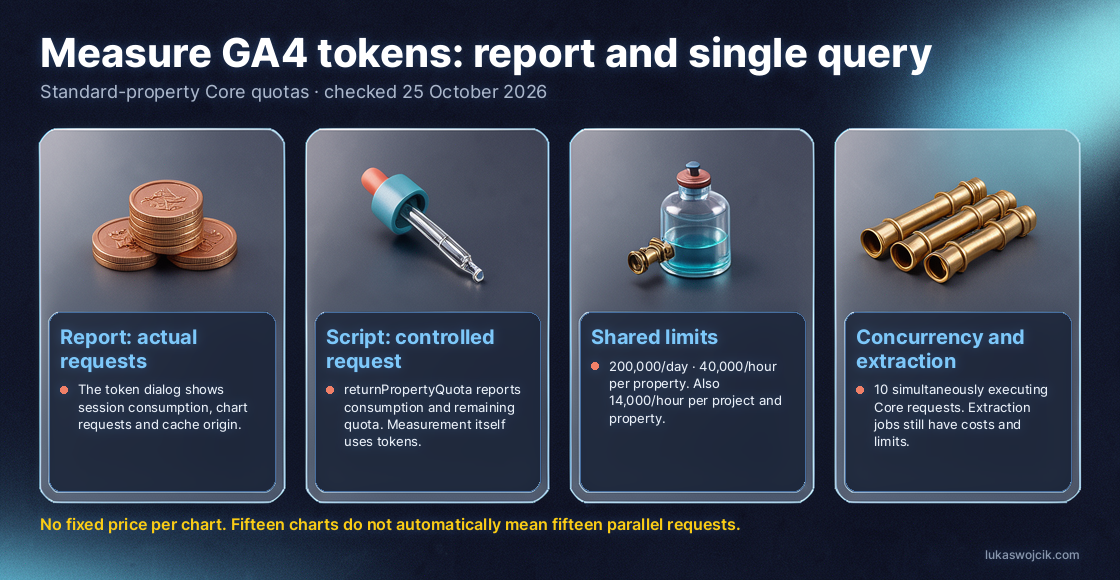
Data API tokens are accounting units for the work required by a query, rather than pieces of text. A Looker Studio report’s token usage can be inspected directly in the report. A separate Python script adds controlled single-query measurements. These answer different questions: the report shows actual chart requests, while the script measures a deliberately defined Data API request.
Applicable requests against the same GA4 property share quota. Measurement itself consumes tokens. One chart does not necessarily equal one request, and caching means one page view need not cause new API calls.
1. Inspection of the actual report
In edit mode, right-clicking the report canvas opens “Google Analytics token usage”. Right-clicking an individual chart opens its details. The overview shows report or page consumption during the session, remaining quota and a breakdown by chart. Details include each request’s consumption, completion time and whether the result came from GA4 or memory cache.
A useful record includes date range, filters, report page and cache status. A session total is not a whole day’s consumption across all report users. A memory hit can avoid new Data API tokens; new filter combinations or manual refreshes can trigger requests.
2. The relevant limits
For Core requests on a standard property, Google’s documentation checked on 25 October 2026 lists:
| Quota | Limit |
|---|---|
| Tokens per property per day | 200,000 |
| Tokens per property per hour | 40,000 |
| Tokens per project and property per hour | 14,000 |
| Simultaneously executing Core requests per property | 10 |
| Server errors per project and property per hour | 10; HTTP 500 and 503 count |
Potentially thresholded requests have an additional limit. Realtime, Funnel and Chat methods use separate quota categories. The runReport method used here belongs to Core.
Hourly quotas refresh within an hour, not necessarily at whole-hour boundaries. Google specifies midnight Pacific Standard Time for daily quotas. The report’s local time zone is therefore not a reliable budget boundary.
3. Measuring individual requests with Python
Requirements include a project with the Data API enabled, property access and the google-analytics-data library. Google supports user and service accounts. A permanently stored JSON key file is not universally required. The client uses Application Default Credentials; identity, OAuth scopes and property permissions need appropriate prior configuration.
The example reads GA4_PROPERTY_ID from the environment and requests seven complete days ending yesterday. return_property_quota=True requests quota details. Automatic retries are disabled for this single measurement attempt so that one call does not silently involve repeated attempts.
import json
import os
from datetime import datetime, timezone

from google.analytics.data_v1beta import BetaAnalyticsDataClient
from google.analytics.data_v1beta.types import (
    DateRange, Dimension, Metric, RunReportRequest,
)
from google.api_core.exceptions import GoogleAPICallError, ResourceExhausted

QUOTAS = (
    "tokens_per_day", "tokens_per_hour", "tokens_per_project_per_hour",
    "concurrent_requests", "server_errors_per_project_per_hour",
    "potentially_thresholded_requests_per_hour",
)

def measure(client, property_id):
    if not property_id.isdecimal():
        raise ValueError("GA4_PROPERTY_ID must contain digits")
    request = RunReportRequest(
        property=f"properties/{property_id}",
        dimensions=[Dimension(name="sessionSourceMedium")],
        metrics=[Metric(name="sessions"), Metric(name="activeUsers")],
        date_ranges=[DateRange(start_date="7daysAgo", end_date="yesterday")],
        limit=10000,
        return_property_quota=True,
    )
    record = {
        "checked_at": datetime.now(timezone.utc).isoformat(),
        "property": request.property,
        "request": json.loads(RunReportRequest.to_json(request)),
    }
    try:
        response = client.run_report(
            request=request, retry=None, timeout=30.0
        )
    except ResourceExhausted:
        return {**record, "status": "quota_exhausted", "quota": None}
    except GoogleAPICallError as error:
        return {
            **record, "status": "api_error",
            "error_type": type(error).__name__, "quota": None,
        }
    if not response._pb.HasField("property_quota"):
        return {**record, "status": "quota_missing", "quota": None}
    quota = response.property_quota
    values = {}
    for name in QUOTAS:
        if quota._pb.HasField(name):
            item = getattr(quota, name)
            values[name] = {
                "consumed": item.consumed, "remaining": item.remaining
            }
        else:
            values[name] = None
    return {
        **record, "status": "ok", "quota": values,
        "row_count": response.row_count,
        "rows_returned": len(response.rows),
    }

if __name__ == "__main__":
    property_id = os.environ["GA4_PROPERTY_ID"]
    # Application Default Credentials; no implicit retry in this measurement.
    client = BetaAnalyticsDataClient()
    print(json.dumps(measure(client, property_id), ensure_ascii=False))
consumed means quota charged by this request; remaining is the reported balance afterwards. Daily, hourly and project token fields describe the same charge against different limits and must not be added into a triple request cost. Missing quota objects are reported as missing, not as zero tokens.
The 10,000-row limit bounds the example response. row_count may be larger, requiring additional pages for a complete extraction. This is a single measurement attempt, not a complete export or a simulation of the Looker report’s load. Error paths were tested with real SDK message types and an injected simulated client, without querying a GA4 account.
4. Interpretation of cost and caching
Cost depends on how much data the query processes. Relevant factors include the date range, number of events, filters and selected attributes and measurements. Many different values of an attribute can also make the query more demanding. Chart types therefore have no fixed token price list. Changing one dimension or date range at a time under comparable conditions makes cost differences easier to interpret.
The current freshness documentation is inconsistent: its prose still describes a fixed twelve hours, while the Google Analytics table lists one, four or twelve hours. The available setting on the actual data source remains decisive. Google also does not guarantee a memory hit throughout the entire interval. When a report uses each viewer’s login, Looker Studio keeps a separate cache for that viewer. When it uses the owner’s login, the cache can be shared.
5. Planning for failures and extraction
Fifteen charts do not establish fifteen simultaneously executing API requests. Actual concurrency matters. Queues and bounded parallelism reduce peaks. Quota exhaustion requires attention to the affected limit and refresh timing; rapid retries cannot replenish a daily budget. Limited retries with increasing delays can address transient failures. Jitter adds a random variation to each delay so separate jobs do not all retry together. A stopping condition is still needed.
Scheduled extraction can decouple report views from direct GA4 queries when every relevant chart uses only the stored dataset. The job still consumes quota. Multiple queries, pagination, retries, overlapping runs and other applications remain relevant. Exactly one API call per interval and elimination of quota risk are not guaranteed.
The process should prevent a second simultaneous start, record token use and stop after a limited number of failed attempts. New report data should become available only after the entire retrieval succeeds. A failed run should not silently leave a half-written report. BigQuery and other storage systems have their own costs and limits.

Questions and answers
How large can an hourly run be?
Dividing 200,000 by 24 yields 8,333.33 tokens per run, without reserve or other access. An illustrative 80-percent planning budget gives about 6,667. This is not a recommendation for every property: hourly limits, peaks, retries and actual cost must also fit.
Do separate projects provide complete isolation?
Project limits are separate, but property limits remain shared. A test can still consume property quota needed by the extraction job.
Does the script replace the token dialog?
No. The dialog shows requests actually triggered by the report. The script enables controlled custom queries and complements that view.
Related articles