GA4 BigQuery Cost Optimization: Stopping Budget Burn on Raw Exports
Contents
GA4 BigQuery Cost Optimization: Stopping Budget Burn on Raw Exports
Working with the native Google Analytics 4 (GA4) event export in Google Cloud BigQuery provides unmatched analytical flexibility. However, unoptimized queries against raw event tables can rapidly inflate cloud infrastructure bills. Since BigQuery charges based on the amount of data processed during query execution, understanding the underlying columnar storage architecture is critical for sustainable data engineering.
1. The Architectural Pitfall of SELECT * on events_* Tables
BigQuery separates query execution from storage: Dremel is the distributed query engine, while the data itself is held in Capacitor, BigQuery's columnar storage format. In a traditional row-oriented database, querying a single row reads the entire record. In a columnar database, each column is stored individually across distributed storage blocks. Therefore, query costs depend entirely on the total data volume of the specific columns referenced in the query.
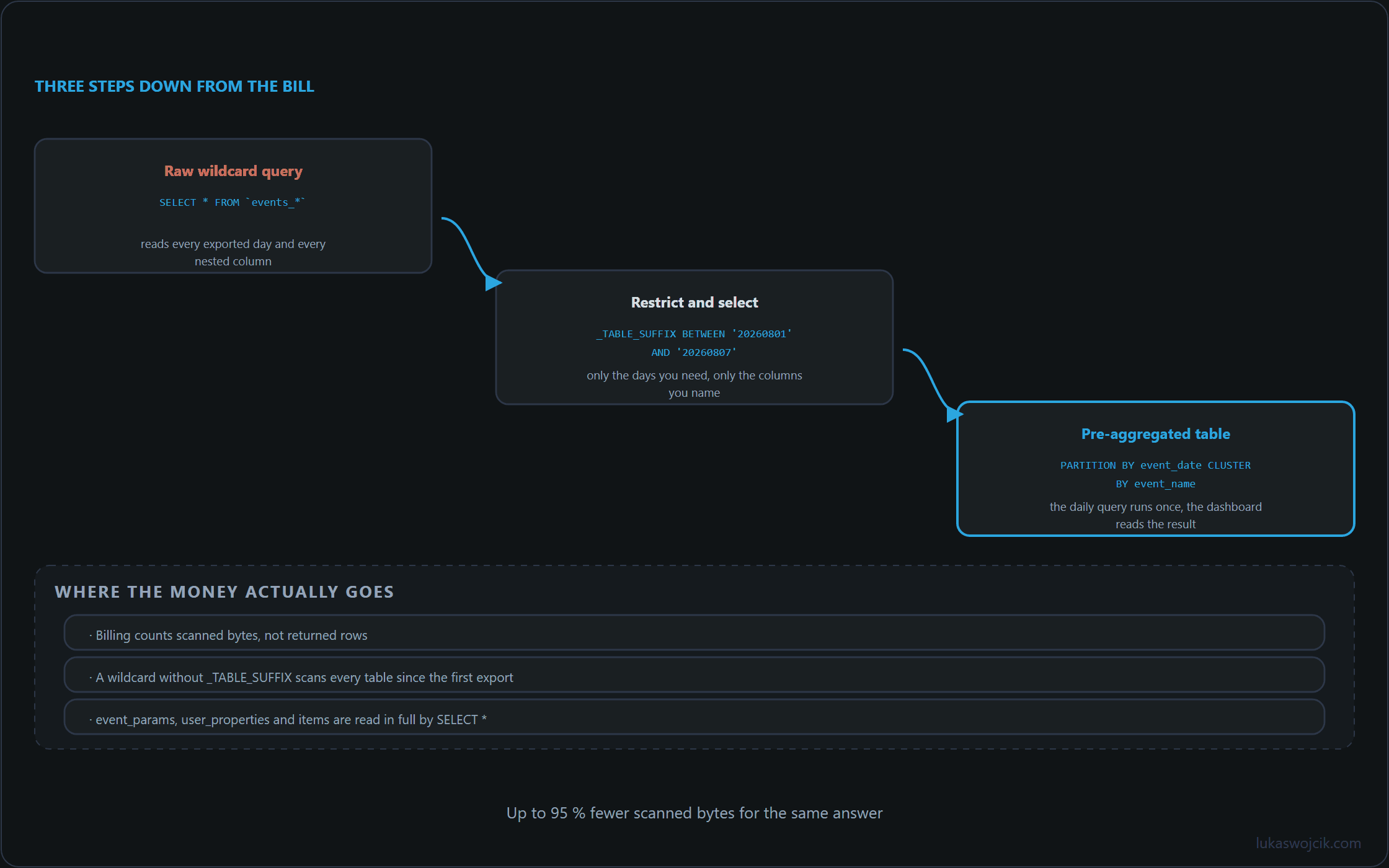
Executing a generic SELECT * FROM `project.analytics_12345.events_*` forces the engine to read every single column across all available shards—including massive nested RECORD arrays such as event_params, user_properties, and items. A single query across several months of raw data can easily scan terabytes, generating substantial unnecessary costs.
2. Date Partitioning and Table Suffix Filtering
GA4 exports data into sharded tables formatted as events_YYYYMMDD. The primary mechanism to reduce scanned bytes is strict date partitioning via the _TABLE_SUFFIX pseudo-column. Without this filter, BigQuery reads the entire history of the dataset before applying WHERE clauses.
-- HIGH COST (Scans entire dataset history):
SELECT event_name, user_pseudo_id
FROM `project.analytics_12345.events_*`
WHERE event_name = 'purchase';

-- OPTIMIZED (Restricts scan to a specific 7-day window):
SELECT event_name, user_pseudo_id
FROM `project.analytics_12345.events_*`
WHERE _TABLE_SUFFIX BETWEEN '20260801' AND '20260807'
  AND event_name = 'purchase';
3. Clustering by event_name and user_pseudo_id
While partitioning filters data at the table-shard level, clustering sorts storage blocks internally based on specific column values. When custom analytics pipelines frequently filter by event types or user identifiers, applying clustering to downstream staging tables dramatically reduces execution overhead.
When a query filters by a clustered column, BigQuery skips scanning irrelevant storage blocks automatically. For analytical workloads, ordering clustering keys by cardinality—starting with event_name followed by user_pseudo_id—delivers maximum scanning efficiency.
4. Building Intermediate Tables with Incremental Scheduled Queries
Repetitively querying raw nested GA4 tables for dashboards or reporting tools is highly inefficient. Best practices dictate implementing an ETL (Extract, Transform, Load) workflow using Incremental Scheduled Queries. By processing only the most recent day’s data and appending it to a flat, clustered summary table, historical scan costs are reduced by up to 95%.
-- One-off setup: create the target table (run once)
CREATE TABLE IF NOT EXISTS `project.analytics_12345.daily_user_metrics`
(
  event_date DATE,
  event_name STRING,
  user_pseudo_id STRING,
  total_events INT64,
  sessions INT64
)
PARTITION BY event_date
CLUSTER BY event_name, user_pseudo_id;

-- Daily incremental aggregation query (the scheduled job)
DELETE FROM `project.analytics_12345.daily_user_metrics`
WHERE event_date = DATE_SUB(CURRENT_DATE(), INTERVAL 1 DAY);

INSERT INTO `project.analytics_12345.daily_user_metrics`
SELECT
  PARSE_DATE('%Y%m%d', event_date) AS event_date,
  event_name,
  user_pseudo_id,
  COUNT(1) AS total_events,
  COUNT(DISTINCT (SELECT value.int_value FROM UNNEST(event_params) WHERE key = 'ga_session_id')) AS sessions
FROM `project.analytics_12345.events_*`
WHERE _TABLE_SUFFIX = FORMAT_DATE('%Y%m%d', DATE_SUB(CURRENT_DATE(), INTERVAL 1 DAY))
GROUP BY 1, 2, 3;
Summary
Cost-effective GA4 BigQuery architecture relies on three foundational rules: eliminating explicit wildcard column selections, restricting scanning boundaries through strict _TABLE_SUFFIX rules, and offloading heavy reporting workloads to flattened, clustered intermediate tables populated via daily scheduled runs.
Related articles