Two June Analytics Changes That Arrive Without an Error Message
Contents
- 1. Two changes that took effect in June without an error message
- 2. The 37-month boundary in the BigQuery Data Transfer Service
- 3. Why a backfill can replace complete history
- 4. A guard before the run: check the boundary, count the rows, keep a copy
- 5. Google Signals has controlled less since 15 June
- 6. An inventory per property, and what stays open
- Summary
Two changes in the Google analytics stack became effective in June 2026. Both are documented, both are in force as of 10 August 2026, and neither announces itself while a pipeline runs. The first narrows what the BigQuery Data Transfer Service will fetch during a backfill. The second narrows what the Google Signals setting in the Analytics admin actually controls. What links them is not the subject matter but the mode of arrival: no failed job, no exception in a log, no line in a monitoring dashboard. The first surfaces when someone starts a backfill. The second surfaces when someone notices that a switch no longer produces the effect it produced before.
1. Two changes that took effect in June without an error message
Most changes in a data stack announce themselves. A schema shifts and a query fails. An endpoint is retired and a client returns a status code. A quota tightens and a job stops. Those changes are noisy, and the noise is what makes them cheap to handle: the monitoring that already exists catches them, and someone reads the message.
The two June changes belong to a different category. In both cases the system keeps working. Jobs complete, settings can still be toggled, dashboards still render. The change shows up only in the content of the data or in the meaning of a configuration value, and neither of those is covered by the usual alerting.
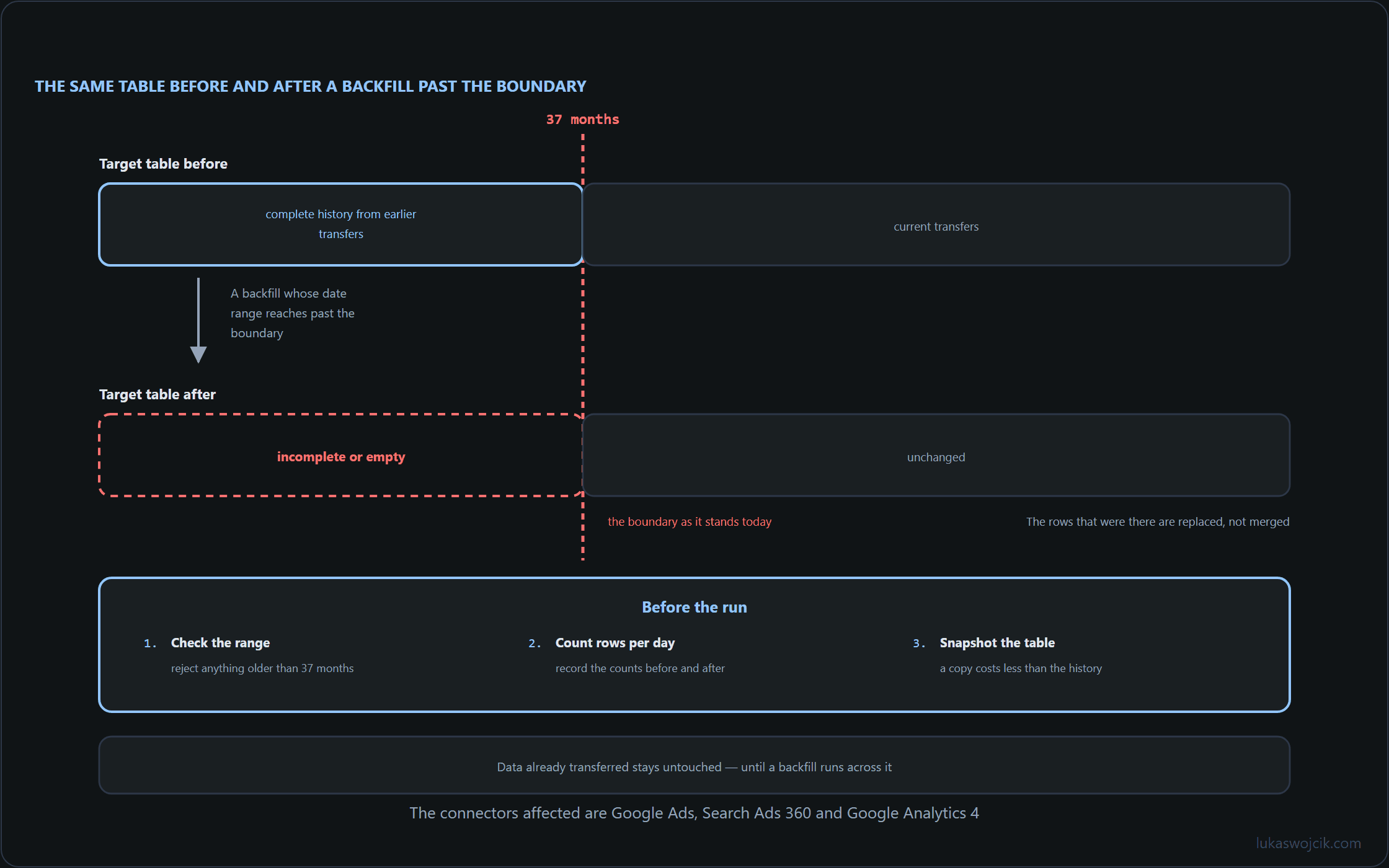
- BigQuery Data Transfer Service: since 1 June 2026 the connectors for Google Ads, Search Ads 360 and Google Analytics 4 no longer populate backfill runs with data older than 37 months. The documentation states that such runs return incomplete or empty results and can overwrite existing complete history.
- Google Signals: from 15 June 2026 the Google Signals setting in the Analytics admin and the Google Signals API control only the association of Analytics data with information from signed-in users for behavioural reporting. Control over the data itself sits with Consent Mode, specifically with the
ad_storageparameter.
The rest of this article treats them as two instances of the same operational problem: a documented change whose effect becomes visible only through a deliberate check. Section 2 to 4 cover the transfer limit and a guard that can be placed in front of a backfill. Sections 5 and 6 cover the Signals change and an inventory that records the current state before it is needed.
2. The 37-month boundary in the BigQuery Data Transfer Service
The entry appeared in the BigQuery release notes on 6 May 2026 and took effect on 1 June 2026. It applies to three connectors of the BigQuery Data Transfer Service: Google Ads, Search Ads 360 and Google Analytics 4. Backfill runs on these connectors are no longer populated with data older than 37 months. The stated reason is a change to the retention rules on the Google Ads side.
Two boundaries of the change matter for anyone maintaining a warehouse built on these transfers. Data already transferred remains untouched — as long as no backfill runs over it. The 37 months are a rolling window, not a fixed cut-off date, so a range that was still inside the boundary in June moves outside it as the months pass. A backfill definition stored in a runbook a year ago and left unchanged will therefore cross the boundary at some point without anything in the definition itself changing.
Several details are not covered by the documentation and should not be assumed. It is not documented which error code or message, if any, accompanies such a run. It is not documented whether the Cloud console shows a warning when a range beyond the boundary is entered. It is not documented whether the operation can be reversed after the fact. A guard therefore cannot be built on a signal from the service; it has to be built on the range that goes in and on the rows that come out.
3. Why a backfill can replace complete history
The core of this change is not the boundary. A limit on how far back a connector reaches would be an inconvenience with an obvious workaround: keep the archive that already exists. The core is the second half of the documented behaviour — a run that returns incomplete or empty results can overwrite history that was complete.
The sequence that leads there is an ordinary one. A warehouse holds four years of transfer data. A late correction, a schema adjustment or a suspected gap prompts a re-run for an older window. The backfill is scheduled with a date range that reaches back beyond 37 months, entirely or in part. The run completes. The partitions inside the window are rewritten with what the connector delivered, and what the connector delivered for the portion beyond the boundary is incomplete or empty. Nothing in that chain requires a mistake in the request itself; the same request would have worked in May.
This is what makes a re-run different from a first load. A first load into an empty range can only add. A re-run over an existing range replaces, and replacement is only safe when the source is at least as complete as the target. Since 1 June that assumption no longer holds for the affected connectors beyond the 37-month mark, which turns a routine operation into one that needs a precondition attached to it.
Because the documentation does not describe a reversal path, the practical consequence is that the check has to happen before the run, and a copy has to exist before the run. Recovery after the fact depends entirely on whatever the warehouse itself preserved.
4. A guard before the run: check the boundary, count the rows, keep a copy
The guard has three parts, and each one is small enough to sit in front of an existing backfill step. All identifiers written in capitals below are placeholders for the project, dataset, table and date column of the warehouse the run touches; the column names are not prescribed by the service and follow whatever the target table already uses.
The first part compares the requested range against the rolling boundary. It answers a single question — does any part of this window fall beyond 37 months — and it answers it from the calendar, not from a response the service may or may not send.
-- PROJECT, DATASET, TARGET_TABLE and PARTITION_DATE are placeholders.
DECLARE backfill_start DATE DEFAULT DATE '2022-01-01';
DECLARE backfill_end   DATE DEFAULT DATE '2022-06-30';
DECLARE earliest_supported DATE DEFAULT DATE_SUB(CURRENT_DATE(), INTERVAL 37 MONTH);

SELECT
  backfill_start,
  backfill_end,
  earliest_supported,
  backfill_start < earliest_supported AS starts_before_boundary,
  backfill_end   < earliest_supported AS ends_before_boundary,
  DATE_DIFF(earliest_supported, backfill_start, DAY) AS days_outside;
The same comparison belongs in the wrapper that triggers the run, so that an out-of-range window stops the job instead of merely producing a row in a result set. A shell gate keeps the decision next to the scheduler rather than inside the warehouse.
#!/usr/bin/env bash
set -euo pipefail

START="2022-01-01"
END="2022-06-30"
BOUNDARY="$(date -u -d '37 months ago' +%F)"

if [[ "$START" < "$BOUNDARY" ]]; then
  echo "range starts $START, boundary is $BOUNDARY - backfill not started" >&2
  exit 1
fi

# only reached when the whole window sits inside the boundary
# ./run_backfill.sh "$START" "$END"
The second part is a row census per day, taken before the run and again afterwards. It does not depend on any message from the service and it makes a replacement with empty results visible as a number rather than as a suspicion. Storing both phases in the same audit table keeps the comparison to a single query.
CREATE TABLE IF NOT EXISTS `PROJECT.audit.transfer_row_census` (
  captured_at TIMESTAMP,
  phase STRING,
  day DATE,
  row_count INT64
);

INSERT INTO `PROJECT.audit.transfer_row_census`
SELECT CURRENT_TIMESTAMP(), 'before', PARTITION_DATE, COUNT(*)
FROM `PROJECT.DATASET.TARGET_TABLE`
WHERE PARTITION_DATE BETWEEN DATE '2022-01-01' AND DATE '2022-06-30'
GROUP BY PARTITION_DATE;

-- after the run, the same statement with phase = 'after', then:
SELECT
  b.day,
  b.row_count AS rows_before,
  IFNULL(a.row_count, 0) AS rows_after,
  IFNULL(a.row_count, 0) - b.row_count AS delta
FROM `PROJECT.audit.transfer_row_census` b
LEFT JOIN `PROJECT.audit.transfer_row_census` a
  ON a.day = b.day AND a.phase = 'after'
WHERE b.phase = 'before'
  AND IFNULL(a.row_count, 0) < b.row_count
ORDER BY delta;
The third part is the copy. Since the documentation says nothing about reversing such a run, the only reliable route back is a copy of the affected range made while it was still complete. A snapshot table named after the run and the date of the run is enough, and it can be dropped once the census shows no negative delta.
CREATE TABLE `PROJECT.DATASET.TARGET_TABLE__pre_backfill_20260810` AS
SELECT *
FROM `PROJECT.DATASET.TARGET_TABLE`
WHERE PARTITION_DATE BETWEEN DATE '2022-01-01' AND DATE '2022-06-30';
Three steps, all on the warehouse side, none of them dependent on a signal the service is not documented to send. The order is what carries the value: boundary check, census, copy, then the run.
5. Google Signals has controlled less since 15 June
The second change is smaller in code and larger in interpretation. From 15 June 2026, the Google Signals setting in the Analytics admin and the Google Signals API govern only one thing: whether Analytics data is associated with information from signed-in users for behavioural reporting. Control over the data itself now sits with Consent Mode, specifically with the ad_storage parameter. The description is on Google Analytics help page 17016975, retrieved on 10 August 2026.
The operational consequence is a shift in which surface answers a given question. A question about signed-in association in behavioural reporting is answered by the Signals setting. A question about the underlying data is answered by the consent configuration on the collection side. A configuration document, an internal wiki page or a client-facing description written before 15 June may still describe the Signals switch as governing the second question, and nothing in the interface marks that description as out of date.
Several things about this change are not documented and are worth naming as open rather than estimating. The help page carries no publication date, so the exact point at which the description was revised cannot be read from the page itself. It names no volume effects, so any statement about how reporting figures move is not supported by the source. And it says nothing about existing audiences, so the status of audiences built while the setting had a wider scope is not addressed there either. Each of these is a question for the properties in question, not one the documentation answers.
6. An inventory per property, and what stays open
What can be done without leaving the documented ground is an inventory: record the current Signals state per property, keep the record, and check the ad_storage consent rates separately in reporting. That produces a dated baseline, which is what any later question about a difference will need.
The Google Signals API is named in the documentation as one of the two control surfaces, but no endpoint names, request fields or response schemas are established here. The script below therefore keeps the API call itself behind a placeholder function, to be filled in against the API reference for the client library in use; the part that is written out is the persistence and the diff, which is where the value of the inventory sits.
import csv
import datetime

# Placeholder: implemented against the Google Signals API with the
# client library in use. Returns whatever state field that API exposes.
def fetch_signals_state(property_id: str):
    raise NotImplementedError("fill in against the API reference")

PROPERTIES = ["PROPERTY_ID_1", "PROPERTY_ID_2"]   # placeholders
OUT = "signals_inventory.csv"

captured_at = datetime.datetime.now(datetime.timezone.utc).isoformat()

with open(OUT, "a", newline="", encoding="utf-8") as fh:
    writer = csv.writer(fh)
    for property_id in PROPERTIES:
        try:
            state = fetch_signals_state(property_id)
            writer.writerow([captured_at, property_id, state, ""])
        except Exception as exc:                  # recorded, not swallowed
            writer.writerow([captured_at, property_id, "", repr(exc)])
The second half of the inventory is the consent side. How ad_storage state is stored differs per setup — it may sit in an export table, in a collection-side log, or in a table maintained by the consent platform — so the table and column names below are placeholders for whatever the warehouse already holds. The query produces a daily rate, which is the form in which a shift over the June boundary would be readable at all.
-- CONSENT_TABLE, DAY_COLUMN and AD_STORAGE_COLUMN are placeholders
-- for the columns in which the warehouse records consent state.
SELECT
  DAY_COLUMN AS day,
  COUNTIF(AD_STORAGE_COLUMN = 'granted') AS granted,
  COUNT(*) AS total,
  SAFE_DIVIDE(COUNTIF(AD_STORAGE_COLUMN = 'granted'), COUNT(*)) AS granted_rate
FROM `PROJECT.DATASET.CONSENT_TABLE`
WHERE DAY_COLUMN BETWEEN DATE '2026-05-01' AND CURRENT_DATE()
GROUP BY day
ORDER BY day;
What the inventory does not deliver is an explanation. A rate that moves across June may reflect the consent configuration, seasonality, traffic mix or a release on the site. The documentation names no volume effects, so attributing a movement to the Signals change would go beyond the source. The record’s purpose is narrower and more durable: it fixes a dated state per property, and it separates the question of what a setting controls from the question of what the data shows.
Summary
- Transfer boundary: since 1 June 2026 the BigQuery Data Transfer Service connectors for Google Ads, Search Ads 360 and Google Analytics 4 no longer populate backfill runs with data older than 37 months. The stated reason is a change to Google Ads retention rules.
- The consequential part: the documentation states that such runs return incomplete or empty results and can overwrite existing complete history. Data already transferred stays untouched as long as no backfill runs over it.
- Not documented: which error code or message appears, whether the interface warns, and whether the operation can be reversed. A guard therefore relies on the requested range, a row census before and after, and a copy taken beforehand.
- Signals scope: from 15 June 2026 the Signals setting and the Google Signals API control only the association of Analytics data with signed-in user information for behavioural reporting; control over the data itself sits with Consent Mode and
ad_storage. - Open on that side: the help page carries no publication date, names no volume effects, and says nothing about existing audiences. A dated per-property inventory records the state; it does not explain movements in the numbers.
Both changes were documented before they took effect, and both remain invisible in day-to-day operation until a specific action or a specific question brings them to the surface. The practical difference between the two is the point at which a check pays for itself: for the transfer boundary it is the moment before a backfill starts, for Google Signals it is the moment a configuration description is written down and dated.
Related articles