English
 Deutsch
 Polski
GA4 Measurement Protocol in Maintenance Mode: What Changes and When the Data Manager API Is Worth Switching To

Contents
- What remains possible with Measurement Protocol
- Authentication: different credentials, not zero maintenance
- Destinations and payloads need explicit mapping
- Encryption supplements hashing
- Monitoring must continue after HTTP success
- A migration with a measurable acceptance criterion
- Questions and answers
- Sources
Google describes the GA4 Measurement Protocol as a mature, finalised product that remains operational, with no planned deprecation. The same notice recommends the Data Manager API for server-to-server event integrations. The practical question is therefore which interface fits the required data flow, rather than how to meet an announced shutdown deadline.
“Maintenance mode” is a useful shorthand for that direction, not a promise that every future change, fix or support decision is already known. The comparison below reflects the documentation available on 24 October 2026.
What remains possible with Measurement Protocol
An existing integration can continue sending events to a GA4 web or app stream. The protocol supplements collection through the Google tag, Tag Manager or Firebase. A server-only implementation can produce incomplete reporting, and historical events are still subject to timestamp and attribution limits. A CRM connection is not an unrestricted archive-import mechanism.
The current notice gives no shutdown date. That supports a planned migration, but does not remove the need to monitor a running integration, protect credentials or check changed requirements.
Authentication: different credentials, not zero maintenance
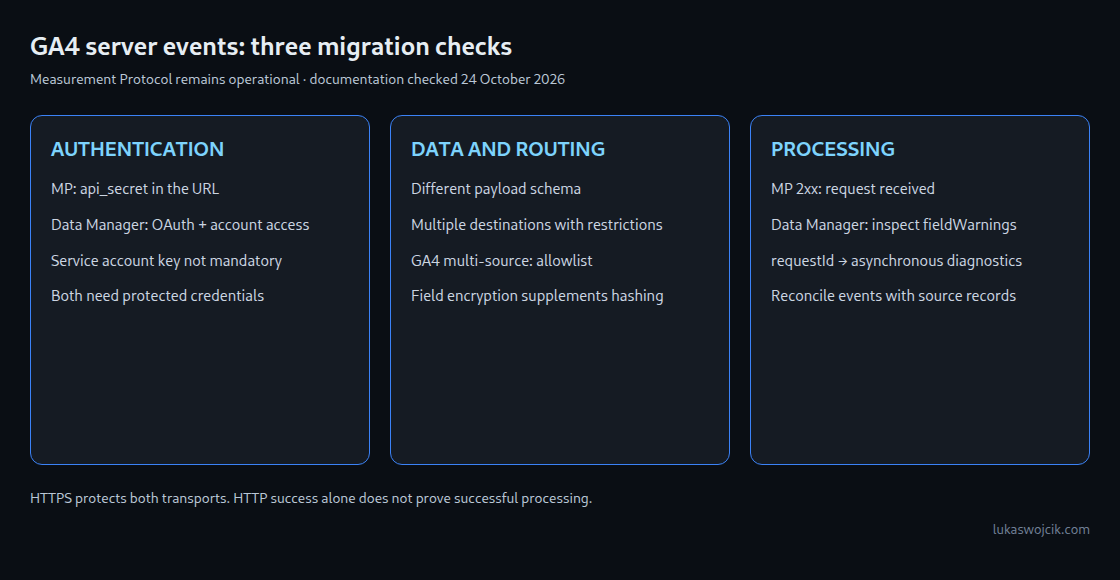
Measurement Protocol uses an api_secret in the request URL. HTTPS protects the transport, but application logs, monitoring and TLS-terminating infrastructure can expose a recorded URL. Query-string redaction and secret rotation both matter. A leaked secret can be used to submit events to the corresponding stream; it is not a credential for reading Analytics reports.
Data Manager API uses OAuth with the scope https://www.googleapis.com/auth/datamanager. Supported approaches include user credentials and service accounts. A service account and a downloaded private-key file are not mandatory: the official setup guide describes service account impersonation. The selected identity also needs access to each destination; for GA4 ingestion, the guide specifies Editor or Administrator.
Access tokens, refresh credentials and any service account keys still require protection. OAuth does not make logging entire authorization headers safe, and a token refresh mechanism does not prevent an administrator from withdrawing account access.
Destinations and payloads need explicit mapping
Measurement Protocol addresses one GA4 stream per request. Data Manager API supports event ingestion for Google Analytics, Google Ads and Floodlight use cases, including relevant Google Marketing Platform products. Multiple destinations can share a request, with destinationReferences selecting the destination for each event. The API’s destination-specific restrictions still apply: an individual event cannot target two Google Analytics destinations.
This is not a change of URL around an unchanged JSON body. For example, GA4 transaction_id maps to transactionId, the event timestamp uses a different representation, and item data moves into cartData. User properties must accompany an event in Data Manager API; a standalone user-properties update supported by Measurement Protocol is not equivalent.
| Requirement | Migration check |
|---|---|
| Recommended or custom GA4 event | Supported event name, stream identifier, timestamp and required client/app identifier |
| GA4 multi-source enhancement | Property allowlist access and a transaction ID |
| Several destinations | Account permissions, destination references and per-destination field requirements |
| Customer identifiers | Allowed fields, normalization, hashing and consent settings |
The general recommended/custom-events route is separate from the allowlisted GA4 multi-source feature. The latter supplements tag or Firebase events and carries a 14-day trial restriction for forwarding new web-stream multi-source data into Google Ads conversion bidding. A blanket claim that the entire Data Manager API is behind an allowlist is incorrect.
Encryption supplements hashing
The UserData.userIdentifiers collection accepts at most ten identifiers in an event or audience member. This is a limit on that collection, not a universal limit on every identifier field in the record.
For supported contact fields, the preparation sequence is normalization, SHA-256 hashing and optional encryption of the hashed values. Data Manager API uses XCHACHA20_POLY1305 for that additional encryption. Measurement Protocol also uses HTTPS: absence of this field-encryption feature does not mean that data travels unencrypted over the network.
KMS support depends on the use case. The current compatibility table permits Google Cloud KMS for Google Analytics multi-source events and marks AWS KMS unsupported for that row. AWS support elsewhere in the API is not proof that an Analytics migration can use the same key-management configuration. Encryption also does not replace consent or other applicable processing requirements.
Monitoring must continue after HTTP success
Measurement Protocol returns a 2xx response when a request is received, even if its payload is invalid or the events are not processed. The validation endpoint /debug/mp/collect helps check payload structure, but does not validate api_secret or firebase_app_id and does not populate reports. Network errors, validation results and eventual arrivals in GA4 need separate checks.
Data Manager API rejects certain invalid requests immediately. A successful response can still contain fieldWarnings; accepted requests also return a requestId for asynchronous diagnostics. Google’s workflow starts checking after about 30 minutes and continues with backoff until each destination reaches SUCCESS, PARTIAL_SUCCESS or FAILURE. Even a success status requires a check for warnings. An alarm that only watches non-2xx responses misses these processing problems.
A migration with a measurable acceptance criterion
A useful sequence is a field-by-field mapping, credential and destination setup, validation, a limited test batch, diagnostics and reconciliation with the source system. Event counts, amounts, currencies, identifiers and attribution need comparison within the applicable processing delays. A retained send ledger makes missing and repeated events easier to distinguish.
For new integrations, the Data Manager API follows Google’s stated direction. For existing integrations, the benefit depends on required destinations, diagnostics, encryption support and migration effort. A working GA4-only sender does not automatically require an emergency replacement.
Questions and answers
Can both interfaces run during migration?
Yes, but parallel sending needs an explicit duplicate-handling plan. GA4 documents transaction-ID deduplication for multi-source data within the same event and property, using information from the first received instance. That is not a guarantee for arbitrary custom events without suitable identifiers. A controlled split or cutover remains useful; duplicate test cases must be checked.
Does a successful validation prove that the upload will arrive?
No. Measurement Protocol validation does not verify all credentials. Data Manager API’s validateOnly checks basic request validity without ingesting events or producing normal processing diagnostics. Destination permissions, actual processing and reporting still require verification.
Is rotating an exposed API secret sufficient?
The new secret needs to be deployed and verified before the old one is retired. The logging path that exposed the old value must also be corrected; otherwise the replacement can leak in the same way. Both URL credentials and OAuth credentials need access controls.
Does migration bypass GA4 collection limits?
No. The recommended/custom-event guide requires event timestamps within the last 72 hours and calls for delivery within 48 hours of the original client event when joining or processing alongside tag or Firebase events. A new API is not an unrestricted historical backfill route.
Sources
- GA4 Measurement Protocol
- Data Manager API: Upgrade from Measurement Protocol
- Data Manager API: Set up API access
- Data Manager API: Recommended and custom events
- Data Manager API: RPC reference
- Data Manager API: Google Analytics multi-source events
- Data Manager API: Events overview
- Data Manager API: UserData
- Data Manager API: Encrypt user data
- Measurement Protocol reference
- Measurement Protocol: Validate events
- Data Manager API: Diagnostics
- Data Manager API: Understand API errors
Related articles