English
 Deutsch
 Polski
Google Tag Gateway: What It Changes in a Measurement Request and How It Differs From Server-Side Tagging

Contents
- What the gateway routes—and what it does not
- Routing and event processing serve different purposes
- Cookie forwarding is not the same as cookie storage
- Set-Cookie does not guarantee a lifetime in Safari
- Deployment details that affect the result
- Combining the gateway with server-side tagging
- Questions and answers
- Sources
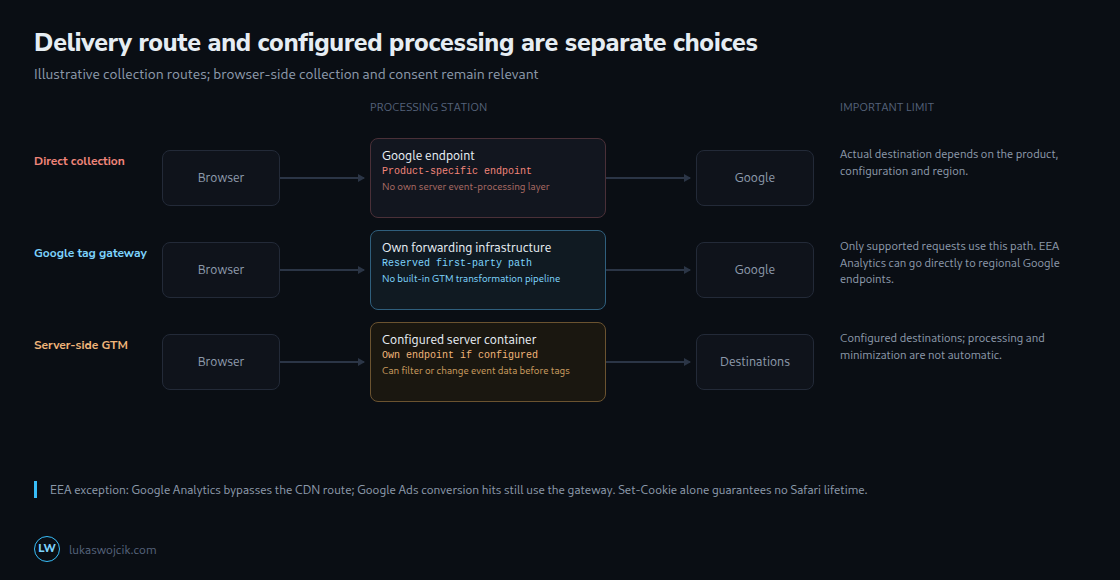
Google tag gateway for advertisers serves Google scripts and routes supported measurement requests through infrastructure on the website’s own domain. Google announced general availability of the Google Cloud integration on 1 June 2026 and a guided Amazon CloudFront setup on 3 June. These deployment options change the delivery route; server-side Tag Manager adds a configurable event-processing layer.
Update — 19.10.2026: The October optimization concerns tag configuration independently of the gateway route. An optimized GTM container can send Google measurements without loading an additional gtag.js. The deployed gateway snippet determines the actual script path; a first-party path does not by itself select or optimize the tag configuration. The October changes to Google tag and GTM.
What the gateway routes—and what it does not
A content delivery network (CDN), load balancer or web server accepts a request on a reserved path and forwards it to the configured Google gateway endpoint. This reverse-proxy arrangement makes the browser-facing request use the website’s domain. Google remains a recipient of forwarded measurement data.
The setup guide deliberately says that some measurement requests use this route. Google’s location documentation specifies an important exception: for visitors in the European Economic Area, Google Analytics measurement goes directly to regional Google endpoints and bypasses the CDN path. Google Ads conversion hits still use the gateway. A first-party script URL therefore does not prove that every subsequent connection stays on the same origin.
The generated deployment snippet is authoritative for the script URL. The current manual guide illustrates a standalone script at /metrics/ and a GTM script at /metrics/?id=.... Paths such as /metrics/gtag/js are not universal requirements. A configured collection path also need not reveal the precise event protocol by its name.
Routing and event processing serve different purposes
A standard gateway setup is not a GTM server container with configurable clients, event transformations and destination tags. That does not make its requests technically unreadable or immutable: the infrastructure can change headers and routing, and a separately implemented proxy could filter traffic. Such changes need their own design and compatibility checks.
With server-side GTM, a client parses the incoming request into event data. Configured transformations can allow, exclude or modify parameters before selected tags use that data. Triggers and tags determine subsequent sending. These controls have to be configured and tested; a server container does not automatically remove sensitive fields or repair collection that already occurred in the browser.
| Aspect | Standard gateway | Server-side GTM |
|---|---|---|
| Browser role | Google script still runs and collects in the browser | Browser collection is usually still needed for page interactions |
| Server role | Serving and forwarding infrastructure | Clients, event data, transformations, triggers and tags |
| Custom event minimization | No built-in GTM transformation layer | Possible through configured processing |
| Own domain | Configured website path | Requires suitable domain and endpoint configuration |
| Operations | Routing, headers, availability, logs and provider costs | Container versions, templates, capacity, security and costs |
Minimization should begin before unnecessary data are collected. Browser-side configuration can omit fields too. Hashing alone does not automatically make a personal identifier anonymous. The right architecture depends on destinations, data controls, maintenance and measured reliability; neither option guarantees the whole task at a fixed lower price.
Cookie forwarding is not the same as cookie storage
Requests to the website’s domain can carry cookies whose scope and browser rules match the request. That can include shop session or login cookies. Google’s cookie-handling documentation says the website forwards first-party cookies and the gateway uses only Google first-party cookies; forwarded non-Google cookies are dropped and are not processed or stored by Google.
This description does not establish that those cookies never reach a Google-operated endpoint. CDN forwarding, access logs and gateway processing are separate stages. The actual route and cookie handling need inspection; a first-party hostname is not proof that all data remain within the website’s own infrastructure.
Set-Cookie does not guarantee a lifetime in Safari
The writing mechanism matters, but it is not the only condition. WebKit describes removal of script-writeable storage after seven days without user interaction and stricter treatment in some link-decoration cases. It also limits cookies set in HTTP responses when third-party CNAME or IP-address cloaking is detected. Consequently, a Set-Cookie header does not guarantee that the requested Max-Age will be preserved.
A single curl -I request cannot settle how the installation creates cookies. The option sends HEAD, not the browser’s actual measurement request. A missing header can mean that no new cookie was needed, that another response sets it or that the test request was incomplete. It does not prove JavaScript creation.
A useful check records the actual browser request and response, any redirect chain, cookie state before and after, acceptance or rejection reasons and the relevant browser settings. JavaScript writes require separate inspection. Appearance after a tag starts is insufficient: the tag may have triggered a server response. Long-term retention needs observation under the intended browser conditions, not just a displayed expiry date.
Deployment details that affect the result
For a manual setup, each distinct standalone tag or container needs an unused path and matching endpoint. The path cannot be the root and must be at most 100 characters. The manual examples derive an endpoint such as g-12345.fps.goog or gtm-abcdef.fps.goog; some provider integrations instead use fps.goog with a tag-ID header. The relevant provider instructions determine Host handling, query strings, cookies, methods and caching.
Location headers matter for reporting and region-specific consent defaults. The preferred country/region form is X-Forwarded-CountryRegion: US-CA; the alternative uses X-Forwarded-Country and, when available, X-Forwarded-Region. The combined form takes precedence. The documentation also describes X-Forwarded-Geolocation for available city and coordinate information.
The transport connection to Google can originate at the CDN while an explicit header carries the original client IP. These are different facts. Google instructs accurate forwarding through a header such as X-Forwarded-For. Trusted proxy configuration must establish the actual client value; an arbitrary browser-supplied header is not an authoritative source.
https://shop.example/metrics/healthy
https://shop.example/metrics/?validate_geo=healthy
These example addresses check route health and geolocation-header handling. An ok response does not prove correct consent behavior, cookie lifetime or receipt of every event. Tag Assistant and actual network observations provide the next checks. The gateway does not support GTM’s <noscript> snippet; that fallback continues to use the standard Google host when present.
Combining the gateway with server-side tagging
Google documents a combined design with one first-party path for scripts and another for collection. The script route goes to Google; the collection route goes to the tagging server, where configured processing precedes destination requests. A tagging server can also serve supported Google scripts directly. Adding a gateway is therefore not the only way to serve scripts from the website’s own domain.
Routing changes can affect blocking and collection, but no recovery percentage follows from the architecture alone. Filter behavior varies by browser, extension, list version and request. An observed increase in recorded conversions is also not proof of more actual purchases.
A controlled comparison can help estimate measurement effects. Stable assignment, avoidance of duplicate sending, equivalent consent conditions and a separately defined business outcome are important. Duration follows traffic volume, delayed conversions and the required precision; two weeks is not a universal guarantee. Before/after comparisons require additional caution about seasonality and simultaneous changes.
Questions and answers
Does the gateway replace consent configuration?
No. Consent settings and banner rules must cover the actual generated script and collection paths. Pending, denied and granted states need checks. Simultaneous container optimization can alter behavior independently of the hostname change.
How can blocking be checked?
A controlled browser test with a recorded blocker and filter-list version can compare actual requests. A blocked request may appear as net::ERR_BLOCKED_BY_CLIENT. The result applies to that setup and date, not every audience or later list version.
Can Google hosts be removed from the Content Security Policy?
Only a path on exactly the same origin can be covered by an appropriate 'self' source expression. Another subdomain is a different origin. Actual script, measurement, preview and destination connections determine the required directives; the EEA Analytics exception is relevant. Report-Only observations and consent-state tests are needed before removing permissions.
Sources
- Server-side tagging
- RFC 9110: HTTP Semantics
- MDN: Set-Cookie
- Set up Google tag gateway for advertisers
- How Google tag gateway for advertisers sets location
- Google Tag Manager: release notes, 8 and 12 October 2026
- Google tag and Tag Manager: unified configuration
- Google tag: supported installation methods
- Google tag in Tag Manager: setup and initialization
- Google: Cookie handling
- WebKit: Tracking Prevention
- Google: Transformations
- Google: Gateway and server-side tagging
- curl: HTTP HEAD
Related articles