English
 Deutsch
 Polski
Automated GA4 & Meta CAPI Event Validation in BigQuery

Contents
- 1. Define what should match first
- 2. Prepare three tables before comparing
- 3. Evaluate the business day and aggregate retries
- 4. Alert on findings rather than successful query execution
- Questions and answers
- Sources
- Practical check: reconcile orders with the shop export
- Preparing the Analytics CSV from BigQuery
- Practical check: inspect the items array before sending
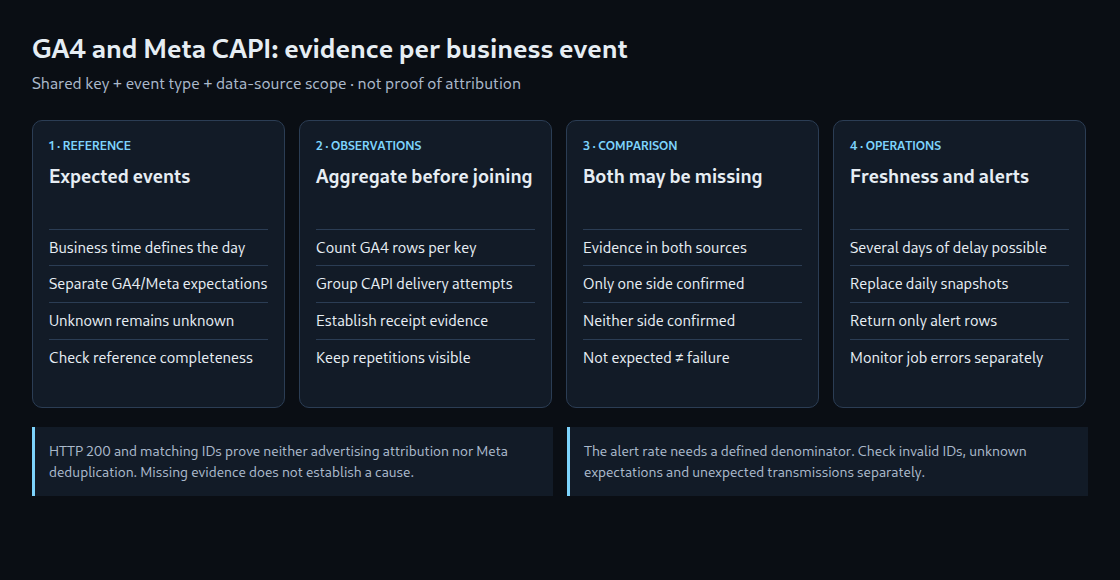
Reconciling GA4 with Meta CAPI shows which expected business events are evidenced in each source. A difference does not establish its cause: consent, different event definitions, processing delays and technical failures can produce the same pattern. GA4 is not necessarily a browser-only stream either.
1. Define what should match first
The starting point is a reliable list of business events, such as confirmed orders. Comparing only two tracking tables cannot reveal an event missing from both. The reference list also needs its own completeness checks.
A stable key connects the sources. UUIDv4 is an option, not a requirement or encryption method. Retries retain the same identifier for the same event; distinct events receive distinct identifiers. An additional scope prevents collisions between shops or data sources.
Event names need an explicit mapping, for example GA4 purchase and Meta Purchase to the common type purchase. GA4’s transaction_id, a custom reconciliation parameter and Meta’s event_id are separate fields. GA4 purchase deduplication and Meta Pixel/CAPI deduplication have their own rules. A BigQuery match proves neither advertising attribution nor successful deduplication at Meta.
2. Prepare three tables before comparing
The example below requires custom tables. Linking GA4 does not create these tables automatically; ingestion and data-quality checks must be implemented first.
expected_events: exactly one row perscope_id,event_kindandevent_id, plusbusiness_timefor the actual business event and BOOL fieldsexpected_ga4andexpected_meta. TRUE means identifiable transmission to that service is intended and permitted; FALSE means not expected; NULL means unresolved.ga4_observations: one row per actually exported event, with the same composite key and ingestion timestamploaded_at. Re-ingesting the same export row must not create another observation. Events actually recorded more than once remain visible.capi_attempts: one row per delivery attempt and associated event, with the key,loaded_atandreceipt_state. Allowed states arereceived,rejectedandunknown. Only evidence attributable to the particular event qualifies asreceived.
HTTP 200 alone is not proof of attribution. A response containing a received-event count also needs a valid association with the request. An ambiguous or partial batch response must not mark every event as received. Failed and uncertain attempts stay in the log; subsequent successful retries add further records. Access tokens and full customer payloads do not belong in this monitoring log.
Blank identifiers, repeated parameter keys, unknown event names and observations without a reference event require separate error lists. Invalid records must not disappear silently. scope_id defines the fixed relationship between shop, GA4 property or stream and Meta data source.
3. Evaluate the business day and aggregate retries
The query uses a UTC business day four days in the past as an example. This allows time for ordinary delays but does not guarantee completeness. The export, reference list and CAPI log must be sufficiently current before evaluation. A missing table is an ingestion failure, not evidence of zero events.
GA4 daily tables follow the property’s time zone. The documentation describes event_timestamp as receipt time; transmission and the business event can differ. The evaluated day therefore comes from business_time. Prepared observation tables must include relevant later arrivals. Reading only the GA4 daily table named for the business day is not generally sufficient.
-- GoogleSQL. Prepared tables are defined in the article.
-- @run_time is supplied by BigQuery Scheduled Queries.
DECLARE target_day DATE DEFAULT DATE_SUB(DATE(@run_time, 'UTC'), INTERVAL 4 DAY);
DECLARE observed_at TIMESTAMP DEFAULT CURRENT_TIMESTAMP();

CREATE TEMP TABLE expected AS
SELECT scope_id, event_kind, event_id, expected_ga4, expected_meta
FROM `project_id.monitoring.expected_events`
WHERE business_time >= TIMESTAMP(target_day, 'UTC')
  AND business_time < TIMESTAMP(DATE_ADD(target_day, INTERVAL 1 DAY), 'UTC');

ASSERT (
  SELECT COUNT(*) = 0 FROM expected
  WHERE scope_id IS NULL OR TRIM(scope_id) = ''
     OR event_kind IS NULL OR TRIM(event_kind) = ''
     OR event_id IS NULL OR TRIM(event_id) = ''
) AS 'Invalid key in expected events';

ASSERT NOT EXISTS (
  SELECT 1 FROM expected
  GROUP BY scope_id, event_kind, event_id
  HAVING COUNT(*) > 1
) AS 'Duplicate business-event key';

CREATE TEMP TABLE result AS
WITH ga4 AS (
  SELECT g.scope_id, g.event_kind, g.event_id, COUNT(*) AS ga4_rows
  FROM `project_id.monitoring.ga4_observations` g
  JOIN expected e USING (scope_id, event_kind, event_id)
  WHERE g.loaded_at <= observed_at
  GROUP BY g.scope_id, g.event_kind, g.event_id
),
capi AS (
  SELECT c.scope_id, c.event_kind, c.event_id,
         COUNT(*) AS capi_attempts,
         COUNTIF(c.receipt_state = 'received') AS capi_receipts,
         COUNTIF(c.receipt_state = 'unknown') AS capi_unknown
  FROM `project_id.monitoring.capi_attempts` c
  JOIN expected e USING (scope_id, event_kind, event_id)
  WHERE c.loaded_at <= observed_at
  GROUP BY c.scope_id, c.event_kind, c.event_id
)
SELECT target_day AS business_day, observed_at AS checked_at, e.*,
       COALESCE(g.ga4_rows, 0) AS ga4_rows,
       COALESCE(c.capi_attempts, 0) AS capi_attempts,
       COALESCE(c.capi_receipts, 0) AS capi_receipts,
       COALESCE(c.capi_unknown, 0) AS capi_unknown
FROM expected e
LEFT JOIN ga4 g USING (scope_id, event_kind, event_id)
LEFT JOIN capi c USING (scope_id, event_kind, event_id);

SELECT *,
  CASE
    WHEN expected_ga4 IS NULL OR expected_meta IS NULL THEN 'SCOPE_UNKNOWN'
    WHEN NOT expected_ga4 OR NOT expected_meta THEN 'OUTSIDE_JOINT_SCOPE'
    WHEN ga4_rows > 0 AND capi_receipts > 0 THEN 'OBSERVED_BOTH'
    WHEN ga4_rows = 0 AND capi_receipts = 0 THEN 'UNCONFIRMED_BOTH'
    WHEN ga4_rows = 0 THEN 'UNCONFIRMED_GA4'
    ELSE 'UNCONFIRMED_CAPI'
  END AS reconciliation_status,
  ga4_rows > 1 AS repeated_ga4_rows,
  (expected_ga4 = FALSE AND ga4_rows > 0)
    OR (expected_meta = FALSE AND capi_attempts > 0) AS unexpected_transmission
FROM result;
Aggregation prevents two GA4 rows and three CAPI attempts from becoming six apparent business events. Repetition remains visible through counts. UNCONFIRMED means missing evidence in the available data, not necessarily a broken tag. unexpected_transmission separately flags transmissions not intended according to the reference.
This is not a complete ingestion pipeline. Table access needs suitable partitioning or limits, permissions and a cost check. Store business day and evaluation time with results. Re-evaluation should deliberately replace older daily snapshots instead of appending duplicates that change the rate.
4. Alert on findings rather than successful query execution
A downstream latest_reconciliation view contains exactly the latest successful snapshot per business day and key. The separate query below returns only days exceeding an example threshold. The minimum of 100 and five-percent threshold need justification; neither is a universal quality standard.
-- A separate scheduled SELECT over the latest successful snapshot.
WITH counts AS (
  SELECT business_day,
    COUNTIF(expected_ga4 AND expected_meta) AS comparable,
    COUNTIF(expected_ga4 AND expected_meta
            AND (ga4_rows = 0 OR capi_receipts = 0)) AS unconfirmed
  FROM `project_id.monitoring.latest_reconciliation`
  GROUP BY business_day
),
rates AS (
  SELECT *, 100 * SAFE_DIVIDE(unconfirmed, comparable) AS rate_pct
  FROM counts
)
SELECT *
FROM rates
WHERE comparable >= 100 AND rate_pct > 5;
With no comparable events, SAFE_DIVIDE leaves the rate unknown. Events outside the joint scope and unresolved expectations stay outside this denominator. Separate checks must monitor those cases, unexpected transmissions, invalid IDs, repeated records and incomplete data feeds.
The Scheduled Query metric last_execution_job_rows counts result rows, not the value of rate_pct. A Monitoring rule filtered to this violations-only query can alert when its row count exceeds zero. The previous value can persist after failed or disabled runs. Execution failures and freshness therefore need separate monitoring; an old retained alert is not a new daily finding.
Questions and answers
Does the reconciliation ID require a GA4 custom dimension?
Not to access a parameter actually exported in event_params. Registration does not guarantee transmission or export, however. Missing or repeated keys need detection during ingestion.
Are 48 hours and a 06:00 UTC run enough?
No. GA4 can update daily tables over several calendar days and occasionally reprocess historical data. CAPI delivery and the local log have separate delays. Waiting periods, freshness checks and re-evaluation of older days belong together; a fixed time does not guarantee export completion.
Can ads_storage substitute for Meta consent checks?
No. Yes, No, Unset and an absent value do not automatically establish permission for a different service. Expectations must reflect the actual documented service configuration and decision. An intentionally unsent event is not a technical fault; an unknown state is not consent.
Sources
Practical check: reconcile orders with the shop export
The Shop vs. GA4 Revenue Reconciliation tool compares two CSV files locally. The order ID is the join key. Names, email addresses and postal addresses are not needed: an order ID, amount and currency are enough. This does not automatically make an order ID anonymous.
- Prepare both exports for the same period and timezone, with the same treatment of tax, shipping and refunds. Aggregate line items and refunds to one agreed amount per order before comparison.
- Select each file’s separator and decimal mark, then load it. Map the order ID, amount and currency columns. Identifiers with leading zeros remain text.
- Select the decimal precision and an explicit per-order tolerance. Currency conversion is not performed.
- Review the separate groups: missing on either side, duplicate ID, different currency and amount outside tolerance.
- Export the result and investigate individual orders in the source systems.
Duplicate IDs are flagged rather than added together: a repeated purchase event, an item-level export and a refund row require different interpretations. Negative amounts are accepted only as numbers; the business definition still has to agree between files. A missing Analytics order can reflect consent, timing, filtering or collection failures and is not by itself proof of a faulty tag. A zero difference also does not establish that all orders were exported. The tool never combines totals across currencies.
Definitions should follow the chosen export and the GA4 ecommerce documentation. The Data API schema distinguishes transaction IDs and revenue metrics; a generic total-revenue column is not automatically equivalent to a shop’s order amount.
Preparing the Analytics CSV from BigQuery
The export helper in the revenue reconciliation tool generates a purchase query for an existing daily GA4 export. Project, dataset, dates and rounding precision are entered locally. The page does not run the SQL or request BigQuery access.
The resulting columns transaction_id, amount and currency match the comparison fields. Each recorded purchase remains a row. An additional purchase-event count helps identify repeated transaction IDs; these are not silently summed or discarded. A missing amount is not replaced with zero.
- Agree on the purchase-amount definition and reporting-day boundaries before creating the shop file. This query excludes refunds and does not add tax or shipping separately.
- Generate SQL, validate it in BigQuery and inspect the cost estimate. Set a maximum bytes billed before execution.
- Save the complete results as a local CSV. Load the file with comma-separated fields and decimal dot, using the same precision as the query.
- Review repeated IDs and missing fields before interpreting amount differences. The comparison accepts up to 20,000 data rows per file. Keep identifiers as text when using spreadsheet software.
Two downloadable invented CSV files provide a reproducible first test, with one case in each of the six result groups. They are independent of the SQL and use two decimals with zero tolerance.
References: GA4 export schema, query validation and cost controls, and saving query results as CSV.
Practical check: inspect the items array before sending
An e-commerce event can arrive successfully while its product data is wrong. The GA4 E-Commerce Item Array Validator checks the JSON array locally and points to the affected field, for example items[0].price. A quoted price such as "12.50" is reported as a type error instead of silently converted.
The check distinguishes errors from review notes. Repeated product IDs can represent variants; they do not automatically prove duplicate purchases. Missing prices prevent a complete calculated value. Zero quantities remain zero, while omitted quantities default to one. The sum uses the already discounted price and excludes tax and shipping. Event-level currency and transaction identifiers still need a separate check.
A useful workflow is to check the array, inspect the actual network request and then reconcile the recorded orders. Passing this structural check alone does not establish correct collection or reporting. Rules and limits follow Google’s e-commerce guide and the purchase reference.
Related articles