English
 Deutsch
 Polski
Cookie Lifetime: The Three Browser Caps and How the Way a Cookie Is Set Changes It

Contents
Max-Age=63072000 requests 730 days of storage. It does not guarantee 730 days of recognition. The browser can cap the expiry, refuse the cookie or remove it earlier. The setting mechanism, tracking protection, browsing mode and cookie attributes all matter.
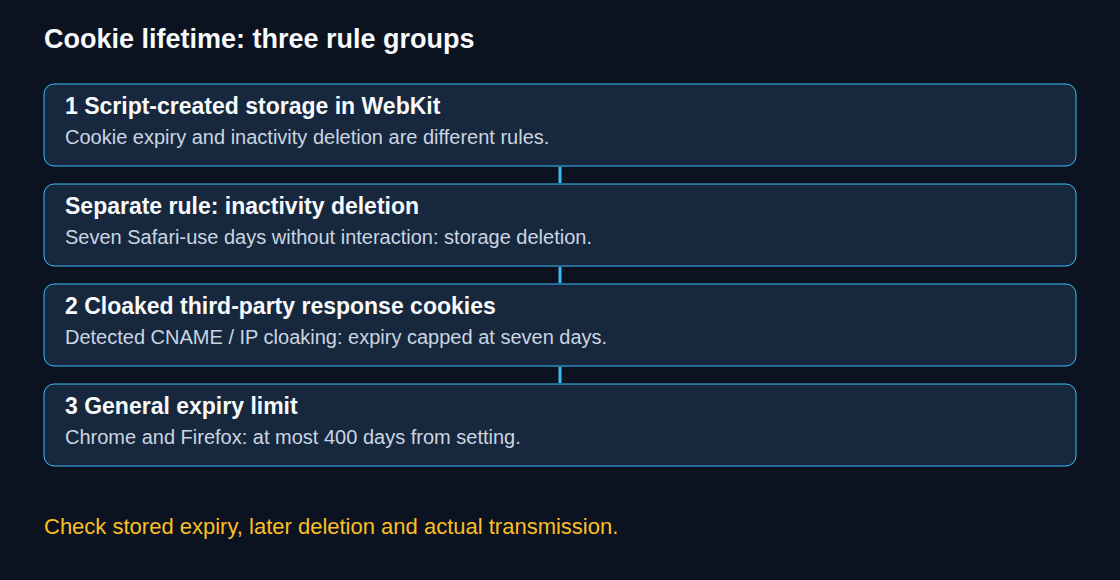
Three groups of limits
Script-created storage in WebKit: ITP 2.1 introduced a seven-day expiry cap for persistent cookies created through document.cookie; shorter requested lifetimes remain shorter and session cookies are a separate case. There is also an inactivity-based deletion rule for script-created cookies and other script-writeable storage. WebKit describes this as seven days of Safari use without interaction with the site. These are distinct mechanisms: an expiry date and a storage-deletion decision must not be treated as the same timer. Rewriting a cookie is not equivalent to a click, tap or keyboard interaction.
Cloaked third-party responses: WebKit caps response-cookie expiry at seven days when third-party CNAME or IP cloaking is detected. A CNAME is a DNS alias; not every alias triggers the rule. The relationship to the first-party domain and the top-frame host’s CNAME matters. An A record alone does not establish an exemption.
General expiry limits: Chrome and Firefox apply a 400-day upper limit when cookies are set. This is a maximum, not a promise of retention or a recommended measurement period. Chrome documents the limit from version 104; current Mozilla implementation records also document the cap.
A server response changes the design, not every restriction
Moving a cookie from JavaScript into a Set-Cookie response can change the applicable rules. It does not guarantee a year of recognition, remove tracking protection or prevent an endpoint outage. Ownership of a server is not the same as the network relationship evaluated by a browser. WebKit’s IP heuristic compares address families and shared address prefixes; the documented criteria can change.
A response can set HttpOnly. Page scripts then cannot read or modify that cookie, although the browser can still send it with eligible HTTP requests, including requests initiated by JavaScript. A tag that expects to read the identifier directly needs a different design. HttpOnly reduces direct cookie theft through script access; it does not neutralize every action an injected script could perform.
Attributes: rejection and transmission are different
SameSite=NonerequiresSecurein current mainstream implementations. Cross-site access can still be blocked by browser policy.SameSite=Laxdoes not exclude every cross-site request: top-level navigation using a safe method such as GET can include the cookie. An omitted attribute can receive a browser’s default-Lax treatment, sometimes with a limited recent-cookie POST exception.__Host-requires Secure, Path=/ and no Domain attribute in supporting browsers, and a secure origin.- Cookie size limits differ in detail. RFC 6265 recommends support for at least 4096 bytes including name, value and attributes; this is not a universal name-plus-value cutoff. Oversized cookies can be rejected, and aggregate request-header limits are a separate issue.
- If both are valid, Max-Age takes precedence over Expires. Expires remains a supported expiry mechanism. Neither combination implies rejection.
Recognition is not historical data retention
If an anonymous identifier expires and no other permitted identity mechanism connects later activity, a returning browser can receive a new identifier. Previously recorded events do not thereby disappear from the analytics database. Whether reports count a new user or connect a conversion depends on identity settings, available data and the attribution method.
A shorter cookie lifetime can fragment paths. It does not make every longer reporting window meaningless, and shortening a configured attribution window does not restore missing links. Reporting should describe the observed coverage and distinguish linked activity from modelled or otherwise connected results.
Questions and answers
Does rewriting extend the lifetime?
A successful update can request a new expiry within the applicable cap. It cannot guarantee uninterrupted recognition: earlier deletion, a shorter requested lifetime or stricter protection may intervene. WebKit also documents a 24-hour expiry cap for JavaScript cookies in detected link-decoration tracking scenarios. A refresh is not a general exemption from those rules.
Does server-side setting remove consent requirements?
No. In Germany, § 25 TDDDG concerns storage on or access to terminal equipment, with defined exceptions; it does not exempt a cookie merely because an HTTP response sets it. Purpose and applicable law remain relevant. Consent-dependent setting and processing must stop after withdrawal. Removing an HttpOnly cookie requires a suitable server response, using the matching name, domain and path with an expired lifetime. Deletion alone must not be followed by automatic recreation.
What should a practical check record?
Record the browser version, privacy mode, setting route and consent state. Compare the requested attributes with the stored cookie, then inspect whether the cookie is actually sent on a later eligible request. For script-created cookies there may be no Set-Cookie header to inspect. A displayed expiry does not prove protection against later inactivity deletion. Missing cookies can result from policy, rejection, deletion or the wrong storage context. An empty document.cookie result also does not establish that an HttpOnly cookie is absent.
Safari-specific behavior needs a relevant Safari/WebKit environment. A desktop Chrome test cannot validate ITP. Differences in returning-user reports alone do not establish the cause.
Sources
- WebKit: Intelligent Tracking Prevention 2.1
- WebKit: Full Third-Party Cookie Blocking and More
- WebKit: Tracking Prevention
- WebKit: Private Browsing 2.0
- Chrome: Cookie expiry upper limit
- Mozilla: Cookie expiry cap implementation
- MDN: Set-Cookie
- RFC 6265: HTTP State Management Mechanism
- TDDDG § 25: Schutz der Privatsphäre bei Endeinrichtungen
Related articles