English
 Deutsch
 Polski
Google Ads Retention: Understanding Limits and Planning Backfills

Contents
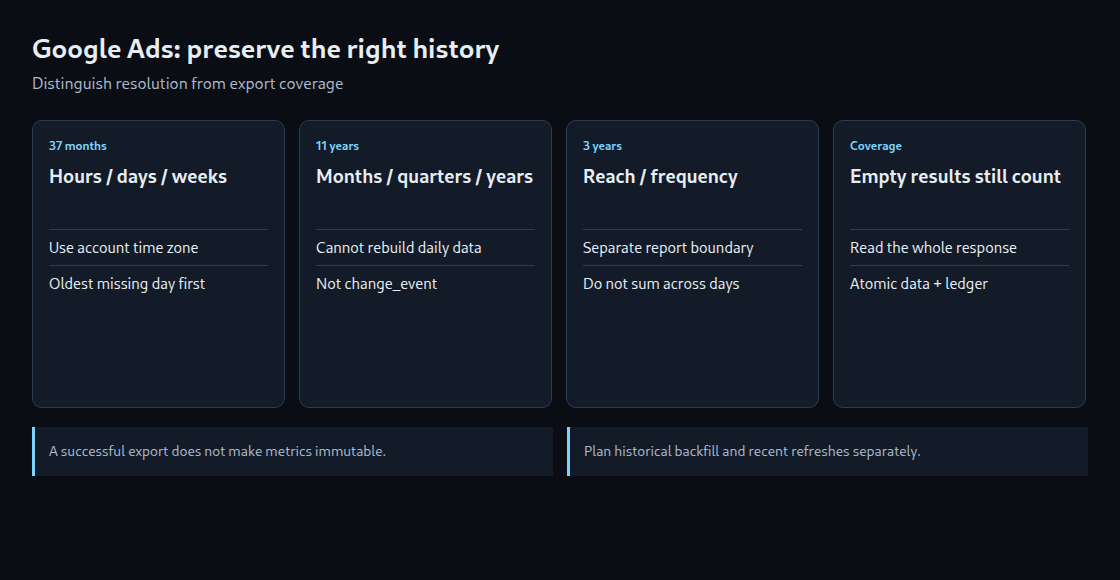
The time resolution of a Google Ads report determines its available history. Since June 1, 2026, the documented 37-month limit applies to hourly, daily and weekly reports. Monthly, quarterly and yearly reporting can reach back up to eleven years. Reach and frequency have a separate three-year limit. A backfill, meaning the retrieval of older data, needs to distinguish these cases.
Retention depends on the query
The eleven years refer to coarser reporting data, not an eleven-year API export of account changes. The change_event resource requires dates within the last 30 days and a limit of at most 10,000 results. That data needs its own export.
Older monthly totals cannot reconstruct a missing daily breakdown. For the longer history, the Google Ads API also permits reports without a date segment when the date filter covers complete months. Boundary months and field compatibility still matter. Data beyond the daily boundary has therefore not necessarily disappeared in every form.
GA4, BigQuery transfers, DV360 and CM360 have separate rules. A number from the Google Ads policy does not establish another product’s retention period. Reach also cannot simply be summed across days: the same person can appear on several days.
Separate the date boundary from export coverage
A fixed example uses August 10, 2026: subtracting 37 calendar months gives July 10, 2023. A running job needs the date in the advertising account’s customer.time_zone, not an incidental server time zone. Month ends and leap years require calendar arithmetic.
A missing metric row does not prove an export gap. Date-segmented Google Ads reports omit a row when all selected metrics are zero. Each successfully and completely queried day therefore needs a coverage record, even when the result contains zero rows. That record applies only to the particular account and report definition.
A useful report key identifies the API resource, fields, filters, segmentation and schema version. A changed query requires a new version or a controlled rebuild. A single MAX(window_end) overlooks older holes and, without a report key, mixes different exports.
A bounded, runnable window planner
The following Python example requires python-dateutil. It plans at most seven days starting at the oldest unconfirmed day still inside the daily window. completed_days contains confirmed days for the same account and report only. Older unconfirmed days are returned separately, including on the first run. This function makes no API requests and writes no database.
from datetime import date, timedelta
from dateutil.relativedelta import relativedelta

def plan_window(today, oldest_wanted, completed_days, chunk_days=7):
    if chunk_days < 1:
        raise ValueError("chunk_days must be positive")
    floor = today - relativedelta(months=37)
    yesterday = today - timedelta(days=1)
    completed = set(completed_days)
    expired_unconfirmed = []
    current = oldest_wanted
    while current < floor and current <= yesterday:
        if current not in completed:
            expired_unconfirmed.append(current)
        current += timedelta(days=1)
    current = max(oldest_wanted, floor)
    while current <= yesterday and current in completed:
        current += timedelta(days=1)
    window = None if current > yesterday else (
        current, min(current + timedelta(days=chunk_days - 1), yesterday)
    )
    return window, expired_unconfirmed

if __name__ == "__main__":
    example_day = date(2026, 8, 10)
    window, expired = plan_window(
        example_day, date(2023, 7, 8), {date(2023, 7, 8)}
    )
    print(window)   # (2023-07-10, 2023-07-16)
    print(expired)  # [2023-07-09], not proof that every other copy is lost
expired_unconfirmed means that this register has no successful export record for a day outside the daily retrieval window. Other backups or older monthly totals may still exist. It is not proof that every copy is permanently lost. Reloading a partly confirmed window is acceptable when storage safely replaces the whole range.
Retrieval and storage need one consistent contract
- Acquire a lock for the account and report before selecting a window. In PostgreSQL, a pre-created state row can be locked using
SELECT … FOR UPDATEinside a transaction. Every participating worker must respect the same lock. - Consume the complete API result: all
Searchpages or the entireSearchStream. Errors and interrupted streams must not create successful coverage records. Validate expected fields, dates and account assignment. - Replace the affected report range atomically: delete old rows for precisely this account, report and window, insert the replacement rows, and confirm every successfully queried day in the coverage register. This includes days returning zero rows.
- Commit data and coverage together, or roll both back. Staging and appropriate unique keys prevent duplicates and support controlled retries.
- Monitor errors, stalled progress and expired unconfirmed days. An alert on the last successful run detects a stalled exporter before its next successful request.
This is the integration contract. API authentication, compatible GAQL fields, table schema and locking must be implemented for the actual exporter. An existing wrapper does not automatically guarantee complete responses or idempotent storage. Long retrievals inside a database transaction require suitable timeouts; larger systems can use leases with a protected completion step.
Catch-up and continuing corrections
July 10, 2023 through August 9, 2026 inclusive covers 1,127 days: 161 windows of at most seven days. One successful window per hour would take approximately 6.7 days under ideal conditions. This is a capacity estimate, not a runtime guarantee. Volume, quotas, failures and retries affect actual operation.
The oldest endangered days deserve priority. Recent completed days also need repeated retrieval because metrics can change afterwards. A confirmed export is not a promise of immutable values. The planner above only closes historical gaps; recent corrections require a separate run.
Questions and answers
Is an hourly cron entry enough?
Only with configured authentication, monitoring, protection against concurrent starts and verified storage. A window does not necessarily correspond to one HTTP request; pagination and retries may add requests.
Which data needs priority?
Each dataset has its own boundary. Reach and frequency must not use the 37-month window for daily performance reports. The coverage register needs separate report identities.
Can a warehouse rebuild the original attribution?
An aggregated performance report preserves the metrics it received. Independent attribution recalculation requires more than these totals, including suitable additional event data and assumptions.
Related articles