

 English
 Deutsch
 Polski
Automated Price and Inventory Monitoring for Meta Ads via Python & Scripts

Management Summary
A stock and price monitor compares an online shop's product data with the Meta ads promoting those products. Its purpose is to flag advertising that may need pausing, for example when stock runs out or an advertised price no longer matches. This can reduce avoidable spending and outdated offers. The article's program prepares proposals rather than changing campaigns directly. Fresh data and a clear link between product and ad are essential: missing information is not the same as an empty warehouse.
Contents
A price and inventory monitor can identify ads for unavailable products and prepare changes. It needs current product data, an unambiguous ad mapping and explicit rules for existing pauses. An hourly run is neither real-time nor instantaneous; improved returns or complete elimination of wasted spend cannot be guaranteed.
1. Identification of the correct object
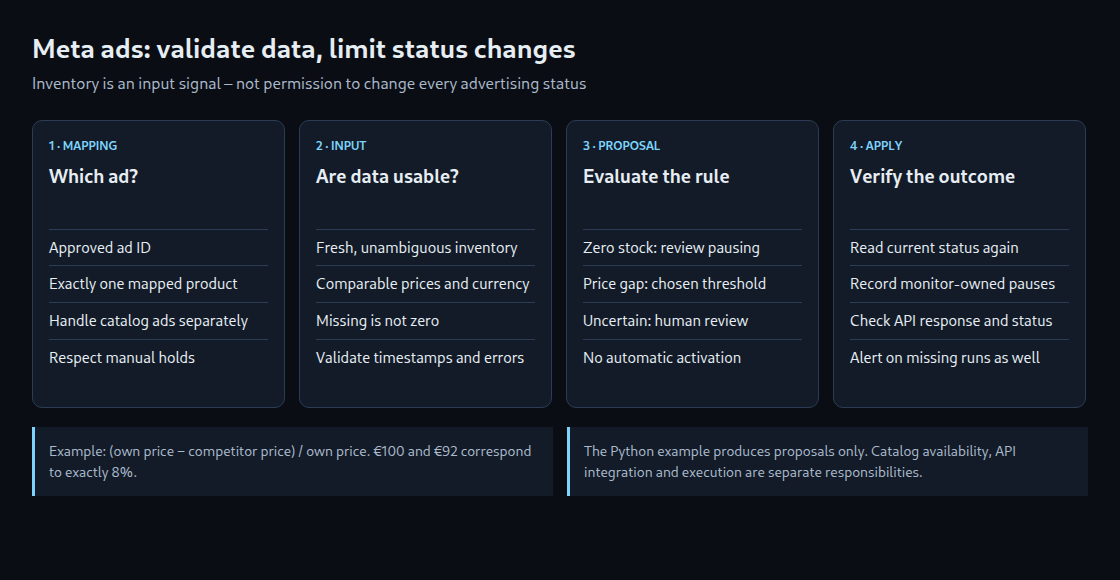
A single-product ad can map to one SKU, the shop’s identifier for a specific product variant. An ad set can contain several ads and products, so pausing the entire set because of one SKU can also stop available offers. For catalog ads, product availability belongs in the catalog, for example through availability; data acceptance, processing and actual delivery require separate checks.
A reviewed mapping of ad account, ad ID and SKU is more reliable than a name fragment. Names can change or be duplicated. Catalog ads and multi-product ads remain outside the single-product rule shown below.
2. Rules without false certainty
- Stock: Available sellable inventory must account for reservations and the intended treatment of preorders. Missing or stale data do not mean zero stock. Negative values require an explicit policy.
- Price: Variant, pack size, currency, tax, shipping and availability must be comparable. A scraped number alone is insufficient.
- Threshold: Eight percent is an example business choice, not an established universal conversion-loss threshold. Relative to the shop’s own price, the formula is
(own price − competitor price) / own price. €100 and €92 give exactly 8%; dividing by the competitor price instead gives about 8.70%. - Reactivation: Healthy stock must not override a manual pause. Even a monitor-owned pause needs evidence that no other restriction has been added.
3. An isolated decision function
The following Python example returns proposals only. It does not fetch a product feed, read an ad account or modify an ad. Upstream preparation supplies a reviewed single-product mapping, the current configured ad status and an explicit manual-hold state. manual_hold=False is a deliberately maintained input, not a Meta API field.
Prices are decimal strings such as "19.95", stock is a non-negative integer and timestamps include a timezone. The example bounds price magnitudes to decimal exponents from −6 to 12 (values from 0.000001 up to, but not including, 10,000,000,000,000) and checks a three-letter uppercase currency format; upstream preparation must validate the actual ISO currency and business comparability. A maximum data age of one hour is also an example policy.
from datetime import datetime, timezone
from decimal import Decimal, InvalidOperation

MAX_AGE_SECONDS = 3600  # Example policy, not a Meta requirement.
PRICE_GAP = Decimal("0.08")


def fresh(value, now):
    try:
        stamp = datetime.fromisoformat(value.replace("Z", "+00:00"))
        if stamp.tzinfo is None:
            return False
        return 0 <= (now - stamp).total_seconds() <= MAX_AGE_SECONDS
    except (AttributeError, TypeError, ValueError):
        return False


def positive_money(value):
    if not isinstance(value, str) or len(value) > 40:
        raise ValueError("Money must be a decimal string")
    amount = Decimal(value)
    if not amount.is_finite() or amount <= 0 or not -6 <= amount.adjusted() <= 12:
        raise ValueError("Invalid price")
    return amount


def propose(item, ad, now):
    """Pure decision function: no API calls and no status writes."""
    if now.tzinfo is None:
        raise ValueError("now must include a timezone")
    if (ad.get("kind") != "single_product"
            or ad.get("sku") != item.get("sku")
            or not isinstance(item.get("sku"), str) or not item["sku"]
            or not isinstance(ad.get("id"), str) or not ad["id"].isascii()
            or not ad["id"].isdigit()):
        return "REVIEW", "mapping"
    if ad.get("manual_hold") is not False:
        return "REVIEW", "manual_or_unknown_hold"
    status = ad.get("status")
    if status not in {"ACTIVE", "PAUSED"}:
        return "REVIEW", "unsupported_status"
    stock = item.get("stock")
    if type(stock) is not int or stock < 0:
        return "REVIEW", "invalid_stock"
    if not fresh(item.get("stock_at"), now):
        return "REVIEW", "stale_stock"
    reason = None
    if stock == 0:
        reason = "out_of_stock"
    else:
        if (item.get("comparable") is not True
                or item.get("currency") != item.get("competitor_currency")
                or not isinstance(item.get("currency"), str)
                or len(item["currency"]) != 3
                or not item["currency"].isascii()
                or not item["currency"].isalpha()
                or item["currency"] != item["currency"].upper()
                or not fresh(item.get("price_at"), now)
                or not fresh(item.get("competitor_at"), now)):
            return "REVIEW", "incomparable_or_stale_prices"
        try:
            own = positive_money(item.get("price"))
            other = positive_money(item.get("competitor_price"))
        except (ValueError, InvalidOperation):
            return "REVIEW", "invalid_price"
        # Competitor discount relative to the shop's own price.
        if (own - other) / own > PRICE_GAP:
            reason = "price_gap"
    if reason:
        return ("PAUSE_REVIEW" if status == "ACTIVE" else "NO_CHANGE"), reason
    if status == "PAUSED":
        if ad.get("pause_owner") == "inventory_monitor":
            return "RESUME_REVIEW", "conditions_recovered"
        return "NO_CHANGE", "pause_not_owned"
    return "NO_CHANGE", "conditions_ok"
PAUSE_REVIEW indicates a reasoned proposal to pause. RESUME_REVIEW requests a review of possible resumption; it is not the status ACTIVE. REVIEW identifies invalid or uncertain inputs, while NO_CHANGE causes no change. Valid zero stock is evaluated independently of missing competitor prices. With positive stock, a missing price comparison prevents a resumption proposal.
4. Separate API integration and execution
A production adapter needs suitable application permissions and assigned ad-account assets. A blanket recommendation for an admin system user is unnecessary. Read and write access require separate planning; ads_management permits changes. Even a token without a fixed expiration date can become invalid. Credentials do not belong in source code, example defaults or logs.
The Marketing API version must be explicit and updated before retirement. The reference checked on 24 October 2026 identifies v26.0; an old hard-coded v20.0 is not a dependable basis. Loading an ad list requires processing all result pages. Increasing limit does not replace pagination. A failed page must not turn a partial result into an apparently complete successful run.
- Immediately before a change, the approved ad ID, account mapping, fresh product data, manual holds and current status need another check. A proposal file may already be stale.
- Only the explicitly selected status is written. API errors, invalid JSON, timeouts and rate limits count as failures. After an uncertain outcome, the current status is read before another attempt.
- The successful change and the following status comparison are recorded. HTTP 200 alone does not prove delivery.
effective_statuscan differ from the configured status because of parent pauses, review or other issues. - A durable journal records monitor-owned pauses, including time, previous status, rule and product-data evidence. Resumption needs an additional authorization step; concurrent manual changes must not be overwritten.
Automatic reactivation also requires controlled writers, explicit ownership and a concurrency strategy. A pause_owner field alone cannot establish those conditions. The example therefore returns only a resumption proposal even for a monitor-owned pause.
5. Monitoring the monitor
A schedule is not operational monitoring. Each run needs a start, end, pages read, data age, count of reviewed mappings, proposals and errors. Empty feeds and missing mappings need an explicit policy. An external check must detect missing successful runs; alerts only for status transitions miss a crashed monitor.
A run lock permits only one monitor run at a time. The operational integration also needs a limited number of retries with increasing waits, secure rotation of log files to limit their size, and tested notifications. Those components and actual Meta access are outside the pure decision function.
Questions and answers
Why is a manually paused offer not activated automatically?
The reason can lie outside stock and price, such as an ongoing review or campaign decision. Available stock does not invalidate that reason. Authorization and the change journal must account for the current situation.
Does a successful run prevent all unnecessary spend?
No. Inventory changes, feed transfer, processing, API requests and actual delivery introduce delays. A monitor can reduce that gap, but cannot eliminate it or guarantee a particular return on ad spend (ROAS), the attributed revenue divided by advertising cost. Effectiveness and false positives need measurement for the actual account.
Related articles


