LW IT Solutions
« Blog Overview /Digital Marketing/Tutorials / Algorithmic ROAS Optimization: BigQuery Attribution Export to...
Read this article in other languages:

Algorithmic ROAS Optimization: BigQuery Attribution Export to Google Ads OCI

Algorithmic ROAS Optimization: BigQuery Attribution Export to Google Ads OCI
Contents
  1. 1. Architectural Framework: Value-Based Bidding (VBB) & OCI
  2. 2. Step-by-Step SQL Modeling in Google BigQuery
  3. 3. Step-by-Step Data Staging for Google Ads OCI
  4. 4. Step-by-Step Automated Sync Configuration
  5. 5. Summary & Architectural Value
  6. Questions and answers
  7. Sources

Standard conversion tracking in performance marketing frequently optimizes bidding models toward superficial metrics. Feeding automated bidding systems with gross order revenue or unweighted transaction counts ignores critical financial realities such as product profit margins, order cancellation rates, shipping overhead, and long-term Customer Lifetime Value (LTV). Implementing an algorithmic ROAS optimization pipeline between Google BigQuery and Google Ads Offline Conversion Import (OCI) allows data engineering teams to replace raw browser conversion pixels with enriched, real-profit signals tied directly to ad click identifiers.

1. Architectural Framework: Value-Based Bidding (VBB) & OCI

Value-Based Bidding (VBB) relies on transmitting accurate profit and LTV metrics back into Google Ads Smart Bidding algorithms. The OCI data pipeline consists of three structural components:

  • Click Identifier Capture: Every inbound landing page URL containing Google click parameters (gclid, wbraid, or gbraid) must persist these identifiers within first-party cookies and backend ERP/CRM transaction databases.
  • Financial Attribution Modeling in BigQuery: A scheduled SQL transformation joins GA4 web traffic streams with backend accounting datasets, calculating the actual net profit and predicted 90-day LTV for each converting customer.
  • Automated OCI Payload Sync: Formatted conversion payloads are uploaded automatically to Google Ads via scheduled BigQuery data transfers or the Google Ads API, allowing bidding models to bid higher on customer profiles generating true financial profit.
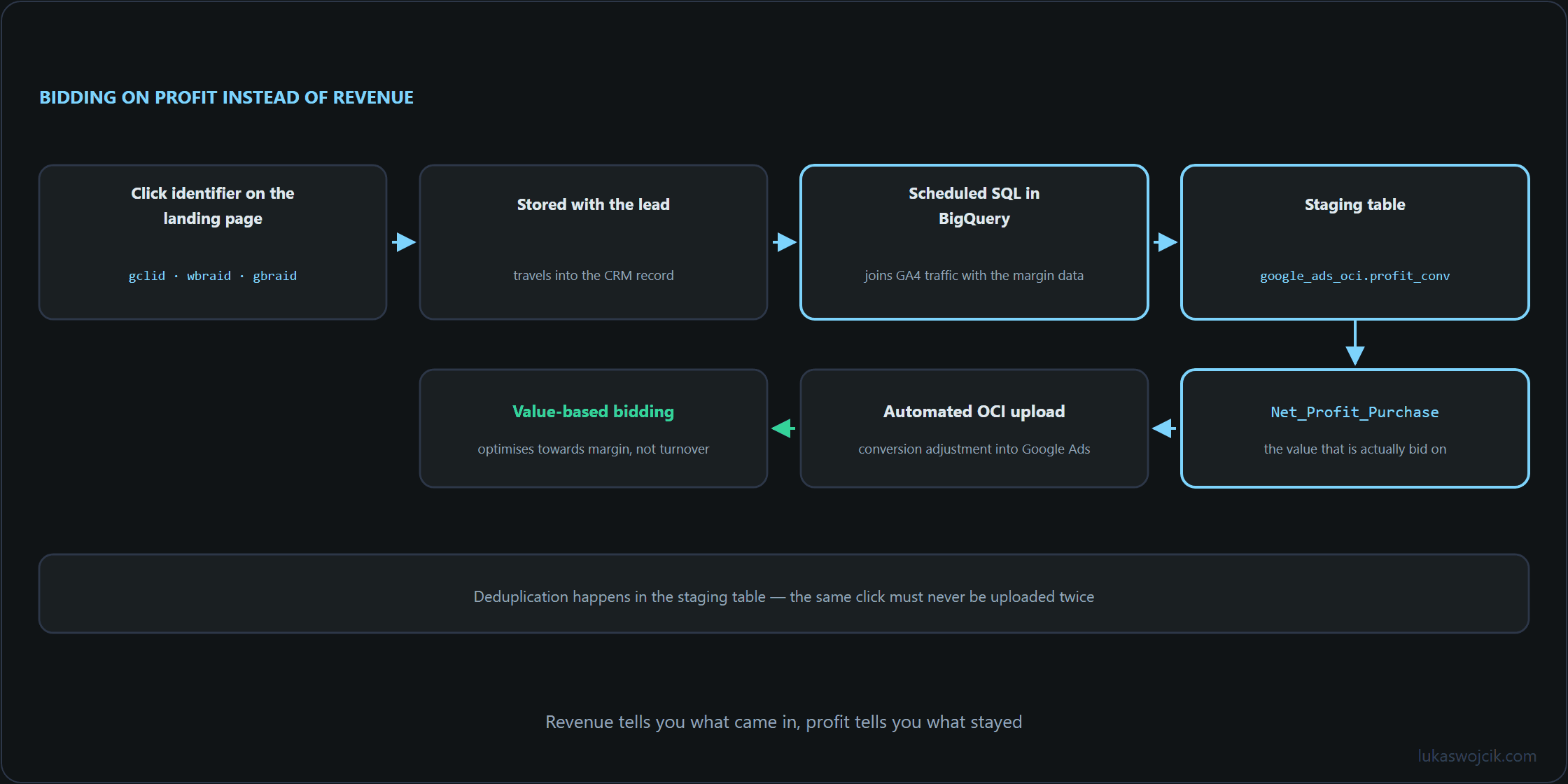
Chain from the click identifier through the BigQuery join and the staging table to the offline conversion import into Google Ads
The chain closes the loop from click to margin: the click identifier is stored with the lead, BigQuery joins it with the real profit, and only that value goes back into the bidding.

2. Step-by-Step SQL Modeling in Google BigQuery

To calculate true conversion value, GA4 click identifiers must be joined with backend transactional data and product margin tables. The following production-grade SQL script extracts click IDs and calculates net profit values for OCI ingestion:

WITH ga4_click_params AS (
    SELECT
        (SELECT value.string_value FROM UNNEST(event_params) WHERE key = 'transaction_id') AS transaction_id,
        (SELECT value.string_value FROM UNNEST(event_params) WHERE key = 'gclid') AS gclid,
        (SELECT value.string_value FROM UNNEST(event_params) WHERE key = 'gbraid') AS gbraid,
        (SELECT value.string_value FROM UNNEST(event_params) WHERE key = 'wbraid') AS wbraid,
        TIMESTAMP_MICROS(event_timestamp) AS event_time
    FROM
        `project_id.analytics_XXXXXXXXX.events_*`
    WHERE
        _TABLE_SUFFIX BETWEEN FORMAT_DATE('%Y%m%d', DATE_SUB(CURRENT_DATE(), INTERVAL 7 DAY))
                          AND FORMAT_DATE('%Y%m%d', DATE_SUB(CURRENT_DATE(), INTERVAL 1 DAY))
        AND event_name = 'purchase'
),
backend_financials AS (
    SELECT
        order_id AS transaction_id,
        order_status,
        -- Gross Revenue minus Cost of Goods Sold (COGS), Returns, and Shipping Cost
        ROUND((gross_revenue - cogs_amount - shipping_cost) * COALESCE(ltv_multiplier, 1.2), 2) AS net_profit_value,
        currency_code
    FROM
        `project_id.erp_data.completed_orders`
    WHERE
        order_status = 'PAID_AND_SHIPPED'
        AND return_status = 'NO_RETURN'
)
SELECT
    COALESCE(g.gclid, g.gbraid, g.wbraid) AS click_id,
    CASE
        WHEN g.gclid IS NOT NULL THEN 'GCLID'
        WHEN g.gbraid IS NOT NULL THEN 'GBRAID'
        WHEN g.wbraid IS NOT NULL THEN 'WBRAID'
    END AS click_id_type,
    'Net_Profit_Purchase' AS conversion_name,
    FORMAT_TIMESTAMP('%Y-%m-%d %H:%M:%S%z', g.event_time) AS conversion_time,
    b.net_profit_value AS conversion_value,
    b.currency_code AS conversion_currency
FROM
    ga4_click_params g
INNER JOIN
    backend_financials b
    ON g.transaction_id = b.transaction_id
WHERE
    COALESCE(g.gclid, g.gbraid, g.wbraid) IS NOT NULL
    AND b.net_profit_value > 0;

3. Step-by-Step Data Staging for Google Ads OCI

Google Ads OCI mandates specific schema rules and timing thresholds before conversions can be processed without rejection:

  1. Deduplication Management: The SQL output must be saved into a staging table named google_ads_oci.profit_conversions_staging. Deduplication is enforced by grouping on `transaction_id` to prevent double-uploading orders adjusted over multiple billing cycles.
  2. Conversion Timing Buffer: Uploads must occur between 24 hours and 90 days after the initial ad click. Orders processed faster than 6 hours after click timestamp risk rejection due to click identifier indexing delays within Google Ads servers.
  3. Conversion Action Mapping: A dedicated Secondary Conversion Action named Net_Profit_Purchase must be created in Google Ads under Goals > Conversions > Uploads. Once data import stability is verified over a 14-day window, this action can be promoted to a Primary Conversion Goal.

4. Step-by-Step Automated Sync Configuration

To eliminate manual CSV exports, automated synchronization between BigQuery and Google Ads must be configured:

  1. BigQuery Scheduled Query: Configure a daily Scheduled Query executing at 04:00 UTC, overwriting the staging table with newly reconciled financial transactions from the preceding day.
  2. Google Ads Scheduled Upload Connection: In Google Ads, navigate to Goals > Conversions > Uploads > Schedules. Select HTTPS / Google Cloud Storage or link directly to the BigQuery staging table using a service account credentials key.
  3. Upload Frequency & Alerting: Schedule the upload daily for 06:00 UTC. Configure error notification webhooks in Google Ads to monitor rejected click identifiers or formatting syntax errors.

5. Summary & Architectural Value

What this tutorial achieves: The deployment of an automated, accounting-verified Offline Conversion Import (OCI) pipeline from Google BigQuery into Google Ads Smart Bidding algorithms.

Resulting value: Smart Bidding algorithms cease optimizing for empty revenue volume or fraudulent orders. Ad budgets are automatically shifted toward customer cohorts that generate high net profit margins and strong Customer Lifetime Value. Consequently, overall advertising efficiency improves, Return on Ad Spend (ROAS) reflects real financial cash flow, and wasted ad spend on high-return, low-margin products is permanently minimized.

Questions and answers

Does Google Ads count an order twice if it appears in the upload on several days?

Not as long as the conversion time stays stable. Google Ads treats a conversion with the same click ID, the same conversion action and the same conversion time as a duplicate and does not accept it a second time. The query takes the time from the GA4 event, and that time is identical in every run, so an order that appears in several consecutive uploads because of the seven-day query window counts once. The same rule also means that a corrected value cannot arrive through a fresh upload; that is what conversion adjustments are for.

The tricky case is the reverse: a second purchase event for the same order, for example because the confirmation page was reloaded. It carries its own timestamp, which makes it a separate conversion with the same profit as far as Google Ads is concerned. That is why the grouping by transaction_id is needed when the staging table is written, in a way that always picks the same time per order, such as that of the earliest event. Only then does every run produce the same row for the same order.

What happens to orders that are returned after they have been uploaded?

The pipeline never learns about it. It reports an order once it is paid, shipped and not returned, and at that point a return is often still possible: for distance sales to consumers in the EU, the 14-day withdrawal period only starts when the goods are received. A later return leaves the reported profit in place, and uploading the same conversion again with a different value does not help either, because Google Ads discards it as a duplicate.

Google Ads provides conversion adjustments for this case. A retraction (RETRACTION) removes the conversion, a restatement (RESTATEMENT) sets a new value, for example after a partial return. The original conversion is located either by the order ID, if it was sent with the upload, or by click ID and conversion time. The query in the article sends no order ID; a setup that plans to use adjustments should add transaction_id to the upload as order_id, or at least keep the exact time of every reported conversion.

The alternative is to hold the upload back until the return period is over. The 90-day window would allow that, but Smart Bidding then learns with a delay of weeks. There is also a quirk in the query itself: it only reads purchases from the last seven days. An order that is shipped only on the eighth day drops out of that window before it meets the PAID_AND_SHIPPED condition and is never reported. Reporting later therefore also means widening the window of the query.

Where does the gclid in the purchase event of the GA4 export come from?

Not from GA4 itself. The standard export does not carry the gclid as a parameter of the purchase event; newer exports hold it in the field collected_traffic_source.gclid, and only on the event whose page URL contained it, which is usually the landing page view rather than the purchase. The query in the article therefore assumes that the shop sends the click ID from the first-party cookie described in section 1 as a custom event parameter with the purchase. Without that, click_id stays empty, and the WHERE condition drops the row without any error.

The second source named in section 1 is more robust: the click ID stored on the order record in the ERP. The GA4 export only contains purchases on which the tag fired; an order placed without analytics consent or behind a blocker is missing there even if its record holds the click ID. Whether such orders may be sent to Google Ads depends on advertising consent, not on analytics consent, so that consent belongs on the record as well.

Where does the factor of 1.2 in the profit calculation come from?

It is a fallback. COALESCE(ltv_multiplier, 1.2) applies wherever the order table has no LTV multiplier of its own and raises the net profit of those orders by a flat 20%, which is an assumption rather than a measurement. Without a multiplier derived from the shop’s own data, 1 is the more honest choice; otherwise measured and assumed values sit in the same column, and the target ROAS rests on a figure that is partly an assumption.

Lukas Wojcik

Lukas Wojcik

Systems architect and technology enthusiast specializing in scalable tracking solutions, GMP Stack (GA4 & GTM), and robust backend architectures. Advocate for clean code and privacy-first design.

Get in Touch

Briefly describe your project or inquiry for a tailored response. This site is protected by reCAPTCHA.

Write a comment

Practical experience and questions about the implementation are welcome here.

The email address is not published. Required fields are marked with an asterisk.

Articles & categories

CCTV

Follow this category by RSS

Cloud & AI

All 17 articles in this category Follow this category by RSS

Data Privacy

All 19 articles in this category Follow this category by RSS

Digital Analytics

All 58 articles in this category Follow this category by RSS

Digital Marketing

All 37 articles in this category Follow this category by RSS

IT & Networks

All 18 articles in this category Follow this category by RSS

Music Production

All 17 articles in this category Follow this category by RSS

Raspberry PI

Follow this category by RSS

SaaS & Internet Earning

Follow this category by RSS

Smart Home

All 18 articles in this category Follow this category by RSS

Web Development

All 11 articles in this category Follow this category by RSS

WordPress Plugins & Tricks

All 14 articles in this category Follow this category by RSS