English
 Deutsch
 Polski
IEEE 802.1X RADIUS Authentication on UniFi Switches

Contents
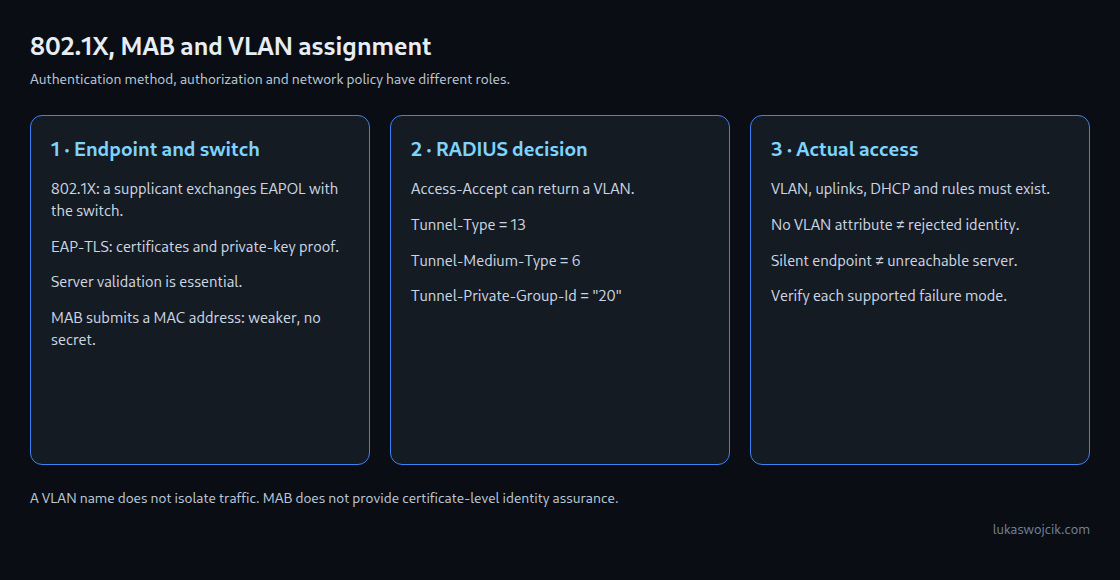
IEEE 802.1X controls access through a network port. A supported UniFi switch can admit an endpoint after successful authentication and apply a VLAN returned by a RADIUS server. The result depends on the port mode, authentication method and fallback policy. MAC-based authentication is a separate, weaker mechanism; it is not certificate authentication.
Three roles and two authentication approaches
- Supplicant: client software that participates in 802.1X, for example the wired authentication service on a laptop.
- Authenticator: the switch that exchanges EAPOL messages with the endpoint and relays authentication to RADIUS. Authentication traffic must be possible before normal data access is authorized.
- Authentication server: the RADIUS service that checks the selected credentials and returns an authorization decision.
EAP-TLS uses certificates and proof of possession of the corresponding private keys. It requires a configured certificate infrastructure and server validation on the endpoint. PEAP is a tunnel method whose inner authentication method must also be specified; a username entry alone does not configure EAP-TLS.
MAC Authentication Bypass, or MAB, lets the switch submit a device’s MAC address to RADIUS without an 802.1X supplicant. A MAC address is not a secret and can be copied. MAB can support restricted legacy-device access, but does not offer the identity assurance of correctly configured EAP-TLS.
Dynamic VLAN assignment
For the standard RADIUS VLAN assignment, an Access-Accept can include:
Tunnel-Type = 13for VLAN.Tunnel-Medium-Type = 6for IEEE 802.Tunnel-Private-Group-Id = "20"for example VLAN 20; the VLAN identifier is encoded as a string.
The VLAN must already exist along the intended path. Uplinks, routing, DHCP and firewall rules still need configuration. A RADIUS response does not create these components. Acceptance without a VLAN attribute can use the port’s untagged VLAN; that is distinct from rejection or an unreachable RADIUS server.
Configuration sequence in UniFi
- Check support: verify the exact switch model, firmware and Network Application version, including supported authentication and failure modes. Preserve a management path before changing access ports.
- Configure RADIUS: current UniFi documentation uses Settings > Networks > RADIUS Servers. A supported gateway can provide the native service, or a profile can point to an external server. For EAP-TLS, a suitable server such as FreeRADIUS or Microsoft NPS also needs its EAP and certificate configuration. The shared secret protects the RADIUS relationship; it is not an endpoint certificate.
- Enable wired VLAN assignment: enable global 802.1X control for the switches, select the RADIUS profile, enable wired RADIUS-assigned VLAN support and define authorization rules. Conventional RADIUS uses UDP 1812 for authentication and UDP 1813 for optional accounting; only the required switch-to-server paths should be permitted.
- Configure the endpoint or MAB record: EAP-TLS requires the correct certificate, private key, trusted CA and expected server identity. For native UniFi MAC records, the current guide specifies a consistent separator-free format such as
AABBCCDDEEFFfor username and password. Matching the actual switch request is more reliable than assuming lowercase universally. - Assign a test access port: the Ethernet port profile and Port Manager select the supported 802.1X control mode, for example Auto for supplicant authentication or MAC-based for the MAC workflow. Mode combinations and timeout behavior need verification on the actual model.
- Validate before rollout: test successful authentication, rejected credentials, a device without a supplicant, an unavailable server, reauthentication and missing VLAN attributes. Check both RADIUS logs and the actual assigned network.
Failure behavior must be deliberate
A rejected identity, a silent endpoint and a server outage are different conditions. A universal “Fallback VLAN” setting covering all three cannot be assumed. Where a fallback or guest network is supported, access must be restricted by actual routing and firewall policy. The VLAN name alone creates no quarantine.
Questions and answers
Can a copied MAC address pass MAB?
It can satisfy a rule based only on that address. Additional controls may still block access, but MAB itself is not proof of device ownership. Dedicated restricted VLANs and narrowly allowed services limit the consequences.
Does EAP-TLS keep the private key permanently on the device?
The authentication exchange does not transmit the private key. Protection against export or theft depends on key storage and device security. Certificate renewal, revocation and endpoint validation of the server are part of the design.
Should uplinks receive the same access-port profile?
No blanket rollout is appropriate. Uplinks, access points and infrastructure ports can carry several networks or support the path to RADIUS itself. An independently tested infrastructure design and a recovery path are needed before changing those ports.
Related articles