English
 Deutsch
 Polski
Google Tag and Tag Manager Merge: Destinations, the gtm init Trigger and What the Loading ID Decides

Contents
Google is bringing the Google tag and Google Tag Manager onto a shared technical foundation. For GTM, optional container optimization is the central change: the container can send directly to Google destinations without loading an additional gtag.js library. For installations based only on the Google tag, Google describes access to Tag Manager’s management features. [1][2]
Content updated on 19 October 2026: This foundation article now accounts for the changes of 8 and 12 October. The detailed October overview of GTM and Google tag unification also covers page views, permissions, visual tagging and the practical migration process.
Three questions remain separate: which capabilities does the loading ID permit, which configuration does optional optimization consolidate, and which behavior has Google changed independently? The last question matters particularly in October. Even a container whose published configuration has not changed can be affected by changes to Google’s delivered runtime. [1]
What a destination is
A destination is a connected recipient in Google’s measurement system. Google lists GA4 web data streams, Google Ads accounts, Floodlight configurations and Merchant Center conversion sources. A destination tag connects that recipient to the container. Shared settings are managed centrally; parameters on an individual destination tag can override them. [6]
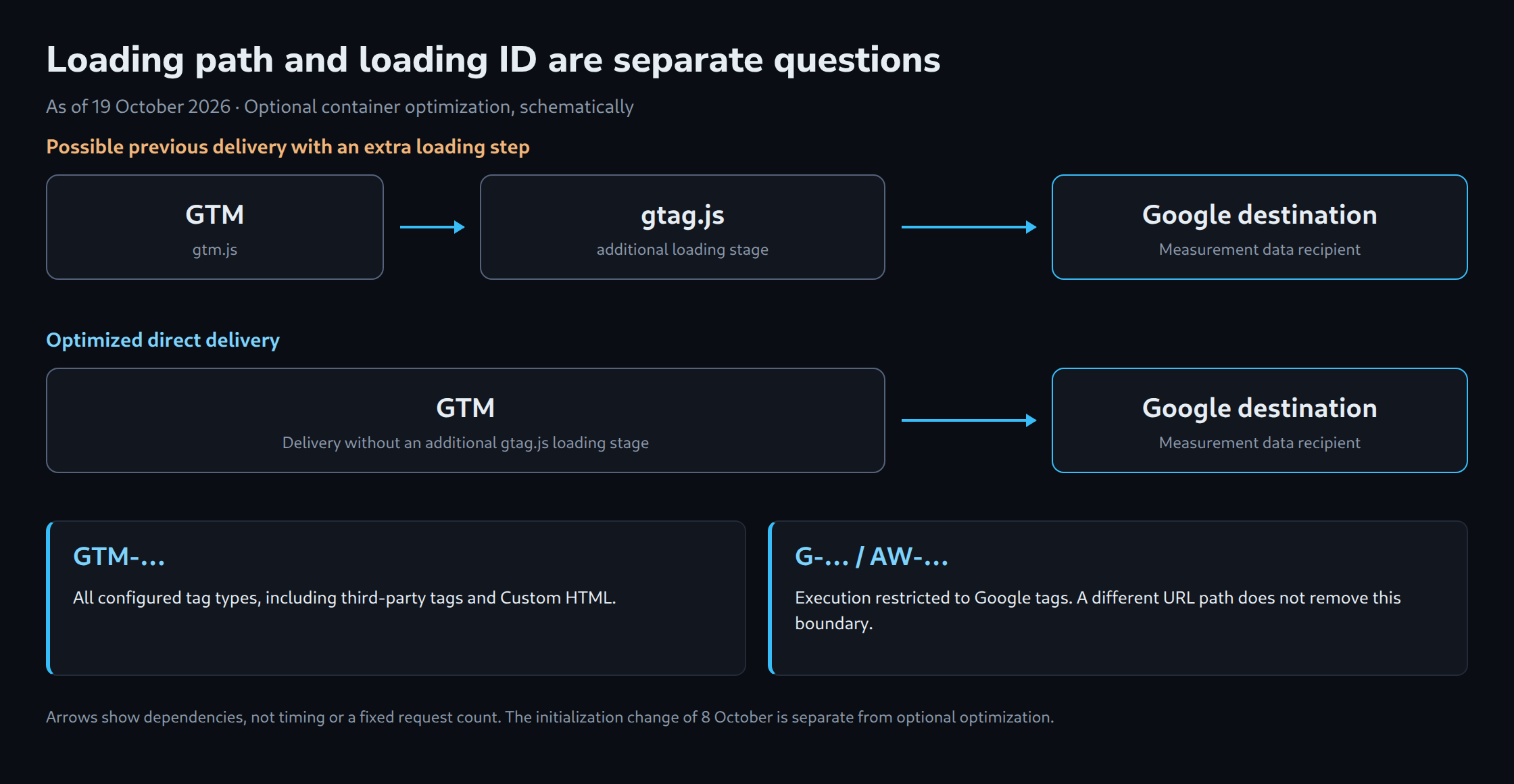
The release notes of 12 October describe direct delivery from optimized GTM containers. Previously, GTM loaded additional gtag.js code to send data to Google destinations. This does not establish a fixed rule of one additional library per product. The actual number of requests depends on the implementation. The documentation likewise establishes neither a universal file size nor guaranteed time savings. [1][3]
Unification connects management and the delivery path. GA4 properties and advertising accounts remain separate recipients. Google also documents an automatic page view for a destination when a destination tag is added. Existing custom page-view logic therefore belongs in the review. [6]
The ID decides, not the path
The note of 9 July 2026 remains relevant: the ID used to load the container controls executable capabilities independently of the URL path. A GTM-… ID permits all configured tag types, including third-party tags and Custom HTML. Product IDs such as G-… and AW-… restrict execution to Google tags. [1][4]
Additional management capabilities do not remove that boundary. Inspection needs both the actual installation delivered on the page and the account configuration. Changing a path or rewriting a prefix cannot create a valid new container ID. The relevant identifier comes from the Google interface for the intended setup.
What becomes of the config command
The announcement describes new unified deployment snippets without gtag('config', …), with initialization through the trigger named gtm init. This is no instruction to delete every existing config call: the documented standalone gtag.js installation still contains that command. [2][5]
The release notes of 8 October 2026 explicitly describe the current distinction: GTM snippets using gtm.js initialize on load independently of config commands. Those commands appear as visible gtag.config events in the dataLayer. Custom Event triggers matching a pattern such as .* can consequently fire again. A technical configuration action is not, by itself, a business purchase event. [1]
The earlier idea that a GTM snippet generally waits for an appended config command is no longer a suitable operating assumption. Google’s installation guide distinguishes a complete gtag.js installation from GTM setups whose Google configuration is maintained inside the container. Loosely mixed snippets and product IDs on an unsupported installation path require a specific review against that guide. [5]
gtm.js snippet
  initializes on load, independently of config

config command in the dataLayer
  can appear as gtag.config
  can match broad Custom Event triggers

Standalone gtag.js installation
  still contains gtag('config', ...)
  requires the appropriate complete snippet
Measurement-tag initialization does not replace consent logic. In GTM, default states are set through the designated Consent Initialization flow; Google recommends the corresponding template APIs. Merely withholding a config call does not provide a general block on a container started through gtm.js. [9]
What optional means here
Adoption of the optimized container configuration is optional. The offer in the particular container leads through a reviewed workspace to publication. Google states that existing event tags and triggers are maintained. Conflicting settings across multiple Google tags require deliberate selection in the guided flow. [2][3]
This choice is no guarantee that runtime behavior can never change without optimization. The separately released change of 8 October demonstrates that boundary. A blanket assurance that everything keeps working unchanged is therefore no longer accurate. [1]
Rollback also has two layers: configuration can, where appropriate, be restored through an earlier container version; Google states that permissions are not versioned. Account links and access rights therefore need separate records and review. [3]
What can be checked before and after optimization
The network panel provides an inventory of scripts actually loaded and measurement requests actually sent. A filter on googletagmanager.com shows only part of the picture; requests to measurement destinations belong in the review too. Counting loaded libraries alone establishes neither data quality nor a performance improvement.
A meaningful comparison keeps page state, consent, event and cache conditions as consistent as possible. Inspection covers the loading sequence and first measurement request, as well as destination ID, event name and required parameters. Purchases also need transaction IDs. Repeated runs with cold and warm caches are more useful than claiming a fixed saving from two, four or five files.
An optimized container can eliminate an additional gtag.js load. Whether and how much that accelerates a particular page requires measurement. The diagram therefore illustrates only the schematic difference in data paths. It is not a benchmark or a complete request inventory.
What can wait and what needs checking now
Optional optimization can wait until a reviewed preview is ready. Existing dependencies on config commands, broadly matching event triggers and the actual loading ID deserve prompt inspection. Since October, the possibility of silent measurement errors is not confined to the identifier. [1][4][5]
Before publication, a preserved container version, documented permissions and test cases for page views, consent and purchases belong in the rollback plan. Actual delivery still needs verification when preview reports that a tag fired successfully. The new October article works through those steps in more detail.
What the container already had: settings variables
The shared platform builds on earlier changes. In September 2023, the Google tag replaced the GA4 Configuration tag in Tag Manager. Configuration and event settings can be grouped through reusable variables. That earlier transition is separate from container optimization in 2026. [11]
- Google tag: Configuration settings groups configuration parameters, such as
language. [7] - Google tag: Event settings groups event-level parameters for Google tags and GA4 Event tags. [8]
Inherited values appear under “Show inherited settings”. The documentation describes local changes and the “Reset” action. An inventory of shared values and local overrides helps identify conflicts when consolidating multiple Google tags; it does not replace checking the settings actually adopted. [3][7][8]
Tool for the inventory: The GTM Container History & Deep Search Engine searches saved container versions for tags, triggers, variables and configuration terms. Google sign-in is required; access is read-only.
Questions and answers
Can a container be affected by the October changes without optional optimization?
Yes. Optional optimization is separate from the initialization change of 8 October. gtm.js snippets start independently of config commands; visible gtag.config events can cause broad event triggers to fire again.
Do existing config calls now need to be removed?
No. The documented standalone gtag.js installation still contains gtag('config', ...). The complete snippet and configuration must match the chosen installation method.
A change requires checking existing parameters and events. Deletion alone can remove necessary settings; adding a second measurement path can create duplication.
Does the loading-ID restriction also govern execution inside a server container?
The restriction described here concerns the web container loaded in the browser. A server container is a separate processing environment with its own configuration.
An incorrect web installation can nevertheless affect which events reach the server. Separate execution environments therefore do not replace verification of the entire delivery chain.
Sources
- Google: GTM release notes: July and October 2026
- Google: Google tag and GTM unification
- Google: GTM container optimization
- Google: Container ID and tagging behavior
- Google: Correct gtag.js installation
- Google: Destinations and destination tags
- Google: Reusable configuration settings
- Google: Reusable event settings
- Google: Consent mode troubleshooting
- Google: Server-side Tag Manager
- Google: Google tag in GTM: the earlier 2023 change
Source review and editorial status: 19 October 2026. The article describes Google’s documentation; it does not claim original performance measurements or an independent test of container optimization.
Related articles