English
 Deutsch
 Polski
gtag(‘set’) in practice: handing a User ID to a Google tag that has already loaded

Contents
A signed-in web application usually learns who the visitor is a moment too late. The page loads, the Google tag initialises, the config command sends its page_view — and only afterwards does the login form return a session, or the single-page application resolve the account from an API call. By the time the User ID exists, the first hit has already left the browser.
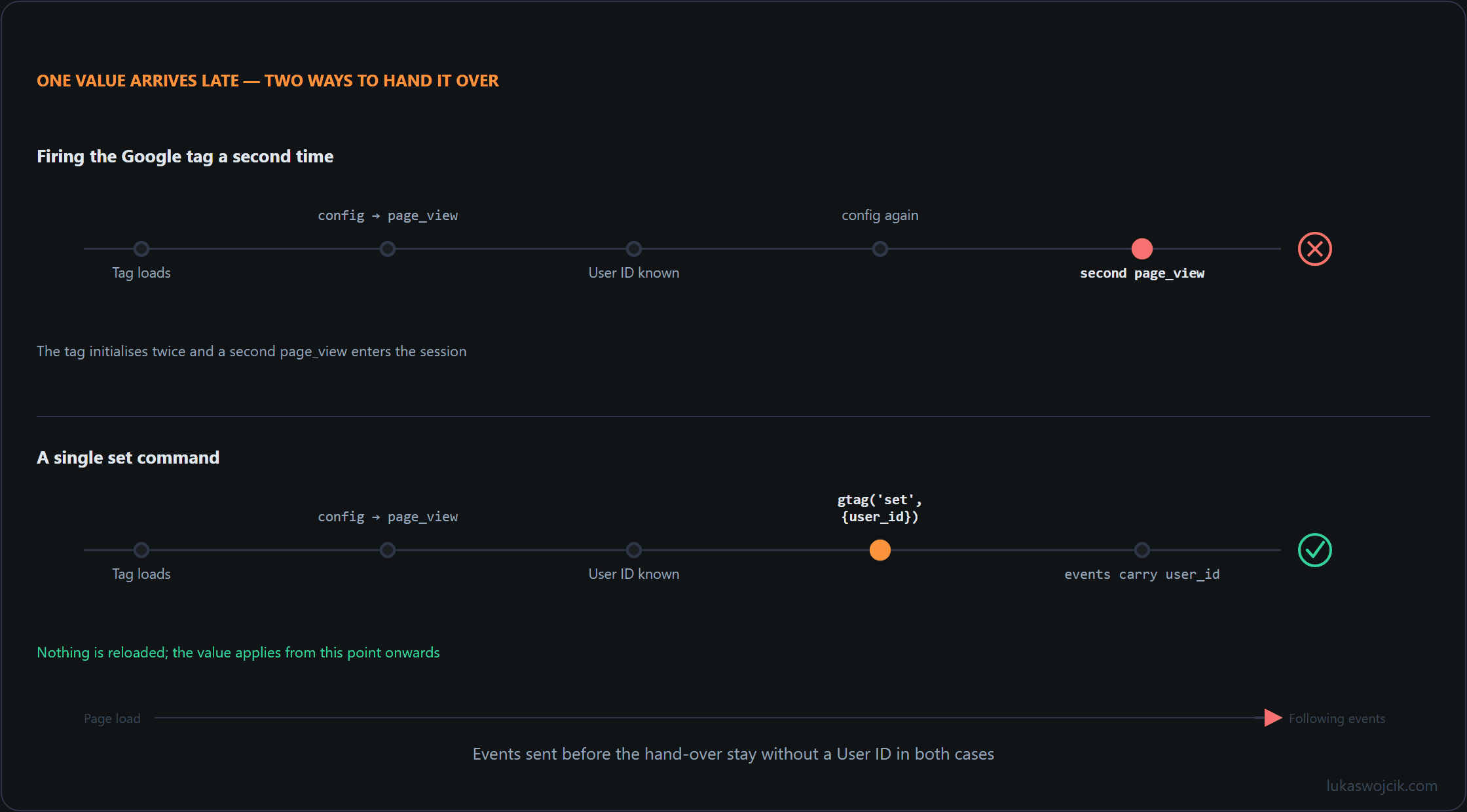
The reflex in that situation is to configure the tag a second time with the identifier attached. That reflex is expensive and unnecessary. An already loaded Google tag does not have to be reloaded or re-initialised because one value arrived late: a single set command hands the value over, and every event sent afterwards on that page carries it.
The five gtag commands and how their scopes interact
The gtag.js API knows exactly five commands, and their division of labour is what makes the late hand-over possible.
| Command | Signature | Purpose | Reach |
|---|---|---|---|
config |
gtag('config', '<TARGET_ID>', {…}) |
Adds configuration information to a target; the TARGET_ID decides where gtag.js sends event data, and a further call adds a further destination. | All events to that one TARGET_ID. |
set |
gtag('set', {…}) |
Defines parameters associated with every subsequent event on the page. A named group form exists too, for example gtag('set', 'campaign', {…}). |
Global, from the call onwards, current page only. |
event |
gtag('event', '<event_name>', {…}) |
Sends event data, either a recommended event or a custom one. | That single event. |
get |
gtag('get', '<target>', '<field>', callback) |
Reads values back out of gtag.js, including values assigned with set: client_id, session_id, session_number, gclid. |
Read access; the callback receives the field or undefined. |
consent |
gtag('consent', 'default'|'update', {…}) |
Sets the initial consent state, or updates it once a decision exists. | Consent signals for the page. |
Three scopes therefore exist: individual events, all events to a specific TARGET_ID, and globally all events. Where the same parameter is assigned in more than one of them, only a single value is used when an event is processed, and the order is event before config before set. The decisive detail sits one line further down in the reference: precedence is not overwriting.
Parameter values set in one scope don’t modify the values set for the same parameter in a different scope.
In the documented example campaign_id is assigned globally as '1234' and then as 'ABCD' in a config call; afterwards the global value is still '1234'. The scopes keep their values side by side, and the ranking decides only at processing time which applies. Combining the two rules yields a consequence the documentation does not spell out: a set call issued after config does not displace a value config already occupies for that target, and takes effect for the parameters config left untouched.
On repetition the documentation is explicit: config is to be called once per Google tag, every subsequent call should use set. It also recommends config or event over set wherever possible, which concerns custom event parameters in particular, because set may not propagate them reliably to all Google Analytics measurement streams. For documented global parameters such as user_id, page_title or currency, set is the intended instrument.
The case in detail: handing over the User ID late
User IDs are self-assigned identifiers for individual users; assigning them consistently is the operator’s business, normally at login. Where the identifier is already known at render time, it can travel inside the config call. Where it becomes known only after the page has loaded, gtag('set') is the documented route. The page snippet stays exactly as installed.
<script async src="https://www.googletagmanager.com/gtag/js?id=G-XXXXXXXXXX"></script>
<script>
  window.dataLayer = window.dataLayer || [];
  function gtag(){dataLayer.push(arguments);}
  gtag('js', new Date());
  gtag('config', 'G-XXXXXXXXXX');
</script>
Once the login response arrives, one command is enough. No second config, no second snippet, no reload.
fetch('/api/session')
  .then(function (response) { return response.json(); })
  .then(function (session) {
    if (session.analyticsId) {
      gtag('set', { 'user_id': session.analyticsId });
    }
    gtag('event', 'login', { 'method': 'password' });
  });
What happens next is split between the browser and the processing side. In the browser, the effect starts at the moment of the call and runs to the end of the page. Every event dispatched after the set command carries user_id; every event dispatched before it does not. The phrase in the reference — parameters associated with every subsequent event on the page — limits the effect forwards in time and to the current document. A classic multi-page site therefore re-issues the command on each page load; a single-page application issues it once for the lifetime of the document.
On the processing side, the earlier events are not lost. Analytics associates events that fired before the User ID was set with that User ID. The documented example runs through a session that starts signed out: event 1 and event 2 carry no identifier, the user signs in, event 3 follows — and afterwards events 1, 2 and 3 are all associated with that user’s ID. Two boundaries apply. The association is described within a session, and it does not reach back into data collected before the implementation existed; such data is not reprocessed. Whether it extends to earlier, already closed sessions on the same device is not stated in the primary sources.
Sign-out is the mirror image. The value is set to null — not an empty string, not a space, not the string "null".
gtag('set', { 'user_id': null });Analytics then stops associating subsequent events with that User ID: in the documented example, events 1 to 3 remain associated and event 4 does not. A renewed sign-in with the same identifier within the same session resumes the association.
The update parameter: merging instead of re-initialising
The set command answers one question: which value should travel
with everything the page sends from now on. A second, narrower instrument
answers a different one: how an existing configuration is changed without the
side effects of a fresh config call. That instrument is the
update parameter, passed inside config itself.
If set to
true, theupdateparameter merges new or updated parameters into the existing Google tag configuration but does not send apage_viewevent for that update. This is typically used in single-page applications to update parameters without re-initializing the tag.
The field is a boolean and defaults to false. That default is
precisely why a repeated config call produces the duplicate hit
described above: without update, the call is treated as a fresh
configuration, and a fresh configuration sends a page_view.
gtag('config', 'G-XXXXXXXXXX', {
  'update': true,
  'page_location': 'https://example.com/new-page'
});
Two differences separate this from set. The first is reach:
update merges into the configuration of the one target it names,
while set assigns globally for every subsequent event and every
destination. The second is intent: update revises what the tag
already holds, whereas set adds a value on top without touching
what config occupies.
That makes the choice reasonably clear. A User ID arriving after login
belongs in set — it is a global property of everything that
follows. A route change in a single-page application belongs in
config with update set to true, because
page_location and page_title are configuration of that
one stream, and the accompanying page_view is better sent
deliberately than as a by-product.
The Google Tag Manager route
Tag Manager and gtag.js share a single global window.dataLayer; only one such object is supported per page, and gtag() is a wrapper that pushes its arguments into it. A Google tag deployed through GTM also processes on-page gtag() commands in addition to the settings configured in the interface. For common context across several Google tags, the GTM help page names gtag.js on the website itself — with the caveat that global parameters are read by all Google tags on the site and should carry non-sensitive data only.
What the GTM interface does not offer is a ready-made tag type for a late set. The Configuration settings variable sets parameters loaded when the Google tag loads — a load-time mechanism; the Event settings variable adds parameters per event. Neither of the two updates a Google tag that is already running.
The container-side equivalent sits one level below the interface, in the Custom Templates API: gtagSet(object) pushes a gtag set command into the data layer, to be processed as soon as the current event and the tags it triggered have finished. The reference guarantees that this update is handled in the container before any items already queued in the data layer.
The route is therefore documented; what is missing is only a preconfigured tag type for it, so the update runs through a template of one’s own. A packaged tag with that behaviour is not described in the documentation reviewed here, which is a negative finding rather than an explicit exclusion by Google.
The queue is what separates the two paths. Tag Manager processes messages first in, first out, one at a time in the order received. A gtag() or dataLayer.push() call from page code or from a Custom HTML tag is queued behind all pending messages, and the updated values are not guaranteed to be available for the next event; the same applies to a generic data layer push out of template code.
The two dedicated template APIs are the documented exception: gtagSet and its sibling updateConsentState are guaranteed to be processed in the container ahead of anything waiting in the data layer queue. The constraint is thus not the container as such but the path chosen through it — a raw push carries no ordering guarantee, the template API does.
Re-firing the Google tag to inject the identifier is the wrong lever for a second reason. The config command initiates a pageview event in some products, in Google Analytics it sends page_view when the tag loads, and configuring the same Google tag twice on one page may cause duplicate data or mixed settings. That a second firing of the GTM Google tag produces a second page_view is a reasonable inference from these pieces, not a statement Google makes for that tag type. Suppression is possible with send_page_view: false — in the snippet, globally via set, or in the Configuration settings variable — but that setting does not carry across pages.
An announcement dated 20 May 2026 belongs in the picture: new deployment snippets will be uniform and will drop the gtag config command, with initialisation configured through a gtm init trigger that can also wait for the config command to preserve a legacy setup. Nothing changes automatically, in-page behaviour is described as unaffected, and the install example in the developer documentation still shows gtag('config', 'TAG_ID');.
The sibling case: Consent Mode
Consent Mode follows the same shape — a value unknown when the tag loads, handed over later without reloading anything — with a different target and stricter ordering. By default no consent mode values are set. The default command must run on every page before any command that sends measurement data; called out of order, the defaults do not work.
gtag('consent', 'default', {
  'ad_storage': 'denied',
  'ad_user_data': 'denied',
  'ad_personalization': 'denied',
  'analytics_storage': 'denied',
  'wait_for_update': 500
});
The wait_for_update value in milliseconds controls how long the tag waits before sending data, which matters for consent solutions that load asynchronously; where network requests are involved, at least 500 milliseconds is suggested. Defaults can be differentiated by region per ISO 3166-2, the more specific region winning.
The update happens on the page where the decision is made, before any page transition, because Consent Mode does not store the choice itself.
gtag('consent', 'update', {
  'ad_storage': 'granted',
  'ad_user_data': 'granted',
  'ad_personalization': 'granted',
  'analytics_storage': 'granted'
});
No reload is required, and the state change itself produces a signal: consent state pings are sent from each page where consent mode is enabled and are additionally triggered for some tags when the state changes from denied to granted. In the advanced implementation the tags load immediately and, while consent is denied, send measurements without cookies. Inside Tag Manager templates the gtag consent command is explicitly not to be used — the updateConsentState API exists so that consent updates are processed ahead of queued data layer items, the same ordering guarantee gtagSet carries for parameters.
Pitfalls and checks
- Scope, not overwrite. A late
setdoes not rewrite whatconfigor an event-level parameter already holds. Where a value must win, it belongs in the higher-ranking scope. - Page boundaries and ordering.
setreaches forward only, within the current document; server-rendered navigations need the command again. The snippet must appear above the event commands, andsetbelongs aboveconfigwhere several tag IDs should inherit the values. - Container path. Inside GTM the ordering guarantee belongs to the template APIs. A late value pushed from a Custom HTML tag competes with the queue; the same value handed over through
gtagSetin a custom template does not. - Identifier hygiene. A User ID value is limited to 256 characters, UTF-8 only per the Measurement Protocol reference, and must not contain information a third party could use to determine a user’s identity; email addresses and personal mobile numbers are named as impermissible. Whether a hashed derivation qualifies cannot be settled from the primary sources.
- No custom dimension on the ID. Registering
user_idas a custom dimension is advised against because of the very high number of distinct values. - Reporting identity. Device-based reporting shows no User-ID analysis; Blended or Observed is required. The choice affects neither collection nor processing.
- Verification.
gtag('get', …)reads backclient_id,session_id,session_numberandgclid, and a value assigned to one of those fields viasettakes precedence over the internally derived one. Tag Assistant reports consent in separate On-page Default and On-page Update columns.
Conclusion
The trade-off is lopsided. Re-configuring a loaded Google tag to attach a value costs a duplicate initialisation, risks mixed settings and a second page_view, and buys nothing a single set command does not deliver. For the User ID the accounting is clearer still, because the processing side closes the gap the browser leaves open: events already sent within the session are associated with the identifier afterwards, so the hits before the login are not sacrificed.
What the approach does not do is cross boundaries it was never given. It does not survive a page transition, it does not outrank a value already held by a higher scope, and it does not reach back into data collected before the implementation existed.
Consent Mode shows the same pattern from another angle: a documented default, a later update on the same page, a state change that reaches the tags without a reload. Where a container manages the tag, the queue is the constraint to design around, and gtagSet together with updateConsentState is the documented exemption from it — at the price of a custom template. The announced unification of Google tag and Tag Manager, still in the future tense in August 2026, is worth tracking rather than pre-empting.
Questions and answers
If user_id travels in the config call and the visitor switches accounts, why does a later gtag(‘set’) leave the old identifier on the events?
Because of the precedence rule, and this is its most expensive consequence.
Where config holds a parameter for a target, a later global assignment does not displace it: the two values coexist and the higher-ranked one is used when an event is processed. So the second identifier is present in the page and simply never wins. Nothing fails, nothing is logged, and the events keep carrying the first account.
Two ways out, and they differ in how much they leave to memory. The value can be changed where it lives, with another config call carrying update: true — a merge into the existing configuration, without the second page_view a plain repeat would send. Or user_id stays out of config entirely and is always handed over with set, which makes sign-in, account switch and sign-out the same operation, the last one with null. The second convention is the one that survives contact with a codebase, because it removes the question of which scope currently owns the identity.
Related articles