English
 Deutsch
 Polski
GA4 Form Tracking: How form_start and form_submit Are Counted and What Their Ratio Does Not Show

Contents
Google’s tutorial on generating leads sets out four measuring points for a form on a website: how many people arrive at the site, how many reach the form, how many begin filling it in, and how many submit it. Three of the four rest on events that Google Analytics collects without a line of extra code, and the tutorial recommends holding the last two against each other to find weaknesses in the form.
That comparison deserves a second look. The enhanced-measurement reference defines the two events in one line each. form_start fires the first time a user interacts with a form in a session. form_submit fires when a form is submitted. One of the two carries a per-session cap, the other does not.
Where the four numbers come from
The first two measuring points both rest on page_view. That event is collected automatically for every web data stream, and it is the one enhanced-measurement option that cannot be switched off. Visits to the site and views of the page carrying the form are two readings of the same event, separated by the page location.
The last two come from the Form interactions option in enhanced measurement, set per data stream under Admin, then Data collection and modification, then Data streams. Changing the switch requires Editor rights or above on the property. Both events read the form element itself: form_id from its id attribute, form_name from its name attribute, form_destination from the address the form posts to. form_submit adds one more, form_submit_text, the label printed on the button.
One start per session, one submit per submission
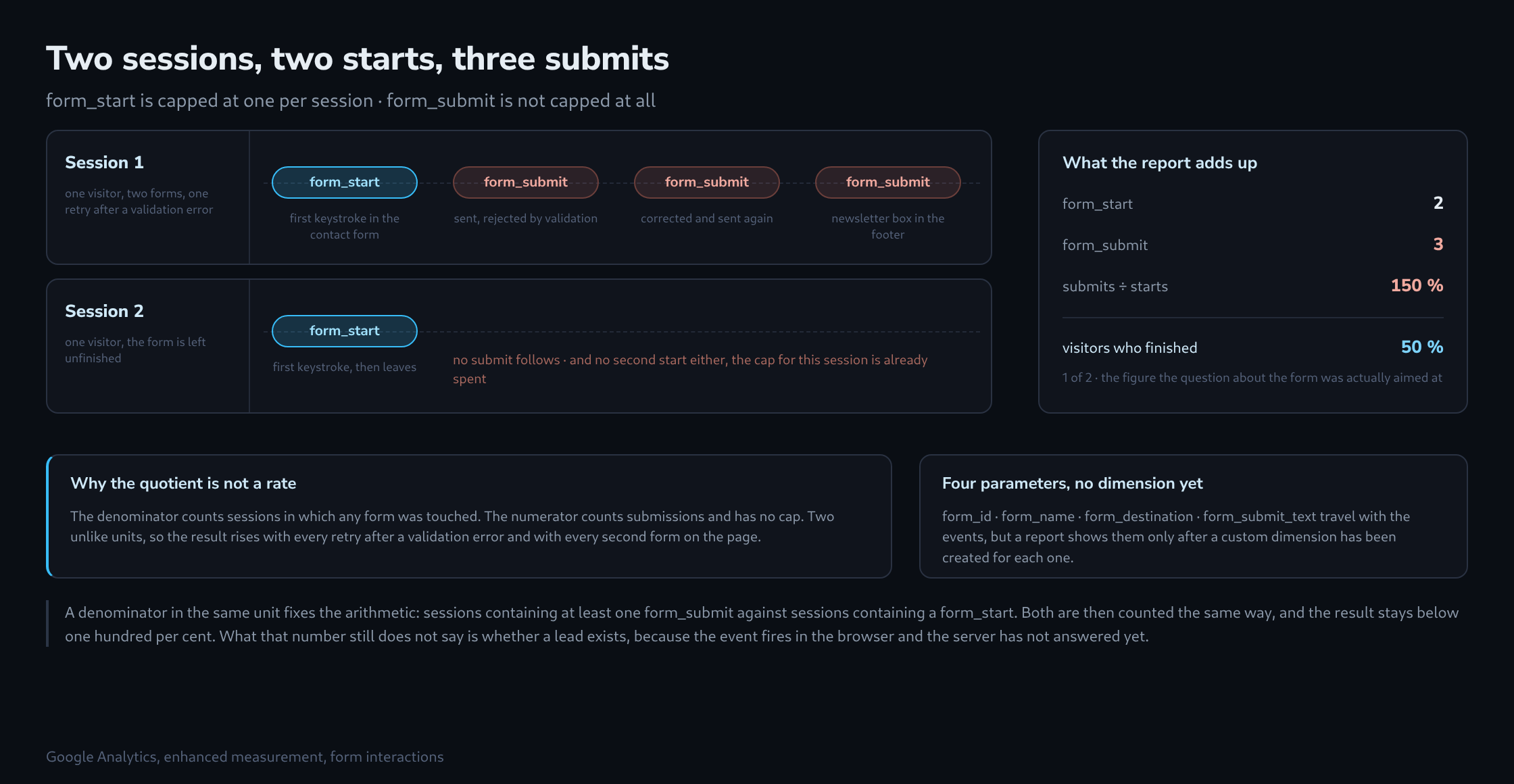
The asymmetry becomes visible as soon as two sessions are written out side by side.
Session 1
  contact form, first keystroke ....... form_start    1
  sent, rejected by validation ........ form_submit   1
  corrected, sent again ............... form_submit   2
  newsletter box in the footer ........ form_submit   3
      no second form_start here: the cap is already spent

Session 2
  contact form, first keystroke ....... form_start    1
  leaves without sending .............. form_submit   0

Totals   form_start  2        form_submit  3
         form_submit / form_start  = 150 %
         visitors who finished     = 1 of 2 = 50 %
The numerator counts submissions. The denominator counts sessions in which any form was touched. Those are different units, so the quotient compares two unlike things and can pass one hundred per cent without anything being broken. Every retry after a validation error inflates it, and so does a second form on the same page.
A completion rate needs a denominator in the unit of the numerator. The nearest honest version is sessions containing at least one form_submit against sessions containing a form_start. Both are then counted the same way, and the result behaves.
Four parameters, and no report showing them yet
These events carry four parameters, but their presence does not mean reports can immediately show counts for each form. The reference states that each parameter becomes available in reports only after a custom dimension has been created for it.
Until then the newsletter box in the footer, the contact form and the demo request form all land in the same undifferentiated count. On a site where the footer form sits on every page, that count is dominated by the form nobody meant to measure, and the ratio above drifts further from anything useful.
Registering the dimensions takes a few minutes in Admin under Custom definitions, and the documentation puts a wait of 24 to 48 hours on it before the data can be reported on. Worth setting up before the measurement is needed rather than on the day the numbers are first read.

What form_submit actually witnesses
The event fires in the browser, at the moment the form is submitted. Everything that decides whether a lead exists happens after that: validation on the server, the spam filter, the double opt-in mail, the duplicate check against the CRM. None of it is visible to the tag.
So form_submit counts attempts, and the goal named in the tutorial itself, a person who showed interest and can be contacted, sits one step further along. The step is short, and it is exactly where the losses are. A submission the server rejected looks identical in Analytics to one that turned into a contract.
Four figures that do line up
A funnel holds together when one unit runs through all of it, and sessions are the convenient unit here because the form events already work that way.
sessions with a view of the form page   page_view, split by page location
sessions with form_start                enhanced measurement
sessions with form_submit               enhanced measurement
sessions with the confirmation          page_view on the thank-you page,
                                        or an event sent by the server
                                        once it has accepted the entry
The last line has to be built; the first three arrive on their own. Between the third and the fourth sits the difference between attempts and leads, and those two numbers next to each other say more about a form than the ratio the tutorial proposes.
Questions and answers
Why do some forms stay invisible to enhanced measurement?
Because both events read the form element itself. A form embedded in an iframe from another domain sits in a separate document that the page’s tag cannot look into, and input fields without an enclosing <form> element give the measurement nothing to attach to. Such forms need an event of their own, for instance through the form provider or through Tag Manager.
How can the ratio of sessions with form_submit to sessions with form_start actually be evaluated?
In one of two places, depending on where the data is analysed:
- In an exploration, using two session segments, one with the condition event name equals form_start and one with form_submit, together with the Sessions metric. A session segment takes in every session in which the event occurred at least once, however often; three submissions in one session count as one there.
- In the BigQuery export, by counting session identifiers. A session there is the combination of user_pseudo_id and the event parameter ga_session_id;
COUNT(DISTINCT …)over that combination, once for form_start and once for form_submit, gives numerator and denominator in the same unit.
Both routes remain imprecise as long as the forms are not separated. Only once a custom dimension exists for form_id can the segment condition be narrowed to a single form; in the export, by contrast, the parameter sits in event_params even without being registered. For the example in the article, both routes give 1 in 2, or 50 %, instead of the 150 % from the event quotient.
Related articles