English
 Deutsch
 Polski
GA4 Hostname Filter: Removing Ghost Spam From the Measurement Protocol and the Order of Steps

Contents
A measurement ID sits in the source of every page that uses it. Anyone who reads it there can send hits straight to the collector without ever loading the site – the collector the browser tag sends to requires no proof that a visit happened; the Measurement Protocol would also need the api_secret key, which does not appear in the page source. Those hits then appear in reports looking like visits, and the hostname inside them is whatever the sender chose.
Since 11 June 2026 there is a tool against this in the admin section: the hostname filter, a new kind of data filter that excludes events based on their hostname. It helps, but it has two properties worth knowing before switching it on.
Where the foreign hostnames come from
Every event reaching GA4 carries a hostname – the domain it supposedly came from. On a real visit the browser sets it and it is true. On a directly sent hit the sender sets it, and then it says whatever was written in.
The common case is blunt advertising: a hostname resembling somebody else’s domain, placed in the hope that a person will see it in a report and look it up. The tiresome case is spray, because such senders often push the same ID at many properties. In both cases the damage is not the content but the dilution: conversion rates fall because the denominator grows, and channel reports gain rows nobody can place.
The other two steps are home-made
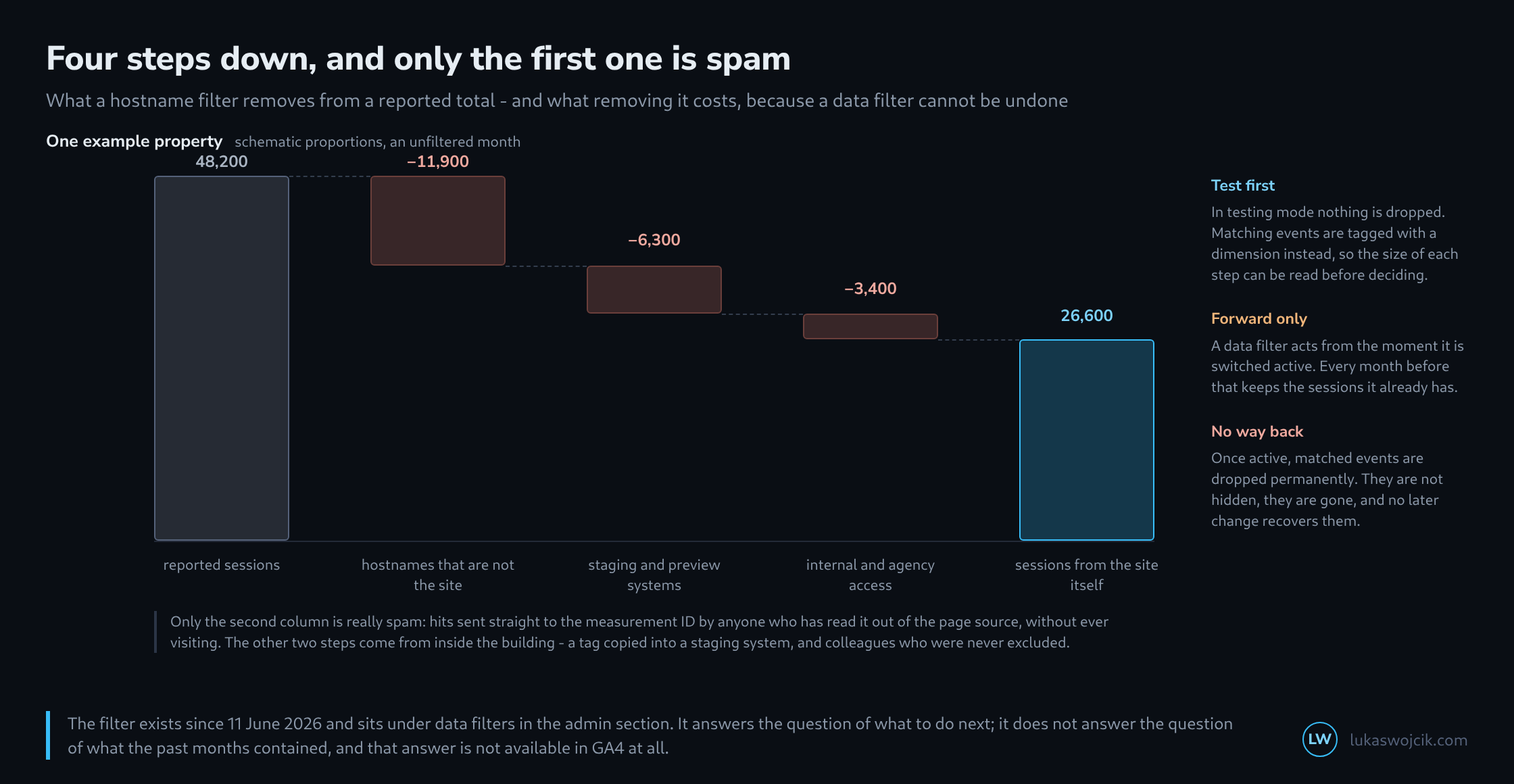
In practice spam is rarely the largest item. Two other sources are more common. The first is the staging environment: when a site is cloned for development the container travels with it, and from then on a system under a name like staging.example.com reports sessions into the same property. The second is internal access – editors, agency, test runs – that was never excluded.
Both look like real traffic in the report because they are real traffic. Just not the traffic in question. The hostname filter catches the first of these reliably, because it carries a name of its own; the second still needs a filter on origin or a marker in the container.
The first property: a filter acts only forward
A data filter takes effect from the moment it is made active. Everything collected before stays in the reports exactly as it was. This is not a limitation that can be worked around – GA4 has no way of filtering an existing set after the fact.
In practice that means a step in every time series reaching past the day it was switched on. Making a filter active on a Tuesday produces fewer sessions from Wednesday, and no report says a word about it. Where comparability matters, that day belongs in a note, ideally in the same place campaigns are noted.
The second property: there is no way back
An active data filter drops the matching events permanently. They are not hidden and do not sit in a bin – they never enter the property. A filter drawn too widely therefore deletes real data silently and for good, and the mistake may only surface weeks later.
Testing mode exists for exactly this, and it is the real reason to like this filter at all. In testing mode nothing is dropped; matching events receive a dimension carrying the filter’s name instead. That makes it possible to read, before deciding, how much a filter would catch – and whether anything in there ought to stay.
An order of operations that saves a deletion

  1  open a report with the hostname dimension and list every
     value from the past months
  2  assign each name to one of four groups:
     the site itself, staging, internal, foreign
  3  create the filter in testing mode and let it run a week
  4  check via the "Test data filter name" dimension what it
     would have caught
  5  only then make it active, and note the day

  Step 1 matters most: a hostname nobody recognises is not yet
  spam - landing pages, campaign sites and shop systems often
  run under names of their own.
What the filter does not do
The past months stay as they are. A cleaned time series over a longer period is not available from the interface, only from the BigQuery export – the hostname sits there on every event, and there it can be filtered retroactively as often as wanted.
That is the real division of labour. The filter in the admin section makes sure less nonsense arrives from today. It does not answer the question of how much nonsense was in there before, and for that question there is no route around the raw data.
Since 21 September 2026 the hostname filter also has an include mode (Google Analytics release notes). Instead of excluding individual names, it only admits events from approved domains and so also keeps out spam hostnames that only appear later. It also discards events without a hostname, and it does not apply to events sent via the Measurement Protocol. What this means for the setup is covered in the article on the include mode.
Questions and answers
Why a week in testing mode rather than just a day?
Because the four groups are not spread evenly across the week. Internal access and staging systems often follow working days and release dates, campaign sites follow individual promotions. A week covers every weekday once; for rare occasions such as a monthly newsletter even that is too short.
Which foreign-looking hostnames still belong to real visits?
Besides the landing pages, campaign sites and shop systems from step 1, these are mainly translation services that deliver a page, tag included, under an address of their own. A well-known example is Google’s translation proxy, whose hostnames end in translate.goog and contain the site’s domain with hyphens, such as www-example-com.translate.goog. Behind them are people reading the site in another language.
Whether such visits belong in the property is a decision, not a spam case. Testing mode shows how many there are before a filter drops them for good.
What does the retroactive clean-up in the BigQuery export look like in practice?
In the export, the hostname sits in the field device.web_info.hostname. The clean-up runs in two steps that match the first two steps of the order in the article:
- List every hostname that occurs, with its frequency:
SELECT device.web_info.hostname AS host, COUNT(*) AS events FROM `project.analytics_XXXXXXXXX.events_*` WHERE _TABLE_SUFFIX BETWEEN '20260601' AND '20260927' GROUP BY host ORDER BY events DESC. That produces the list to be assigned to the four groups. - Restrict every further analysis to the names that are meant to stay, for example with
WHERE device.web_info.hostname IN ('www.example.com', 'shop.example.com'). A list of allowed names like this also catches spam hostnames that only appear later; a list of blocked names cannot do that.
One limit remains: retroactive here only means back to the day the BigQuery link was created. The export does not backfill history, and a property that only switches it on the day the filter goes live has no raw data for the time before.
Related articles