English
Plugin i18n: text domain, language packs and JavaScript

Contents
- The text domain: one identifier, identical to the slug
- The gettext functions in PHP
- Who loads the translations: just-in-time instead of load_plugin_textdomain
- JavaScript: @wordpress/i18n, build step and wp_set_script_translations
- From the source code to the language pack
- Own translation files with WP-CLI
- Limits and open points
- Questions and answers
- Sources
A plugin written only in English shows English buttons on a German or Polish site, even when WordPress itself speaks the visitor’s language. This blog runs in English, German and Polish, so every plugin string used here has to exist three times, including texts that JavaScript writes into the page later. WordPress handles this on three levels: gettext calls in PHP, separate JSON files for scripts, and language packs built by translate.wordpress.org. Many older tutorials still call load_plugin_textdomain() early in plugins_loaded, although since WordPress 6.7 that call only records the path; the notice added in 6.7 comes from translation calls before after_setup_theme.
This article builds a small plugin, “LW Reading Time”, with one PHP file and one script that imports @wordpress/i18n. It covers the translation functions, the plural rules of German and Polish, what WordPress 7.1.2 (the current release on 29.09.2026) loads by itself, how a string travels through GlotPress into a language pack, and how translation files are built locally with WP-CLI. Plugin Check and the fields of readme.txt each have a separate article in this series and appear here only where translations touch them.
The text domain: one identifier, identical to the slug
Every gettext call carries the text domain as its last argument. It tells WordPress which translation file a string belongs to. For plugins in the directory the rule is strict: the text domain has to match the plugin slug, so a plugin with the slug akismet uses the text domain akismet, and a plugin may use only one text domain. The Meta handbook states that plugins breaking this rule cannot be imported properly into translate.wordpress.org and do not get language packs. The format is lowercase with hyphens, no underscores and no spaces.
The text domain must also be a literal string. Tools such as wp i18n make-pot and the importer on WordPress.org read the source code without running it, so a constant or variable in place of 'lw-reading-time' is invisible to them; the plugin handbook explicitly advises against this shortcut. Strings that core already translates, such as “Settings”, still get the plugin’s own text domain, otherwise they lose their translation once core changes its wording.
According to the handbook, the Text Domain header has been optional since WordPress 4.6, and directory plugins may omit Domain Path. Both are still worth setting: make-pot reads the text domain from the header, and since WordPress 6.8 this pair lets plugins outside the directory load translations automatically. Plugin Check 2.1.0 (released on 16.08.2026) reports an invalid text domain format as an error, a header that differs from the slug as a warning, and a Domain Path that lacks a leading slash or points to a missing folder as a warning as well. The example plugin therefore ships an existing languages/ folder containing the POT file.
The gettext functions in PHP
The main file of the example plugin shows the reading time above single posts and adds a button that the script later relabels. All visible strings pass through a translation function:
<?php
/**
 * Plugin Name:       LW Reading Time
 * Description:       Shows the estimated reading time above single posts.
 * Version:           1.0.0
 * Requires at least: 6.8
 * Requires PHP:      7.4
 * Author:            Lukas Wojcik
 * License:           GPL-2.0-or-later
 * License URI:       https://www.gnu.org/licenses/gpl-2.0.html
 * Text Domain:       lw-reading-time
 * Domain Path:       /languages
 *
 * @package LW_Reading_Time
 */

defined( 'ABSPATH' ) || exit;

const LW_READING_TIME_WORDS_PER_MINUTE = 200;

/**
 * Returns the estimated reading time of a post in whole minutes.
 *
 * @param WP_Post $post Post object.
 * @return int Minutes, at least 1.
 */
function lw_reading_time_minutes( WP_Post $post ) {
	$text  = wp_strip_all_tags( strip_shortcodes( $post->post_content ) );
	$words = preg_split( '/\s+/u', trim( $text ), -1, PREG_SPLIT_NO_EMPTY );

	return max( 1, (int) ceil( count( $words ) / LW_READING_TIME_WORDS_PER_MINUTE ) );
}

/**
 * Prepends the reading time and a "mark as read" button to single posts.
 *
 * @param string $content Post content.
 * @return string
 */
function lw_reading_time_prepend( $content ) {
	if ( ! is_singular( 'post' ) || ! in_the_loop() || ! is_main_query() ) {
		return $content;
	}

	$post    = get_post();
	$minutes = lw_reading_time_minutes( $post );

	$label = sprintf(
		/* translators: %s: estimated reading time in minutes. */
		_n( 'Reading time: %s minute', 'Reading time: %s minutes', $minutes, 'lw-reading-time' ),
		number_format_i18n( $minutes )
	);

	$button = sprintf(
		'<button type="button" class="lw-reading-time__mark" data-post="%1$d">%2$s</button>',
		(int) $post->ID,
		esc_html__( 'Mark as read', 'lw-reading-time' )
	);

	return '<p class="lw-reading-time">' . esc_html( $label ) . ' ' . $button . '</p>' . $content;
}
add_filter( 'the_content', 'lw_reading_time_prepend' );

/**
 * Enqueues the front-end script and connects it to its translation files.
 */
function lw_reading_time_enqueue_script() {
	if ( ! is_singular( 'post' ) ) {
		return;
	}

	$asset_file = plugin_dir_path( __FILE__ ) . 'build/index.asset.php';
	if ( ! file_exists( $asset_file ) ) {
		return;
	}
	$asset = require $asset_file;

	wp_enqueue_script(
		'lw-reading-time',
		plugins_url( 'build/index.js', __FILE__ ),
		$asset['dependencies'],
		$asset['version'],
		array( 'in_footer' => true )
	);

	// Looks for lw-reading-time-{locale}-{md5 of "build/index.js"}.json in wp-content/languages/plugins, without a language pack there in languages/ (Domain Path).
	wp_set_script_translations( 'lw-reading-time', 'lw-reading-time' );
}
add_action( 'wp_enqueue_scripts', 'lw_reading_time_enqueue_script' );
__() returns the translation, _e() prints it. Printing without escaping is exactly what the WordPress Coding Standards flag: the EscapeOutput sniff lists _e() and _ex() as unsafe printing functions and suggests esc_html_e() or esc_attr_e() instead. The combined functions esc_html__(), esc_html_e(), esc_attr__(), esc_attr_e(), esc_html_x() and esc_attr_x() translate and escape in one step. A translated string is still text from outside the code and is escaped like any other output. In the example, esc_html() wraps the result of sprintf(), because escaping only the pattern would leave the inserted number unescaped.
Placeholders and translator comments
Variables never belong inside the translated string. A call like _e( "Your city is $city." ) fails because the extractor sees the literal $city, while at runtime WordPress looks up a string with the actual city name, which no translation file contains. The correct form is a placeholder plus printf() or sprintf(). With several placeholders the handbook recommends numbered arguments such as %1$s and %2$s in single quotes, so a translation can reorder the values.
A comment starting with translators: tells the translator what a placeholder stands for. It has to be the last PHP comment before the gettext call; make-pot copies it into the POT file as a #. line, and GlotPress displays it next to the string. The number itself goes through number_format_i18n(), because German and Polish use different thousands separators than English.
_x() adds a context for words with several meanings; GlotPress treats context plus text as a separate entry. The script below uses _x( 'Read', … ) for the state after the click: without context, “Read” might become the verb “Lesen” or “Czytaj”, while the button needs “Gelesen” or “Przeczytany”.
Plural forms: two in English and German, three in Polish
_n() receives a singular, a plural, the count and the text domain. English and German get by with two forms, Polish needs three. The rule lives in the Plural-Forms header of each locale. GlotPress, the software behind translate.wordpress.org, defines Polish with nplurals=3 and the expression (n == 1) ? 0 : ((n % 10 >= 2 && n % 10 <= 4 && (n % 100 < 12 || n % 100 > 14)) ? 1 : 2); a Polish export from translate.wordpress.org carries the same header. For the reading time this results in:
| Minutes | English | German | Polish (form) |
|---|---|---|---|
| 1 | Reading time: 1 minute | Lesezeit: 1 Minute | Czas czytania: 1 minuta (0) |
| 2 | Reading time: 2 minutes | Lesezeit: 2 Minuten | Czas czytania: 2 minuty (1) |
| 5 | Reading time: 5 minutes | Lesezeit: 5 Minuten | Czas czytania: 5 minut (2) |
| 12 | Reading time: 12 minutes | Lesezeit: 12 Minuten | Czas czytania: 12 minut (2) |
| 21 | Reading time: 21 minutes | Lesezeit: 21 Minuten | Czas czytania: 21 minut (2) |
| 22 | Reading time: 22 minutes | Lesezeit: 22 Minuten | Czas czytania: 22 minuty (1) |
This explains a rule from the handbook: the singular has to contain the placeholder as well, so '%s minute' and not 'One minute', because in some languages the “singular” slot also covers numbers other than one. The code only passes the number; which of the three Polish sentences appears is decided by the translation file. For plural strings whose count is not known yet at definition time, _n_noop() and translate_nooped_plural() exist.
Who loads the translations: just-in-time instead of load_plugin_textdomain
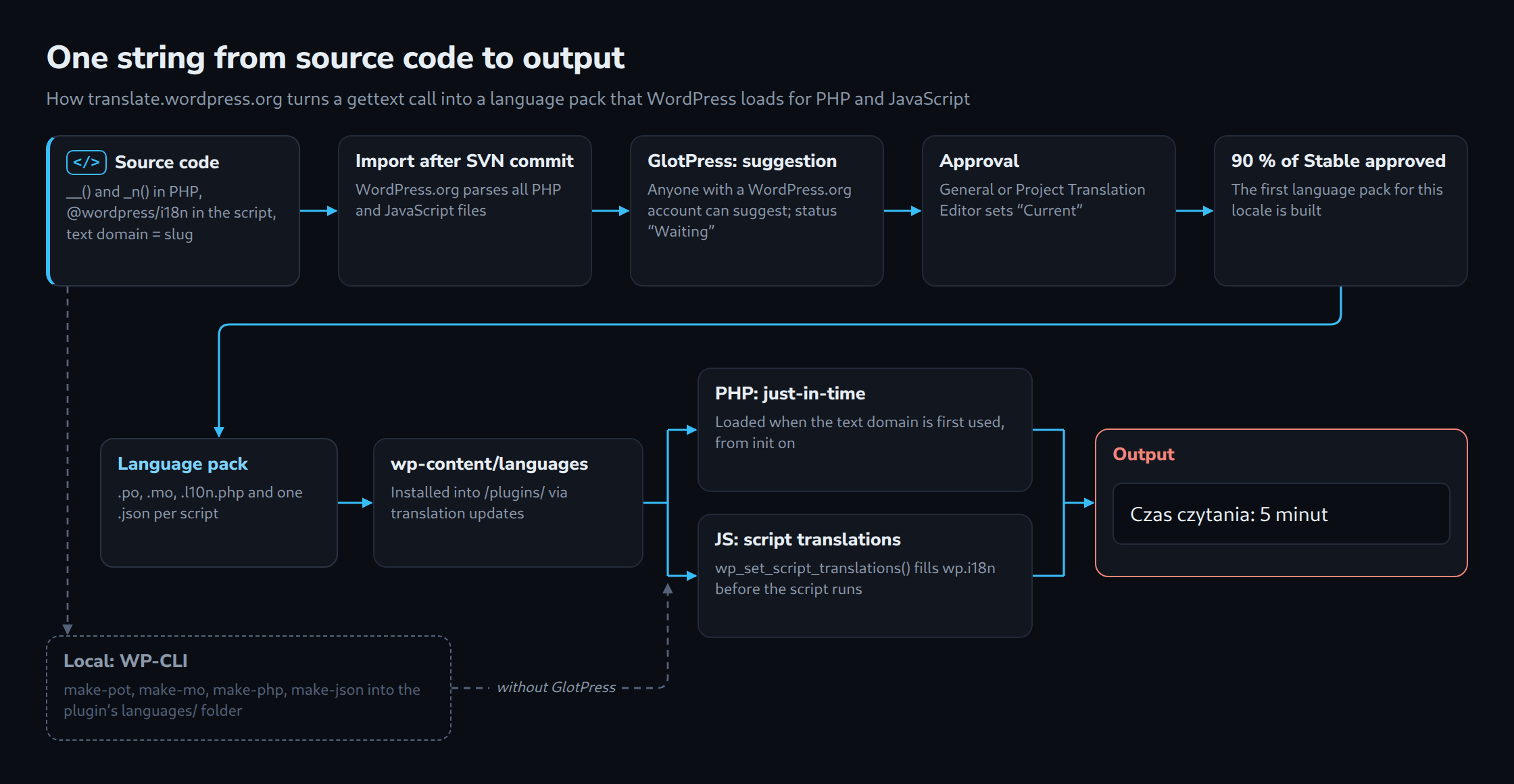
With WordPress 4.6, the way translations are loaded changed fundamentally. The dev note from July 2016 introduced just-in-time loading: when WordPress meets a text domain for the first time, _load_textdomain_just_in_time() looks in wp-content/languages and loads the matching file. Since then, plugins from the directory no longer need load_plugin_textdomain(). The same release reversed the search order, so language packs in wp-content/languages are checked before files inside the plugin folder.
WordPress 6.5 replaced the translation engine. Language packs now also contain a .l10n.php file next to .po and .mo; when present, WordPress loads it instead of the .mo file, which is faster, uses less memory and benefits from OPcache. The filter translation_file_format switches back to mo.
WordPress 6.7 changed load_plugin_textdomain() so that it only records the path; the just-in-time mechanism loads the translations. The same release added a _doing_it_wrong() notice. If translations for a domain are requested before after_setup_theme, WordPress reports that loading “was triggered too early” and says to load translations at init or later. According to the dev note, early loading forces WordPress to determine the current user prematurely and prevents other plugins from filtering the locale or file location.
For testing, a detail in core’s l10n.php matters: the notice appears as soon as core knows a language directory for the domain, even if no translation file exists. Since 6.8, core registers the Domain Path folder for every active plugin, or the plugin folder if the header is absent. On WordPress 7.1.2, the snippet below therefore also triggers the notice on an English site without any translation file.
<?php
// Too early: runs while WordPress loads the plugin file, before after_setup_theme and init.
// WordPress 6.7+ reports (since 6.8 also without a translation file, even on en_US)
// _load_textdomain_just_in_time() via _doing_it_wrong().
define( 'LW_READING_TIME_TITLE', __( 'Reading time', 'lw-reading-time' ) );

// Better: translate at the moment the text is needed (init or later).
function lw_reading_time_title() {
	return __( 'Reading time', 'lw-reading-time' );
}

// Plugin metadata without translating it: third parameter $translate = false.
function lw_reading_time_version() {
	if ( ! function_exists( 'get_plugin_data' ) ) {
		require_once ABSPATH . 'wp-admin/includes/plugin.php';
	}
	$data = get_plugin_data( __FILE__, false, false );

	return $data['Version'];
}
The dev note names two typical causes: get_plugin_data() without $translate = false, and classes instantiated in the main file whose constructor calls __(). To locate the trigger, it suggests a callback on doing_it_wrong_run that prints a backtrace for _load_textdomain_just_in_time, or Query Monitor.
WordPress 6.8 extended just-in-time loading to plugins outside the directory, based on the Text Domain and Domain Path headers. The dev note sums it up in two cases:
- Plugin hosted on WordPress.org and requiring at least WordPress 4.6: no
load_plugin_textdomain()call is needed. - Plugin with
Text DomainandDomain Pathheaders and requiring at least WordPress 6.8: no call is needed either.
Anything else, for example a plugin distributed elsewhere that still supports older versions, keeps the call but moves it to init. Plugin Check enforces this for the directory: the sniff PluginCheck.CodeAnalysis.DiscouragedFunctions.load_plugin_textdomainFound produces a warning as soon as the minimum WordPress version, taken from Requires at least in the header or readme, is above 4.6. The message adds that WordPress loads translations under the plugin slug automatically.
JavaScript: @wordpress/i18n, build step and wp_set_script_translations
Since WordPress 5.0, the script handle wp-i18n provides the same functions in the browser: __(), _x(), _n(), _nx() and sprintf(). The example imports them from the npm package @wordpress/i18n and builds the file with @wordpress/scripts:
{
	"name": "lw-reading-time",
	"version": "1.0.0",
	"private": true,
	"license": "GPL-2.0-or-later",
	"scripts": {
		"build": "wp-scripts build",
		"start": "wp-scripts start"
	},
	"devDependencies": {
		"@wordpress/scripts": "^36.0.0"
	}
}
// src/index.js
import { _n, _x, sprintf } from '@wordpress/i18n';
const STORAGE_KEY = 'lwReadingTimeRead';
function getReadPosts() {
try {
const stored = JSON.parse( window.localStorage.getItem( STORAGE_KEY ) );
return Array.isArray( stored ) ? stored : [];
} catch ( error ) {
return [];
}
}
function saveReadPosts( ids ) {
try {
window.localStorage.setItem( STORAGE_KEY, JSON.stringify( ids ) );
} catch ( error ) {
// Storage may be unavailable (e.g. private windows); the button still updates.
}
}
document.querySelectorAll( '.lw-reading-time__mark' ).forEach( ( button ) => {
button.addEventListener( 'click', () => {
const postId = Number( button.dataset.post );
const readPosts = getReadPosts();
if ( ! readPosts.includes( postId ) ) {
readPosts.push( postId );
saveReadPosts( readPosts );
}
button.disabled = true;
button.textContent = _x(
'Read',
'status of a post after it was marked as read',
'lw-reading-time'
);
button.title = sprintf(
/* translators: %d: number of posts marked as read in this browser. */
_n(
'%d post marked as read in this browser',
'%d posts marked as read in this browser',
readPosts.length,
'lw-reading-time'
),
readPosts.length
);
} );
} );Without a block.json, wp-scripts build takes src/index.js as the entry point and writes build/index.js. The dependency extraction plugin replaces the import with the global wp.i18n and writes build/index.asset.php with wp-i18n as a dependency plus a version hash; the PHP file passes both to wp_enqueue_script(). The webpack configuration keeps comments matching translators: in the minified output, and make-pot recognises the call forms webpack produces.
The link between script and translation is wp_set_script_translations(), available since WordPress 5.0; since 5.1 the text domain parameter is optional. It only works for a registered script, identified by the same handle that the article on selectively dequeuing plugin scripts relies on. WordPress then searches for a Jed JSON file and places its contents in wp.i18n before the script runs. The file name follows the pattern {domain}-{locale}-{md5}.json, where the hash is calculated from the script’s path relative to the plugin folder. For build/index.js that is dfbff627e6c248bcb3b61d7d06da9ca9. Core maps .min.js to .js before hashing, and make-pot skips *.min.js files by default. An optional third parameter names a directory that WordPress checks first, both for {domain}-{locale}-{handle}.json and for the hashed name, before it falls back to wp-content/languages/plugins.
For script modules registered with wp_register_script_module(), WordPress 7.0 added the counterpart wp_set_script_module_translations(). The example uses a classic script, so the function only gets this mention here.
From the source code to the language pack
For directory plugins, WordPress.org parses all PHP and JavaScript files after the next SVN commit and imports the strings into translate.wordpress.org. Each plugin appears there with four sub-projects: Development, Development Readme, Stable (latest release) and Stable Readme (latest release). Existing .mo files in the plugin are imported once; after that, translation work happens on the platform.
Anyone with a WordPress.org account can suggest translations. Suggestions start with the status “Waiting” and only count after a General Translation Editor for the locale, or a Project Translation Editor appointed for the plugin, sets them to “Current”. Unreviewed machine translations are not accepted. The first language pack for a locale is built once at least 90 percent of the strings in the Stable sub-project are approved; readme strings do not count toward this threshold. After that, every change to strings or translations leads to a new language pack, even if coverage falls below 90 percent again.
A language pack contains the .po and .mo files, since WordPress 6.5 the .l10n.php file, and one JSON file per script that contains translatable strings. WordPress installs it through the regular translation updates into wp-content/languages/plugins/, where just-in-time loading and wp_set_script_translations() find it without any further code in the plugin.
Own translation files with WP-CLI
Local files are needed outside the directory, before a first language pack exists, and for client projects with their own wording. The wp i18n commands cover the chain:
# Run inside wp-content/plugins/lw-reading-time/

# 1. Build the script: creates build/index.js and build/index.asset.php (dependency "wp-i18n").
npm install
npm run build

# 2. Extract all strings from PHP and from the built JavaScript into a template.
wp i18n make-pot . languages/lw-reading-time.pot --exclude=src

# 3. Copy the template to languages/lw-reading-time-pl_PL.po (and -de_DE.po),
#    translate it in Poedit or a text editor, then compile the runtime files.
wp i18n make-mo languages
wp i18n make-php languages
wp i18n make-json languages --no-purge

# Result for Polish:
# languages/lw-reading-time-pl_PL.po
# languages/lw-reading-time-pl_PL.mo
# languages/lw-reading-time-pl_PL.l10n.php
# languages/lw-reading-time-pl_PL-dfbff627e6c248bcb3b61d7d06da9ca9.json   (md5 of "build/index.js")
make-pot scans PHP, Blade and JavaScript files as well as the plugin header and always excludes node_modules, vendor, version control folders and *.min.js. In the example, --exclude=src ensures that only the built file appears as the source of the JavaScript strings. make-mo compiles the binary files, make-php creates the .l10n.php files and arrived with WP-CLI 2.10.0 (i18n-command 2.6.0). make-json writes one Jed JSON file per JavaScript source file. By default it removes the JavaScript strings from the PO file afterwards; --no-purge leaves the PO file untouched. The Polish PO file then contains all three plural forms:
# languages/lw-reading-time-pl_PL.po (excerpt)
msgid ""
msgstr ""
"Language: pl_PL\n"
"Content-Type: text/plain; charset=UTF-8\n"
"Plural-Forms: nplurals=3; plural=(n == 1) ? 0 : ((n % 10 >= 2 && n % 10 <= 4 && (n % 100 < 12 || n % 100 > 14)) ? 1 : 2);\n"
"X-Domain: lw-reading-time\n"

#. translators: %s: estimated reading time in minutes.
#: lw-reading-time.php:50
msgid "Reading time: %s minute"
msgid_plural "Reading time: %s minutes"
msgstr[0] "Czas czytania: %s minuta"
msgstr[1] "Czas czytania: %s minuty"
msgstr[2] "Czas czytania: %s minut"

#: lw-reading-time.php:57
msgid "Mark as read"
msgstr "Oznacz jako przeczytany"

#: build/index.js:1
msgctxt "status of a post after it was marked as read"
msgid "Read"
msgstr "Przeczytany"

#. translators: %d: number of posts marked as read in this browser.
#: build/index.js:2
msgid "%d post marked as read in this browser"
msgid_plural "%d posts marked as read in this browser"
msgstr[0] "%d wpis oznaczony jako przeczytany w tej przeglądarce"
msgstr[1] "%d wpisy oznaczone jako przeczytane w tej przeglądarce"
msgstr[2] "%d wpisów oznaczonych jako przeczytane w tej przeglądarce"
Since 4.6, language packs in wp-content/languages take precedence over files inside the plugin. Where a plugin must load its own translations nonetheless, the handbook points to the filter load_textdomain_mofile; since 6.5, core also offers load_translation_file, which receives the path of either the .mo or the .l10n.php file. For scripts, the third parameter of wp_set_script_translations() sets the directory that WordPress checks first.
Limits and open points
- The example plugin was tested on WordPress 7.1.2 with WP-CLI 2.12.0 and
@wordpress/scripts36.0.0; the package declares Node 22.22.2 or newer, under Node 20 npm only warned. The line numbers in the PO excerpt come from that build and shift with every change to the code. - The sources used do not say whether the WordPress.org importer skips folders such as
src/or minified files in the same way asmake-pot. Either way, the built file has to be in SVN. - Without a third parameter,
wp_set_script_translations()on WordPress 7.1.2 also finds the JSON files in theDomain Pathfolder, because core uses the directory registered for the domain. As soon aswp-content/languages/pluginsholds a translation file for the same locale, the plugin’s own JSON files are ignored. _n()expects a whole number; fractional values such as 1.5 minutes follow other grammatical rules in Polish. The example rounds up to whole minutes.
Questions and answers
Does a plugin in the directory have to ship its own .mo files?
No. After the import into translate.wordpress.org, language packs are built and WordPress downloads them into wp-content/languages/plugins/ by itself. Existing .mo files are imported once during the first import; according to the Meta handbook they can then be removed from the package and from SVN.
Does the too-early notice only show up on a site with a translation file?
No, not on WordPress 7.1.2. The check in _load_textdomain_just_in_time() runs as soon as core knows a language directory for the domain, and since 6.8 core registers the plugin folder or its Domain Path for every active plugin. A test on an en_US site without any translation file therefore shows the notice as well. Language packs remain necessary to check the translated output itself.
PHP strings are translated, script strings stay in English. What is the usual cause?
wp_set_script_translations()runs before the script is registered or uses a different handle.- The hash in the JSON file name does not match the relative path of the delivered file, for example because the POT file was built from
src/instead ofbuild/. - The built file is missing from SVN, so WordPress.org finds no JavaScript strings.
Sources
- Plugin Handbook: How to Internationalize Your Plugin (retrieved 29.09.2026)
- Plugin Handbook: Localization (retrieved 29.09.2026)
- Block Editor Handbook: Internationalization (retrieved 29.09.2026)
- Code Reference: __(), _e(), _x(), _n(), esc_html__() (retrieved 29.09.2026)
- Code Reference: load_plugin_textdomain() and wp_set_script_translations() (retrieved 29.09.2026)
- Make WordPress Core: I18N Improvements in 4.6 (retrieved 29.09.2026)
- Make WordPress Core: JavaScript i18n support in WordPress 5.0 (retrieved 29.09.2026)
- Make WordPress Core: I18N Improvements in 6.5 (Performant Translations) (retrieved 29.09.2026)
- Make WordPress Core: Internationalization improvements in 6.7 (retrieved 29.09.2026)
- Make WordPress Core: Internationalization improvements in 6.8 (retrieved 29.09.2026)
- Meta Handbook: Translations (retrieved 29.09.2026)
- Polyglots Handbook: Plugin/Theme Authors Guide (retrieved 29.09.2026)
- WP-CLI: wp i18n make-pot, make-json, make-php, make-mo (retrieved 29.09.2026)
- wordpress-develop, branch 7.1: wp-includes/l10n.php and script-modules.php (retrieved 29.09.2026)
- GlotPress: locales.php (plural rules) and translate.wordpress.org: Akismet project, Polish export (retrieved 29.09.2026)
- Plugin Check 2.1.0: DiscouragedFunctionsSniff and Plugin_Header_Fields_Check (retrieved 29.09.2026)
- @wordpress/scripts (README and webpack configuration) and @wordpress/i18n (retrieved 29.09.2026)
- WordPress Coding Standards: EscapeOutputSniff (retrieved 29.09.2026)
- WordPress Releases (retrieved 29.09.2026)
Related articles