English
Settings pages with the Settings API and register_setting

Contents
Almost every plugin needs a page where administrators can adjust a handful of values. Many plugins still build it by hand, with a custom POST handler, capability checks, nonces and a dozen separate rows in wp_options. This can leave a capability check in one place and a forgotten nonce in another. Since version 2.7, WordPress core has provided the Settings API for this work. It renders the form in the familiar admin layout, posts it to wp-admin/options.php and handles the nonce, capability check, sanitizing and storage there. Since WordPress 4.7, register_setting() also describes the data itself: type, default value, sanitize callback and, with show_in_rest, visibility in the REST endpoint /wp/v2/settings.
This article builds a small but complete plugin, “LW Settings Demo”: a notice bar whose three settings live in one bundled option, a page under Settings, a sanitize callback that serves both the form and the REST API, and a short script that reads and writes the same option with apiFetch. Along the way it follows a single form field from the input element to its row in wp_options and shows where the REST path takes a different route. The core source was read on 29.09.2026; the current release according to the WordPress.org version check is 7.1.2, and the example requires at least WordPress 6.6.
Four jobs, four groups of functions
The Settings API splits a settings page into clearly separated tasks. Each group of functions belongs to its own hook, and mixing them up is the most common reason why a page renders fine but refuses to save.
| Function | Hook | Job |
|---|---|---|
add_options_page() |
admin_menu |
Menu entry below Settings, capability for showing the menu item |
register_setting() |
init (explained below) |
Puts the option on the allowed list of a group, attaches sanitize callback, default value and REST schema |
add_settings_section(), add_settings_field() |
admin_init |
Layout: headings, labels, callbacks that print the input elements |
settings_fields(), do_settings_sections() |
Page callback | Hidden fields with nonce, then all sections and fields of the page |
add_options_page() is a thin wrapper: it calls add_submenu_page() with options-general.php as parent. The capability passed here decides whether the menu item appears; users without it also get status 403 when they open the page address directly. Its docblock states explicitly that the page callback must check the capability as well, which is why the example starts its render function with current_user_can( 'manage_options' ). Saving is checked a third time and separately, in options.php, as the section on the storage path shows.
The link between form and storage is the option group. register_setting( 'lwsd_notice_bar', 'lwsd_settings', … ) adds the option lwsd_settings to the group lwsd_notice_bar. settings_fields( 'lwsd_notice_bar' ) sends that group name as the hidden field option_page. The page ID used by add_settings_section() and do_settings_sections() is a different identifier; in the example it matches the menu slug lwsd-notice-bar.
One option instead of dozens
The Plugin Handbook recommends storing related values as an array in a single option, because reading or writing an array happens in one database transaction instead of many. The source of options.php adds a second, less obvious reason. On save, it iterates over every option registered in the submitted group and calls update_option() for each one. If a field is missing from the POST data, the value passed along is null. Two forms that share a group therefore overwrite each other’s values. A single array option per form avoids that trap, and the sanitize callback sees all values at once, which makes rules across fields possible, such as “no active notice bar without a message”.
The price is serialization: the array ends up as a serialized string in one row, and individual keys cannot be filtered in SQL. For configuration values that is rarely a problem; for data that needs querying, the article on the limits of wp_postmeta and custom tables covers the alternatives.
Setting autoload on purpose
WordPress 6.6 reworked the autoload column. The $autoload parameter of add_option() now defaults to null, and the column stores on and off for explicit decisions, auto when nobody decided, and auto-on or auto-off when a filter decided dynamically. The old values yes and no are deprecated since 6.7. Options larger than 150,000 bytes receive no autoload by default (filter wp_max_autoloaded_option_size). According to wp_autoload_values_to_autoload(), auto is currently still loaded; the 6.6 dev note, however, says that this default may change in future versions.
This matters for the Settings API because options.php calls update_option() without an autoload argument. If the option does not exist yet, update_option() calls add_option(), which creates the row with auto. To set autoload explicitly, a plugin can create the option itself. The example does this on activation with add_option( …, true ), because the notice bar is read on every front-end request.
Later calls of update_option() without an autoload argument keep an explicit on or off; only the auto variants are re-evaluated. An option needed only on a single admin page would get false instead.
To change autoload afterwards, wp_set_option_autoload() (since 6.4) works without changing the stored option value. By contrast, update_option() only applies a new autoload value when the option value itself changes. The explanation in a separate, planned article on autoload covers what the individual values in the column mean in practice.
The complete plugin
The main file contains everything: registration, page, fields, sanitize callback, front-end output and activation. The prefix lwsd_ is used consistently for functions, constants, the option and the HTML IDs.
<?php
/**
 * Plugin Name:       LW Settings Demo
 * Description:       Notice bar with a settings page built on the Settings API, also available via /wp/v2/settings.
 * Version:           1.0.0
 * Requires at least: 6.6
 * Requires PHP:      7.4
 * Author:            Lukas Wojcik
 * License:           GPL-2.0-or-later
 * License URI:       https://www.gnu.org/licenses/gpl-2.0.html
 * Text Domain:       lw-settings-demo
 *
 * @package LW_Settings_Demo
 */

if ( ! defined( 'ABSPATH' ) ) {
	exit;
}

const LWSD_OPTION = 'lwsd_settings';   // Row in wp_options.
const LWSD_GROUP  = 'lwsd_notice_bar'; // Option group, sent as option_page.
const LWSD_PAGE   = 'lwsd-notice-bar'; // Menu slug and settings page ID.

/**
 * Default values of the bundled option.
 *
 * @return array
 */
function lwsd_default_settings() {
	return array(
		'enabled'  => false,
		'message'  => '',
		'position' => 'bottom',
	);
}

/**
 * Returns the stored settings merged with the defaults.
 *
 * @return array
 */
function lwsd_get_settings() {
	$settings = get_option( LWSD_OPTION );

	if ( ! is_array( $settings ) ) {
		$settings = array();
	}

	return wp_parse_args( $settings, lwsd_default_settings() );
}

/**
 * Registers the option on init, so admin screens and REST requests both know it.
 */
function lwsd_register_setting() {
	register_setting(
		LWSD_GROUP,
		LWSD_OPTION,
		array(
			'type'              => 'object',
			'label'             => __( 'Notice bar', 'lw-settings-demo' ),
			'description'       => __( 'Visibility, text and position of the notice bar.', 'lw-settings-demo' ),
			'sanitize_callback' => 'lwsd_sanitize_settings',
			'default'           => lwsd_default_settings(),
			'show_in_rest'      => array(
				'schema' => array(
					'type'       => 'object',
					'properties' => array(
						'enabled'  => array(
							'type' => 'boolean',
						),
						'message'  => array(
							'type'      => 'string',
							'maxLength' => 200,
						),
						'position' => array(
							'type' => 'string',
							'enum' => array( 'top', 'bottom' ),
						),
					),
				),
			),
		)
	);
}
add_action( 'init', 'lwsd_register_setting' );

/**
 * Sanitizes the whole settings array.
 *
 * Runs for options.php and for REST writes, because both end in update_option().
 * Must be idempotent: on the first save of a missing option it runs twice.
 *
 * @param mixed $input Raw value.
 * @return array
 */
function lwsd_sanitize_settings( $input ) {
	$defaults = lwsd_default_settings();

	if ( ! is_array( $input ) ) {
		return $defaults;
	}

	$message  = isset( $input['message'] ) ? sanitize_text_field( $input['message'] ) : '';
	$position = isset( $input['position'] ) ? sanitize_key( $input['position'] ) : '';

	$output = array(
		'enabled'  => ! empty( $input['enabled'] ),
		'message'  => mb_substr( $message, 0, 200 ),
		'position' => in_array( $position, array( 'top', 'bottom' ), true ) ? $position : $defaults['position'],
	);

	if ( $output['enabled'] && '' === $output['message'] ) {
		$output['enabled'] = false;

		// add_settings_error() lives in wp-admin/includes/template.php,
		// which a REST request does not load.
		if ( function_exists( 'add_settings_error' ) ) {
			add_settings_error(
				LWSD_OPTION,
				'lwsd_empty_message',
				__( 'The notice bar stays off until a message is entered.', 'lw-settings-demo' ),
				'warning'
			);
		}
	}

	return $output;
}

/**
 * Adds the page below Settings and loads its script only there.
 */
function lwsd_add_settings_page() {
	$hook_suffix = add_options_page(
		__( 'Notice bar', 'lw-settings-demo' ),
		__( 'Notice bar', 'lw-settings-demo' ),
		'manage_options',
		LWSD_PAGE,
		'lwsd_render_settings_page'
	);

	if ( $hook_suffix ) {
		add_action( 'load-' . $hook_suffix, 'lwsd_load_settings_page' );
	}
}
add_action( 'admin_menu', 'lwsd_add_settings_page' );

/**
 * Runs only when the settings page is requested.
 */
function lwsd_load_settings_page() {
	add_action( 'admin_enqueue_scripts', 'lwsd_enqueue_admin_script' );
}

/**
 * Enqueues the REST demo script.
 */
function lwsd_enqueue_admin_script() {
	wp_enqueue_script(
		'lwsd-settings-rest',
		plugins_url( 'js/settings-rest.js', __FILE__ ),
		array( 'wp-api-fetch', 'wp-i18n' ),
		'1.0.0',
		array( 'in_footer' => true )
	);
	wp_set_script_translations( 'lwsd-settings-rest', 'lw-settings-demo' );
}

/**
 * Declares section and fields. Only needed on admin screens.
 */
function lwsd_register_fields() {
	add_settings_section(
		'lwsd_section_main',
		__( 'Display', 'lw-settings-demo' ),
		'lwsd_render_section',
		LWSD_PAGE
	);

	add_settings_field(
		'lwsd_enabled',
		__( 'Show notice bar', 'lw-settings-demo' ),
		'lwsd_render_enabled_field',
		LWSD_PAGE,
		'lwsd_section_main',
		array( 'label_for' => 'lwsd_enabled' )
	);

	add_settings_field(
		'lwsd_message',
		__( 'Message', 'lw-settings-demo' ),
		'lwsd_render_message_field',
		LWSD_PAGE,
		'lwsd_section_main',
		array( 'label_for' => 'lwsd_message' )
	);

	add_settings_field(
		'lwsd_position',
		__( 'Position', 'lw-settings-demo' ),
		'lwsd_render_position_field',
		LWSD_PAGE,
		'lwsd_section_main',
		array( 'label_for' => 'lwsd_position' )
	);
}
add_action( 'admin_init', 'lwsd_register_fields' );

/**
 * Section intro.
 */
function lwsd_render_section() {
	echo '<p>' . esc_html__( 'All three values are stored together in one option.', 'lw-settings-demo' ) . '</p>';
}

/**
 * Checkbox field.
 */
function lwsd_render_enabled_field() {
	$settings = lwsd_get_settings();

	printf(
		'<input type="checkbox" id="lwsd_enabled" name="%1$s[enabled]" value="1" %2$s />',
		esc_attr( LWSD_OPTION ),
		checked( $settings['enabled'], true, false )
	);
}

/**
 * Text field.
 */
function lwsd_render_message_field() {
	$settings = lwsd_get_settings();

	printf(
		'<input type="text" class="regular-text" id="lwsd_message" name="%1$s[message]" value="%2$s" maxlength="200" />',
		esc_attr( LWSD_OPTION ),
		esc_attr( $settings['message'] )
	);
}

/**
 * Select field.
 */
function lwsd_render_position_field() {
	$settings = lwsd_get_settings();
	$choices  = array(
		'top'    => __( 'Top of the page', 'lw-settings-demo' ),
		'bottom' => __( 'Bottom of the page', 'lw-settings-demo' ),
	);

	printf( '<select id="lwsd_position" name="%s[position]">', esc_attr( LWSD_OPTION ) );

	foreach ( $choices as $value => $label ) {
		printf(
			'<option value="%1$s" %2$s>%3$s</option>',
			esc_attr( $value ),
			selected( $settings['position'], $value, false ),
			esc_html( $label )
		);
	}

	echo '</select>';
}

/**
 * Settings page. The form posts to options.php, not to this page.
 */
function lwsd_render_settings_page() {
	if ( ! current_user_can( 'manage_options' ) ) {
		return;
	}
	?>
	<div class="wrap">
		<h1><?php echo esc_html( get_admin_page_title() ); ?></h1>
		<form action="options.php" method="post">
			<?php
			settings_fields( LWSD_GROUP );
			do_settings_sections( LWSD_PAGE );
			submit_button();
			?>
		</form>
		<p>
			<button type="button" class="button" id="lwsd-rest-toggle"><?php esc_html_e( 'Toggle via REST API', 'lw-settings-demo' ); ?></button>
			<span id="lwsd-rest-status" aria-live="polite"></span>
		</p>
	</div>
	<?php
}

/**
 * Prints the notice bar on the front end.
 *
 * @param string $position Where the calling hook prints: top or bottom.
 */
function lwsd_print_notice( $position ) {
	$settings = lwsd_get_settings();

	if ( ! $settings['enabled'] || $position !== $settings['position'] || '' === $settings['message'] ) {
		return;
	}

	printf(
		'<div class="lwsd-notice lwsd-notice-%1$s" role="status">%2$s</div>',
		esc_attr( $position ),
		esc_html( $settings['message'] )
	);
}

/**
 * Top position, needs a theme that calls wp_body_open().
 */
function lwsd_print_top_notice() {
	lwsd_print_notice( 'top' );
}
add_action( 'wp_body_open', 'lwsd_print_top_notice' );

/**
 * Bottom position.
 */
function lwsd_print_bottom_notice() {
	lwsd_print_notice( 'bottom' );
}
add_action( 'wp_footer', 'lwsd_print_bottom_notice' );

/**
 * Creates the option with an explicit autoload value.
 */
function lwsd_activate() {
	// Read on every front-end request, so autoload it on purpose.
	add_option( LWSD_OPTION, lwsd_default_settings(), '', true );
}
register_activation_hook( __FILE__, 'lwsd_activate' );
Why register_setting runs on init
The Plugin Handbook example registers settings on admin_init. That hook fires in wp-admin/admin.php, and a REST request to /wp-json/ never loads that file. A setting registered only there works in the form but is missing from /wp/v2/settings. Core registers its own settings on rest_api_init, and the Developer Blog example for React-based settings pages uses init. The example follows the latter: init covers options.php, the settings page, REST requests and the front end, where the registered default value also takes effect. Sections and fields, on the other hand, are pure admin layout and stay on admin_init.
One sanitize callback for two paths
register_setting() attaches the callback to the filter sanitize_option_lwsd_settings. That filter is applied by sanitize_option(), which update_option() calls on every write, whether the value comes from options.php or the REST API. This has two consequences.
First, add_settings_error() is defined in wp-admin/includes/template.php, which a normal REST request does not load. The function_exists() check therefore ensures that the function is available before calling it. Second, the callback must be idempotent: running it again on its own output must produce the same result. When the option is missing, update_option() sanitizes once and add_option() sanitizes again. Creating the row on activation avoids this double pass in normal operation, but the callback must not rely on that.
No settings_errors() call on the page
For pages below Settings, admin-header.php includes the file options-head.php, which calls settings_errors() on its own. An additional call in the page callback would print every message twice. The Handbook example uses a top-level menu page and therefore calls settings_errors() itself. One more detail from options.php: the message “Settings saved.” is only added when no other message is registered. The warning from the sanitize callback replaces it, even though the other values were stored.
What happens on save
The form posts to options.php, not to the settings page. The following steps come straight from the core source and apply to every page built on the Settings API.
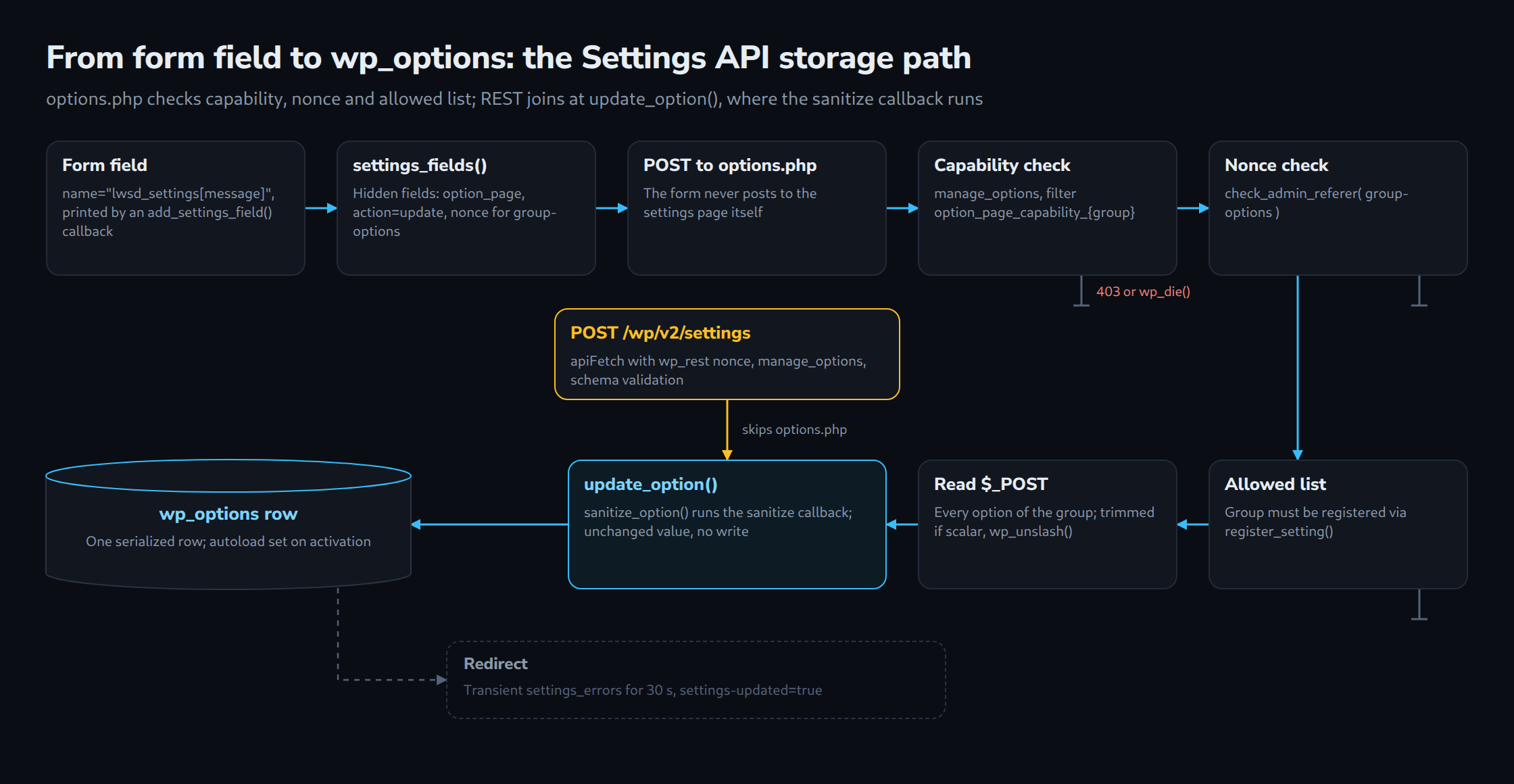
settings_fields()prints four hidden fields:option_pagewith the group name,actionwith the valueupdate, the nonce_wpnoncefor the actionlwsd_notice_bar-optionsand_wp_http_refererwith the address thatoptions.phpredirects back to after saving.options.phpdetermines the required capability:manage_options, adjustable through the filteroption_page_capability_{$option_page}. Without it, the request ends with status 403.check_admin_referer( $option_page . '-options' )verifies the nonce.- The group has to be on the allowed list, which
register_setting()fills and the filterallowed_optionscan extend. Otherwisewp_die()stops the request. - For each registered option, the value is read from
$_POST, trimmed if it is scalar, passed throughwp_unslash()and handed toupdate_option(). update_option()runssanitize_option()and thus the callback, then thepre_update_optionfilters. If the value has not changed, nothing is written; otherwise the serialized value lands in the row.- The collected messages are stored for 30 seconds in the transient
settings_errors, followed by a redirect withsettings-updated=true. After the redirect,settings_errors()reads the transient and prints the messages.
Step two has a practical consequence. A plugin that shows its menu item to editors with the capability edit_pages fails on save as long as the filter option_page_capability_lwsd_notice_bar still requires manage_options. Menu, page callback and save have to agree on the same capability. Why a nonce alone never replaces the capability check is covered in detail in a separate article of this series on sanitizing, escaping, nonces and capabilities.
register_setting and the REST endpoint /wp/v2/settings
By default, registered settings do not appear in the REST API. show_in_rest set to true is enough for scalar types. For array and object, the option needs a schema under show_in_rest.schema. For arrays without items, core raises a _doing_it_wrong notice (since 5.4); for objects, properties define which keys exist. The controller builds the final schema from type, label (as title), description and default and merges the schema from show_in_rest on top. Only the types number, integer, string, boolean, array and object are accepted; other settings are silently skipped.
The controller in class-wp-rest-settings-controller.php answers several questions that the reference pages leave open:
- Permission: reading and writing both require
manage_options. The endpoint is not a way to hand settings to anonymous visitors; that takes a separate route with its ownpermission_callback. - Name: the key in the response equals the option name unless
show_in_restsets a differentname. - Strict objects: the controller adds
additionalProperties: falserecursively to every object without an explicit rule. Unknown keys in a request are rejected. If the stored value contains keys the schema does not know, for example left over from an older plugin version, GET returnsnullfor the whole setting. - Replace, not merge: a POST passes the submitted object unchanged to
update_option(). Properties that are missing are not kept; in the example the sanitize callback fills them with defaults, soenabledsilently turns intofalse. - null deletes:
nullas a value callsdelete_option(), unless the stored value is invalid; in that case the controller refuses withrest_invalid_stored_valueand status 500. - Response: after the update, the controller calls
get_item()again. The response therefore shows the value after sanitizing, not the submitted one.
Reading and writing with apiFetch
The script lives in js/settings-rest.js and is only loaded on the settings page: the plugin attaches admin_enqueue_scripts inside the load-{$hook_suffix} hook that add_options_page() returns. The dependency wp-api-fetch is enough for authentication. Core registers two inline scripts for this handle, one for the root URL of the REST API and one for the nonce middleware, so the request carries the wp_rest nonce matching the login cookie without any extra code.
/* global wp */
( function () {
	'use strict';

	const { __ } = wp.i18n;
	const button = document.getElementById( 'lwsd-rest-toggle' );
	const status = document.getElementById( 'lwsd-rest-status' );

	if ( ! button || ! status ) {
		return;
	}

	button.addEventListener( 'click', async () => {
		button.disabled = true;

		try {
			// GET returns every setting registered with show_in_rest, keyed by name.
			const settings = await wp.apiFetch( { path: '/wp/v2/settings' } );
			const current = settings.lwsd_settings;

			if ( ! current ) {
				// null: the stored value does not match the registered schema.
				status.textContent = __( 'Stored value does not match the schema.', 'lw-settings-demo' );
				return;
			}

			// The endpoint replaces the whole object, so send every property.
			const saved = await wp.apiFetch( {
				path: '/wp/v2/settings',
				method: 'POST',
				data: {
					lwsd_settings: { ...current, enabled: ! current.enabled },
				},
			} );

			// The response already contains the sanitized value.
			status.textContent = saved.lwsd_settings.enabled
				? __( 'Notice bar is on.', 'lw-settings-demo' )
				: __( 'Notice bar is off.', 'lw-settings-demo' );
		} catch ( error ) {
			status.textContent = error.message || __( 'Request failed.', 'lw-settings-demo' );
		} finally {
			button.disabled = false;
		}
	} );
} )();
The button reads the entire settings object, flips enabled and sends the object back complete. The response illustrates the point from the previous section: with an empty message field, the sanitize callback switches the notice bar off again, and the status line reports that the bar is off. The form above does not update itself and shows the new state only after a reload.
The same pattern carries over to a settings page built with React. The WordPress Developer Blog shows a page based on @wordpress/components that loads the option with apiFetch( { path: '/wp/v2/settings' } ) and saves it with a POST, registered on init with a schema. The PHP side stays the same: register_setting() with schema and sanitize callback remains the single place where type, default value and cleaning are defined. Only the form rendering and options.php drop out of the picture.
Limits and open points
- The code was checked against the core source (branch 7.1 and trunk) and run on a WordPress 7.1.2 test installation with PHP 8.4: activation creates the option with autoload
on, a first save through the form after deleting the option creates it withauto. Saving through the form and through/wp/v2/settingsleft no entries in the debug log, and Plugin Check 2.1.0 only reported the missingreadme.txt. - How
autowill be treated in future versions is open; the 6.6 dev note explicitly leaves room for a change. - The plugin does not delete its option on uninstall. That belongs in
uninstall.php, the topic of a separate article in this series on the plugin lifecycle. - The top position depends on the theme calling
wp_body_open(); otherwise only the bottom position works. - Multisite network settings and
register_setting()in combination with network admin pages were not examined. - In trunk (7.2 alpha),
settings_errors()has been changed to usewp_admin_notice(). That version is not released, so the article describes the behaviour of 7.1.
Questions and answers
Is register_setting() on admin_init enough when the setting is only used in the form?
For the form, yes: options.php runs through wp-admin/admin.php, where admin_init fires. As soon as the setting is meant to appear in /wp/v2/settings, however, it is missing, because a REST request never triggers admin_init. The registered default value for get_option() on the front end also only applies when the registration runs there. init covers all three cases.
Why does GET /wp/v2/settings suddenly return null for an array or object option?
The controller validates the stored value against the schema and outputs null when validation fails. The most common cause is keys the schema does not know, for example from an earlier plugin version: objects without their own rule automatically receive additionalProperties: false. The fix is a migration of the stored value or an extended schema. In this state, a POST with null is rejected with rest_invalid_stored_value.
Can a single key of an object option be changed through /wp/v2/settings?
No. The controller passes the submitted object unchanged to update_option() and thereby replaces the entire value. A client has to read the object first, change the key and send the complete object back. Real partial updates require a custom route with a permission_callback.
Is the nonce from settings_fields() enough to protect a settings page?
No. A WordPress nonce helps protect against CSRF. It is time-limited and tied to an action and user session, but does not prove that a request came from the plugin’s own form or replace authentication or authorization. options.php checks permission separately, using manage_options or whatever the filter option_page_capability_{$option_page} returns. A plugin that lowers the capability of its menu item has to adjust that filter as well, otherwise saving fails.
Sources
- Plugin Handbook: Settings API, retrieved 29.09.2026
- Plugin Handbook: Using Settings API, retrieved 29.09.2026
- Plugin Handbook: Custom Settings Page, retrieved 29.09.2026
- Plugin Handbook: Options API, retrieved 29.09.2026
- Code Reference: register_setting(), retrieved 29.09.2026
- Code Reference: settings_fields(), retrieved 29.09.2026
- Code Reference: add_option(), retrieved 29.09.2026
- Code Reference: wp_set_option_autoload(), retrieved 29.09.2026
- REST API Handbook: Settings, retrieved 29.09.2026
- Block Editor Handbook: @wordpress/api-fetch, retrieved 29.09.2026
- WordPress Developer Blog: How to use WordPress React components for plugin pages, retrieved 29.09.2026
- Make WordPress Core: Registering your settings in WordPress 4.7, retrieved 29.09.2026
- Make WordPress Core: New option functions in 6.4, retrieved 29.09.2026
- Make WordPress Core: Options API: Disabling autoload for large options, retrieved 29.09.2026
- wordpress-develop: wp-admin/options.php (branch 7.1), retrieved 29.09.2026
- wordpress-develop: wp-admin/options-head.php (branch 7.1), retrieved 29.09.2026
- wordpress-develop: wp-includes/option.php (branch 7.1), retrieved 29.09.2026
- wordpress-develop: class-wp-rest-settings-controller.php (branch 7.1), retrieved 29.09.2026
- wordpress-develop: wp-admin/includes/plugin.php (branch 7.1), retrieved 29.09.2026
- wordpress-develop: wp-admin/includes/template.php (branch 7.1), retrieved 29.09.2026
- wordpress-develop: wp-includes/script-loader.php (branch 7.1), retrieved 29.09.2026
- WordPress.org version check API (current release), retrieved 29.09.2026
Related articles