English
 Deutsch
 Polski
BigQuery Data Transfer Backfill Limit and Google Signals Scope: Two GA4 Changes From June 2026

Contents
- BigQuery Data Transfer Backfill Limit and Google Signals Scope: Two GA4 Changes From June 2026
- 1. The backfill limit applies to reporting connectors
- 2. Calendar-date validation before scheduling
- 3. A run-specific recovery point
- 4. Daily comparison and content validation
- 5. Google Signals and Consent Mode control different things
- 6. Separate records for settings and measurement evidence
- Questions and answers
- Sources
BigQuery Data Transfer Backfill Limit and Google Signals Scope: Two GA4 Changes From June 2026
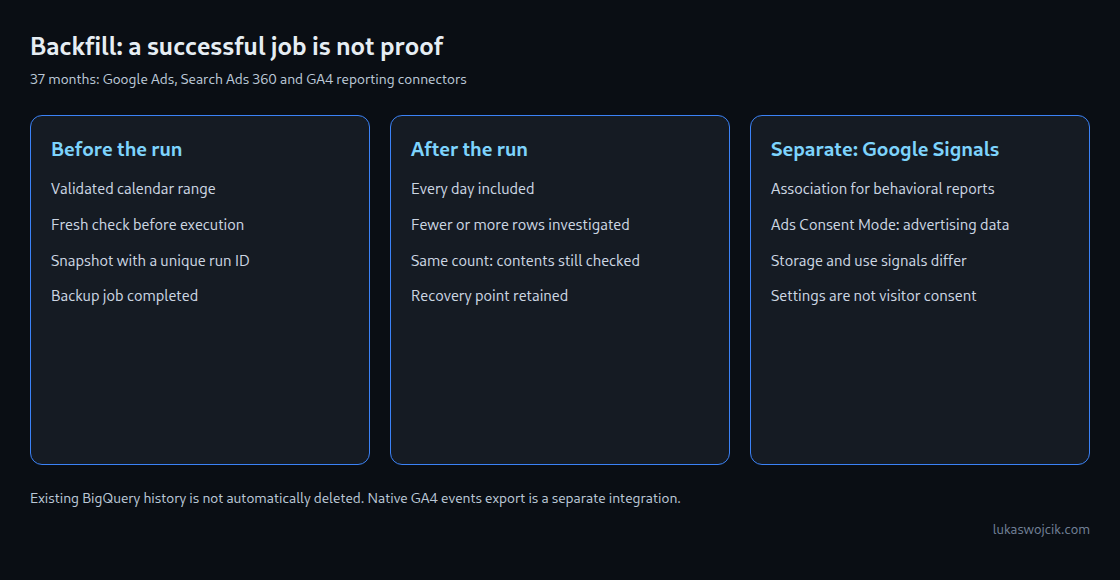
Two June 2026 changes need separate checks. BigQuery Data Transfer Service limits historical reloads for several reporting connectors to 37 months. Google Signals now controls a narrower association of Analytics data, while Ads Consent Mode controls the relevant advertising-data collection and use. Neither change can be assessed from a green dashboard alone.
1. The backfill limit applies to reporting connectors
A backfill reloads a historical period. The BigQuery release notes of 6 May 2026 announced that, from 1 June 2026, the Data Transfer Service connectors for Google Ads, Search Ads 360 and Google Analytics 4 stop populating backfills beyond 37 months. This concerns those connectors, including the GA4 reporting-data connector. It is not a new retention limit for the native GA4 events_* export and does not automatically delete existing BigQuery history.
The current connector changelog distinguishes the outcomes: Google Ads and Search Ads 360 reject daily backfills older than 37 months, whereas the Analytics connector warns about partial or empty results overwriting historical partitions.
The daily-transfer restriction must not be generalized to all Google Ads reporting. Google Ads retains monthly, quarterly and annual reporting for up to 11 years; reach and frequency metrics have a three-year limit.
For direct Google Ads API queries beyond 37 months, the selected date granularity must be monthly or coarser, or omitted, and the requested range must cover complete months. These aggregate results cannot reconstruct daily detail. API date ranges use the serving account’s customer.time_zone. The UTC-only guard below illustrates calendar arithmetic and requires adaptation to the actual connector and scheduling rules; it is not a complete validator for arbitrary Google Ads API queries.
2. Calendar-date validation before scheduling
The limit moves with the scheduling date. A saved date range needs a fresh check immediately before execution, especially after a delayed or retried run. The following Python guard uses UTC and clamps month-end dates like BigQuery DATE_SUB with MONTH. For example, 31 March 2026 minus 37 months is 28 February 2023. GNU date can normalize the impossible February date into March instead, which makes the old shell calculation unsuitable as an equivalent.
#!/usr/bin/env python3
import calendar
from datetime import date, datetime, timezone
import json
import re
import sys

def parse_day(value):
    if not re.fullmatch(r"[0-9]{4}-[0-9]{2}-[0-9]{2}", value):
        raise ValueError('Expected YYYY-MM-DD')
    return date.fromisoformat(value)

def months_before(day, months):
    month_index = day.year * 12 + day.month - 1 - months
    year, zero_month = divmod(month_index, 12)
    month = zero_month + 1
    return date(year, month, min(day.day, calendar.monthrange(year, month)[1]))

def validate(start_text, end_text, as_of):
    start, end = parse_day(start_text), parse_day(end_text)
    boundary = months_before(as_of, 37)
    if start > end:
        raise ValueError('Start is after end')
    if end > as_of:
        raise ValueError('End is in the future')
    if start < boundary:
        raise ValueError(f'Start precedes 37-month boundary {boundary}')
    return {'start': str(start), 'end': str(end),
            'as_of_utc': str(as_of), 'boundary': str(boundary)}

def main():
    if len(sys.argv) != 3:
        print('Usage: guard.py START END', file=sys.stderr)
        return 2
    try:
        result = validate(sys.argv[1], sys.argv[2], datetime.now(timezone.utc).date())
    except ValueError as exc:
        print(f'BLOCKED: {exc}', file=sys.stderr)
        return 1
    print(json.dumps(result))
    return 0

if __name__ == '__main__':
    sys.exit(main())
The example checks complete YYYY-MM-DD dates, start before or equal to end, no future end, and the 37-month boundary. It prints the accepted range but does not launch a transfer. The scheduler must stop on a nonzero exit code and pass exactly the checked dates to the actual transfer command. The UTC assumption and any account-specific scheduling semantics need confirmation near the boundary; a safety margin can avoid borderline runs. This guard is only for the affected connectors, not a universal backfill policy.
3. A run-specific recovery point
Before a destructive reload, the target and backup must be identified unambiguously. The following statement creates a read-only table snapshot, unlike CREATE TABLE AS SELECT, which creates a materialized copy. PROJECT, DATASET, TARGET_TABLE and RUN_ID are placeholders; RUN_ID must be fresh for each run. Snapshot and source must be in the same location. A successful backup job is a prerequisite for starting the transfer.
-- Replace identifiers; use a fresh RUN_ID for every backfill.
-- Keep snapshot and source in the same location.
CREATE SNAPSHOT TABLE `PROJECT.audit.TARGET__RUN_ID`
CLONE `PROJECT.DATASET.TARGET_TABLE`;
The snapshot covers the source table, not just a WHERE-filtered date range. Streaming-buffer data and other snapshot limitations need checking for the actual table. Unrelated writes to the affected range must be paused or accounted for during the comparison. Existing snapshot names must not be overwritten, and restoration into a separate table should be practiced before relying on the backup.
4. Daily comparison and content validation
After the transfer finishes, the query compares the specific snapshot with the current table. The complete date list includes empty days. A missing table causes a query failure, rather than becoming zero rows; a missing per-day group in an existing table is genuinely zero for that query. The example assumes PARTITION_DATE is a DATE column. An ingestion-time or timestamp-partitioned schema requires an explicit matching date expression.
-- Run only after the transfer has completed successfully.
-- @start_day and @end_day are DATE parameters from the validated range.
-- PARTITION_DATE is a DATE column in this example.
WITH days AS (
  SELECT day FROM UNNEST(GENERATE_DATE_ARRAY(@start_day, @end_day)) AS day
), before_counts AS (
  SELECT PARTITION_DATE AS day, COUNT(*) AS n
  FROM `PROJECT.audit.TARGET__RUN_ID`
  WHERE PARTITION_DATE BETWEEN @start_day AND @end_day
  GROUP BY day
), after_counts AS (
  SELECT PARTITION_DATE AS day, COUNT(*) AS n
  FROM `PROJECT.DATASET.TARGET_TABLE`
  WHERE PARTITION_DATE BETWEEN @start_day AND @end_day
  GROUP BY day
)
SELECT d.day,
       COALESCE(b.n, 0) AS rows_before,
       COALESCE(a.n, 0) AS rows_after,
       COALESCE(a.n, 0) - COALESCE(b.n, 0) AS delta,
       CASE
         WHEN COALESCE(b.n, 0) = 0 AND COALESCE(a.n, 0) = 0 THEN 'BOTH_EMPTY'
         WHEN COALESCE(a.n, 0) < COALESCE(b.n, 0) THEN 'FEWER_ROWS'
         WHEN COALESCE(a.n, 0) > COALESCE(b.n, 0) THEN 'MORE_ROWS'
         ELSE 'SAME_COUNT_REQUIRES_CONTENT_CHECK'
       END AS check_result
FROM days d
LEFT JOIN before_counts b USING (day)
LEFT JOIN after_counts a USING (day)
ORDER BY d.day;
Fewer rows require investigation; more rows are also a change, not automatic success. Equal counts do not prove equal content: deleted records and new duplicates can cancel out numerically. Business-key checks, relevant metrics and selected record-level comparisons are still required. A snapshot should be retained until that validation and the recovery window are complete, rather than dropped merely because the count did not fall.
5. Google Signals and Consent Mode control different things
Google’s data-controls notice states that, from 15 June 2026, the Signals setting in Analytics administration and the corresponding API only control association of Analytics-sourced data with signed-in user information for behavioral reporting. The related change moves control of Google Ads cookies and identifiers collected by the Analytics tag or SDK to Ads Consent Mode. The statement concerns that advertising-data scope, not all Analytics data.
The consent types remain distinct: ad_storage covers advertising cookies or device identifiers; analytics_storage covers analytics storage; ad_user_data concerns sending user data for online advertising; ad_personalization controls personalized advertising. A Signals setting is not a substitute for these signals. Depending on basic or advanced implementation, denied storage can still coexist with cookieless measurement pings; it does not universally mean that no network request is sent.
6. Separate records for settings and measurement evidence
A property inventory can record capture time, property ID, the Signals state and the source of the observation. The documented read-only Admin API request below requires a valid access token, the analytics.readonly scope and access to the property. PROPERTY_ID and ACCESS_TOKEN are placeholders; no setting is changed by this GET request.
GET /v1alpha/properties/PROPERTY_ID/googleSignalsSettings HTTP/1.1
Host: analyticsadmin.googleapis.com
Authorization: Bearer ACCESS_TOKEN
Accept: application/json
Illustrative response, not a reading from an actual property:
{
  "name": "properties/123456789/googleSignalsSettings",
  "state": "GOOGLE_SIGNALS_ENABLED",
  "consent": "GOOGLE_SIGNALS_CONSENT_CONSENTED"
}
The consent field in this resource means acceptance of the Google Signals terms, not visitor consent. Missing or unspecified state is not proof that Signals is enabled. Failed requests must remain recorded as failures, and a scheduled inventory must fail visibly rather than append an error and report success. A comparison uses two successful dated observations for the same property; this request template does not implement an automatic inventory or diff.
Consent rates require a separate definition of the observation unit: events, sessions and individual consent decisions produce different rates. In native GA4 export, privacy_info.ads_storage uses Yes, No and Unset, not granted/denied. Unknown values belong in a separate category. A changing rate can reflect traffic mix, banner changes or releases; a June change alone does not demonstrate causation by Signals.
Questions and answers
Can time travel replace a backup?
BigQuery time travel can support recovery within the configured window, normally seven days and configurable from two to seven days. A snapshot can retain a recovery point longer. Snapshot storage charges may rise when source blocks change or are deleted; small logical changes can affect larger physical blocks. Neither a fixed low cost nor unlimited retrospective recovery should be assumed.
Does an unchanged partition modification time prove that no data changed?
No. INFORMATION_SCHEMA.PARTITIONS metadata is useful context, but some modifications, including record deletions, may not be reflected in last_modified_time. Counts, content checks and an actual recovery point serve different purposes; no single metadata field proves completeness.
Sources
- BigQuery release notes
- BigQuery transfer changes
- BigQuery date functions
- BigQuery table snapshots
- BigQuery time travel
- Google Analytics data controls
- Consent Mode
- Admin API: getGoogleSignalsSettings
- GoogleSignalsSettings
- BigQuery PARTITIONS
- GA4 BigQuery export schema
- BigQuery documentation
- Google Ads Data Retention Policy
- Google Ads API date ranges
Related articles