English
 Deutsch
 Polski
GA4 Channel Rules: Sources, Media and Priorities

Contents
A channel such as Paid Search is the result of classification, not a direct record of the marketing intention. Source, medium and campaign name matter, but connected advertising platforms can supply additional fields. A surprising channel therefore needs a check of the input data before any tagging change.
The following examples concern session acquisition. The relevant dimension is Session default channel group. First-user acquisition and event-scoped attribution answer different questions and can produce different channel totals.
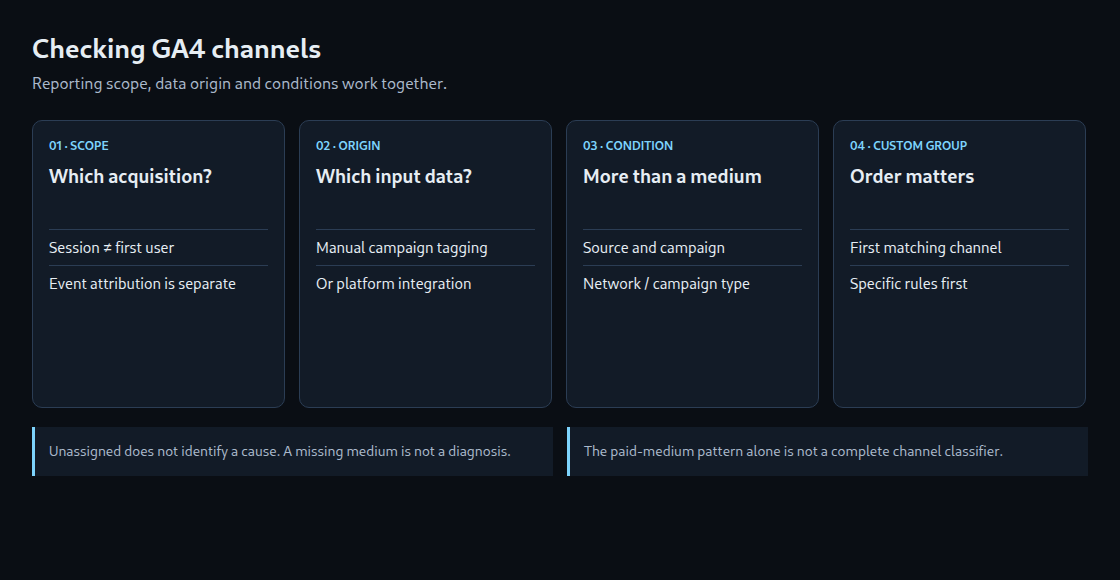
One rule list is not enough for every source
Google documents separate definitions for manually tagged traffic and integrations such as Google Ads, DV360 and Merchant Center. Google Ads classification can use network and campaign types. Performance Max therefore does not need a campaign name containing cross-network to appear in Cross-network. The campaign-name condition belongs to the definitions for manual traffic.
A fixed diagram of eighteen numbered rules is also out of date. The current list includes AI Assistant. Google maintains the definitions and source categories; the default group cannot be edited in a property. In custom channel groups, the first matching channel in the configured order wins. A broad custom rule placed above a specific one can consequently absorb its traffic.
A paid-medium pattern is only part of a condition
Several manual definitions use ^(.*cp.*|ppc|retargeting|paid.*)$. Matching is case-insensitive. The table tests this pattern only; it does not calculate a final GA4 channel.
| Medium | Pattern match | Meaning |
|---|---|---|
cpc, cpv, cpm |
Yes | Contain cp. The Display definition also names cpm. |
paid_social, paidsearch |
Yes | Begin with paid. |
ppc, retargeting |
Yes | Explicit alternatives. |
display, banner |
No | Still recognized by the separate Display definition. |
ad, ads, sponsored |
No | Another condition may still match. Unassigned is not inevitable. |
A recognized search source plus an appropriate paid medium supports Paid Search for manual traffic. An unrelated partner source with cpc can instead fall into Paid Other, provided no more specific applicable condition matches. Campaign names can matter too, especially for shopping. A source list alone is therefore not a complete channel classifier.
Unassigned is a finding, not a diagnosis
Unassigned means that no channel definition matched the available data. An unusual medium, incomplete campaign information or missing session information can contribute. The label does not identify the cause or prove that a link builder is responsible.
A missing medium does not always force Unassigned: some definitions can match the source alone. Conversely, missing session-start information can leave session acquisition fields unavailable. Investigation needs the actual reporting scope, source, medium, campaign, source platform and collection sequence. Consent requirements still apply during debugging.
A short investigation sequence
- The reporting dimension and period establish which acquisition data is being compared.
- The source platform identifies the applicable integration or manual definitions.
- Actual field values are compared with those definitions, including campaign-name conditions and source categories.
- Link tests check whether redirects preserve the intended parameters. Collection checks examine session information and tag ordering.
- A corrected future campaign link is checked in incoming data. Historical attribution is not automatically repaired by changing that link.
Custom rules have a different purpose
A custom group can express a business taxonomy without changing Google’s default group. Its order matters: a specific partner rule above a general paid rule can create a dedicated partner channel. Reversing those two rules can change the result for the same input.
Custom group definitions can be applied to historical data in supported reports and explorations. That does not mean every use is retrospective: choosing a new primary group affects that dimension going forward, and audience eligibility also changes going forward. Custom channel groups are not included in the BigQuery export schema.
Questions and answers
Does every Google Ads click carry a gclid and become Paid Search?
No. Auto-tagging, account linking and available integration data all matter. Google also documents GBRAID-based classification. Search, video, display and cross-network campaigns cannot be distinguished reliably from google / cpc alone.
Why can newsletter / newsletter become Unassigned?
Those values do not by themselves satisfy the Email definition. With no other matching condition, Unassigned is possible. A consistent newsletter taxonomy normally uses utm_medium=email and a descriptive source or campaign name. Campaign-name conditions still need a check; the shopping expression is more specific than a simple search for any occurrence of shop.
Why can facebook / ads look organic?
For manual traffic, ads misses the paid-medium pattern while a recognized social source can satisfy Organic Social. A suitable medium such as paid_social expresses the paid intention. Any integration and campaign conditions must also be considered.
Does Email need to be changed to email to fix the channel?
Consistent lowercase naming helps analysis, but the default channel definitions are case-insensitive. That spelling change alone does not explain a channel difference. Extra spaces or other field differences need separate investigation.
Does AI Assistant include Google’s AI search features?
No. Google’s current definition separates AI Assistant from traffic through AI Overviews and AI Mode, which belongs to Organic Search. Channel classification does not measure every visit influenced by an AI answer.
Sources
Practical check: audit real acquisition rows
The Acquisition Audit in the Channel Debugger adds a report-based check to the individual channel-rule examples. After Google authorization, a property and an explicit date range determine the query. The tool reads session source, medium, campaign and default channel group together with sessions. It does not mix first-user acquisition with session acquisition.
- A completed reporting period provides the comparison window. Recent data may still change.
- Review starts with the largest Unassigned session values and compares their source and medium with the applicable channel definitions.
- Naming checks cover spelling candidates such as
Emailandemail, or campaign names with extra spaces. A candidate is a naming inconsistency to investigate, not an automatic correction. - Interpretation includes the returned metadata. Thresholding, sampling and an
(other)row can hide detail. - CSV export documents findings for corrections to future campaign links or tracking configuration where the evidence supports them.
The displayed Unassigned percentage uses the sum of the returned session values. It is not an independently retrieved property total. The tool rejects incomplete pagination and does not rewrite historical attribution. A row containing (not set) alone cannot establish whether consent, redirects or tagging caused the missing value.
Technical references: Data API dimensions and metrics and response metadata.
Related articles