English
 Deutsch
 Polski
Microsoft Clarity via MCP: Export Limits, Tool Versions and Reliable Comparisons

Contents
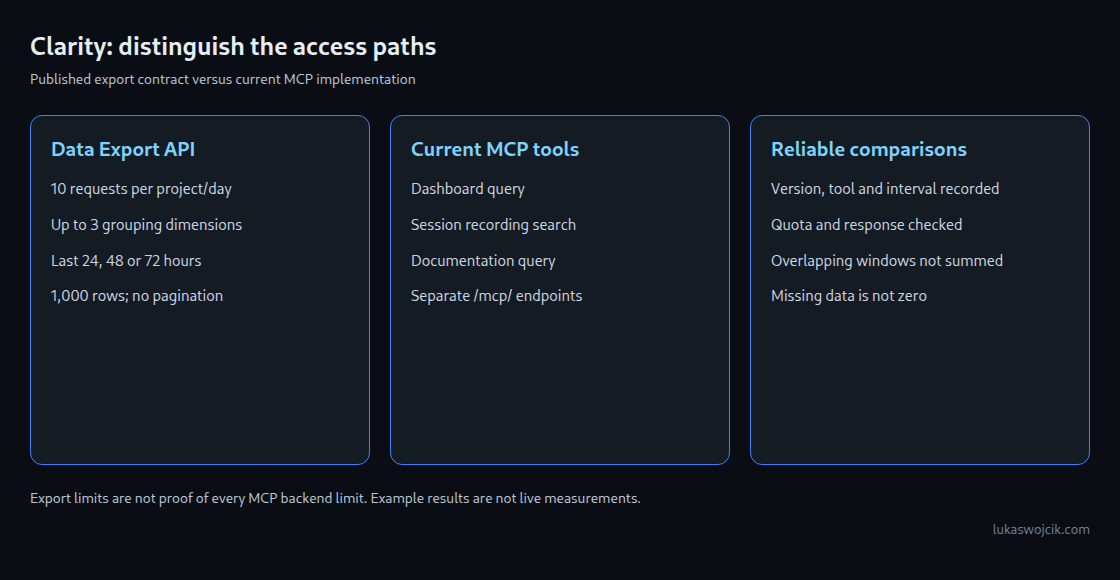
Microsoft Clarity can provide analytics through an export API and through MCP tools used by an AI assistant. These access paths need separate treatment. The familiar limits of ten requests, three dimensions and three days are explicitly documented for the Data Export API. Applying all of those limits to every current MCP tool would go beyond the available evidence.
The endpoint matters
The Data Export endpoint project-live-insights returns dashboard metrics. Microsoft’s documentation specifies at most ten requests per project per day, up to three grouping dimensions and a response capped at 1,000 rows without pagination. The numOfDays values 1, 2 and 3 mean the preceding 24, 48 and 72 hours measured from the request, not an unspecified selection of calendar days. Results use UTC.
The current official MCP repository exposes three tools: query-analytics-dashboard, list-session-recordings and query-documentation-resources. The inspected implementation sends requests to separate /mcp/ endpoints. A recording search and a documentation question are therefore not simply identical exports under another name.
What the documentation does not settle
The Microsoft Learn MCP page repeats the ten-request, three-day and three-dimension limits. The official blog post of 18 August 2026, however, illustrates seven-day and thirty-day questions, with results explicitly labelled as mock outputs. Neither illustrative results nor the client source prove the current backend entitlement, quota accounting or maximum history of a particular installation.
A reliable setup records the installed MCP package version, tool name, actual requested interval and server response. Export-based integrations can plan against the published export contract. Newer MCP tools need confirmation of their own behaviour; an example prompt alone is insufficient evidence that a thirty-day query succeeded. The absence of a limit in client code also does not mean unlimited server access.
Grouping is not an arbitrary filter
A grouping divides a result into categories, such as device types. A filter restricts the underlying population, such as traffic from one country. The export parameter list contains numOfDays and dimension1 through dimension3; it does not document a free-form country filter that could substitute for a fourth grouping.
For example, URL × Device × Source already uses three export dimensions. Adding Country requires a different breakdown, another supported interface or a narrower analytical question. Filtering a returned three-dimensional result cannot reconstruct a country dimension that was never present. Joining separate aggregates also cannot reliably rebuild the missing four-dimensional combinations.
MCP recording filters are a separate capability. The current recording tool declares fields such as country, device and a date interval. That schema does not create a matching filter parameter on the export endpoint. Filtering after a capped response cannot recover rows already omitted by the server.
A small budget can still support a report
A daily snapshot is a reasonable use of an export quota. An illustrative allocation is one call for a stable monitoring view, up to five for focused investigations, two for checks and two held in reserve. The numbers are a local planning choice, not a Microsoft recommendation. A single response can contain several metrics, so separate calls for every metric may waste the budget.
The budget applies to the project, including other export clients. A chat question can produce several calls; retries also need consideration. A shared call log and a fixed application-side maximum are more dependable than assuming one sentence consumes one request. An exhausted quota returns HTTP 429; repeated immediate retries do not create more allowance. An HTTP error or missing response must remain a failed observation, not become a zero in a report.
Snapshots need an explicit time contract
An export with numOfDays=1 provides a rolling 24-hour snapshot. A sequence of such snapshots can form a monitoring series, provided retrieval times and gaps remain visible. It does not retroactively retrieve a missing week. A weekly three-day snapshot covers only those three days, not the entire week; overlapping three-day exports must not simply be added together.
Each stored observation needs the project, endpoint or MCP tool, package version, actual parameters, UTC request time, intended interval, response status and raw returned data. Row-limit warnings and known gaps belong beside the values. Aggregated responses cannot later be split into dimensions that were not requested.
The same weekday can reduce one source of variation, but does not cancel holidays, campaign changes, tracking changes or random variation. A fixed UTC schedule preserves elapsed-hour spacing; a fixed local time can shift relative to UTC at daylight-saving changes. Consistent denominators, metric definitions and comparable traffic matter more than a confident model summary.
Interpreting a result
A second breakdown can help locate an issue, but agreement across two views of the same data is not independent confirmation of a cause. Small groups, missing rows and changes to measurement can produce misleading patterns. A useful report distinguishes the observed count or rate, the proposed explanation and the next check.
Clarity’s interface remains useful for recordings, heatmaps and historical exploration, subject to the retention rules of each feature. MCP is not inherently unsuitable for scheduled reporting: suitability depends on supported tools, reproducible parameters, quotas and completeness. API tokens belong in protected configuration, not prompts, screenshots or shared logs.
Frequently asked questions
Does three days mean that all Clarity data disappears after three days?
No. The documented export look-back is an access limit on that endpoint. It does not describe the retention of every Clarity feature.
Does a larger quota break an existing pipeline?
Not by itself. Lower quotas, changed response schemas or different interval semantics can require adaptation. Monitoring should detect concrete failures and changes instead of treating every quota update as an outage.
Does a response below 1,000 rows prove completeness?
No. The row cap is only one possible constraint. The requested scope, supported dimensions, collection coverage and response metadata still need checking. A response at the cap deserves particular scrutiny.
Related articles