English
 Deutsch
 Polski
Google Ads API v25.1: Reading Conversion Lift Data Without Creating a Study

Contents
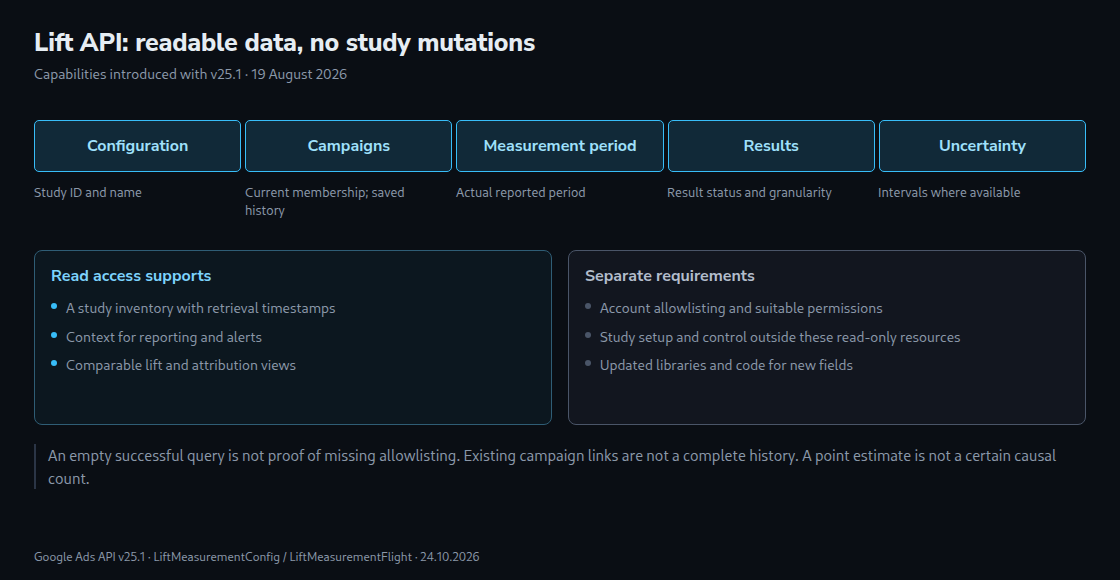
Google Ads API v25.1 was released on 19 August 2026, adding read access to lift studies alongside 24 new Conversion Lift metrics and winner-score metrics. Study information and effect estimates can therefore feed automated reporting. The new lift resources are read-only: studies cannot be created or controlled through these resources.
This article covers that v25 extension. As of the review on 24 October 2026, v26 has already been released. A new integration needs a separate check of supported versions, libraries and field combinations.
Read access and account eligibility
Google explicitly requires allowlisting for the announced Conversion Lift and Brand Lift capabilities. The official contact is the Google account representative. Successful API authentication does not replace this additional eligibility requirement.
LiftMeasurementConfig includes the study name, currently linked campaigns, conversion actions and holdback ratio. Holdback is the proportion reserved for the control group. The campaign list is explicitly current membership, not a complete history. Periodic snapshots are therefore useful for later comparisons.
LiftMeasurementFlight exposes flight information such as status and start/end dates in the customer’s time zone. A flight is a measurement phase. The resource reference particularly describes Brand Lift flights; timelines for different lift types must not be treated as interchangeable without checking. Conversion Lift reporting needs the actual reported measurement period.
What Conversion Lift measures
Conversion Lift compares a treatment group with a control group held back from the advertising under study. Depending on the study type, the comparison uses people or geographic areas. Incrementality is an estimate of the additional effect of the studied advertising under the experiment’s conditions. Group allocation, measurement coverage and uncertainty are part of the interpretation.
Attribution asks a different question: which advertising interactions receive credit for recorded conversions under the selected rules? Different windows, conversion goals, groups and modelling methods can produce different figures. The gap between attributed and incremental conversions therefore does not automatically count purchases that would have happened anyway. Nor does it establish a generally large gap for branded search or remarketing.
Interim results are provisional. Google recommends evaluation after the study ends; modelled or delayed conversions may be included depending on the measurement method. A lift point estimate without its interval and result status is insufficient for an automatic budget decision.
A reliable integration workflow
- Inventory: The account, study identifier, current campaign membership and conversion actions are stored with the retrieval timestamp.
- Measurement context: The record includes lift type, period, holdback ratio, result status and available uncertainty information.
- Comparison: Campaigns, goals, periods, currencies and aggregation levels need alignment before comparison.
- Changes: New memberships, missing results and measurement-phase changes are recorded as separate states.
A study result spanning several campaigns must not be assigned in full to every campaign and then summed. The same caution applies to cumulative results returned repeatedly by daily retrievals. Study identifier, measurement period and metric granularity must be established before joining tables.
An empty result is not an eligibility diagnosis
A technically successful response with no rows initially means only “no data visible for this query”. Possible causes include the wrong customer account, filters, an unsuitable resource, unavailable results or permissions. A study visible in the interface but absent from an API response therefore does not prove missing allowlisting.
API errors need separate handling: authentication, authorisation, invalid queries and temporary technical failures are not empty study lists. Cross-checks include customer ID, manager-account access path, API version, filters and confirmed eligibility. Unresolved discrepancies require investigation with the account representative or API support.
What a compatible minor update means
Google describes v25.1 as a backward-compatible extension of v25. That protects existing calls against announced breaking changes in this minor release. Using new fields can still require updated client libraries, new code and revised tests. An automated dashboard still requires integration work.
The value depends on existing reporting effort and the decisions involved. Even a small number of economically important studies can justify an integration; neither a fixed threshold of two or three studies per year nor a blanket “one afternoon” estimate is reliable.
Questions and answers
Does lift replace standard conversion reporting?
No. Both views can be reported together with clear definitions and measurement periods. Lift does not produce a list of individual purchases labelled “caused by advertising”.
Should alerts be disabled during a study?
A holdback can affect reach and observed results, so the study belongs in alert and comparison context. A decline is not automatically harmless: tracking failures, budget problems and genuine performance losses still need investigation. Suppressing all alerts would be inappropriate.
Is everything before study launch manual?
The new resources provide no study mutation operations. That does not mean existing configurations are readable only after launch or every preparatory task must be manual. Setup and control remain with the designated Google Ads workflows; actual read availability depends on resource, status and permissions.
Sources
- Google Ads API documentation
- Google: v25.1 announcement
- Google Ads API: Release notes
- Google Ads API: LiftMeasurementConfig
- Google Ads API: LiftMeasurementFlight
- Google: About Conversion Lift
- Google: Conversion Lift measurement data
- Google: Conversion Lift setup and interpretation
- Google Ads API: Versioning
- Google Ads API: Troubleshooting
- Google: v26 release announcement
Related articles