English
 Deutsch
 Polski
Tutorial: JSON-LD That Search Engines Actually Read

Contents
Structured data has no error state that anyone notices. A page carrying a relative image path, a date in local notation or a price with a currency symbol is served exactly like a correct one, ranks exactly like a correct one, and simply never receives the rich result it was written for. The markup is there, the crawler reads it, and nothing happens.
That makes structured data a maintenance problem rather than a writing problem. The mistakes are mechanical, they repeat across every page built from the same template, and a single wrong character in a field no visitor ever sees decides whether a listing shows a rating or a bare blue link. What follows is the chain a piece of markup has to pass through, and the four places where it usually drops out.
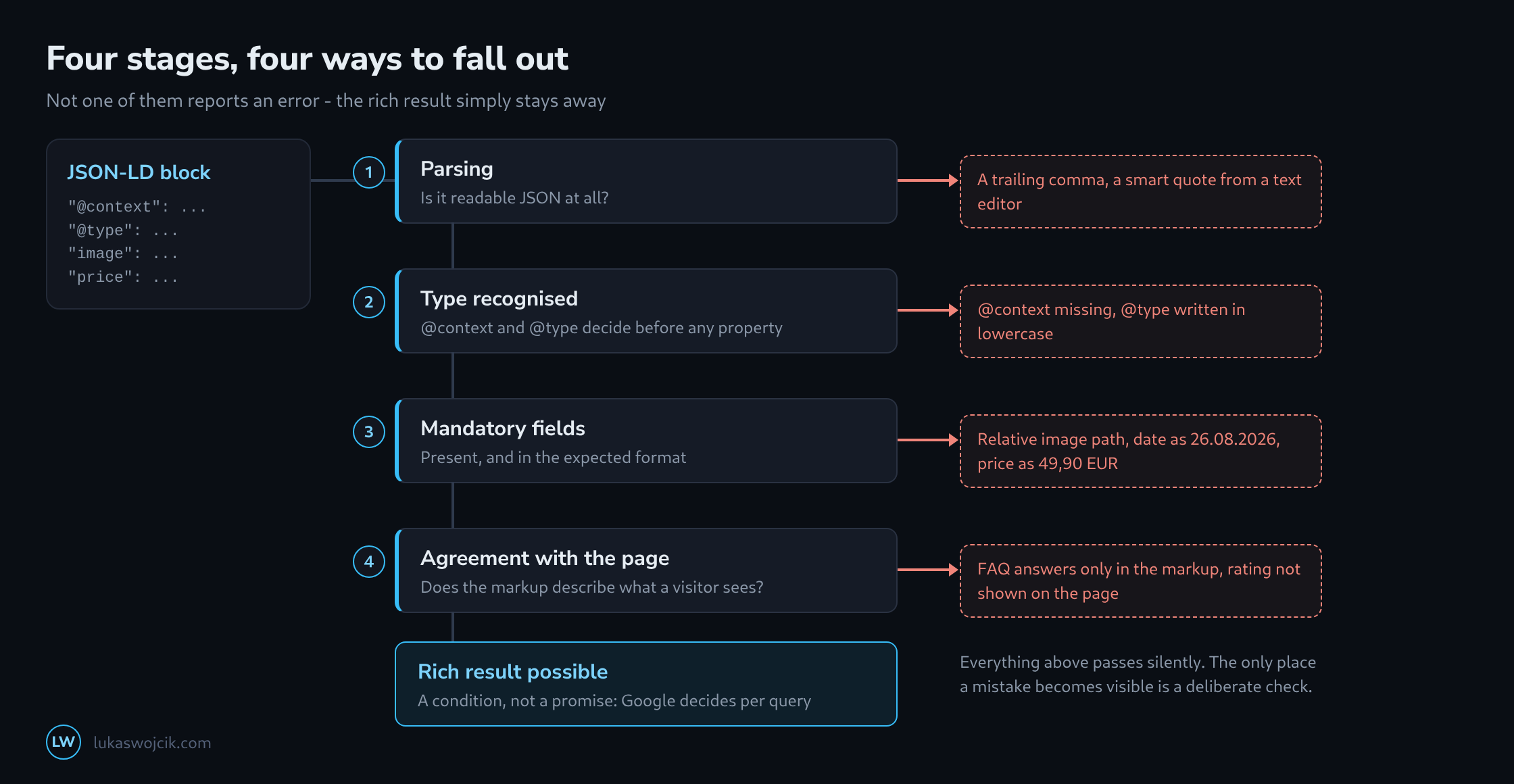
The Two Lines That Decide Everything
Before a single property is read, two fields decide whether the block is looked at at all. @context has to point at https://schema.org; without it the object is a piece of JSON without a vocabulary, and every property in it means nothing. @type then names the thing being described. Its spelling is case sensitive: Article is a type, article is not, and the difference produces no warning anywhere.
Where several objects belong to one page – an article, its author and the breadcrumb trail – they can sit in one block under @graph or in separate script elements. Both work. What does not work is two blocks describing the same thing differently, because the parser has no rule for deciding which of them is meant.
Four Mistakes That Produce No Error
These four account for most of the markup that validates and still shows nothing. They share one trait: the field involved is invisible to visitors, so nobody notices it is wrong.
| Written like this | What happens | What it has to be |
|---|---|---|
"image": "/img/a.jpg" |
The path is never resolved, the image counts as missing, and with it the most visible part of the result. | An absolute URL including the scheme. |
"datePublished": "26.08.2026" |
The field is dropped. An article without a publication date loses its date in the listing. | ISO 8601: 2026-08-26 or with a time and offset. |
"price": "49,90 EUR" |
The offer is discarded as a whole – price and availability disappear together. | A bare number with a dot, currency in priceCurrency. |
"@type": "article" |
The type is unknown, so every property below it is read as an unspecified thing. | Exactly Article, capital letter included. |
The first three come from templates that fill the markup from the same variables as the page itself: The image path is relative because the template writes relative paths. The date is formatted because it is the formatted date that was already at hand. And the price carries its currency because that is how it is printed. Structured data needs the raw values, not the ones prepared for display.
Article: The One Mandatory Field, and the Four That Matter
An article needs a headline and nothing else. Everything that makes a result look like a result is optional, which is why so much markup passes the test and shows nothing.
<script type="application/ld+json">
{
  "@context": "https://schema.org",
  "@type": "Article",
  "headline": "JSON-LD that search engines actually read",
  "description": "Why structured data fails without an error message.",
  "image": ["https://www.example.com/images/json-ld.png"],
  "author": { "@type": "Person", "name": "Lukas Wojcik" },
  "datePublished": "2026-08-26",
  "dateModified": "2026-08-26",
  "mainEntityOfPage": { "@type": "WebPage", "@id": "https://www.example.com/blog/json-ld/" }
}
</script>
Four details decide whether this markup earns anything. The headline is cut off beyond roughly 110 characters, so a title built from the page title plus the site name loses its ending. The author belongs in an object with a @type. A bare string is accepted, but it says nothing about whether a person or an organisation wrote the piece. dateModified must not lie before datePublished, a combination that appears whenever a migration writes the import date into one of the two fields. And the image should exist in more than one aspect ratio, because the layout that a result ends up in is not the one the markup asks for.
FAQPage: The Rule That Reaches Into the Page
An FAQ block is the one type whose validity depends on something outside the markup: every question and every answer has to be visible on the page itself. Markup describing an accordion that never opens, or questions that exist only in the JSON, counts as misleading rather than incomplete – and that is a manual action, not a missing feature.
Since 2023 the FAQ rich result itself is shown almost exclusively for authoritative government and health sites, so for most pages the visible reward is gone. The markup is still worth writing, only for different consumers: internal search, the assistants that read a page to answer a question, and every downstream system that would otherwise have to guess which part of the text is a question. Whoever expects the star-and-arrow listing from it will be disappointed; whoever wants a machine-readable question and answer pair gets exactly that.
Product: Price, Currency, Availability
A product without an offers block is a product without a price, and a price is the only reason a product result exists.
<script type="application/ld+json">
{
  "@context": "https://schema.org",
  "@type": "Product",
  "name": "Compact PoE switch, 8 ports",
  "image": ["https://www.example.com/images/switch.png"],
  "brand": { "@type": "Brand", "name": "Example" },
  "offers": {
    "@type": "Offer",
    "price": "149.00",
    "priceCurrency": "EUR",
    "availability": "https://schema.org/InStock",
    "url": "https://www.example.com/switch/"
  }
}
</script>
The availability field takes a schema.org address, not the word behind it: InStock on its own is not a value. Where an aggregateRating is added, it needs both a ratingValue and a count – one without the other is dropped, and a rating that appears on the page but not in the markup is worth nothing to the listing. Ratings that a page cannot show, on the other hand, must not appear in the markup at all.
Checking Before It Goes Live
Three checks catch nearly everything, and they answer different questions. A structural check reads the block on its own: are the mandatory fields there, is the date an ISO date, is the price a number. The Rich Results Test then says whether Google recognises a type at all, which is the only place where a lowercase @type becomes visible. And the enhancement reports in Search Console show what happens across the whole site over time, which is where a template error surfaces as several hundred identical warnings rather than one.
What none of them answers is whether a result will be shown. Valid markup is a condition, not a claim: Google decides per query and per page whether a rich result appears, and a correct block that produces nothing is the normal case rather than a fault. The reason to write structured data is the one that survives that decision – a page whose statements are readable by machines, at a moment when more and more of them are doing the reading.
Questions and answers
What happens when an SEO plugin and the theme each output their own Article block?
Then two blocks describe the same thing, and usually not identically: the plugin may take the SEO title and a full-size image, the theme the post title and the thumbnail, and the dates differ by a time zone. For exactly this case the parser has no rule for deciding which block is meant. Even so, there is no error message; the Rich Results Test merely shows two detected items of type Article.
The remedy is a single source. An SEO plugin often builds a @graph with website, page, author and breadcrumb trail anyway, which makes it the better choice, while the theme’s output is switched off. If the theme is to add something, it refers to the article in the plugin’s graph via @id instead of creating a second article.
After every change of plugin or theme, the source of a post page is worth a look: how often does application/ld+json appear there? Two blocks are not a fault; two blocks describing the same page differently are.
Does Google read JSON-LD that is only inserted by JavaScript, for example through Tag Manager?
Google can read it, because its crawler renders pages before evaluating the structured data, and the Rich Results Test shows blocks inserted this way too. Rendering happens in a separate, later step, however, and a block that is only inserted after a user action or after consent never reaches the crawler.
For the other consumers, such as the assistants and downstream systems named under the FAQ type, the picture is worse. Many machines that collect pages for language models or generate previews execute no JavaScript and see only the delivered HTML. To them, a block from Tag Manager does not exist. Structured data meant to do more than earn a single rich result therefore belongs in the delivered HTML, generated on the server.
How can a template produce the date and the price in the right format from the start?
By formatting the raw value specifically for the markup instead of reusing the display version. In PHP, date('c', $timestamp) returns an ISO 8601 date with time and offset, and in WordPress get_the_date('c') does the same for the post. For the price, number_format($price, 2, '.', '') yields a bare number with a dot and no thousands separator, so 49.90 rather than 49,90 EUR.
In JavaScript, toISOString() also produces a valid date, but always in UTC with a trailing Z. That is correct, except that a post published shortly after midnight local time then still carries the previous day’s date.
Which count does an aggregateRating need besides the ratingValue?
Either ratingCount, the number of ratings given, or reviewCount, the number of reviews; one of the two is enough. If the scale is not one to five, bestRating and worstRating belong in the markup as well; otherwise the five-point scale applies, and a value of 8 on a ten-point scale does not fit it.
Related articles