Tutorial: Double-Encoded UTM Parameters and Where to Fix Them

Contents
A campaign called Sommer Aktion turns up in the report as Sommer%20Aktion. Nothing is broken – the traffic arrived, the sessions are counted, the conversions are attributed. The name is simply wrong, and every filter, every comparison and every export inherits it.
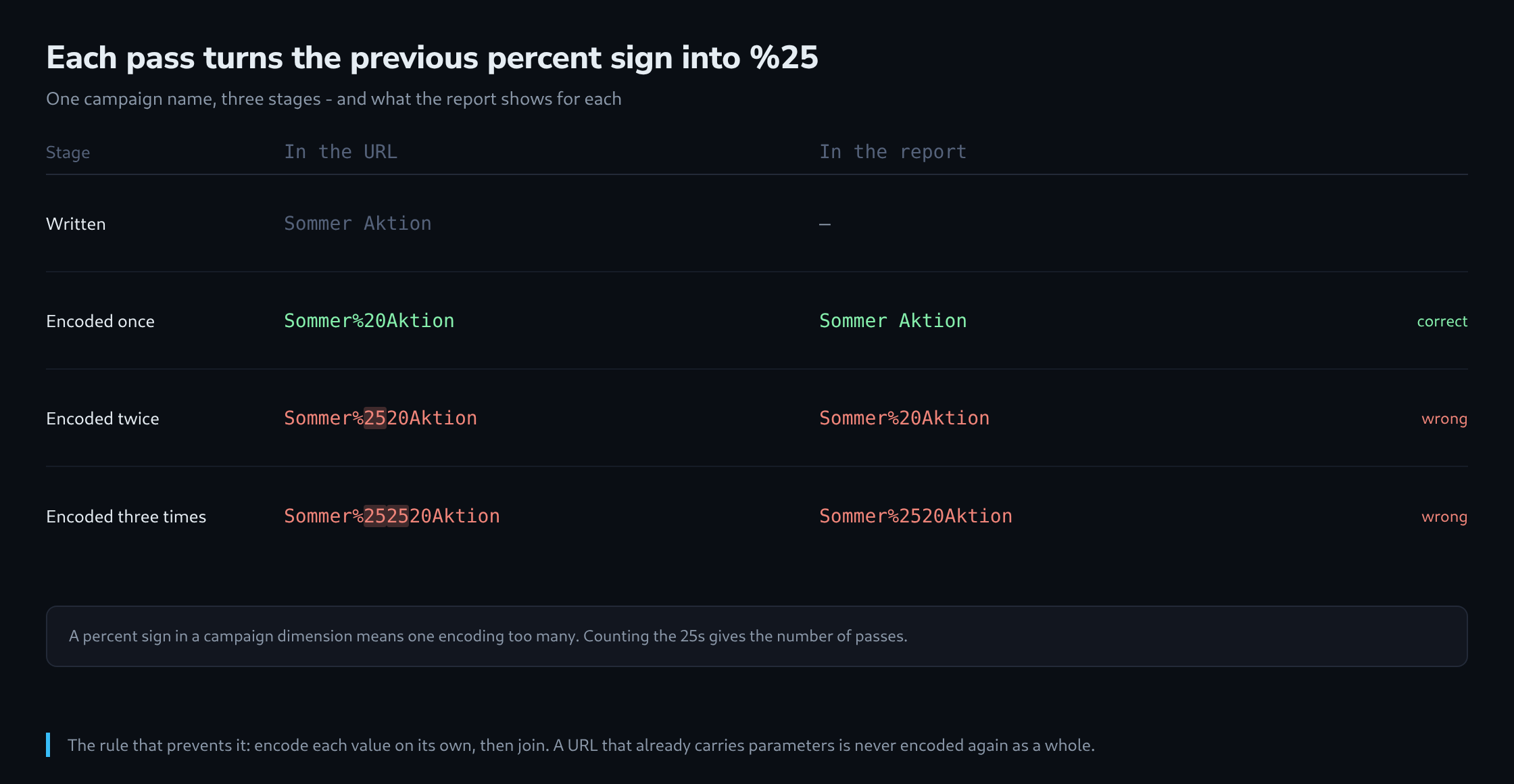
The cause is always the same: the value was encoded twice. What differs is where the second pass happened, and the report itself says how many passes there were.
What Percent-Encoding Does, and What Happens Twice
A URL may only contain a limited set of characters. Everything else is written as a percent sign followed by the hexadecimal value of its bytes – a space becomes %20, an ampersand %26, a German u-umlaut becomes %C3%BC because it is two bytes in UTF-8.
The percent sign itself is one of the characters that has to be encoded, and that is the whole mechanism behind the problem. Encoding an already-encoded string converts each % into %25.
Sommer Aktion          the value as written
Sommer%20Aktion        encoded once   - correct in a URL
Sommer%2520Aktion      encoded twice  - the %20 was encoded again
Sommer%252520Aktion    encoded three times
Reading it in the other direction is just as mechanical. A decoder turns %2520 back into %20, which is a literal percent-two-zero rather than a space – so the value arrives as text with a percent sign in it, and that is what the report displays.
The Three Places a Second Pass Comes From
A URL is rarely built in one step, and each additional step is a candidate.
The first is the link builder itself. A tool that takes an already-assembled URL and encodes the whole thing produces exactly this. The tell is that the ampersands between the parameters are also affected: a URL containing %26utm_source%3D was encoded as a whole rather than per component, and it does not even work as a link any more.
The second is a click tracker. An email tool or an ad platform that wraps the destination as a parameter of its own address has to encode it once – correctly. If the destination was already encoded, the encoding of the wrapper is the second pass, and the result reaches the site intact but with doubled values.
https://klick.beispiel/r?u=https%3A%2F%2Fshop.example%2F%3Futm_campaign%3DSommer%2520Aktion
                            └── correct encoding of the destination ──┘  └ already encoded ┘
The third is a content management system. A field that stores a URL and escapes it on save, then escapes it again when rendering, produces the same result – and it is the one case where nothing in the marketing tooling is at fault, which is why it takes the longest to find.
Telling the Cases Apart in the Report
The number of passes is readable from the value, and it points at a different culprit each time.
| In the report | Passes | Where to look |
|---|---|---|
| Sommer Aktion | 1 | Correct – nothing to do |
| Sommer%20Aktion | 2 | Link builder or click tracker |
| Sommer%2520Aktion | 3 | Two wrappers in a chain |
| Sommer+Aktion | 1 | A different convention, see below |
| Sommer%C3%A4Aktion | 2 | Same problem, non-ASCII character |
The quickest way to see all of them at once is to sort the campaign dimension and look for a percent sign. A single filter on % across campaign, source, medium, term and content finds every affected value in one pass, and the count next to it says how much traffic is landing in the wrong bucket.
The last row is worth a note. An umlaut encoded once is %C3%A4, and that is correct – the report should show the letter. Seeing the escape sequence in the report means it was encoded twice, exactly like the space.
Encoding Components, Not URLs
The rule that prevents all of this is one sentence: encode each value on its own, then join them. Never encode a URL that already has parameters in it.
const ziel   = "https://shop.example/sommer";
const felder = {
  utm_source:   "newsletter",
  utm_medium:   "email",
  utm_campaign: "Sommer Aktion",
  utm_content:  "kopfbild & titel"
};

const url = ziel + "?" + Object.entries(felder)
  .map(([k, v]) => encodeURIComponent(k) + "=" + encodeURIComponent(v))
  .join("&");

// https://shop.example/sommer?utm_source=newsletter&utm_medium=email
//   &utm_campaign=Sommer%20Aktion&utm_content=kopfbild%20%26%20titel
The distinction between the two available functions matters here. encodeURIComponent encodes everything that is not unreserved, including &, = and ?, and it belongs on individual values. encodeURI leaves exactly those characters alone because they have a structural meaning, and it belongs on a whole address that has not been encoded yet. Using the second one on a value is how an ampersand inside a campaign name splits it into two parameters.
A simple habit closes the remaining gap: build the final URL once, and paste that string everywhere. A URL that is assembled again in a second tool is a URL that gets encoded again.
The Space That Is Sometimes a Plus
Two conventions exist for a space in a query string, and both are in use.
Percent-encoding writes %20. Form encoding, the format a browser uses when submitting a form over GET, writes +. Both are common in URLs, and the difference is that a decoder has to be told which one it is looking at: a generic URL decoder leaves the plus as a plus, a form decoder turns it into a space.
The practical consequence is that a campaign name containing a plus sign cannot be distinguished from one containing a space, and which of the two a given tool reports is a property of that tool. Two systems can therefore disagree about the same campaign, and neither is wrong.
The way out is to avoid the ambiguity rather than resolve it. Campaign values without spaces – sommer-aktion rather than Sommer Aktion – are unaffected by the whole question, and they also survive being lowercased, which some platforms do without asking. A naming convention that uses hyphens and lower case removes an entire class of report noise for the cost of looking slightly less pretty in a spreadsheet.
Repairing What Is Already Recorded
Fixing the link stops new damage. The recorded sessions keep their values, and there are three ways to deal with them, in increasing order of permanence.
In the report, two values that differ only in their encoding can be brought together by hand – a comparison, a segment, or a grouping in a spreadsheet. This is the honest option for a campaign that has ended: nothing is changed, the difference is simply accounted for.
For a campaign that is still running, a rule at collection time is better. GA4 can rewrite an incoming parameter before it is stored, and the same is possible one step earlier in a tag – decode the value once, then write it back.
function () {
  var wert = {{URL - utm_campaign}};
  if (!wert) { return undefined; }
  // einmal zusaetzlich dekodieren, wenn ein %25 uebrig ist
  while (/%25/.test(wert)) {
    try { wert = decodeURIComponent(wert); } catch (e) { break; }
  }
  return wert;
}
The try around the decode is not decoration. A value containing a lone percent sign that is not a valid escape sequence makes decodeURIComponent throw, and without the guard the variable returns nothing at all – which turns a cosmetic problem into a missing campaign.
And in BigQuery, the historical rows can be corrected in the query rather than in the data, which keeps the raw export intact and is reversible.
SELECT
  REPLACE(REPLACE(kampagne, '%2520', ' '), '%20', ' ') AS kampagne_sauber,
  COUNT(*) AS sitzungen
FROM `projekt.dataset.sitzungen`
GROUP BY kampagne_sauber
ORDER BY sitzungen DESC;
Which of the three is right depends on one question: whether the numbers are going into a report somebody will act on, or into an archive. For the first, correct at collection. For the second, correcting in the query is enough – and it leaves the evidence of what actually arrived.
Sources
Related articles