English
 Deutsch
 Polski
Key Events and Conversions in GA4: Two Counters and What the Data API Release of May 2026 Shows

Contents
- What the 2024 rename actually did
- The consequence that shows up in the interface
- What the API release added
- The documentation confirms the split by falling back
- Which number belongs where
- One caveat about the alpha
- Questions and answers
- Sources
- Practical check: compare the configuration before and after a change
On 4 May 2026 cross-channel conversion data became available through the Analytics Data API, in alpha, for properties linked to Google Ads. Read as a release note it is a modest item: a report that existed in the interface can now be fetched programmatically.
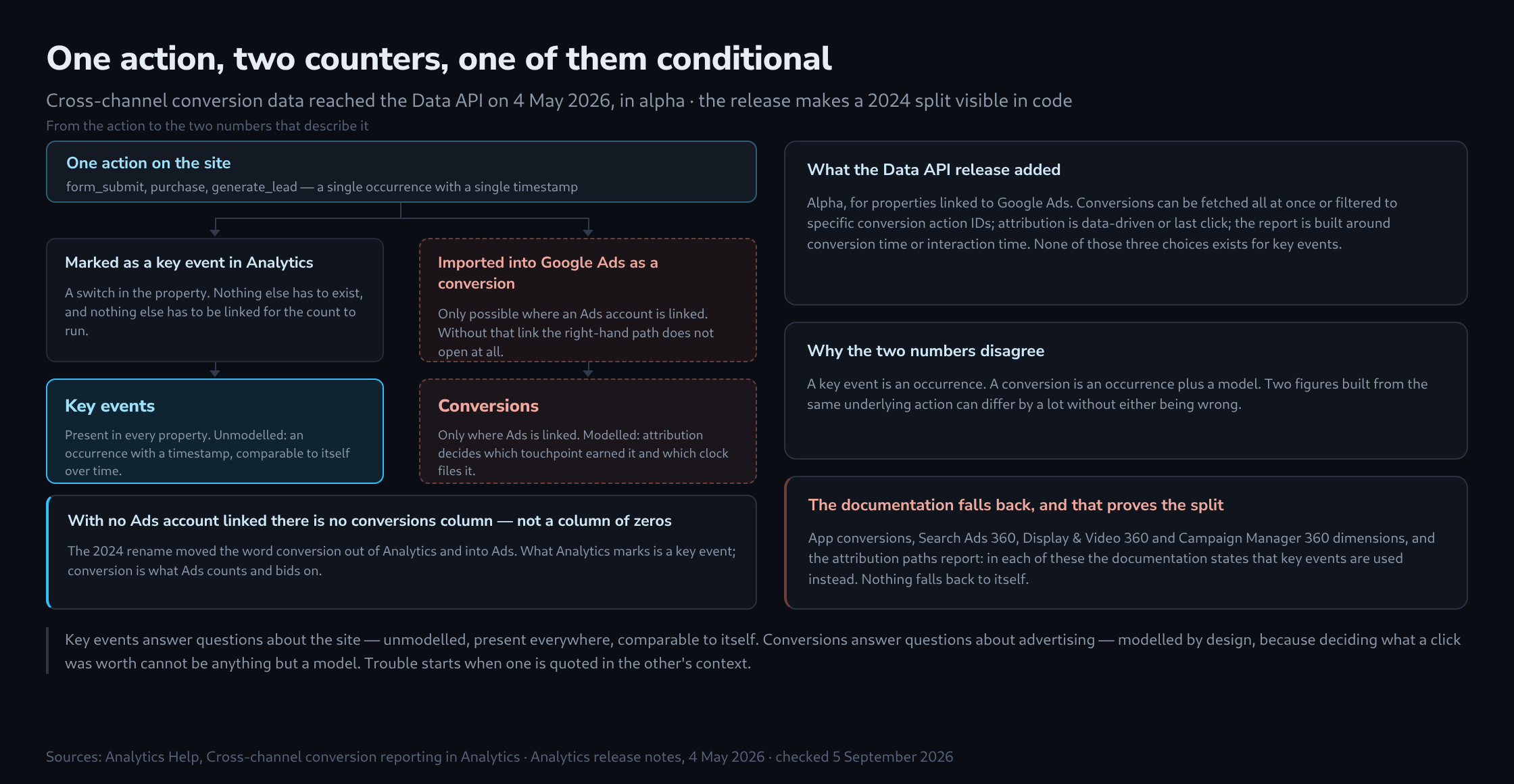
Read as a piece of evidence it is more useful than that. To return conversions the API has to say what a conversion is, and the answer exposes a split that the interface has carried quietly since 2024. Two counters run beside each other in every GA4 property. Only one of them is always there.
What the 2024 rename actually did
Until 2024 the thing GA4 counted was called a conversion. The rename moved that word out of Analytics and into Google Ads: what Analytics marks is now a key event, and conversion became the term for what Ads counts and bids on.
This was widely read as cosmetics, one word swapped for another to tidy up the vocabulary across two products. It was not. The rename separated two counts that had been sharing a name, and the sharing had been hiding the fact that they do not agree.
The consequence that shows up in the interface
Inside Analytics, conversion now refers specifically to a key event that has been imported into Google Ads. That definition has a blunt edge to it: with no Ads account linked, a property has no conversions at all. Not zero conversions — no column. There is only the key events column, and nothing missing from it.
Where both exist, they can be compared, and they will rarely match. The reason is that they are attributed by different models, scoped to different data, and counted under different rules, which is exactly why keeping one word for both was misleading enough to be worth a rename.
What the API release added
The alpha exposes the same figures the Conversion performance report shows in the interface: paid and organic conversion performance across channels, retrievable in code for the first time. Two options in the request are worth noting because they are where the differences from key events become concrete.
Conversion action    all conversions at once, or filtered
                     to specific conversion action IDs

Attribution model    data-driven, or last click

Time basis           conversion time - the report is built
                     around when the conversion happened

                     interaction time - the report is built
                     around the ad interaction that preceded it
None of those three choices exists for key events, and that is the point. A key event is an occurrence with a timestamp. A conversion is an occurrence plus a model that decides which touchpoint earned it and which clock it is filed under. Two numbers built from the same underlying action can differ by a lot without either being wrong.
The documentation confirms the split by falling back
The clearest evidence that these are two separate systems is not a definition but a list of exceptions. In several places the cross-channel conversion documentation states that conversions are not available and key events are used instead.
App conversions                    key events used instead
Search Ads 360 dimensions          key events used instead
Display & Video 360 dimensions     key events used instead
Campaign Manager 360 dimensions    key events used instead
Attribution paths report           key events used instead
A fallback list of that shape only makes sense if the two are genuinely different quantities. Nothing falls back to itself. Anyone reading a report that mixes web and app, or that carries SA360 or DV360 dimensions, is reading a mixture of the two counts, and the column heading does not say so.
Which number belongs where
The division of labour is clean enough to write down once and follow.
Key events answer questions about the site. How many people completed the form, whether that rose after the redesign, which page precedes it most often. The count is unmodelled, present everywhere, and comparable to itself across time, which is what makes it the right basis for anything internal.
Conversions answer questions about advertising. What a campaign earned, what to bid, which channel to credit. The count is modelled by design, because deciding what a click was worth is a modelling question and cannot be anything else.
Trouble starts when one count is used in the other’s context: a campaign report defended with key events, or a redesign judged by conversions that changed because the attribution window changed rather than the page. Each count describes something different, so using it for the other purpose gives a misleading basis for the assessment.
One caveat about the alpha
Alpha in the Data API means the surface can change without the notice a stable version would get. That is not a reason to leave it alone — it is the only programmatic route to these figures — but it is a reason to keep the extraction thin. A pipeline that pulls conversions and stores them raw survives a field rename with an edit in one place. A pipeline that joins, reshapes and aggregates on the way in has to be understood again from scratch each time the shape moves.
Questions and answers
Does a key event automatically become a conversion once Google Ads is linked?
No. The link only establishes the connection; a key event becomes a conversion only once it has been imported into Google Ads as a conversion action. Until then the conversions column does not count that event, even while the key events column next to it shows figures.
Which settings determine how far key events and conversions drift apart?
The article names models, data scope and counting rules; in practice these come down mainly to four settings that can be checked one by one:
- The counting method. In GA4 a key event can be counted once per event or once per session; a conversion action in Google Ads counts every conversion or one per interaction. If the two sides are set differently, the numbers diverge before any model is involved.
- The attribution model. Data-driven attribution spreads a conversion across several touchpoints; last click gives it to a single one.
- The window. Google Ads only counts a conversion if it falls within the configured conversion window after the ad interaction; a key event has no such deadline.
- The time basis. Under interaction time a conversion is filed on the day of the click, the key event on the day of the action. Daily figures then differ even where the totals over a longer period match.
Any comparison of the two figures should line up these four first. Whatever gap remains after that is the part that actually needs explaining.
Why can the conversions for a past day rise after the fact?
Because under interaction time every conversion is credited to the day of the ad interaction that preceded it. A purchase today after an ad click a week ago raises the figure for that earlier day. An extraction that pulls only the previous day, every day, therefore freezes values that are still growing.
What does a thin extraction of the alpha data look like in practice?
A thin extraction stores the response as it arrives and writes the request next to it. Each row carries the attribution model, the time basis and the filtered action IDs, because the same combination of day and channel yields a different figure under different settings, and without them there is no telling later which version of a number is on file. The retrieval time belongs there too, because values under interaction time change after the fact.
For the same reason the pipeline does not fetch just the previous day but pulls a trailing period again and again, replacing the stored days rather than appending to them. How far back that period has to reach follows from the conversion windows in Google Ads. Joining, reshaping and aggregating happen only afterwards, in views over the raw data; if the alpha interface changes a field, that affects one place in the extraction rather than every downstream table.
Metadata and quotas in a report response can be inspected with the GA4 API Response Inspector. GA4 API Response Inspector
Practical check: compare the configuration before and after a change
The GA4 Property Configuration Comparator records a defined set of settings through the read-only Admin API. This makes a changed key-event counting method or retention period visible without confusing the change with a new reporting result.
- Capture snapshot A before the intended change and save its JSON file locally.
- After the change, capture snapshot B from the same property. Alternatively, use a second property to compare implementations.
- Compare the snapshots. The result lists added, removed and changed fields. The original capture times and property IDs remain visible.
- Review key events, retention, timezone, currency, streams and custom definitions within the documented scope.
This is not a full backup or a retrospective history. A snapshot cannot reconstruct the settings from a date before it was captured. Stream identifiers used for matching are type and name; custom definitions use scope and parameter name. Renaming those keys appears as removal and addition. Resource IDs, creation timestamps, measurement IDs and secrets are excluded, so a clean comparison does not certify identical tagging or identical collected data. If an API section fails, no partial snapshot is presented as complete.
The tool supports local comparison of saved files without Google login. Its scope follows the Analytics Admin API, including key events and retention settings.
Related articles