English
Safari 27 and Measurability in 2027: What Is Technically Blocked and Which Tracking Architecture Holds Up

Contents
- Why this topic matters in 2027
- The protection layers at a glance
- Confirmed vs. observed: what is official and what comes from the source code
- AFP in detail: the tag sends, but the data stays empty
- Network layer: the destination matters, not where the script comes from
- Link Tracking Protection: longer list, same scope
- The underestimated trap: server cookies and the IP prefix rule
- Reference architecture 2027: the browser talks only to the site’s own infrastructure
- Measuring the Safari gap: test matrix, metrics, query
- Checklist for 2027
- Conclusion
- Questions and answers
- Sources
Safari 27 removes three more foundations of browser-side tracking: the ability of classified scripts to read context data, connections to known ad network address ranges, and further click IDs. Anyone who wants reliable figures in 2027 has to move data collection away from the browser onto their own infrastructure – and measure precisely how large the gap is today.
Why this topic matters in 2027
iOS 27 with Safari 27 has been available since 14 September 2026 (Improvado). It is the next stage of a development that has been eroding browser-side measurement piece by piece every year since 2017.
In Germany, Safari accounted for 16.8% of all page views across all devices in June 2026 (Statcounter), and in Austria for 18.1% (Statcounter). On smartphones, the share was over a quarter in July 2025: 28.4% (Statista). A measurement gap in Safari therefore affects a noticeable share of every data set, and in mobile commerce often the share with the most purchasing power.
Plenty of half-truths circulate around Safari 26 and 27. “Safari blocks Google Tag Manager” is just as inaccurate as “nothing changes”. This article separates documented facts from source code findings, explains the mechanics of each protection layer and closes with a reference architecture and a checklist for putting a number on a site’s own Safari gap.
The protection layers at a glance
Each Safari generation has reached a new level of the measurement chain: first storage, then URLs, then scripts, and now the network.
| Version | Layer | Mechanism | Active by default in |
|---|---|---|---|
| Safari 27 (Sept. 2026) | Network, URL, script | Blocking of connections to known ad network IP ranges; more click IDs in the filter list; CDPs on the fingerprinting list (according to source code analysis) | see the section “Confirmed vs. observed” |
| Safari 26 (Sept. 2025) | Script | Advanced Fingerprinting Protection (AFP): classified scripts lose individual access rights, fingerprinting APIs return noise | all browsing modes |
| Safari 17 (2023) | URL, network | Advanced Tracking and Fingerprinting Protection (ATFP): removal of known click IDs, blocking of known tracking domains | Private Browsing, links from Mail and Messages |
| Safari 16.4 (April 2023) | Cookie | Server-set cookies capped at 7 days if the first half of the setting server’s IP differs from the website’s IP | all modes |
| ITP (from 2017) | Cookie, storage | Limited lifetimes for cookies set via JavaScript and for browser storage | all modes |
Sources: TAGGRS on Safari 27, TAGGRS on Safari 26, Snowplow on the IP rule.
Confirmed vs. observed: what is official and what comes from the source code
The official Safari 27 release notes contain no entry on tracking protection. According to an analysis by Improvado, neither Apple’s iOS 27 announcement nor the release notes nor the WebKit features post mention any change to Link Tracking Protection (Improvado). What is officially documented for Safari 26 essentially comes down to one sentence: protection against fingerprinting by known tracking scripts.
The changes in Safari 27 come from an analysis of the open WebKit source code by analytics engineer Mariusz Brucki, published in July 2026 (TAGGRS). The analysis is detailed, but it comes from a vendor of server-side tracking infrastructure. For planning, this means the mechanisms are evidenced in the code, while their exact reach in the shipped version has to be tested by every website itself.
The most important structural finding concerns the rule lists. According to the analysis, which click IDs are removed, which scripts are restricted and which IP ranges are blocked is defined in a separate system library. Apple can update it independently of the browser, without release notes and without a Safari update.
This calls for a new way of working: Safari compatibility is no longer a project per major release but an ongoing monitoring task. A measurement gap can appear on any day, not just in September.
AFP in detail: the tag sends, but the data stays empty
Advanced Fingerprinting Protection does not block a classified script outright; it withdraws individual rights. According to the source code analysis, Apple can block the following separately per script: URL query parameters (click IDs, UTM values), referrer, cookie access, local storage, the Canvas API, screen and viewport dimensions, hardware information and network requests (TAGGRS).
That is exactly what makes AFP treacherous for analytics. A script that may still send network requests but can read neither the query string nor the referrer produces a technically valid hit without a source. Everything is green in the network tab, while “Direct” or “Unassigned” grows in the report. This silent data loss does not show up in any tag debugger, only in the distribution of channels by browser.
According to the analysis, the fingerprinting list includes the LinkedIn Insight Tag as well as the CDPs Tealium and Segment. The second point has the wider impact: if a conversion pixel is triggered through a classified CDP container, it inherits the container’s restrictions. The container becomes a single point of failure for every tag inside it.
Then there is the noise. In Safari 26, fingerprinting-relevant APIs return slightly different values on every call (gblock). Any logic that condenses device characteristics into an identifier therefore produces unstable IDs. The result is artificially inflated user counts, return rates that are too low and broken customer journeys. In Safari, fingerprint-based identification is thus not merely unwelcome but simply unusable.
Network layer: the destination matters, not where the script comes from
According to the source code analysis, Safari 27 checks outgoing connections against a list of known ad network subnets and aborts them before they are established (TAGGRS). This happens below the page, at the transport layer. One example from the analysis is the Bing UET endpoint bat.bing.com, which is blocked both by domain and by IP range. According to the analysis, the filter data resembles entries from Chromium’s open ad detection infrastructure.
This is where the most common misunderstanding about the “first-party proxy” arises. There are two fundamentally different variants:
| Variant | What runs through the site’s own domain | Where the browser sends data | Effect of the IP block |
|---|---|---|---|
| Script hosting | Only the JavaScript file | Directly to the platform’s servers | Applies: the connection to the destination is cut |
| Collection endpoint | Data intake itself, e.g. /metrics |
To the site’s own server, which forwards server-side | Does not apply: the browser contacts no platform IP |
A renamed script on a dedicated subdomain therefore achieves nothing in Safari 27 as long as it keeps sending its data directly to the platform. The only robust variant is the one in which the browser talks exclusively to the site’s own infrastructure and forwarding happens server to server.
What remains unclear is how AFP classifies self-hosted scripts. Public sources do not make it clear whether the classification depends on the script URL, on code patterns or on both. Self-hosting is therefore no reliable protection against the withdrawal of rights, only against the domain block.
Link Tracking Protection: longer list, same scope
Link Tracking Protection removes known click IDs before the destination page loads. According to the source code analysis, Safari 27 adds new parameters (TAGGRS):
| Platform | Parameters | Status |
|---|---|---|
| X | twclid, cn, cxt |
new in Safari 27 |
| YouTube | si |
new in Safari 27 |
| Threads | xmt |
new in Safari 27 |
| Google, Meta, Microsoft | gclid, dclid, fbclid, msclkid |
since Safari 17 |
According to Apple’s documentation, the scope has not changed: Private Browsing as well as links from Mail and Messages (Improvado). In normal browsing, click IDs are preserved by default. The exception is users who have set the ATFP switch in Safari’s settings to “All Browsing”.
Standard UTM parameters such as utm_source, utm_medium and utm_campaign are not on the list. For channel attribution, UTM parameters are therefore more stable than platform-specific click IDs. Two caveats remain: AFP can still prevent classified scripts from reading the URL, and Apple’s pattern so far has been to extend the list first and widen enforcement later.
In practice, every campaign should be delivered with clean UTM parameters in addition to auto-tagging. For attribution, a separate channel mapping based on UTM is the more robust source of truth.
The underestimated trap: server cookies and the IP prefix rule
Many server-side setups silently lose their long-term IDs in Safari, even though they count as “first-party”. The cause is a rule that has applied since Safari 16.4 and never appeared in the release notes: server-set cookies expire after at most 7 days if the first half of the setting server’s IP address does not match the IP address of the server of the visited website (Snowplow). This applies to both IPv4 and IPv6.
A typical example: the website runs at a hosting provider on 203.0.113.10, the tagging server under data.example.com on a cloud service at 198.51.100.20. Despite the dedicated subdomain and the HttpOnly cookie, Safari treats the server as a third party. A user who returns after ten days appears as new.
The solution is architectural: the collection endpoint has to be served from the same IP space as the main document. A proven approach is a path on the main domain, such as example.com/metrics, which the upstream reverse proxy or CDN passes on to the tagging server. Browser and website then see the same IP, and the cookie lifetime is preserved.
The Safari Web Inspector is enough for a check: the expiry time of the ID cookie is listed under Storage. If it shows a date seven days in the future instead of one year, the rule applies.
Reference architecture 2027: the browser talks only to the site’s own infrastructure
Safari-proof measurement follows one principle: the browser sends events exclusively to an endpoint on the site’s own domain within its own IP space, and everything else happens server to server. This leaves the network block, the domain block and the cookie cap no point of attack in the measurement path.
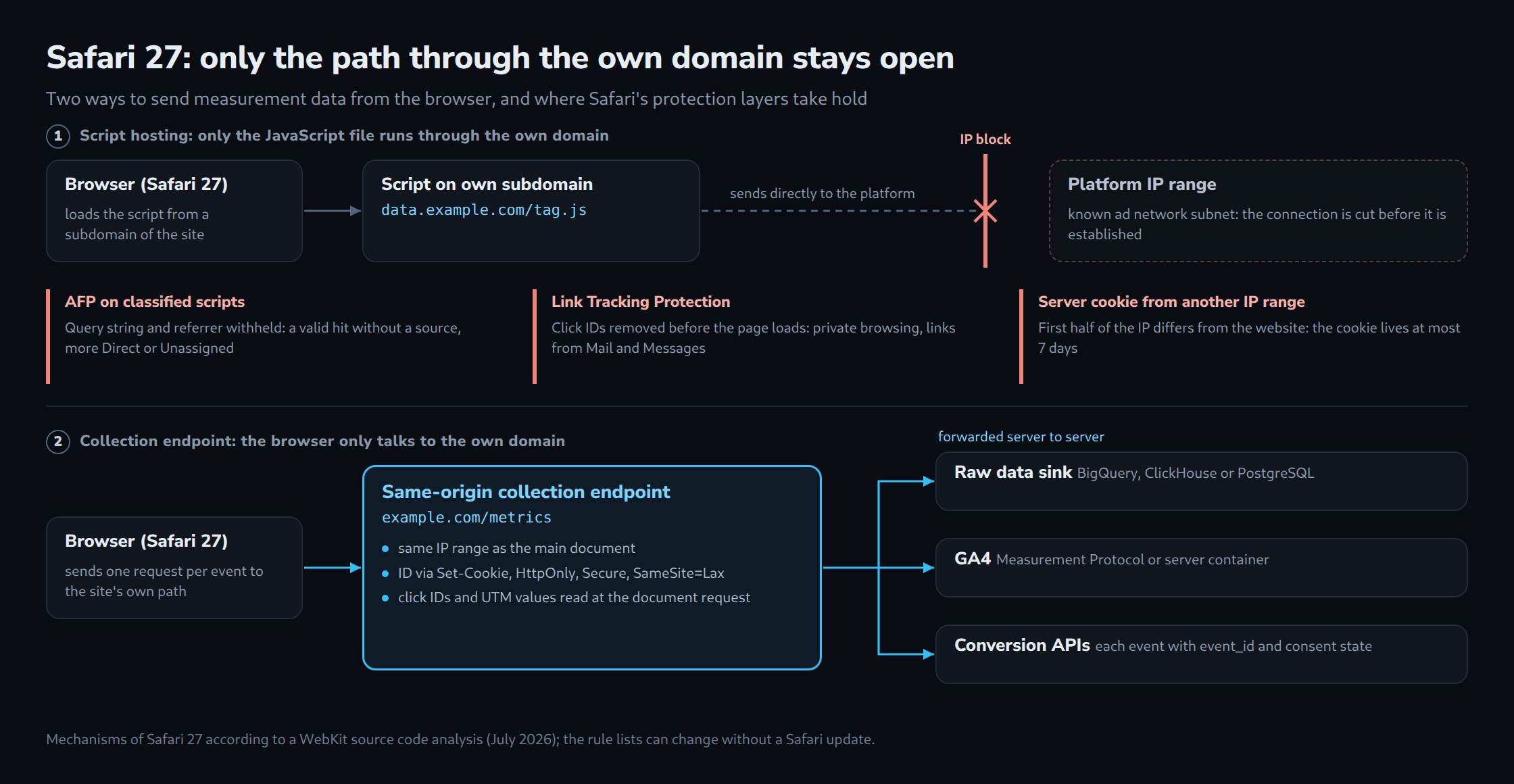
Five building blocks carry the concept:
- Same-origin collection endpoint. A path such as
example.com/metrics, served through the same reverse proxy or the same CDN as the website. A lean custom script or the client of a server-side tag manager sends data there. No connections to platform domains leave the browser. - Capturing context on the document request. The server that delivers the landing page sees the full request URL and the
Refererheader, regardless of which rights AFP withdraws from a script. Click IDs and UTM values are read here and bound to the session. The limit: whatever Link Tracking Protection removed before navigation does not reach the server either. - Stable first-party ID. Set via
Set-Cookiefrom the same IP space, withHttpOnly,SecureandSameSite=Lax. No derivation from device characteristics, as these return noise in Safari anyway. - Server-side forwarding. Conversions go through the ad platforms’ conversion APIs, analytics events through server-side endpoints such as the GA4 Measurement Protocol or a server container. Every event carries an
event_idso that platforms can remove duplicates with browser tags that are still running. The consent status travels as a field in every event and controls the forwarding. - Own raw data sink. Every event first lands in a table of its own, for example in BigQuery, ClickHouse or PostgreSQL, and is distributed only afterwards. This table is the reference for any gap monitoring and makes measurement independent of platform reports.
A side effect: less third-party JavaScript on the page noticeably improves load time and Interaction to Next Paint.
Measuring the Safari gap: test matrix, metrics, query
The size of a site’s own gap can be quantified with a simple comparison: server logs count every page delivered, while analytics only counts what arrives in the browser. The difference per browser narrows the browser effect down. It does not isolate it completely: the assumption is that declined consent and ad blockers have a similar effect in Chrome and Safari. Safari supports its own content blockers, and the consent rate can differ by browser. The consent rate per browser from the site’s own consent log shows how much of the difference comes from there.
Manual test matrix
| Scenario | Setting | What to check in Web Inspector |
|---|---|---|
| Safari 27, normal browsing | Default | Expiry of the ID cookie, outgoing requests, referrer in the hit |
| Safari 27, Private Browsing | Default | Whether gclid and twclid arrive in the URL |
| Safari 27, ATFP for all browsing | Settings → Safari → Advanced | Blocked requests, click IDs, UTM values |
| Link from Mail or Messages | Test link with gclid and UTM |
Which parameters reach the landing page |
| Current Chrome | Default | Reference values for all points above |
Four metrics for ongoing monitoring
- Capture rate per browser: page view events divided by bot-filtered document requests from the server logs.
- Click ID rate: share of paid landings with a click ID, Safari against Chrome for the same campaign.
- Direct share per browser: a value that rises only in Safari points to withdrawn referrer or URL access.
- Return rate after 8 to 30 days: if it drops in Safari, the 7-day cap is probably in effect.
Example query (BigQuery SQL)
The prerequisite is a request ID that the server writes into the document on delivery and that the page view event sends back. This allows the log line and the event to be joined exactly.
-- Capture rate and click ID rate per browser, last 28 days
WITH logs AS (
  SELECT browser_family, request_id,
         REGEXP_CONTAINS(url, r'[?&](gclid|msclkid|fbclid|twclid)=') AS has_click_id
  FROM server_access_logs
  WHERE is_document_request AND NOT is_bot
    AND ts >= TIMESTAMP_SUB(CURRENT_TIMESTAMP(), INTERVAL 28 DAY)
),
hits AS (
  SELECT DISTINCT request_id
  FROM analytics_events
  WHERE event_name = 'page_view'
    AND ts >= TIMESTAMP_SUB(CURRENT_TIMESTAMP(), INTERVAL 28 DAY)
)
SELECT
  l.browser_family,
  COUNT(*) AS document_requests,
  ROUND(COUNTIF(h.request_id IS NOT NULL) / COUNT(*), 3) AS capture_rate,
  ROUND(COUNTIF(l.has_click_id) / COUNT(*), 3) AS click_id_rate
FROM logs l
LEFT JOIN hits h USING (request_id)
GROUP BY l.browser_family
ORDER BY document_requests DESC;
If Safari’s capture rate (capture_rate) is several percentage points below Chrome’s, that is the browser-related gap. Because Apple can change rule lists without an update, this query belongs in a daily dashboard with an alert for sudden changes.
Checklist for 2027
Eight points decide whether a setup survives Safari 27 and the generations that follow.
| Check | Test | Target state |
|---|---|---|
| Direct platform connections | Network tab in Safari, filtered by third-party domains | No requests from the browser to advertising or analytics domains |
| Collection endpoint | Comparing DNS resolution of website and endpoint | Same path or same IP space as the main document |
| Lifetime of the ID cookie | Web Inspector → Storage | Set via Set-Cookie, expiry well beyond 7 days |
| CDP dependency | Inventory of all tags per container | No conversion tags running solely through a Tealium or Segment client |
| Click ID capture | Server log of the landing page | Click IDs and UTM values are stored on the document request |
| UTM discipline | Sample of all active campaigns | Every campaign with complete UTM parameters in addition to auto-tagging |
| Deduplication | Inspecting the event payload | Every event with a unique event_id |
| Gap monitoring | Dashboard built from server logs and raw data | Daily capture rate per browser with an alert threshold |
Conclusion
Safari 27 marks the point at which browser-side workarounds reach their end. Renamed scripts, new subdomains and proxies used only for script hosting all target places that Safari now controls at a deeper level. What remains reliable is measurement whose browser part is reduced to a single request to the site’s own domain.
The biggest lever for 2027 is not another tool but visibility. Anyone who calculates the capture rate per browser every day from their own server logs will spot any silent rule change by Apple within a day rather than after the quarterly report.
Questions and answers
Is a CNAME record pointing to a vendor’s tagging server enough instead of a path on the main domain?
No. A CNAME changes only the name, not the destination: the browser still connects to the vendor’s IP address. The IP prefix rule therefore caps server cookies at 7 days, and if the address lies in a blocked ad network range, Safari 27 aborts the connection altogether.
What happens to the capture rate when a CDN serves pages from its cache?
A CDN cache interferes with the query in two places. First, a document request that the CDN answers from its cache never reaches the origin server. Its logs then contain only part of the page views, and the baseline has to come from the CDN’s own access logs.
Second, the request ID. If it sits in the HTML and that HTML is cached, every visitor to the same copy carries the same ID. The query finds only a single log line for all of these page view events, and the rate no longer reflects individual page views. At the same time, the CDN logs contain many requests without an ID of their own that cannot be matched to any event.
Two approaches hold up: the ID is created only at the edge, for example by a CDN function that writes it into the document on every delivery and logs it in the same step. Or measurement is limited to pages delivered without a cache. A check beforehand shows whether the problem exists: if many page view events arrive with the same request ID, that ID comes from a cached copy.
Sources
- TAGGRS: Safari 27 tracking protection (source code analysis, July 2026)
- TAGGRS: Safari 26 tracking changes
- Improvado: iOS 26 Link Tracking Protection and attribution
- Snowplow: Cookie Extension and the Safari 16.4 rule
- gblock: Safari 26 Fingerprinting Protection
- Statcounter: browser market share in Germany, June 2026
- Statcounter: browser market share in Austria, June 2026
- Statista: mobile browsers in Germany
Related articles