English
 Deutsch
 Polski
Zigbee2MQTT vs. ZHA: Building a Highly Reliable Mesh Network in Home Assistant
Part 1 of 6 in the series Home Assistant without the cloud

Contents
- Zigbee2MQTT vs. ZHA: Building a Highly Reliable Mesh Network in Home Assistant
- 1. Why Dedicated Ethernet Coordinators Outperform USB Dongles
- 2. RF Spectrum Management: Wi-Fi vs. Zigbee Channel Separation
- 3. Router Planning and LQI Optimization
- Summary
- USB as a Fallback, Thread Alongside, Binding and Availability
- Questions and answers
- Sources
Zigbee2MQTT vs. ZHA: Building a Highly Reliable Mesh Network in Home Assistant
Deploying a robust, fault-tolerant Zigbee infrastructure within a Home Assistant environment requires careful architectural decisions regarding software stacks and physical coordinator hardware. While the native Zigbee Home Automation (ZHA) integration provides straightforward setup, Zigbee2MQTT coupled with an MQTT broker offers superior device compatibility, detailed telemetry, and independent lifecycle management. Achieving a zero-downtime mesh network demands migrating away from local USB adapters toward dedicated Ethernet coordinators, strategic RF spectrum planning, and systematic router placement.
1. Why Dedicated Ethernet Coordinators Outperform USB Dongles
Directly attaching USB Zigbee coordinators to a Home Assistant host or virtualization server introduces significant radio frequency interference (RFI) generated by USB 3.0 controller busses and CPU shielding leaks. Furthermore, USB dongles restrict the physical placement of the coordinator to the server rack, which is rarely the geometric center of the home.
- RF Noise Isolation: Ethernet-based network coordinators (such as the SMLIGHT SLZB-06 equipped with Texas Instruments CC2652P chips) can be mounted anywhere within the building footprint, completely isolating the RF antenna from server motherboard noise.
- PoE Power Stability: Utilizing Power over Ethernet (PoE) ensures a clean, uninterruptible power supply and decouples Zigbee communication from host OS USB driver restarts.
2. RF Spectrum Management: Wi-Fi vs. Zigbee Channel Separation
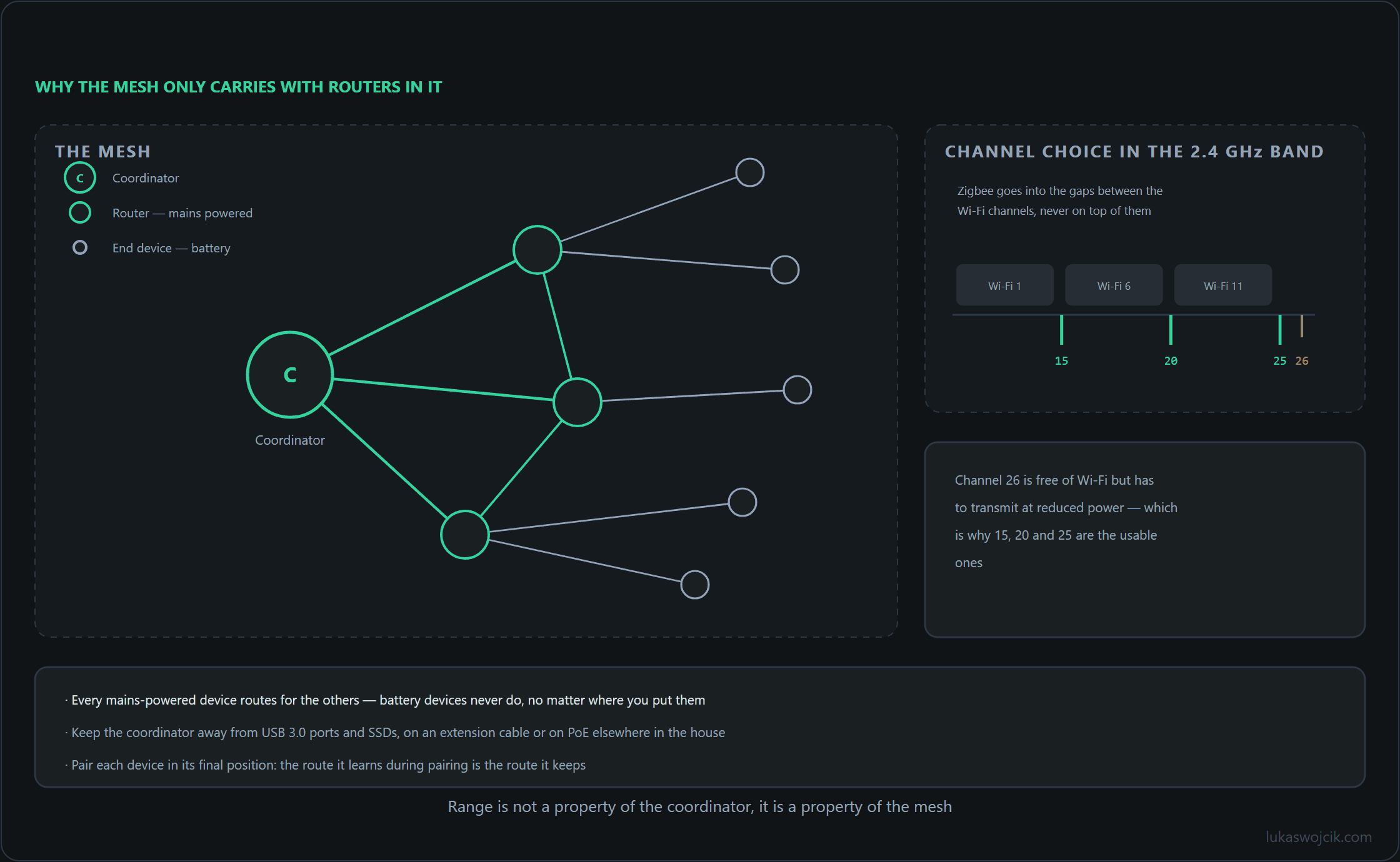
Both Wi-Fi and Zigbee operate within the crowded 2.4 GHz frequency band. Unplanned channel overlaps degrade Link Quality Indication (LQI) metrics, cause packet dropping, and induce high latency across smart home automation rules. Standard 20 MHz Wi-Fi channels (typically 1, 6, and 11) overlap heavily with lower Zigbee frequencies.
- Optimal Frequency Selection: Configuring Zigbee2MQTT to use Channel 15, 20, or 25 positions Zigbee communication cleanly between standard Wi-Fi channel peaks.
- Avoiding Channel 26: Although Zigbee Channel 26 resides above most Wi-Fi frequencies, certain older end-devices operate with reduced transmission power on this edge frequency, making Channel 20 or 25 preferable for general deployment.
# Example: Optimal Zigbee2MQTT RF configuration in configuration.yaml
serial:
  port: tcp://192.168.10.50:6638
advanced:
  channel: 25
  pan_id: 6754
  network_key: GENERATE
  transmit_power: 20
3. Router Planning and LQI Optimization
A stable mesh topology requires avoiding star-network bottlenecks where dozens of battery-powered sensors attempt to communicate directly with the central coordinator. Installing mains-powered Zigbee routers (such as dedicated smart plugs or neutral-wired in-wall relays) at uniform intervals establishes a resilient routing backbone.
- LQI Thresholds: Maintaining Link Quality Indication (LQI) values above 100 between routers prevents mesh route flapping and ensures instantaneous state updates.
- Pairing Discipline: Battery-powered sensors must always be paired in their final physical locations to force them to bind to the nearest active router rather than the distant coordinator.
Summary
Building a fault-tolerant Zigbee mesh in Home Assistant requires separating the Zigbee coordinator from host USB interference through dedicated Ethernet PoE hardware like the SLZB-06. Combining Zigbee2MQTT with rigorous RF channel separation and strategic mains-powered router placement guarantees zero-latency execution and maximum network stability.
USB as a Fallback, Thread Alongside, Binding and Availability
Where an Ethernet coordinator is not an option, the Zigbee2MQTT documentation names two simple measures against USB interference. The first is a USB extension cable: 50 cm already reduces interference, and a shielded cable is preferable. The second is to connect the adapter to a USB 2 port instead of a USB 3 port.
Thread uses the same IEEE 802.15.4 radio technology in the 2.4 GHz band as Zigbee, so a Thread network next to the Zigbee network competes for the same spectrum. It belongs on its own channel, not on the Zigbee channel. The Home Assistant documentation names Thread channel 26 as the least likely to experience Wi-Fi interference; with Zigbee on channel 25 as in the configuration above, the two networks stay on separate channels.
Two Zigbee2MQTT features cover the cases where the software side fails or a device goes quiet:
- Binding lets devices control each other directly, for example a wall switch and a light, without Zigbee2MQTT or Home Assistant in between. It keeps working when Home Assistant, Zigbee2MQTT or the coordinator is down. It is set up in the frontend on the device’s Bind tab or through the MQTT topic
zigbee2mqtt/bridge/request/device/bind. Whether a device supports it depends on its own Zigbee implementation, and a battery device has to be woken, usually with a button press, right before the request, otherwise it sleeps through it. - Availability marks devices as offline when they stop checking in, and it is disabled by default. Mains-powered devices count as active and are pinged when they have not checked in for 10 minutes; battery devices count as passive and are marked offline after 25 hours (1500 minutes) without a check-in. The pinging can be heavy on the coordinator, especially with CC2530 or CC2531 adapters; longer timeouts reduce it.
availability:
  enabled: true
  active:
    timeout: 10
  passive:
    timeout: 1500
Questions and answers
Does switching from ZHA to Zigbee2MQTT mean re-pairing every device, or does the network survive the change?
Re-pairing is the realistic assumption; anything else is a bonus. Migration paths exist that carry the network key and the addressing across, and when they work the mains-powered devices rejoin on their own. Battery devices, however, frequently need a manual wake-up, and the ones that do not rejoin tend to be mounted in the least convenient places.
The realistic sequence is therefore an evening rather than a command: coordinator set up, network rebuilt, devices paired one at a time, starting with the mains-powered routers so that the mesh exists before the sensors look for it.
The upside is that this is the one moment when the article’s other advice can be applied for free. Every battery device can be paired in its final position, so it binds to the nearest router rather than to the coordinator. The channel can be chosen deliberately now, because changing it later means going through the sleepy devices a second time. A migration that preserves the old network also preserves the old channel and the old bindings, which is convenient and misses the opportunity.
Home Assistant without the cloud
- Zigbee2MQTT vs. ZHA: Building a Highly Reliable Mesh Network in Home Assistant
- ESPHome and ESP32 in Practice: Building Cloud-Free Environmental Sensors
- Presence Detection 2.0: mmWave Radars (LD2410/LD2450) in Lighting Automation
- Local Voice Control in Home Assistant with Whisper & Piper
- WireGuard & Tailscale DMZ: Secure External Access to Home Assistant and Self-Hosted Servers
- Local Energy Management: Integrating PV Inverters and Battery Storage via Modbus TCP
Related articles