English
 Deutsch
 Polski
WireGuard & Tailscale DMZ: Secure External Access to Home Assistant and Self-Hosted Servers
Part 5 of 6 in the series Home Assistant without the cloud

Contents
Private VPN access can remove Home Assistant and administration interfaces from the public web. Remote access then uses approved devices and an encrypted tunnel. This reduces exposure but does not replace updates, application authentication or careful access rules.
What changes compared with a public web service?
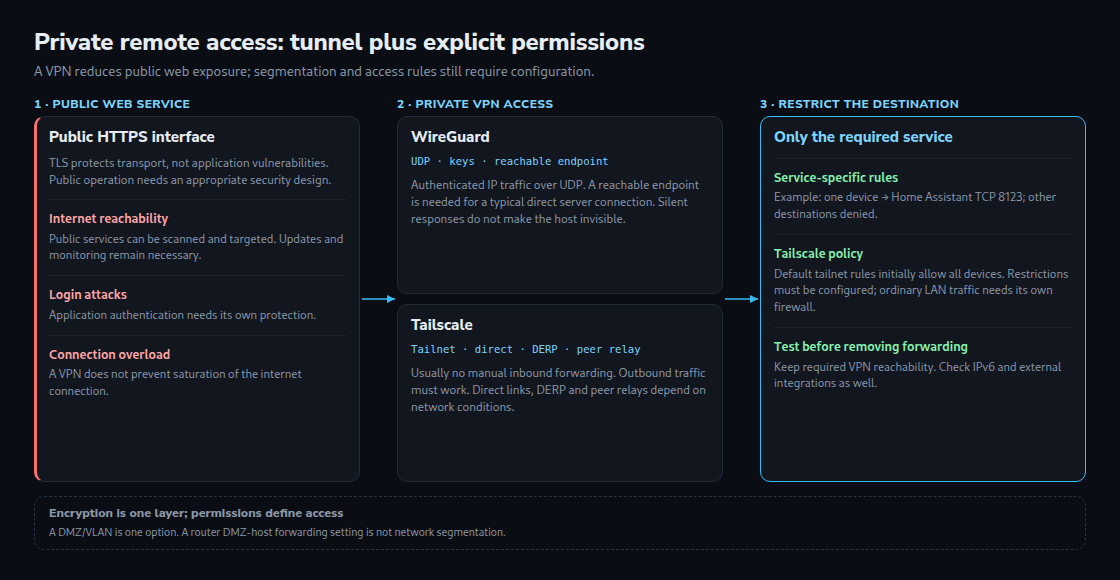
A public HTTPS interface remains reachable from the internet. TLS protects transport but does not fix application vulnerabilities. A VPN restricts access to authorized peers. Public web services can still be a justified architecture choice; purpose, protection and operation matter.
A tunnel does not automatically prevent saturation of the internet connection. The VPN endpoint and other services still need protection. “No public web forwarding” means neither an invisible host nor a complete zero-trust architecture.
WireGuard and Tailscale compared
WireGuard encrypts IP traffic over UDP and authenticates peers with keys. Linux provides a kernel implementation; other platforms use other implementations. Restrained responses make simple service scanning harder but do not hide the entire host. A typical directly reachable server needs a reachable UDP endpoint. WireGuard on the router needs an appropriate firewall rule; a server behind the router may also need port forwarding. CGNAT can prevent direct incoming connectivity.
Tailscale adds device management, connection establishment and access rules to WireGuard. Manual inbound port forwarding is usually unnecessary. Outgoing connections and their return traffic must still be permitted. Direct UDP connections are not always possible, so relays may be used. DERP forwards encrypted traffic, and current versions also support peer relays. A restrictive firewall can block these routes too.
DMZ, VLANs and permissions
A DMZ is a separate network segment with controlled connections to other networks. A VLAN can support this separation; firewall rules provide the actual access restrictions. A VPN gateway in such a zone is one option. A client directly on the destination server can also be tightly restricted. A home router’s “DMZ host” feature, which broadly forwards incoming traffic, is not equivalent to this segmentation.
A concrete target is a particular mobile device reaching only the Home Assistant server on TCP 8123. SSH, a NAS and other subnets remain blocked. The service’s actual configured port matters. Appropriate routes and effective rules throughout the path are required.
Tailscale manages rules centrally and distributes enforcement to devices. A new tailnet’s default policy initially allows communication between all devices; restricted access requires a suitable policy. Grants or ACLs do not replace the firewall for ordinary LAN traffic. Default SNAT on a subnet router changes the visible source address, so a downstream firewall may see only the router.
Make the transition testable
VPN access should be tested from an external network before old web forwarding rules are removed. Checks also need to cover forbidden destinations, IPv6 exposure, name resolution and access after a restart. A local management route prevents lockout. Public webhooks or other external integrations may still need a separate access mechanism.
Questions and answers
Why do IP addresses work but internal names fail?
Routing and DNS are separate tasks. WireGuard itself does not distribute DNS configuration; tools such as wg-quick provide a DNS option. The resolver must be reachable, including required UDP/TCP connections on port 53. Tailscale supports split DNS for selected internal domains. Full internet tunneling and routing only internal networks are separate choices.
What happens after a device is lost?
With independently managed WireGuard, the device’s peer key must be removed from all relevant peers and the running configuration updated. Tailscale provides removal through device management. Revocation and existing sessions need verification afterwards. Individual keys per device simplify removing one device’s access.
How can a relay connection be identified?
tailscale status reports states including direct, relay and peer-relay. Relays can affect throughput and latency. Allowing UDP may enable a direct connection but does not guarantee one under difficult NAT conditions.
Home Assistant without the cloud
- Zigbee2MQTT and ZHA: Planning a Reliable Zigbee Network
- ESPHome and ESP32 in Practice: Building Cloud-Free Environmental Sensors
- Presence Detection 2.0: mmWave Radars (LD2410/LD2450) in Lighting Automation
- Local Voice Control in Home Assistant with Whisper & Piper
- WireGuard & Tailscale DMZ: Secure External Access to Home Assistant and Self-Hosted Servers
- Local Energy Management: Integrating PV Inverters and Battery Storage via Modbus TCP
Related articles