English
 Deutsch
 Polski
Reading the Per-Event Consent State From the GA4 BigQuery Export

Contents
In the GA4 BigQuery export, privacy_info contains storage-state information for an exported event. This supports technical checks of consent signals. It does not replace CMP records or establish a particular choice made on a banner.
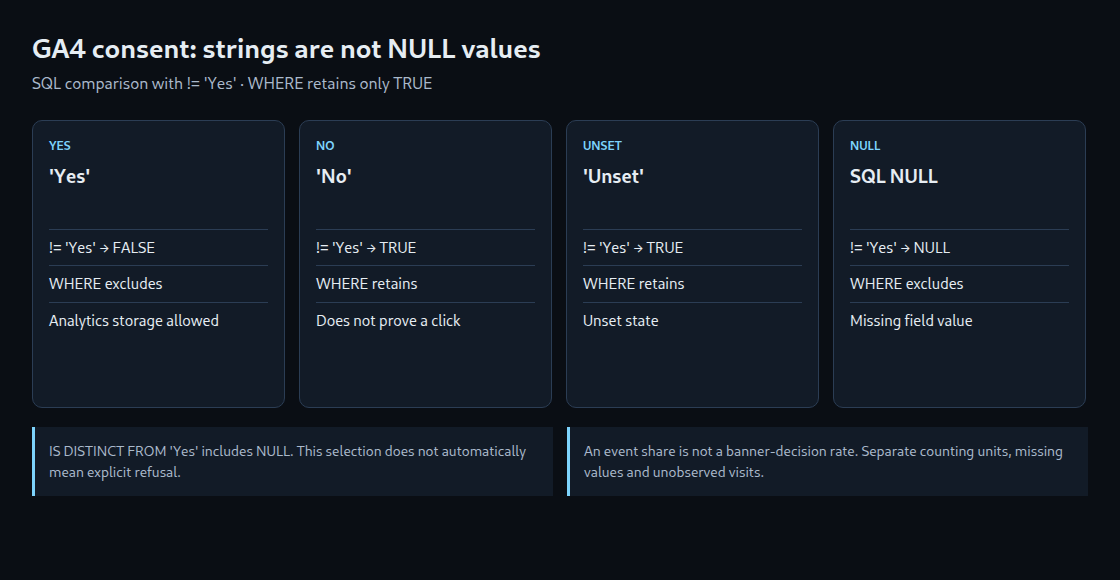
The common SQL mistake: analytics_storage != 'Yes' excludes NULL values. A comparison with NULL does not produce true; WHERE retains only true conditions.
1. Inspect the raw values first
analytics_storage and ads_storage are strings. Google documents Yes, No and Unset. An actual SQL NULL remains separately identifiable as a missing value. 'Unset' and NULL are not interchangeable in comparisons. Dot notation accesses each field within the record.
Replace the project, dataset and example dates before execution. Grouping first exposes all existing combinations without classifying unknown values as refusals.
SELECT
  event_date,
  privacy_info.analytics_storage AS analytics_storage,
  privacy_info.ads_storage AS ads_storage,
  COUNT(*) AS event_count
FROM `project_id.analytics_XXXXXX.events_*`
WHERE _TABLE_SUFFIX BETWEEN '20260801' AND '20260831'
GROUP BY 1, 2, 3
ORDER BY event_date, event_count DESC;
2. Demonstrate the NULL trap with four values
This small GoogleSQL example needs no Analytics data. It distinguishes explicit No, not Yes, and not Yes including NULL.
WITH sample AS (
  SELECT state
  FROM UNNEST(ARRAY<STRING>['Yes', 'No', 'Unset', NULL]) AS state
)
SELECT state,
  state = 'No' AS equals_no,
  state != 'Yes' AS not_yes,
  state IS DISTINCT FROM 'Yes' AS not_yes_including_null
FROM sample;
For No and Unset, != 'Yes' is true. For NULL, the result is NULL, so a matching WHERE filter removes the row. IS DISTINCT FROM 'Yes' includes NULL. Its technical meaning is “not Yes, including missing,” not “explicit refusal.”
Even No does not establish a click on “Reject”: a denied storage default can apply before a banner decision. The field alone cannot explain the cause of unknown values.
3. Make the denominator explicit
The next query separates known, unset, missing and unexpected values. SAFE_DIVIDE returns NULL for a zero denominator instead of failing. The shares range from 0 to 1; percentage display needs suitable formatting.
WITH source AS (
  SELECT privacy_info.analytics_storage AS state
  FROM `project_id.analytics_XXXXXX.events_*`
  WHERE _TABLE_SUFFIX BETWEEN '20260801' AND '20260831'
)
SELECT
  COUNT(*) AS exported_events,
  COUNTIF(state = 'Yes') AS yes_events,
  COUNTIF(state = 'No') AS no_events,
  COUNTIF(state = 'Unset') AS unset_events,
  COUNTIF(state IS NULL) AS null_events,
  COUNTIF(state NOT IN ('Yes', 'No', 'Unset')) AS other_events,
  SAFE_DIVIDE(COUNTIF(state = 'Yes'), COUNT(*)) AS yes_share_all_events,
  SAFE_DIVIDE(
    COUNTIF(state = 'Yes'),
    COUNTIF(state IN ('Yes', 'No'))
  ) AS yes_share_known_events
FROM source;
With one event each for Yes, No, Unset and NULL, the Yes share of all events is 25%. Among the two known states, it is 50%. Both calculations can be correct while answering different questions. Unknown-value shares must remain visible alongside them.
Both results are event-weighted: a visit producing many events contributes more than a visit producing few. Under basic consent mode, visits without permission can be absent from the export entirely. A banner-decision rate therefore needs a suitably defined CMP dataset, including period, counting unit and treatment of repeated decisions.
4. Investigate patterns
- Page and event: Are unknown states concentrated on a template or an exclusively server-generated event?
- Time: Does a change coincide with a release or CMP adjustment?
- Device and source: Does a difference persist when event mix and data availability are comparable?
These patterns guide investigation; they do not prove a cause. Tag configuration, consent initialization, network requests and relevant server-side forwarding must corroborate the finding.
A visit can pass through multiple storage states. A stable pseudonymous identifier across denied and granted events is not guaranteed. Without suitable identifiers, earlier events cannot reliably be reconstructed into a session; joining missing identifiers does not solve that problem.
Questions and answers
Why _TABLE_SUFFIX rather than event_date alone?
For these wildcard daily tables, a constant suffix range restricts the selected tables. Date strings exclude events_intraday_…. An event_date-only filter does not replace this table selection. Check estimated scan volume and cost beforehand; a month is not automatically cheap.
Does COALESCE explain missing values?
No. COALESCE(state, 'missing') merely gives NULL a visible label. It does not establish whether the cause was missing configuration, a different collection path or something else.
Why name columns explicitly?
Named columns limit dependency on the export schema. New fields do not automatically change the output shape. Changes to required field types or missing fields can still require adjustments.
Sources
Related articles