English
 Deutsch
 Polski
Tutorial: What Arrives in page_location and Why the Fragment Never Reaches the Server

Contents
An address in the browser bar looks like one string. On its way to a report it passes through four systems, and each of them keeps a different part of it.
Most of that is unsurprising. One part is not: everything after the hash never reaches the web server at all, and reaches the analytics property in full – which is the opposite of what most people assume, and it decides where a single-page application’s routes end up.
The Parts of a URL and Who Sees Which
An address is assembled from five pieces, and the separators between them are what a parser looks for.
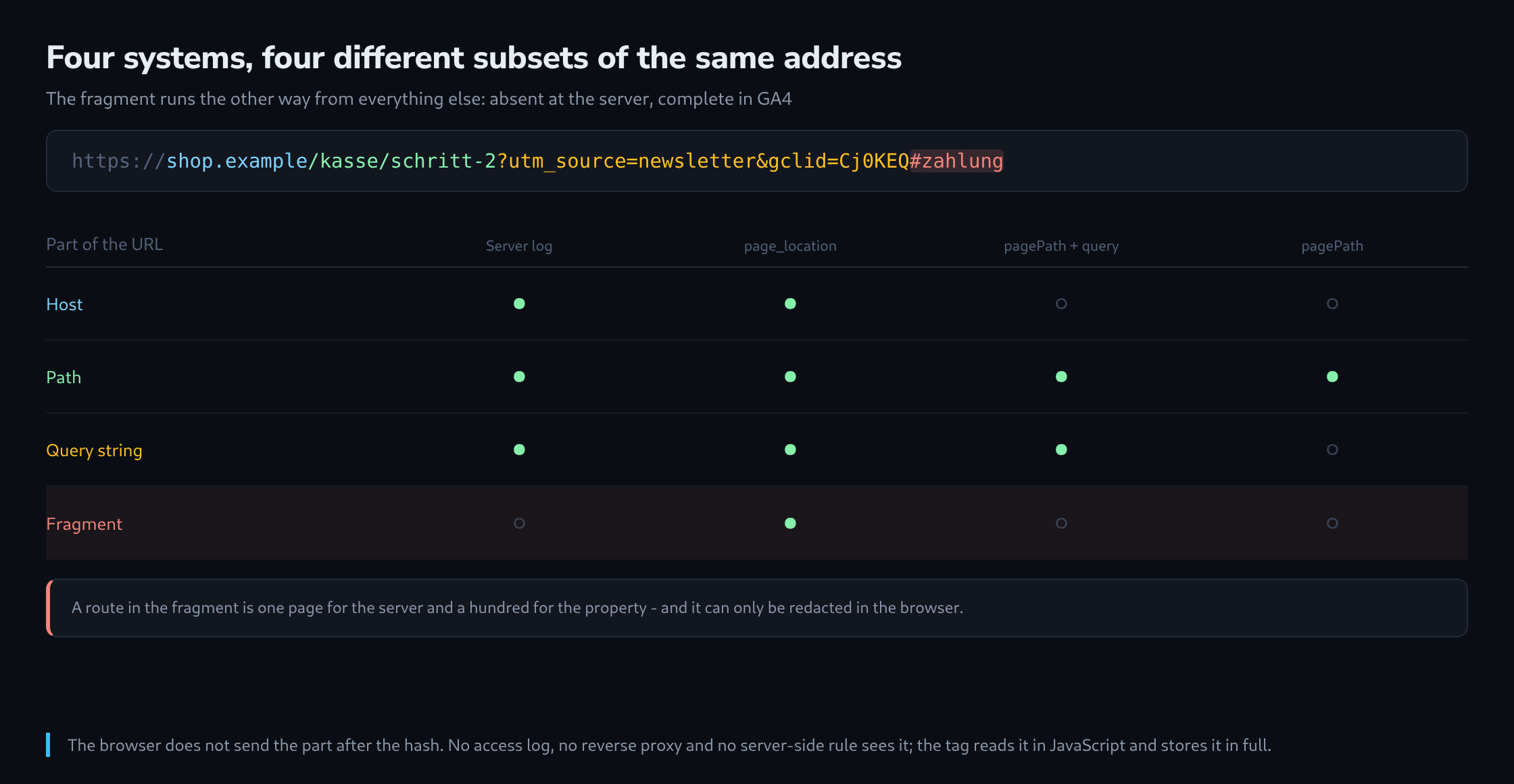
https://shop.example/kasse/schritt-2?utm_source=newsletter&gclid=Cj0KEQ#zahlung
└─┬─┘   └────┬─────┘└──────┬───────┘└─────────────┬──────────────────┘└───┬──┘
Scheme     Host          Path                 Query string             Fragment
The web server receives the host in a header and the path and query in the request line. It never receives the fragment, because the browser does not send it – that part is defined as client-side and stays there. No access log, no reverse proxy and no server-side rule can see it.
The analytics tag runs in the browser, reads document.location.href, and that string contains everything including the fragment. So the value in page_location is more complete than anything the server has.
The Fragment, and Where It Ends Up
This matters most for applications that put their routing in the fragment. A path of the form /#/produkt/42 is one page as far as the server is concerned – it only ever sees / – while the analytics property receives a distinct page_location for every route.
Three consequences follow, and they pull in different directions.
Server-side measurement of such an application is impossible without help: a log analysis sees one page and a hundred thousand visits. This is the argument for client-side tracking that nothing else replaces.
Server-side redaction of such an application is likewise impossible. A fragment containing an order number or an email address cannot be removed by a proxy, because the proxy never receives it – the only place to strip it is in the browser, before the tag reads it.
And the reporting dimensions treat it inconsistently, which is the practical part.
What Each Dimension Actually Contains
GA4 stores one parameter and derives several dimensions from it, and each derivation drops something.
| Dimension | Content for the example above |
|---|---|
| Page location | https://shop.example/kasse/schritt-2?utm_source=…&gclid=…#zahlung |
| Hostname | shop.example |
| Page path and query string | /kasse/schritt-2?utm_source=newsletter&gclid=Cj0KEQ |
| Page path | /kasse/schritt-2 |
The fragment appears only in the first row. Which means a report grouped by page path shows one row for a hash-routed application, and the same report grouped by page location shows a hundred – and both are the same data.
The query string is the second thing to watch. It is in two of the four dimensions, and every parameter in it becomes part of the value: a page reached with a gclid and the same page reached without it are two different rows. On a site with campaign traffic, that alone splits a single page into dozens.
The Length Limit
Most event parameters in GA4 accept a hundred characters. Page location is special-cased and accepts a thousand, which is generous and not unlimited.
A URL longer than that is truncated, and the truncation is silent. Where it hurts is exactly where URLs get long: a filtered category page with eight facets, a search result with the query in the address, and a hash-routed application whose route carries state.
// check before the tag how long the address actually is
console.log(document.location.href.length,
            document.location.href.slice(0, 120));
Where the limit is a real risk, the answer is to shorten deliberately rather than let the platform cut. A page_location override that keeps the path and only the parameters that matter is both shorter and more useful, because it also removes the campaign parameters that were splitting the page into dozens of rows.
function () {
  var behalten = ["page", "sort", "filter"];
  var u = new URL(document.location.href);
  var neu = new URL(u.origin + u.pathname);

  behalten.forEach(function (name) {
    if (u.searchParams.has(name)) {
      neu.searchParams.set(name, u.searchParams.get(name));
    }
  });
  return neu.href;          // no fragment, no campaign parameters
}
One warning about that variable: it has to be applied to the page view tag and to every event tag, or the property ends up with two different notions of the same page. And the campaign parameters have to be read before they are removed – the configuration tag needs the original address, or the attribution disappears along with them.
Single-Page Applications: Reading It at the Right Moment
A page load reads the address once. A route change in an application does not reload anything, so nothing reads it again unless something is told to.
What follows is the most common wrong number in this whole area: the second route of a session reports the address of the first one, because the tag fired before the framework updated the URL. The order of those two operations is a property of the framework and not of the tag manager.
// report only after the address has changed, not before
(function () {
  var alt = document.location.href;
  ["pushState", "replaceState"].forEach(function (name) {
    var original = history[name];
    history[name] = function () {
      var r = original.apply(this, arguments);
      melde();
      return r;
    };
  });
  window.addEventListener("popstate", melde);
  window.addEventListener("hashchange", melde);

  function melde() {
    if (document.location.href === alt) { return; }
    alt = document.location.href;
    window.dataLayer.push({
      event: "seitenwechsel",
      seite_adresse: document.location.href,
      seite_titel: document.title
    });
  }
})();
Two details in that snippet do actual work. The comparison against the previous address suppresses the duplicate events that a framework produces when it replaces the state without changing the route. And hashchange is listed separately, because a hash-only change does not always go through pushState – which is precisely the case for the applications that keep their routes in the fragment.
The title is worth pushing along for the same reason as the address: it changes after the route, and a tag that reads it too early reports the previous page’s title against the current page’s path. A pair that disagrees like that is easy to spot in a report and hard to explain without knowing this.
Deciding What Should Reach the Report
All of the above describes what is possible. The decision is what should be there, and three questions settle it.
Which parameters distinguish pages, and which merely mark how somebody arrived. Sorting and paging distinguish; gclid, fbclid and the campaign set do not, and leaving them in the page dimension splits every landing page into a long tail of rows with one visit each.
Whether the fragment carries information or a position. A route belongs in the report; an anchor to a heading is noise, and both look the same in the value.
And whether anything in there is personal. This is the point at which the earlier question about redaction returns with a sharper edge: a value in the fragment cannot be caught by a rule on the web server, cannot be caught by a proxy, and, before it leaves the device, is only removable in the browser. That makes the tag the last line rather than a convenience.
Questions and answers
Can a hash-routed application be moved to real paths with a server redirect?
Not on the server alone. A request for /#/produkt/42 arrives there as /, so the server does not know which route was meant and cannot choose a matching redirect. If it redirects / to a new address across the board, the browser reattaches the fragment itself: the HTTP specification states that a redirect target without a fragment of its own inherits the fragment of the original address. /#/produkt/42 therefore becomes /app/#/produkt/42, not /app/produkt/42.
The old routes have to be translated in the browser instead: a small script reads location.hash and replaces the address with the new path via history.replaceState or location.replace. This should happen before the analytics tag reports the first page view; otherwise every old address shows up once more as a view of its own.
In the reports, the switch breaks the time series. Before it, all routes sat under a single page path and differed only in page location; afterwards they spread across page paths of their own. A comparison across the switchover day therefore needs a mapping from the old fragments to the new paths.
Does the snippet in the article also report jumps to anchors on the same page?
Yes. A click on an anchor changes document.location.href and fires hashchange, and the comparison with the previous address lets the event through because the address really has changed. On pages with a table of contents, every jump then produces a route change. An additional condition that only counts the fragment when it carries a route, for example when it starts with #/, avoids this.
Does a server-side container see the fragment?
Yes, but by a different route than the web server. The container does not receive the page request but the tag’s measurement request, and that request carries page_location as a value, fragment included, exactly as the tag read it from document.location.href. There the value can be rewritten or shortened before it is passed on to the analytics property.
For personal data in the fragment this changes little: by the time the container removes it, it has already left the browser and reached the site’s own server, where, depending on the configuration, it can also end up in logs. If a value is not supposed to leave the device at all, it still has to be removed in the browser before the tag reads it.
Sources
Related articles